1. はじめに
The Positive Grid Spark MINI is a portable 10W smart guitar amplifier and Bluetooth speaker designed for versatile sound experiences. It offers powerful, multi-dimensional sound and a rechargeable battery providing up to 8 hours of listening or playing time. This device integrates seamlessly with a free accompanying smart app, offering features like Auto Chords, video creation, and access to over 50,000 tones for endless musical inspiration.
主な機能は次のとおりです。
- ポータブルギター amp & Bluetooth speaker with powerful, multi-dimensional sound.
- Rechargeable battery delivers up to 8 hours of listening or play time.
- Free accompanying smart app (iOS or Android) with Auto Chords, video creation & access to 50,000+ tones.
- Smart Jam Live uses machine learning technology to build bass and drum backing tracks based on your playing style.
- Ready for electric guitar, acoustic, or bass – plug in anywhere for unbelievable sound.
- 30種類のギタートーンで自分だけのギタートーンを作ろう amp40 種類のエフェクトを使用して、Spark MINI を USB オーディオ インターフェイスとして使用し、自宅で録音できます。
2. 箱の中身
Upon unboxing your Positive Grid Spark MINI, you should find the following items:
- Spark MINI 10W Smart Guitar Amp &Bluetoothスピーカー
- USB-C充電ケーブル
- Removable Carrying Strap
- クイックスタートガイド

図1: 前面 view of the Spark MINI 10W Smart Guitar Amp.
3. コントロールとポート
The Spark MINI features intuitive controls and essential connectivity ports for ease of use.
トップパネルのコントロール:
- プリセットノブ: Rotate to select between custom, solo, lead, and rhythm presets. LEDs indicate the active preset.
- ギターのボリュームノブ: Adjusts the volume level for your connected guitar.
- 音楽音量ノブ: Controls the volume for Bluetooth audio playback.
- 入力ジャック: Connect your electric, acoustic, or bass guitar here.
背面パネルのポート:
- ライン出力 (3.5mm): ヘッドホンや外部スピーカーを接続します。
- 補助入力(3.5mm): 外部オーディオ機器を接続します。
- USB-C Port (5V == 2A): Used for charging the device and for USB audio interface functionality.
- ペアボタン: Bluetoothペアリングモードを開始します。
- 電源ボタン: Turns the device on/off. Hold for tuner function.
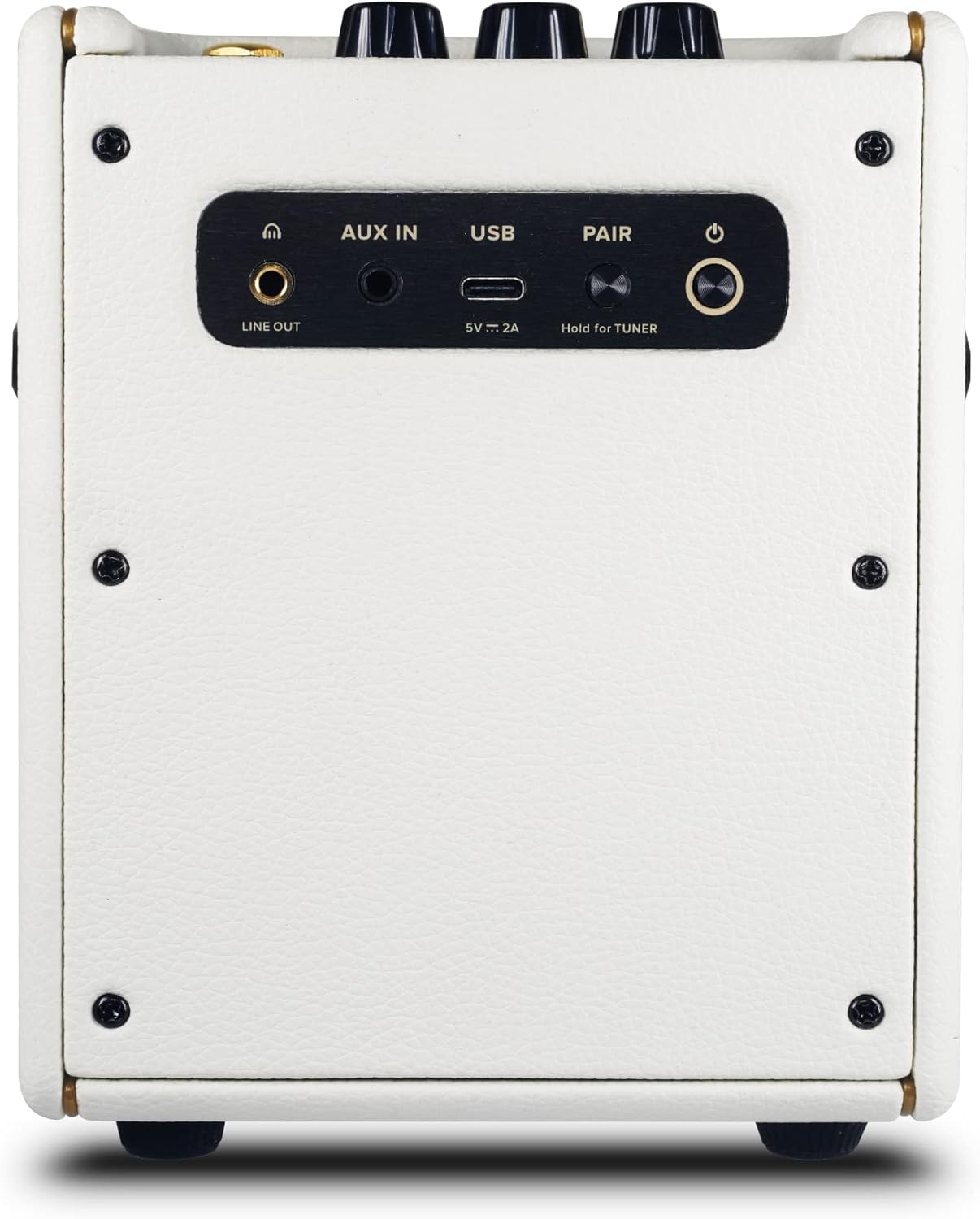
図2:背面 view of the Spark MINI showing all ports and buttons.
4. セットアップ
4.1 初期充電
Before first use, fully charge your Spark MINI using the provided USB-C cable and a compatible 5V/2A power adapter (not included). The power LED will indicate charging status.
4.2 電源のオン/オフ
Press and hold the Power button on the rear panel for a few seconds to turn the Spark MINI on or off.
4.3 アプリのダウンロードと接続
Download the free Spark app from the iOS App Store or Google Play Store. Open the app and follow the on-screen instructions to connect your Spark MINI via Bluetooth. This unlocks the full potential of the amplifier, including access to a vast tone library and smart features.

Figure 3: Spark MINI connected to the mobile app for enhanced control and features.
5。 動作モード
5.1ギター Ampリファイアモード
Connect your guitar to the Input jack. Use the Preset knob to select one of the four onboard tones (Custom, Solo, Lead, Rhythm). Adjust the Guitar Volume knob to your desired level. For advanced tone shaping, connect to the Spark app to access 30 amps, 40 effects, and thousands of user-created tones.
5.2 Bluetoothスピーカーモード
Pair your mobile device with the Spark MINI via Bluetooth. Once connected, you can stream music directly to the Spark MINI. Use the Music Volume knob to control the playback volume. This allows you to use the device as a high-quality portable Bluetooth speaker.
5.3 Smart Jam Live
Engage the Smart Jam Live feature through the Spark app. This innovative technology uses machine learning to analyze your playing style and automatically generate dynamic bass and drum backing tracks, providing a personalized jam session experience.
5.4 USBオーディオインターフェース
Connect the Spark MINI to your computer via the USB-C port. It can function as a USB audio interface, allowing you to record your guitar playing directly into your preferred digital audio workstation (DAW) software.
Video 1: Spark MINI - Metal Tone Demo. This video demonstrates the metal tone capabilities of the Spark MINI amplifier。
Video 2: Why This Spark Mini Guitar Amp - BT Speaker Is So Much FUN! This video provides an in-depth look at the features and enjoyment derived from the Spark MINI.
6. 仕様
| 特徴 | 詳細 |
|---|---|
| アイテム重量 | 3.75ポンド |
| 製品寸法 | 5.76 x 4.84 x 6.49インチ |
| 商品型番 | 855316004729 |
| バッテリー | リチウムイオン電池1個が必要です。(付属) |
| 出力ワットtage | 10ワット |
| 電池のタイプ | リチウムイオン |
| 電源 | 電池駆動 |
| 色名 | パールホワイト |
| 対応デバイス | ギター |
| コネクタタイプ | USB |
| 材質タイプ | Black Textured Vinyl, Pearl Vinyl |

Figure 4: Dimensions of the Spark MINI 10W Smart Guitar Amp.
7. メンテナンス
7.1 クリーニング
To clean your Spark MINI, use a soft, dry cloth. Avoid using abrasive cleaners or solvents, as these may damage the finish. Ensure no liquids enter the ports or speaker grille.
7.2 ストレージ
Store the Spark MINI in a cool, dry place away from direct sunlight and extreme temperatures. If storing for an extended period, ensure the battery is partially charged (around 50%) to maintain battery health.
7.3バッテリーケア
The Spark MINI uses a Lithium Ion battery. For optimal battery life, avoid fully discharging the battery frequently. Recharge the device when the battery indicator is low. Do not attempt to replace the battery yourself; contact customer support if battery issues arise.
8。 トラブルシューティング
8.1 ギターから音が出ない
- Ensure the guitar cable is securely connected to both the guitar and the Spark MINI Input jack.
- Check that the Spark MINI is powered on and the Guitar Volume knob is turned up.
- Verify that the correct preset is selected using the Preset knob.
- If using the app, ensure the guitar input is not muted within the app settings.
8.2 Bluetooth接続の問題
- Ensure the Spark MINI is in pairing mode (indicated by a blinking Bluetooth LED).
- Check your mobile device's Bluetooth settings and ensure Spark MINI is visible and selected.
- Try restarting both the Spark MINI and your mobile device.
- If the app is crashing on high refresh rate phones (above 60fps), enable "power saving mode" on your phone to lock the refresh rate at 60fps.
8.3 バッテリー寿命が短い
- 使用する前に、デバイスが完全に充電されていることを確認してください。
- High volume levels or continuous use of power-intensive app features can reduce battery life.
- Ensure the charging cable and adapter meet the 5V/2A requirement.
9. 保証とサポート
保証情報、技術サポート、またはサービスに関するお問い合わせについては、Positive Gridの公式ウェブサイトをご覧ください。 web公式サイトをご覧いただくか、カスタマーサポートに直接お問い合わせください。保証請求のために購入証明書を保管してください。
Online resources and FAQs are available on the Positive Grid support page to assist with common questions and issues.