導入
This manual provides comprehensive instructions for the use and care of your new Remote brand compatible remote control. This remote is specifically designed to function seamlessly with Nordmende ND40S3000J SMART televisions, offering full functionality without the need for complex programming.
Please read this manual carefully to ensure proper setup and operation of your remote control.
設定
1. バッテリーの取り付け
The remote control requires alkaline batteries (not included). Follow these steps to install them:
- リモコンの背面にある電池ボックスのカバーを見つけます。
- カバーを下方向にスライドするか、ラッチを押して開きます。
- Insert two new alkaline batteries, ensuring the positive (+) and negative (-) terminals match the diagrams inside the compartment.
- 電池ボックスのカバーを元に戻し、カチッと音がするまで所定の位置までスライドさせます。
重要: 最適な性能を得るには、必ず新しいアルカリ電池をご使用ください。古い電池と新しい電池、または異なる種類の電池を混ぜて使用しないでください。
2. 初期使用(プログラミング不要)
This compatible remote control is pre-programmed for the Nordmende ND40S3000J SMART TV model. No additional programming or setup steps are required. Once batteries are installed, the remote is ready for immediate use with your television.
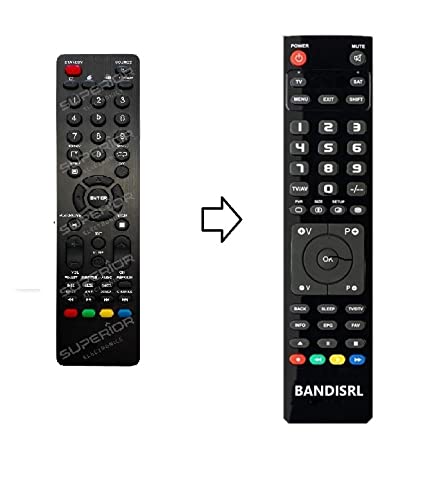
図1: The Remote compatible remote control. This image displays the layout of the buttons and the overall design of the remote, ready for use with your Nordmende TV.
操作手順
To operate your Nordmende ND40S3000J SMART TV with this remote control, point the remote directly at the television's infrared receiver. Ensure there are no obstructions between the remote and the TV.
- 電源ボタン: を押してテレビの電源をオンまたはオフにします。
- 音量を上げる/下げる: オーディオの音量を調整します。
- チャンネルアップ/ダウン: テレビのチャンネルを順番に変更します。
- 数字ボタン(0-9): テレビチャンネルを直接選択します。
- ナビゲーション ボタン (矢印キー、OK): メニュー内を移動してオプションを選択します。
- スマートテレビのボタン: Access specific Smart TV functions or applications (e.g., Home, Apps, Netflix, YouTube, etc., depending on the remote's layout and TV's features).
- 消音ボタン: テレビの音声を消音します。
- ソース/入力ボタン: 利用可能な入力ソース(HDMI、AV など)を切り替えます。
Refer to your Nordmende TV's original user manual for specific details on its menu structure and Smart TV functionalities.
メンテナンス
リモコンのクリーニング
リモコンを清掃するには、柔らかく乾いた布を使用してください。頑固な汚れには、軽くampen the cloth with water. Do not use abrasive cleaners, alcohol, or solvents, as these can damage the remote's surface and internal components.
バッテリー交換
Replace batteries when the remote control's response becomes sluggish or stops working. Always replace both batteries simultaneously with new alkaline batteries. Dispose of used batteries according to local regulations.
ストレージ
リモコンは、直射日光や極端な温度を避け、涼しく乾燥した場所に保管してください。長期間使用しない場合は、液漏れを防ぐため、電池を取り外しておくことをお勧めします。
トラブルシューティング
- リモコンが動作しません:
- 電池が正しい極性 (+/-) で正しく挿入されているかどうかを確認します。
- Replace the batteries with new alkaline batteries.
- リモコンとテレビの赤外線受信機の間に障害物がないことを確認してください。
- リモコンをテレビに直接向けていることを確認してください。
- テレビの電源がオンになっていることを確認します。
- Some buttons are not responding:
- This remote is designed for the Nordmende ND40S3000J SMART TV. If you are using it with a different model, some advanced functions may not be compatible.
- Ensure the buttons are clean and free from debris.
- テレビが断続的に応答します:
- 電池残量が少なくなっている可能性があります。交換してください。
- Ensure a clear line of sight to the TV's infrared sensor.
- 赤外線信号に干渉する可能性のある強い光源(直射日光など)を避けてください。
トラブルシューティング手順を実行しても問題が解決しない場合は、サポート セクションを参照してください。
仕様
| ブランド: | Remote (Manufacturer: Bandisrl) |
| 対応デバイス: | Nordmende ND40S3000J SMART Television |
| 接続技術: | 赤外線(IR) |
| 特集: | プログラミングは不要 |
| 電池のタイプ: | アルカリ |
| 電池付属: | いいえ |
| 色: | 黒 |
| ボタンの数: | 25 |
| コントローラタイプ: | ボタンコントロール |
保証とサポート
保証情報
Specific warranty details for this compatible remote control are not provided in this manual. Please refer to the purchase documentation or contact the seller/manufacturer (Bandisrl) for information regarding warranty coverage and terms.
カスタマーサポート
For further assistance, technical support, or inquiries regarding compatibility with other TV models, please contact the manufacturer, Bandisrl. Contact information can typically be found on the product packaging or the seller's webサイト。
If you own a different TV model than the Nordmende ND40S3000J SMART, it is recommended to contact Bandisrl to confirm compatibility before purchase or use.


