導入
OBSBOT Tiny 2 リモコンは、OBSBOT Tiny シリーズの体験を向上させるために設計されています。 webcams, including Tiny 2 Lite, Tiny 2, Tiny 4K, Tiny 1080P, Tiny SE, and the OBSBOT UVC to HDMI Adapter 2nd Gen. This smart remote provides intuitive control over various camera functions and AI features, offering a more convenient and pleasant usage experience.
It combines the functionality of a remote control with a presentation clicker, allowing for seamless control during video calls, live streaming, and presentations.
パッケージ内容
- OBSBOT Tiny 2 Remote Control
- USB Receiver Dongle (stored inside the remote's battery compartment)
- User Guide/Instructions
ビデオ: Unboxing and initial setup of the OBSBOT Tiny Remote Control, including battery installation and USB dongle location.
設定
1. バッテリーの取り付け
- リモコンの背面にある電池コンパートメントカバーを開きます。
- 正しい極性 (+/-) を確認して、単 4 電池 2 本を挿入します。
- 電池ボックスのカバーを閉じます。
2. USBレシーバーの接続
- Locate the USB receiver dongle inside the remote's battery compartment.
- Plug the USB receiver dongle into an available USB 2.0 or higher port on your computer.
3. Software Setup (OBSBOT TinyCam)
- Ensure your OBSBOT Tiny series webcam is connected to your computer and the OBSBOT TinyCam software is running.
- Navigate to the settings within the OBSBOT TinyCam software.
- Scroll down to find the "Remote Control" option and enable it.
- The remote control should now be paired and ready for use.
操作手順
リモコンのレイアウトと機能
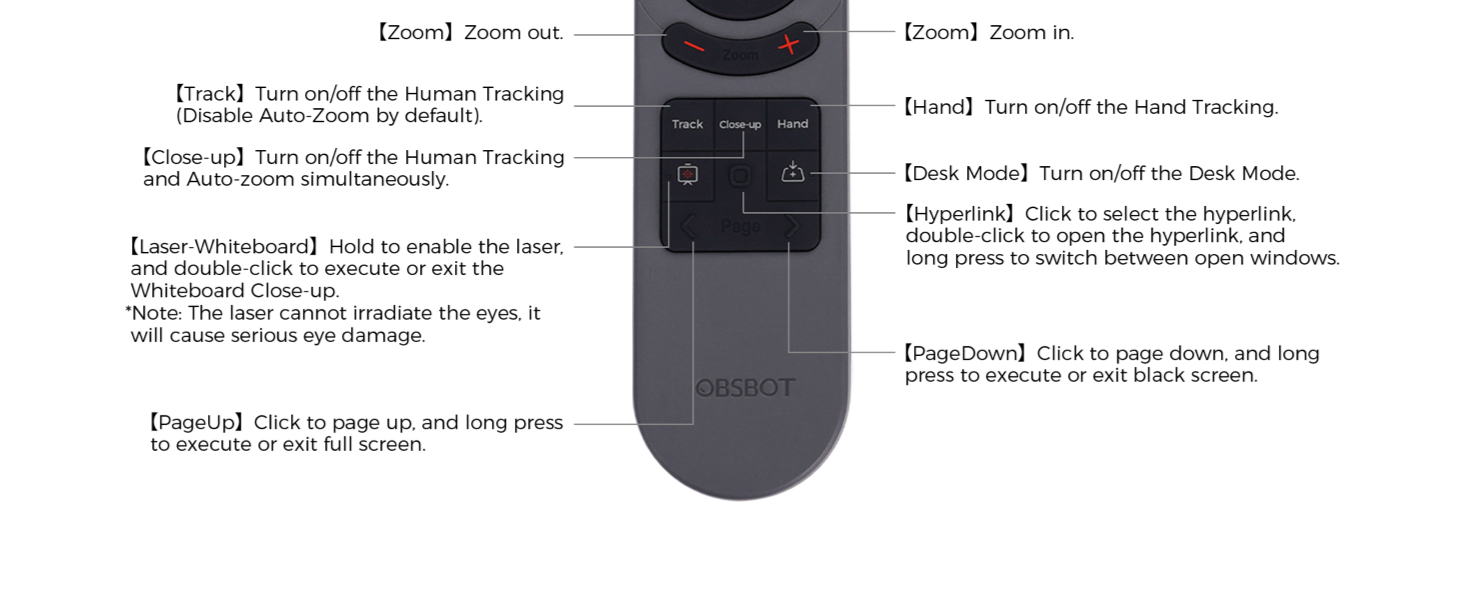
画像: Detailed diagram illustrating the buttons and their corresponding functions on the OBSBOT Tiny 2 Remote Control.
- 電源ボタン: Turns the connected OBSBOT Tiny series webカムのオンまたはオフ。
- 方向ボタン: Control the pan and tilt of the webカム。
- リセットボタン: Resets the camera's position to its default (square zero).
- Device Selection Buttons (Left/Right Arrows): Allows switching control between multiple connected OBSBOT devices (if connected to the same computer).
- ズームイン/ズームアウトボタン: カメラのズームレベルを調整します。
- P1, P2, P3 Buttons: Preset buttons to save and recall specific camera positions and zoom levels.
- トラックボタン: Toggles Human Tracking on/off. Disables Auto Zoom by default.
- クローズアップボタン: Activates Close-up mode, turning on Human Tracking and Auto Zoom simultaneously.
- ハンドボタン: Toggles Hand Tracking on/off.
- デスクモードボタン: デスク モードのオン/オフを切り替えます。
- レーザーホワイトボードボタン: Hold to enable the laser pointer. Double-click to execute or exit Whiteboard Close-up. Note: The laser cannot irradiate the eyes; it will cause serious eye damage.
- ハイパーリンク ボタン: ハイパーリンクを選択するにはクリックします。ハイパーリンクを開くにはダブルクリックします。開いているウィンドウを切り替えるには長押しします。
- PageDownボタン: Click to page down. Long press to execute or exit a black screen.
- PageUp ボタン: Click to page up. Long press to execute or exit full screen.
重要な注意: Some keys on the remote controller will not work with OBSBOT Tiny 4K and OBSBOT Tiny, as the features controlled by those keys (e.g., Close-up, Hand, Laser-Whiteboard, Desk Mode) are not integrated into those specific models.
音声コントロール
The OBSBOT Tiny 2 webcam supports voice control for various functions, including waking up the device, initiating tracking, and adjusting zoom. Refer to the OBSBOT TinyCam software settings for a full list of voice commands and to enable/disable this feature.
ビデオ: Demonstration of the OBSBOT Meet Remote Control features and functions.
アプリケーション

ビデオ会議: Control your camera's focus and framing during online conferences.

Remote Classes: Utilize presentation clicker features and camera control for engaging online teaching.

ライブストリーミング: Adjust camera angles and zoom on the fly for dynamic broadcasts.
メンテナンス
- Keep the remote control clean and dry. Use a soft, dry cloth for cleaning.
- リモコンを極端な温度や直射日光にさらさないでください。
- リモコンを長期間使用しない場合は、液漏れを防ぐために電池を取り外してください。
- Store the USB receiver dongle securely within the remote's battery compartment to prevent loss.
トラブルシューティング
- リモコンが応答しない:
- 電池が正しく取り付けられ、十分に充電されていることを確認してください。必要に応じて交換してください。
- Ensure the USB receiver dongle is securely plugged into your computer.
- Verify that the "Remote Control" option is enabled in the OBSBOT TinyCam software settings.
- Restart the OBSBOT TinyCam software and/or your computer.
- Specific features not working:
- Confirm that your OBSBOT webcam model supports the specific feature (e.g., Close-up, Desk Mode). Refer to your webcam's manual for compatibility.
- Ensure your OBSBOT TinyCam software and webcam firmware are up to date.
- 干渉:
- 強力な電磁干渉源の近くでリモコンを使用しないでください。
仕様
| 製品寸法 | 10 x 2 x 0.01インチ |
| アイテム重量 | 1.76オンス |
| 商品型番 | OBS-200002 |
| バッテリー | 単2電池XNUMX本(別売) |
| ブランド | オブスボット |
| 特集 | 人間工学に基づいた |
| 色 | 黒 |
| サポートされるデバイスの最大数 | 4 |
| 対応デバイス | OBSBOT Tiny series webcams, OBSBOT UVC to HDMI Adapter 2nd Gen, Personal Computer |
保証とサポート
For warranty information, technical support, or further assistance, please visit the official OBSBOT web公式サイトをご覧いただくか、カスタマーサービスに直接お問い合わせください。保証請求のために購入時のレシートを保管してください。


