1. はじめに
This manual provides detailed instructions for the setup, operation, and maintenance of your ITECH Fusion 2 S Smartwatch and accompanying Wireless Headphones. The ITECH Fusion 2 S is designed to help you monitor your health and fitness goals, offering features such as heart rate tracking, step counting, sleep monitoring, and multi-sport modes. The included wireless headphones provide an integrated audio experience.
2. パッケージ内容
パッケージにすべてのアイテムが含まれていることを確認してください。
- ITECH Fusion 2 S Smartwatch
- ワイヤレスヘッドフォン
- USB Charging Cable (for smartwatch)
- USB Charging Cable (for headphones)
- ユーザーマニュアル(このドキュメント)

Image: The ITECH Fusion 2 S Smartwatch and Wireless Headphones displayed within their retail packaging.
3.デバイスオーバーview
3.1. ITECH Fusion 2 S Smartwatch

Image: The ITECH Fusion 2 S Smartwatch with a grey camouflage band shown alongside the matching wireless headphones.
The smartwatch features a touch screen display, a side button for navigation, and sensors on the rear for health monitoring. The display shows time, date, activity data, and notifications.

Image: A close-up of the ITECH Fusion 2 S Smartwatch display, highlighting features such as heart rate monitor, apps and notifications, multi-sports modes, water resistance, calorie tracker, music remote, pedometer, sleep monitor, hydration reminder, and extended 14-day battery life.
3.2. Wireless Headphones
The wireless headphones are over-ear style with cushioned earcups and an adjustable headband. Controls for audio playback and calls are located on the earcup.

画像:側面 view of the ITECH Wireless Headphones, illustrating features like powerful sound quality, convenient controls, comfort for hours, and a go-anywhere design.

画像: 詳細な view of the ITECH Wireless Headphones, emphasizing noise isolating fit, built-in microphone, Bluetooth wireless technology, and up to 8 hours of playback.

Image: A diagram of the ITECH Wireless Headphones highlighting the flexible headband, comfortable ear cushion, foldable design, and convenient controls, along with key technical specifications.
4. セットアップ
4.1.デバイスの充電
Before first use, fully charge both your smartwatch and wireless headphones.
- スマートウォッチ: Connect the USB charging cable to the charging port on the back of the smartwatch and to a USB power source. The battery icon on the screen will indicate charging status.
- ワイヤレスヘッドフォン: Connect the USB charging cable to the charging port on the headphones and to a USB power source. An indicator light will show charging status and turn off when fully charged.
4.2. 電源のオン/オフ
- スマートウォッチ: To power on, press and hold the side button until the screen illuminates. To power off, navigate to the 'Settings' menu on the smartwatch, then select 'Power Off'.
- ワイヤレスヘッドフォン: 電源を入れるには、インジケーターライトが点滅するまで電源ボタンを長押しします。電源を切るには、インジケーターライトが消えるまでもう一度電源ボタンを長押しします。
4.3. Pairing the Smartwatch with Your Smartphone
The ITECH Fusion 2 S Smartwatch is compatible with both iPhone and Android devices.
- ダウンロード iTECH Wearables Apple App Store または Google Play ストアからアプリをダウンロードします。
- スマートフォンでBluetoothが有効になっていることを確認します。
- Open the iTECH Wearables app and follow the on-screen instructions to create an account and pair your smartwatch.
- The app will guide you through connecting the smartwatch via Bluetooth. Confirm the pairing request on both your phone and smartwatch.
4.4. Pairing the Wireless Headphones
- ヘッドフォンの電源がオフになっていることを確認してください。
- インジケーター ライトが高速点滅してペアリング モードになるまで、電源ボタンを長押しします。
- スマートフォンまたはその他の Bluetooth 対応デバイスで、Bluetooth 設定に移動し、利用可能なデバイスを検索します。
- Select "ITECH Headphones" (or similar name) from the list to connect. The indicator light will change to a steady blue when successfully paired.
5. スマートウォッチの操作
5.1. ナビゲーション
- タッチスクリーン: 左右または上下にスワイプしてメニューや機能を操作します。タップして選択します。
- サイドボタン: 押すとホーム画面に戻るか、デバイスを起動します。
5.2. ウォッチフェイス
Customize your smartwatch display by changing watch faces. On the home screen, press and hold the display, then swipe left or right to browse available watch faces. Tap to select your preferred design.
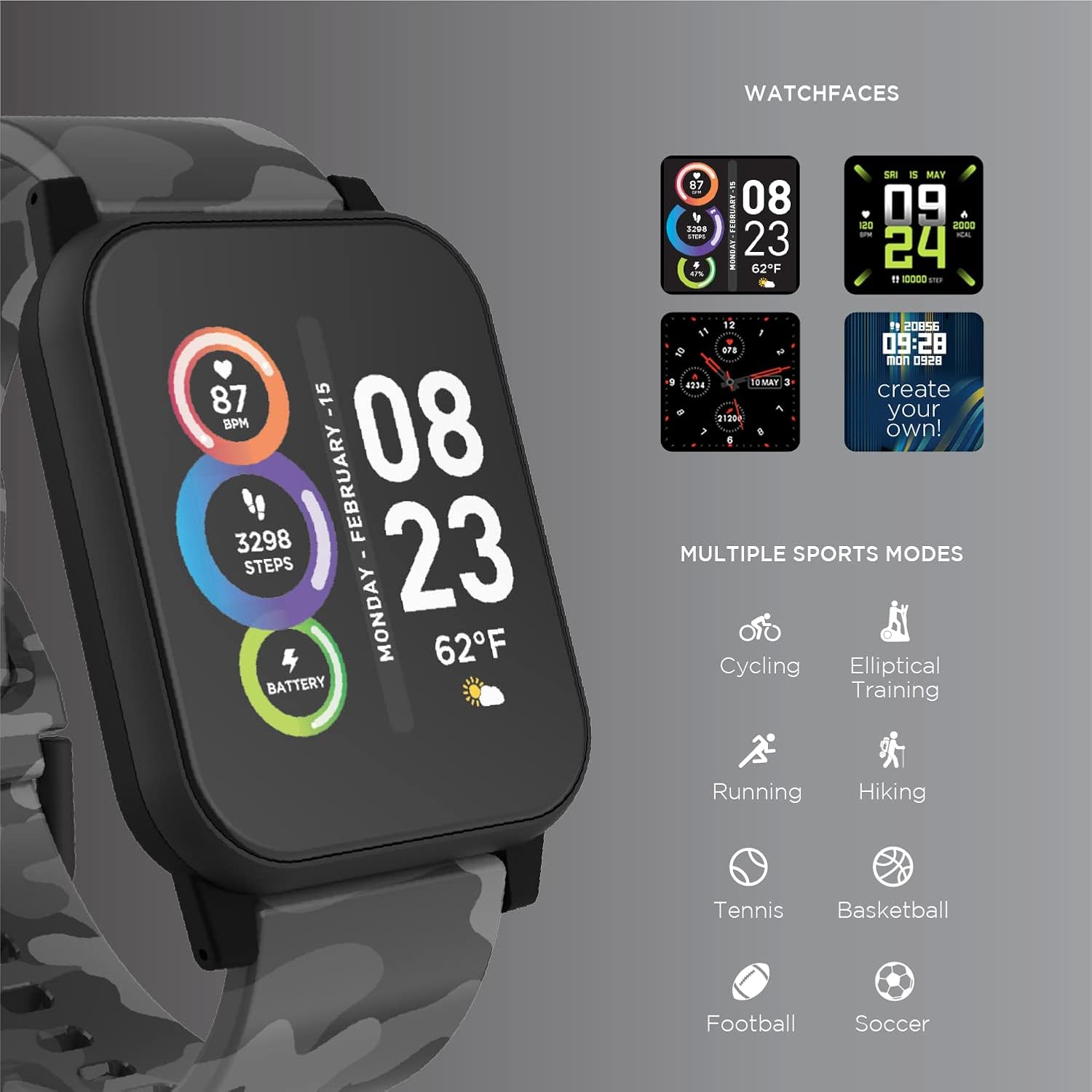
Image: The ITECH Fusion 2 S Smartwatch display showing various customizable watch faces and icons representing multiple sports modes including cycling, elliptical training, running, hiking, tennis, basketball, football, and soccer.
5.3. コア機能
- 心拍数モニター: Access the heart rate feature on your smartwatch to measure your heart rate using the built-in optical sensor. Ensure the watch is snug on your wrist for accurate readings.
- ステップカウンター(歩数計): The smartwatch automatically tracks your daily steps, distance, and calories burned. View your progress on the device or in the iTECH Wearables app.
- 睡眠モニター: Wear your smartwatch to bed to track your sleep patterns, including light and deep sleep stages. Data is synchronized with the app for detailed analysis.
- マルチスポーツモード: Select from various sports modes (e.g., running, cycling, hiking) to track specific workout data, including duration, distance, and calories.
- メッセージ通知: Receive notifications for calls, texts, and app alerts directly on your smartwatch when connected to your smartphone.
- カロリートラッカー: Monitors calories burned throughout the day based on your activity level.
- 水分補給リマインダー: Set reminders to drink water at regular intervals through the app.
- ミュージックリモート: Control music playback on your smartphone directly from your smartwatch (play, pause, skip tracks).
5.4. アプリの統合
包括的な view of your health and fitness data, regularly sync your smartwatch with the iTECH Wearables app. The app allows you to set goals, view historical data, customize settings, and manage notifications.
6. Operating the Wireless Headphones
6.1. コントロール
The headphones feature intuitive controls for media playback and call management:
- 電源ボタン: 長押しで電源のオン/オフ、短く押すと再生/一時停止になります。
- 音量ボタン: 音量を上げるには「+」を押し、音量を下げるには「-」を押します。
- トラック制御: 「+」を押し続けると次のトラック、「-」を押し続けると前のトラックになります。
- 通話管理: Short press power button to answer/end calls. Press and hold to reject calls.
6.2. オーディオ機能
- Powerful Sound Quality: Designed to deliver clear and rich audio.
- ノイズ遮断フィット: The over-ear design helps to reduce external noise for an immersive listening experience.
- 内蔵マイク: ハンズフリー通話が可能になります。
6.3. バッテリー寿命
The wireless headphones provide up to 8 hours of playback on a single charge, depending on usage and volume levels.

Image: A person wearing the ITECH Fusion 2 S Smartwatch on their wrist and the matching wireless headphones, demonstrating typical use.
7. メンテナンス
7.1. 清掃
- スマートウォッチ: Wipe the screen and band with a soft, damp糸くずの出ない布を使用してください。刺激の強い化学薬品や研磨剤は使用しないでください。
- ヘッドフォン: Gently wipe earcups and headband with a soft, dry cloth. Do not immerse in water.
7.2. Water Resistance (Smartwatch)
The ITECH Fusion 2 S Smartwatch is IP67 water resistant. This means it is protected against dust and can withstand immersion in water up to 1 meter for up to 30 minutes. It is suitable for daily use and light splashes, but not recommended for swimming, showering, or prolonged water immersion.
7.3. ストレージ
Store your devices in a cool, dry place away from direct sunlight and extreme temperatures when not in use.
8。 トラブルシューティング
If you encounter issues with your ITECH Fusion 2 S devices, please refer to the following common solutions:
- デバイスの電源が入らない: デバイスが完全に充電されていることを確認してください。別のUSB電源に接続してみてください。
- スマートウォッチが携帯電話とペアリングされない: Ensure Bluetooth is enabled on your phone and the smartwatch is within range. Restart both devices and try pairing again through the iTECH Wearables app.
- ヘッドフォンがペアリングされない: Ensure headphones are in pairing mode (rapidly flashing indicator light). Check your device's Bluetooth settings and try reconnecting.
- Inaccurate heart rate/step readings: スマートウォッチが手首にぴったりとフィットしていることを確認してください。締めすぎたり緩すぎたりしないでください。時計の裏側にあるセンサーを清掃してください。
- 通知が表示されない: Check app permissions on your smartphone to ensure the iTECH Wearables app has access to notifications. Verify notification settings within the app.
- Audio issues with headphones: Ensure headphones are fully charged and properly paired. Check volume levels on both the headphones and the connected device.
If problems persist, consider performing a factory reset (refer to the smartwatch settings menu or contact customer support for headphones). For further assistance, please contact Itech customer support.
9. 仕様
| 特徴 | 詳細 |
|---|---|
| 製品寸法 | 22.86 x 5.08 x 22.86 cm; 621 g |
| 商品型番 | 900366B-40-G57 |
| オペレーティング·システム | Android (Compatible with iPhone and Android) |
| 特集 | Heart Rate Monitor, Step Counter, Sleep Monitor, Message Notifications, Multi-Sport Modes |
| 接続技術 | USB |
| 無線通信規格 | ブルートゥース |
| バッテリーセルの構成 | リチウムイオン |
| GPS | 真実 |
| Smartwatch Shape | 四角 |
| Smartwatch Screen Size | 1.3インチ |
| ブランド | アイテック |
| モデル名 | Fusion 2 Bundle |
| 耐水性 | IP67 |
| Headphones Playback Time | 最大8時間 |
| Headphones Driver Diameter | 40mm |
| Headphones Connection Type | Bluetooth®の5.0 |
| ヘッドホンインピーダンス | 32オーム±15% |
| ヘッドフォンの周波数応答 | 20Hz - 20KHz |
10. 保証とサポート
Your ITECH Fusion 2 S Smartwatch and Wireless Headphones are covered by a manufacturer's warranty. Please refer to the warranty card included in your package or visit the official Itech web詳細な保証条件については、サイトをご覧ください。
For technical support, troubleshooting assistance, or warranty claims, please contact Itech customer service through their official webサイトまたは製品ドキュメントに記載されている連絡先情報を参照してください。