1. はじめにview
This manual provides comprehensive instructions for the safe and effective operation of your FBT X-Lite 112A Professional 12-inch Active Speaker. The FBT X-Lite 112A is a lightweight, bi-amplified system featuring an integrated 3-channel mixer and Bluetooth 5.0 connectivity, designed for high-fidelity audio reproduction in various applications.

図1.1: フロント view of the FBT X-Lite 112A Professional Active Speaker. This image shows the speaker's front grille and the FBT logo at the bottom.

図1.2: 角度付き view of the FBT X-Lite 112A Professional Active Speaker, highlighting its polypropylene molded enclosure and side handle for portability.
2. 箱の中身
Upon unpacking your FBT X-Lite 112A, please ensure all components are present and in good condition:
- FBT X-Lite 112A 12-inch Active Speaker with Integrated 3-Channels Mixer
- 電源コード
- ユーザーマニュアル(このドキュメント)
If any items are missing or damaged, please contact your retailer or FBT customer support immediately.
3. 特徴とハイライト
The FBT X-Lite 112A is engineered with advanced features for superior audio performance and versatility:
- バイAmplified System: Features a 1200W low frequency amplifier and a 300W high frequency amplifier for optimal power distribution.
- 統合型3チャンネルミキサー: Allows for direct connection of multiple audio sources.
- Bluetooth 5.0接続: Enables wireless audio streaming from compatible devices.
- DSPプリセット: Four selectable Digital Signal Processing presets to optimize sound for various applications.
- Lightweight Polypropylene Enclosure: Rugged yet lightweight construction for easy transport and durability.
- 多彩な取り付けオプション: Includes a standard 1.38-inch speaker stand socket and M10 rigging points for fixed installations or use as a floor monitor.
- スイッチモード電源: Universal 100-240 VAC power supply for global compatibility.
4. セットアップ
Follow these steps to set up your FBT X-Lite 112A speaker:
- 配置: Position the speaker on a stable, flat surface, a speaker stand, or suspend it using appropriate rigging hardware. The asymmetrical design allows for use as a floor monitor.
- 電源接続: Connect the provided power cord to the speaker's power input and then to a suitable electrical outlet (100-240 VAC). Ensure the power switch is in the "OFF" position before connecting.
- オーディオ接続:
- Channel 1 & 2 (Micro-Line/XLR): Connect microphones or line-level devices using XLR or 1/4" TRS/TS cables. Use the corresponding MIC/LINE selector switch to match the input signal level.
- Channel 3 (Stereo/Bluetooth): Connect stereo line-level devices via RCA or 1/4" TRS inputs. This channel also supports Bluetooth audio streaming.
- 出力接続(オプション): If linking multiple speakers, connect the XLR output from the first speaker to the input of the next speaker. Use the CH1 or MIX LINK selector to determine the output signal.
- 電源オン: Once all connections are secure, switch the power button to the "ON" position. The power indicator LED will illuminate.
5. 操作手順
Understanding the control panel is key to operating your FBT X-Lite 112A speaker effectively.
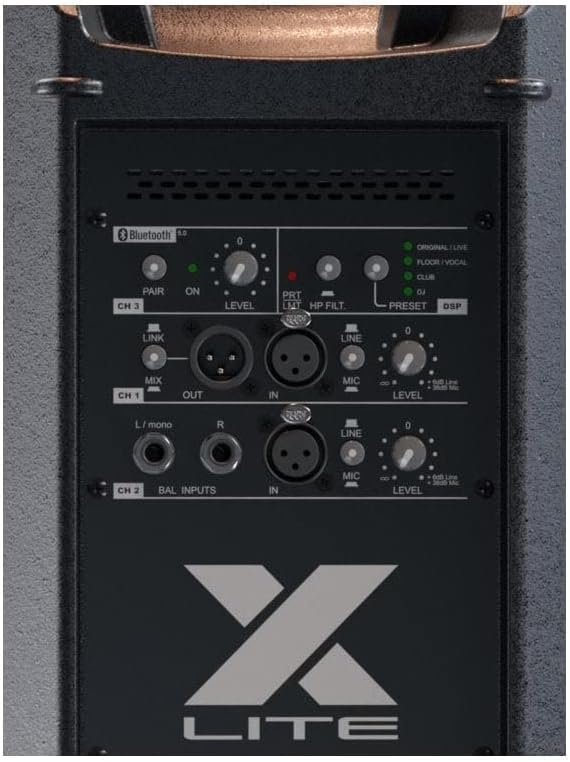
図5.1: 詳細 view of the FBT X-Lite 112A control panel, showing inputs, outputs, level controls, DSP presets, and Bluetooth pairing button.
5.1. ミキサーコントロール
- CH 1 & CH 2 LEVEL: Adjusts the input gain for Channel 1 and Channel 2.
- MIC/LINE Selector: Switches the input sensitivity between microphone level and line level for Channels 1 and 2. Ensure this matches your connected device to prevent distortion or low signal.
- HPフィルター: Activates a high-pass filter to cut low frequencies, useful for vocal applications to reduce rumble.
- PRT/LIMIT LED: Illuminates to indicate signal clipping (PRT) or limiter activation (LIMIT). Adjust input levels to avoid constant illumination.
- CH 3 LEVEL: Adjusts the input gain for Channel 3 (Stereo/Bluetooth).
- MIX OUT / CH1 LINK: Selects whether the XLR output carries a mix of all channels or only the signal from Channel 1.
5.2. DSPプリセット
The FBT X-Lite 112A features four DSP presets to optimize the speaker's sound for different applications:
- オリジナル/ライブ: Standard flat response for general live sound reinforcement.
- フロア/ボーカル: Optimized for use as a floor monitor or for vocal clarity.
- クラブ: Enhanced bass and treble for music playback in club environments.
- DJ: Specific EQ curve for DJ applications, often with boosted lows and highs.
使用 PRESET DSP button to cycle through these options. The corresponding LED will indicate the active preset.
5.3.Bluetoothペアリング
To connect a Bluetooth device to your FBT X-Lite 112A:
- スピーカーの電源が入っていることを確認します。
- を押す ペア button on the control panel. The Bluetooth LED will flash, indicating it is in pairing mode.
- Bluetooth 対応デバイス (スマートフォン、タブレットなど) で、利用可能な Bluetooth デバイスを検索します。
- Select "FBT X-Lite 112A" from the list.
- Once paired, the Bluetooth LED on the speaker will illuminate steadily. You can now stream audio wirelessly to the speaker.
The Bluetooth 5.0 technology provides a reliable connection up to 10 meters (33 feet).
6. メンテナンス
Proper maintenance ensures the longevity and optimal performance of your FBT X-Lite 112A speaker:
- クリーニング: スピーカーの外側は、柔らかく乾いた布で拭いてください。頑固な汚れには、軽く湿らせた布で拭いてください。amp cloth with mild soap can be used, ensuring no liquid enters the speaker grilles or control panel. Do not use abrasive cleaners or solvents.
- ストレージ: When not in use for extended periods, store the speaker in a cool, dry environment, away from direct sunlight and extreme temperatures.
- 換気: 適切な空気の流れを確保する amplifier section to prevent overheating. Do not block ventilation openings.
- ケーブル管理 電源ケーブルとオーディオケーブルに摩耗や損傷の兆候がないか定期的に点検してください。損傷したケーブルはすぐに交換してください。
7。 トラブルシューティング
If you encounter issues with your FBT X-Lite 112A, refer to the following common troubleshooting steps:
| 問題 | 考えられる原因 | 解決 |
|---|---|---|
| 電源なし | Power cord disconnected; Power outlet faulty; Speaker power switch off. | Ensure power cord is securely connected. Test the power outlet. Turn the speaker power switch to "ON". |
| 音が出ない | Input level too low; Incorrect input selected; Damaged audio cable; Source device issues; DSP preset issue. | Increase channel level. Verify correct input connection. Test with a different audio cable. Check source device output. Try a different DSP preset. |
| 歪んだ音 | Input level too high (clipping); MIC/LINE switch incorrect; Damaged speaker component. | Reduce input level until PRT/LIMIT LED no longer illuminates constantly. Ensure MIC/LINE switch matches input source. If distortion persists, contact support. |
| Bluetoothペアリング失敗 | スピーカーがペアリング モードになっていません。デバイスが遠すぎます。干渉があります。デバイスはすでに別のスピーカーとペアリングされています。 | Press PAIR button on speaker. Move device closer to speaker. Reduce interference sources. Disconnect device from other Bluetooth speakers. |
If the problem persists after attempting these solutions, please contact FBT customer support for further assistance.
8. 仕様
Detailed technical specifications for the FBT X-Lite 112A Professional Active Speaker:

図8.1: Dimensions of the FBT X-Lite 112A speaker: 17"D x 28"W x 17"H.
| 特徴 | 詳細 |
|---|---|
| モデル名 | X-Lite 112A |
| スピーカータイプ | ウーファー |
| 特集 | 軽量 |
| 推奨用途 | サラウンドサウンドシステム用 |
| 対応デバイス | スマートフォン |
| ウーファー直径 | 12インチ |
| HF Compression Driver | 1" throat / 1.4" voice coil |
| ユニット数 | 1.0 カウント |
| サラウンドサウンドチャンネル構成 | 2.0 |
| 色 | 黒 |
| 製品寸法(奥行き×幅×高さ) | 奥行き17インチ x 幅28インチ x 高さ17インチ |
| 防水です | 間違い |
| 保証タイプ | 限定 |
| アイテム数 | 1 |
| 制御方法 | 触る |
| 無線通信技術 | ブルートゥース |
| スピーカーサイズ | 12インチ |
| 電源 | コード式電気 |
| 耐水性レベル | 耐水性はありません |
| オーディオドライバータイプ | ダイナミックドライバ |
| Bluetooth範囲 | 10メートル(33フィート) |
| オーディオドライバーのサイズ | 12インチ |
| 接続プロトコル | ブルートゥース |
| MP3プレーヤーは付属していますか? | いいえ |
| 回路数 | 1 |
| メーカー | FBT |
| アイテム重量 | 41ポンド |
| ASIN | B09JKSS3JW |
| 商品型番 | X-Lite 112A |
| 初回利用可能日 | 1年2024月XNUMX日 |
| ブランド | FBT |
| スピーカー最大出力 | 1500ワット |
| 接続技術 | ブルートゥース、XLR |
| オーディオ出力モード | ステレオ |
| 取り付けタイプ | 床立ち |
| 周波数範囲 | 50Hz~20kHz |
| 最大音圧レベル | 129デシベル |
| Horn Directivity | 90°Hx60°V |
| Monitor Taper | 30° / 45° |
9. 保証とサポート
The FBT X-Lite 112A Professional Active Speaker comes with a 限定保証. For specific terms and conditions of the warranty, please refer to the warranty card included with your product or visit the official FBT webサイト。
For technical support, service, or warranty claims, please contact FBT customer service through their official webご購入いただいたサイトまたは正規サービスセンターにご連絡ください。保証の有効性を確認するため、購入証明書を保管してください。
FBT Official Webサイト: www.fbt.it