1. 安全に関する注意事項
Please read these safety instructions carefully before using the product. Keep this manual for future reference.
- 本製品は屋内使用のみを目的として設計されています。湿気や極端な温度にさらさないでください。
- Do not attempt to open or modify the device. This may void the warranty and pose a safety risk.
- デバイスを子供の手の届かない場所に保管してください。
- Use only the provided micro-USB cable for charging.
- LED光源を直接見ないでください。
2. パッケージ内容
パッケージにすべてのアイテムが揃っていることを確認します。
- ANSMANN Under-Cabinet Light M
- マイクロUSB充電ケーブル
- 取扱説明書
3.製品オーバーview
The ANSMANN Under-Cabinet Light M is a versatile, rechargeable LED lamp designed for various indoor applications. It features a motion sensor, adjustable color temperatures, and a slim design for discreet placement.

Image 1: The ANSMANN Under-Cabinet Light M, showcasing its sleek, white design and integrated motion sensor.
主な特徴:
- PIRモーションセンサー: Automatically activates the light when motion is detected in low-light conditions.
- トワイライトセンサー: Ensures the light only activates in dark environments, conserving battery life.
- 調整可能な色温度: Choose between 3 color temperatures (cool white, neutral white, warm white) or activate all LEDs for maximum brightness.
- 無段階調光: Adjust brightness by holding down the control button.
- 充電式バッテリー: Integrated battery for cordless operation, charged via micro-USB.
- 磁気取り付け: Easy installation and removal with a magnetic strip.

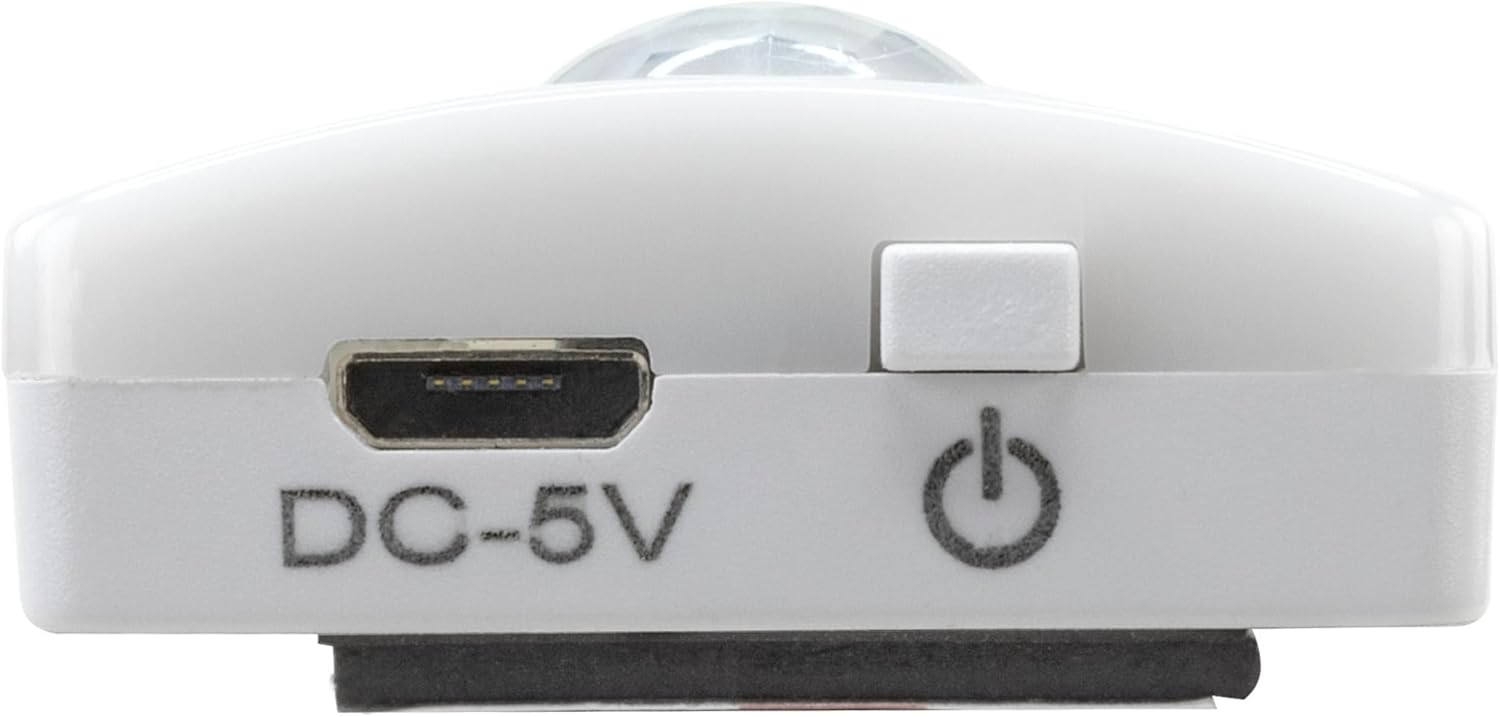
Image 2: Diagram illustrating the Micro-USB Port, On/Off button, and PIR motion sensor on the device.
4. セットアップとインストール
The Under-Cabinet Light M offers flexible installation options using its integrated magnetic strip.
磁気取り付け:
- Identify a suitable, clean, and dry surface for installation (e.g., inside a cabinet, under a shelf).
- The light comes with a fixed magnetic strip on its back. For non-metallic surfaces, use the included adhesive strip.
- Peel off the protective film from the adhesive strip and firmly press it onto the desired surface.
- Attach the Under-Cabinet Light M to the adhesive strip. The magnetic connection will hold it in place.
画像3: クローズアップ view of the magnetic strip and the removable adhesive strip, demonstrating the mounting mechanism.

図4: 例ample of the under-cabinet light installed in a modern kitchen setting, providing illumination over a countertop.
5. 操作
The Under-Cabinet Light M offers intuitive control for its lighting functions.
電源オン/オフ:
- Locate the On/Off button (refer to Image 2).
- Press the button once to turn the light on or off.
色温度の調整:
- With the light on, short press the control button repeatedly to cycle through the 3 available color temperatures: cool white, neutral white, and warm white.
- A fourth press will activate all LEDs for maximum brightness.
調光機能:
- To adjust the brightness, press and hold the control button. The light will gradually dim or brighten. Release the button when the desired brightness level is reached.
Motion and Twilight Sensor:
- When the light is in motion sensor mode, it will automatically turn on when movement is detected within its range.
- The integrated twilight sensor ensures that the motion sensor only activates the light in dark environments, preventing unnecessary illumination during daylight hours.
6. 充電
The Under-Cabinet Light M is equipped with a rechargeable battery for convenient cordless use.
- When the battery is low, the light output may decrease or the light may not turn on.
- Gently detach the light from its magnetic mounting surface.
- Connect the provided micro-USB cable to the micro-USB port on the light (refer to Image 2).
- Connect the other end of the micro-USB cable to a suitable USB power source (e.g., USB wall adapter, computer USB port).
- インジケータ ライトに充電状態が表示されます (例: 充電中は赤、完全に充電されている場合は緑)。
- Once fully charged, disconnect the cable and reattach the light to its mounting surface.

画像5: 詳細 view of the Micro-USB charging port and the On/Off button, essential for charging and operation.
7. メンテナンス
To ensure the longevity and optimal performance of your Under-Cabinet Light M, follow these simple maintenance guidelines:
- Clean the light regularly with a soft, dry cloth. Do not use abrasive cleaners or solvents.
- Ensure the motion sensor lens is kept clean and free from obstructions for proper function.
- Store the light in a cool, dry place if not in use for extended periods.
8。 トラブルシューティング
If you encounter issues with your Under-Cabinet Light M, refer to the following common problems and solutions:
| 問題 | 考えられる原因 | 解決 |
|---|---|---|
| ライトが点灯しません。 | 電池が消耗しています。 | Charge the light using the micro-USB cable. |
| モーションセンサーが動きを検出していません。 | Ensure the sensor is clean and unobstructed. Check if the environment is dark enough for the twilight sensor to activate. | |
| ライトが充電されません。 | ケーブルまたは電源に障害があります。 | Try a different micro-USB cable or USB power adapter. |
| 充電ポートが汚れています。 | Gently clean the micro-USB port with a dry, soft brush. | |
| 光がちらついたり暗くなったりする。 | バッテリー残量が少なくなりました。 | デバイスを充電します。 |
これらの解決策を試しても問題が解決しない場合は、カスタマー サポートにお問い合わせください。
9. 仕様
| 特徴 | 詳細 |
|---|---|
| モデル番号 | 1600-0438 |
| 製品寸法 | 長さ25cm x 幅3.5cm x 高さ1.3cm(長さ9.84cm x 幅1.38cm x 高さ0.51cm) |
| アイテム重量 | 112グラム(0.25ポンド) |
| 電源 | 電池駆動 |
| 充電ポート | Micro-USB (DC-5V) |
| 材料 | プラスチック |
| 色 | 白 |
| インストールタイプ | 壁掛け(マグネット式) |
| 部屋タイプ | Dining Room, Kitchen, Wardrobe, Hallway, etc. |
10. 保証とサポート
ANSMANN products are manufactured with high-quality standards. For information regarding warranty terms and conditions, please refer to the documentation provided with your purchase or visit the official ANSMANN webサイト。
For technical support or inquiries, please contact ANSMANN customer service through their official channels.


