1. はじめに
This manual provides detailed instructions for the installation, operation, and maintenance of your ESLYYDS Double Din Car Stereo. This advanced multimedia system offers a wide range of features including Apple CarPlay, Android Auto, Bluetooth connectivity, a high-definition touchscreen, and support for a backup camera, enhancing your in-car entertainment and navigation experience.

Figure 1.1: ESLYYDS Double Din Car Stereo Overview
2. パッケージ内容
以下にリストされているすべてのアイテムがパッケージに含まれていることを確認してください。
- ESLYYDS Double Din Car Stereo Unit
- 取り付けブラケットセット
- Camera Wire A
- Camera Wire B
- Steering Wheel Control Unit
- ワイヤーハーネスA
- ワイヤーハーネスB
- 後方-view カメラ
- リモートコントロール
- ユーザーマニュアル(このドキュメント)

Figure 2.1: Stereo Dimensions and Included Accessories
3 製品の特徴
The ESLYYDS Double Din Car Stereo is equipped with a variety of features designed for convenience and enhanced driving experience:
- Apple CarPlayとAndroid Autoの互換性: Seamlessly integrate your smartphone for navigation, music, calls, and messages using voice control.
- 7インチHD静電容量式タッチスクリーン: A responsive and accurate display supporting 1080P video playback.
- Bluetooth 5.2: For stable and clear hands-free calling and audio streaming.
- 電話ミラーリンク: スマートフォンの画面をステレオに直接表示します。
- デュアルUSBインターフェース: One port for media playback and another with 2.1A fast charging capability.
- 後方 View カメラ入力: Supports the included 12 HD LED light, night vision, 170° viewing angle waterproof backup camera for safer reversing.
- ステアリングホイールコントロール(SWC): 既存のステアリングホイールコントロールと互換性があり、操作が便利です。
- AM/FM Audio Receiver: Access to radio stations with user-friendly digital control.
- AUX IN Connectivity: 外部オーディオデバイス用。
- 7 Color LED Buttons: ボタンの照明をカスタマイズできます。
3.1 Apple CarPlayとAndroid Auto
Connect your smartphone via USB to access navigation, phone contacts, email, notifications, and music directly on the stereo display. This feature utilizes voice control technology for safe operation while driving.
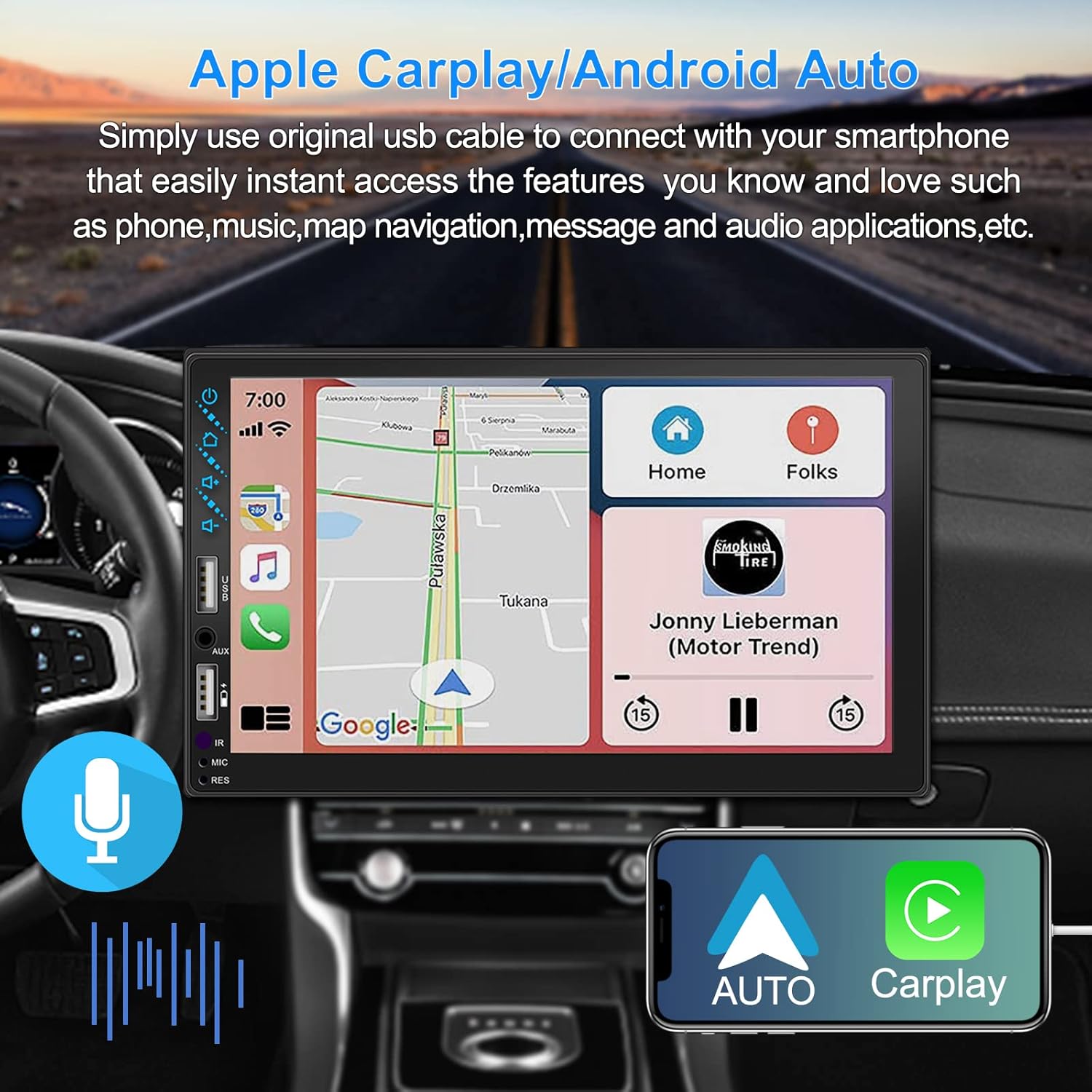
図3.1: Apple CarPlayとAndroid Autoのインターフェース
3.2 音声制御
Utilize voice commands to control various functions such as making calls, playing music, and navigating, allowing you to keep your hands on the wheel and eyes on the road.

図3.2: 音声制御機能
3.3 電話ミラーリンク
The Mirror Link function allows you to display your smartphone's screen directly onto the stereo's touchscreen. This supports Android devices (version 10.1 and below) and iPhone devices (version 14.5 and below, including iPhone 12, 11, XR, and 8 series and below) with resolutions up to 1920x1080 pixels.
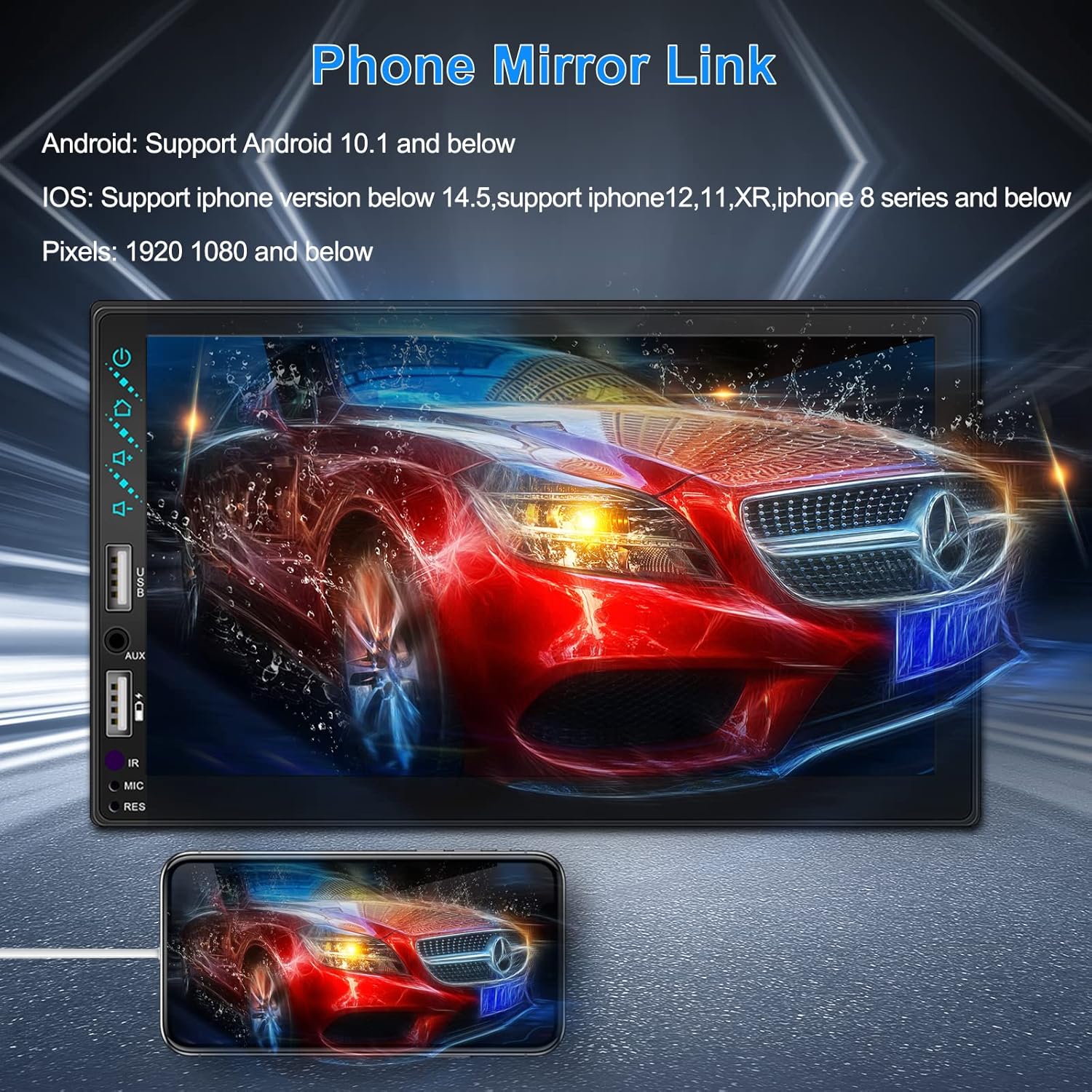
Figure 3.3: Phone Mirror Link
3.4 リア View カメラ
The included waterproof backup camera features 12 HD LED lights for night vision and a 170° viewing angle. When you shift into reverse, the system automatically displays the camera feed on the screen, providing optimal visibility in various weather conditions.
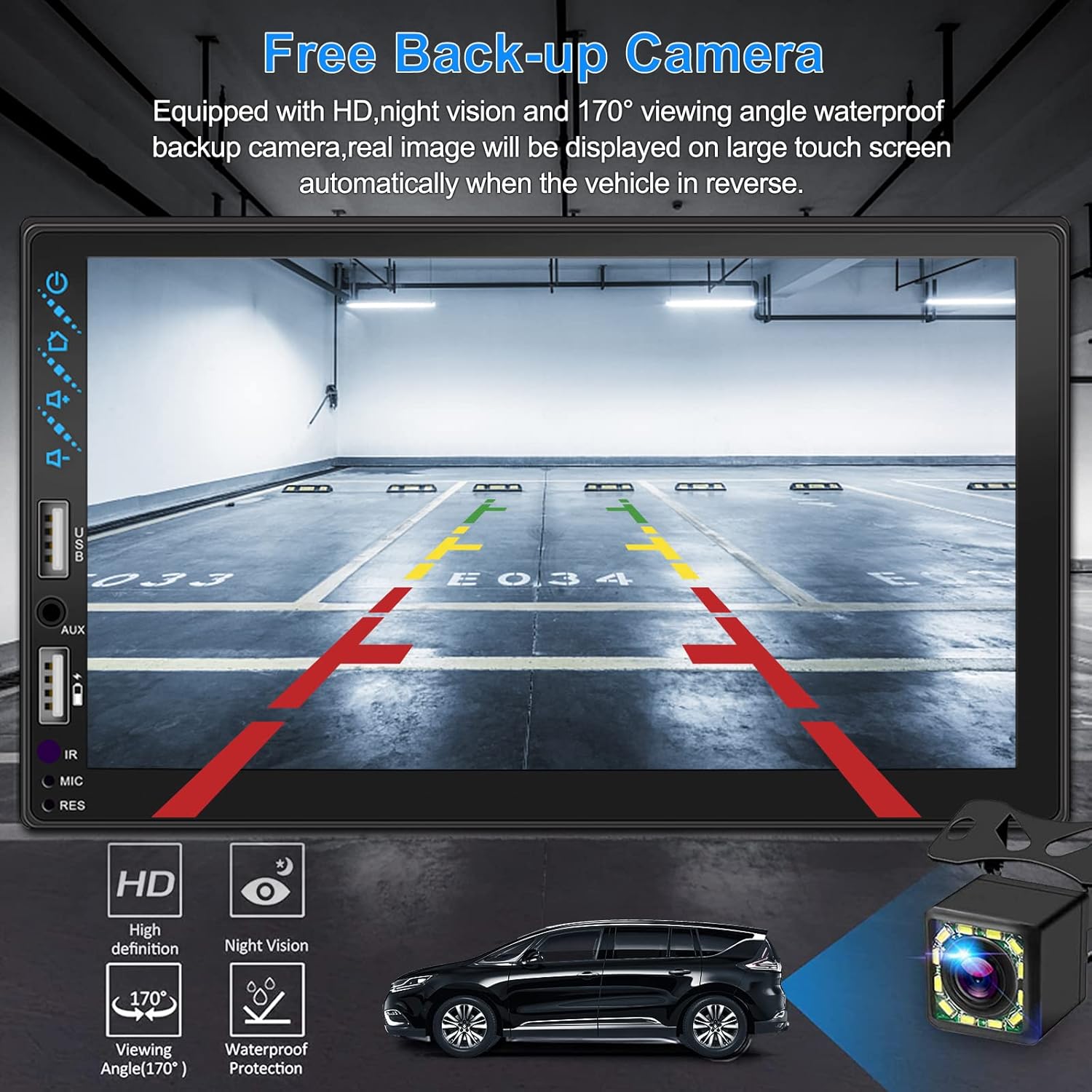
図3.4:背面 View カメラディスプレイ
4.インストールガイド
Proper installation is crucial for optimal performance. It is recommended to have the unit installed by a professional if you are unfamiliar with car audio wiring.
4.1 寸法
The stereo unit has a standard double din size. Refer to Figure 2.1 for detailed dimensions.
- 幅:178mm(7インチ)
- 身長:102mm(4インチ)
- 深さ:60mm(2.6インチ)
4.2 配線図
Carefully follow the wiring diagram below to connect the stereo to your vehicle's electrical system. Ensure all connections are secure to prevent malfunctions.
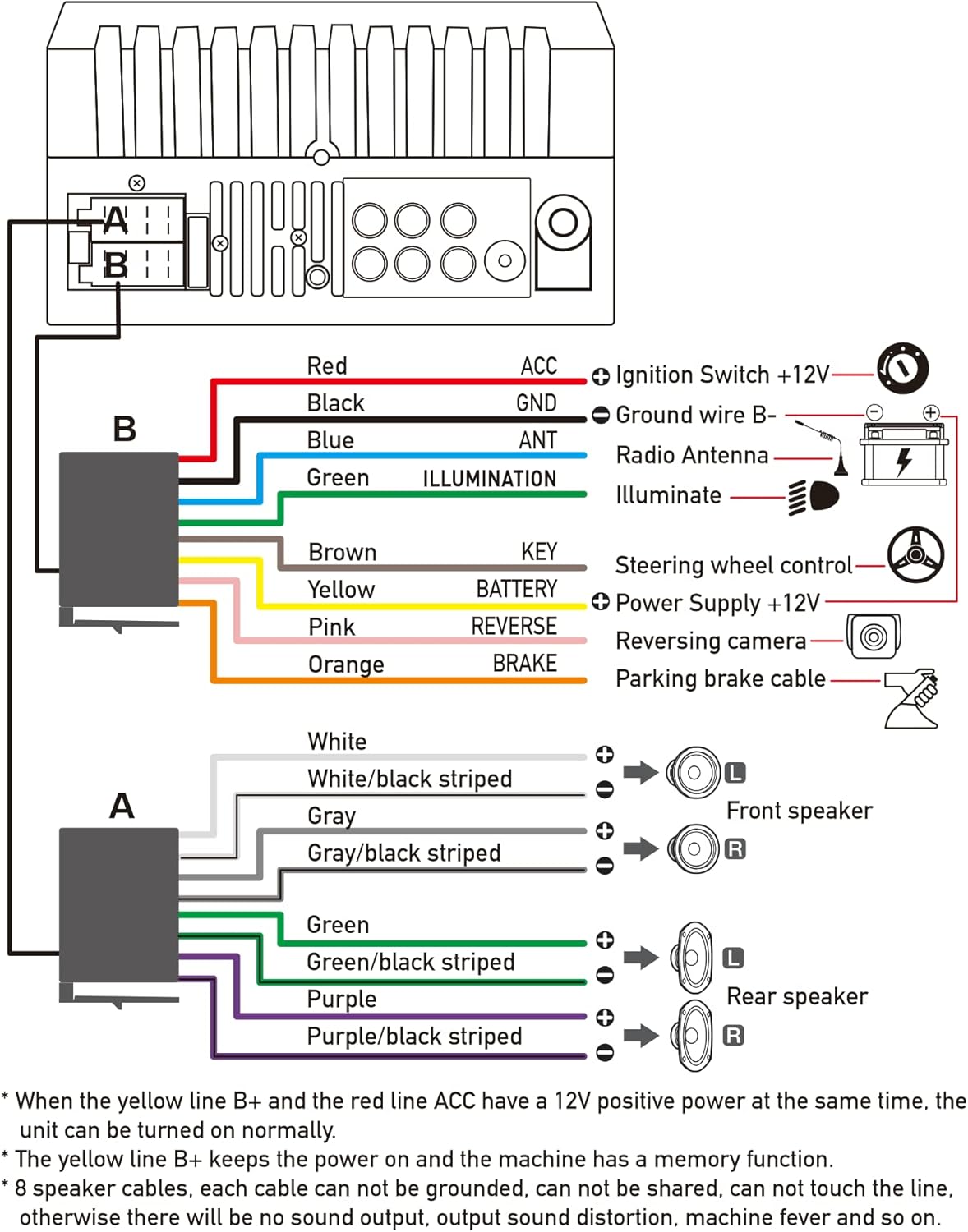
図4.1: 主配線図
- レッド(ACC): Connect to Ignition Switch +12V.
- 黒(GND): Connect to Ground wire B-.
- 青(ANT): Connect to Radio Antenna (if applicable).
- Green (ILLUMINATION): Connect to Illuminate wire.
- Brown (KEY): Connect to Steering wheel control.
- Yellow (BATTERY): Connect to Power Supply +12V.
- ピンク(裏面): Connect to Reversing camera input.
- Orange (BRAKE): Connect to Parking brake cable.
Speaker Connections (8 speakers supported):
- White / White/black striped: フロント左スピーカー
- Gray / Gray/black striped: フロント右スピーカー
- Green / Green/black striped: リア左スピーカー
- Purple / Purple/black striped: 右リアスピーカー
重要な注意事項:
- The unit requires both the Yellow (BATTERY) and Red (ACC) wires to have a 12V positive power supply simultaneously for normal operation.
- The Yellow (BATTERY) wire keeps the power on and maintains memory functions.
- For speaker connections, each cable must not be grounded or shared with other cables. Incorrect wiring can lead to no sound output, sound distortion, or damage to the machine.
5. 操作手順
5.1 基本操作
- 電源オン/オフ: 前面パネルまたはリモコンの電源ボタンを押します。
- 音量コントロール: Use the volume buttons on the front panel, steering wheel controls, or remote control.
- ソースの選択: Tap the 'Source' or 'Mode' icon on the touchscreen to switch between Radio, Bluetooth, USB, AUX, CarPlay, and Android Auto.
5.2 Apple CarPlay / Android Auto Usage
- Connect your compatible iPhone or Android smartphone to the stereo's USB port using a certified USB cable.
- The stereo will automatically detect the connection and prompt you to launch CarPlay or Android Auto.
- 画面の指示に従ってセットアップを完了します。
- Once connected, you can access supported apps like Maps, Phone, Messages, and Music directly from the stereo's touchscreen or via voice commands.
5.3Bluetoothペアリング
- スマートフォンのBluetoothをオンにします。
- ステレオで、Bluetooth メニューに移動します。
- 検索する available devices on your smartphone. The stereo's Bluetooth name will typically be 'ESLYYDS' or similar.
- Select the stereo from your smartphone's list and confirm the pairing code if prompted.
- ペアリングすると、ワイヤレスで通話の発信/受信やオーディオのストリーミングが可能になります。
5.4 Phone Mirror Link Usage
- スマートフォンをステレオのUSBポートに接続します。
- Select the 'Mirror Link' option on the stereo's screen.
- Follow the specific instructions displayed on the stereo for your phone's operating system (Android or iOS) to enable screen mirroring. This may involve enabling USB debugging for Android or trusting the device for iOS.
5.5無線操作
- Select the 'Radio' source.
- Use the 'Scan' function to automatically search and save stations, or manually tune using the frequency controls.
- お気に入りの放送局をプリセット ボタンに保存して、すぐにアクセスできるようにします。
5.6 USB再生
- オーディオまたはビデオが保存されているUSBドライブを挿入します files into the designated USB playback port.
- The stereo will automatically switch to USB mode or prompt you to select it.
- Browse and play your media files using the touchscreen controls.
6. メンテナンス
カーステレオの寿命を延ばし、最適なパフォーマンスを確保するには、次のメンテナンス ガイドラインに従ってください。
- クリーニング: Use a soft, dry cloth to clean the screen and exterior. For stubborn smudges on the screen, use a screen cleaner specifically designed for electronic displays. Avoid abrasive cleaners or solvents.
- 温度: ユニットを長時間、高温や低温などの極端な温度にさらさないでください。
- 水分: 本体を乾燥した状態に保ってください。水や過度の湿気にさらさないでください。
- ファームウェアの更新: メーカーの webパフォーマンスの向上や新機能の追加のために、利用可能なファームウェア アップデートを定期的にサイトから確認してください。
7。 トラブルシューティング
If you encounter issues with your ESLYYDS car stereo, please refer to the following common problems and solutions. If the problem persists, contact customer support.
| 問題 | 考えられる原因 | 解決 |
|---|---|---|
| 電源なし | 配線間違い、ヒューズ切れ、車両バッテリーの問題。 | Check power (Yellow and Red) and ground (Black) wire connections. Inspect vehicle fuses. Ensure vehicle battery is charged. |
| 音が出ない | スピーカー配線が正しく接続されていない、音量が低すぎる、ミュート機能が有効になっている。 | Verify all speaker wire connections (ensure no shorts or grounds). Increase volume. Check if mute is enabled. |
| Bluetoothが接続されない | Bluetooth not enabled on phone/stereo; Incorrect pairing process. | Ensure Bluetooth is active on both devices. Delete previous pairings and re-attempt pairing process. |
| CarPlay/Android Autoが起動しない | USB ケーブルの故障、電話機の互換性がない、ソフトウェアの問題。 | Use a high-quality, certified USB cable. Ensure your phone's OS version is compatible. Restart both phone and stereo. |
| リアカメラが表示されない | Camera wire disconnected; Reverse trigger wire not connected. | Check the camera's video input and power connections. Ensure the Pink (REVERSE) wire is correctly connected to the vehicle's reverse light trigger. |
| USB not reading media | サポートされていません file format; Corrupted USB drive; USB port issue. | メディアを確保する files are in supported formats (e.g., MP3, MP4, MKV). Try a different USB drive. |
8. 仕様
| 特徴 | 仕様 |
|---|---|
| 製品寸法 | 7 x 2.6 x 3.94インチ |
| アイテム重量 | 2.33ポンド |
| モデル番号 | L3 |
| 表示サイズ | 7インチ(18 cm) |
| 表示タイプ | HD Capacitive Touchscreen |
| 接続技術 | Carplay, Android Auto, Mirror-Link, Bluetooth 5.2, USB, AUX |
| コントローラータイプ | Googleアシスタント、iOS、Android |
| 特集 | Touchscreen, RDS, Steering Wheel Control (SWC), Fast Charging USB (2.1A) |
| 対応デバイス | スマートフォン |
| コネクタタイプ | USB |
| オーディオ出力モード | 囲む |
| サラウンドサウンドチャンネル構成 | 5.1 |
| ビデオエンコーディングのサポート | 動画 |
| 色 | 黒 |
| 初回利用可能日 | 25年2021月XNUMX日 |
9. 保証とサポート
ESLYYDS is committed to providing excellent customer service and technical support. For any inquiries or assistance, please contact our professional technical team.
- 返金保証: 30-day period from purchase.
- 交換保証: 12-month period for product replacement.
- テクニカルサポート: Life-time technical support is provided.
Please refer to your purchase documentation for specific contact details or visit the official ESLYYDS webサポート情報のサイト。


