1.製品オーバーview
The Anderic OEM NSRCFNA21 Smart Remote is an original equipment manufacturer (OEM) replacement remote control specifically designed for various Insignia TV models. This remote provides seamless functionality and user-friendly operation, ensuring reliable control over your television.
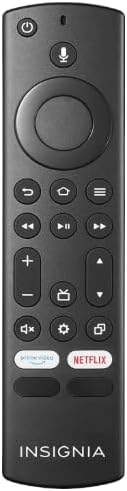
画像1.1: The Anderic OEM NSRCFNA21 Smart Remote. This image displays the front view of the black remote control, featuring various buttons for power, voice control, navigation, volume, channel, and dedicated streaming service buttons.
主な機能は次のとおりです。
- Original Quality: An authentic OEM product, ensuring performance and reliability comparable to the remote originally supplied with your TV.
- ユーザーフレンドリーなデザイン: Intuitive buttons and controls for easy navigation, volume adjustment, channel changes, and access to various TV functions.
- 信頼性の高いパフォーマンス: Provides a stable and responsive connection for accurate command execution.
2. セットアップとペアリングの手順
To ensure proper functionality, the remote control must be paired with your Insignia TV. Follow these steps carefully:
- テレビをリセットする: Unplug your Insignia TV from its power source. Wait for approximately 30 seconds.
- テレビの電源オン: Plug the TV back into the power source and turn it on. Allow the TV to fully boot up.
- ペアリングを開始する: Once the TV has completely booted up and is displaying content, press and hold the 家 button on the Anderic NSRCFNA21 remote control for up to 30 seconds.
- Remote Update (if prompted): Your TV may display a message indicating that the remote needs an update. If prompted, allow the TV to proceed with the update. This process may take 1 to 3 minutes to complete.
- 検証: After the update (if any) and pairing process, test the remote's functions (e.g., volume, channel, navigation) to confirm successful pairing.
If the remote does not pair after following these steps, repeat the process or refer to the troubleshooting section.
3. リモコンの操作
The Anderic NSRCFNA21 remote control features an intuitive layout for easy operation of your Insignia TV. Below are the general functions of the primary buttons:
- 電源ボタン: テレビの電源をオンまたはオフにします。
- 音声制御ボタン: コンテンツの検索やテレビの制御のための音声コマンドを有効にします。
- Navigation Pad (Directional Buttons and Select): メニュー間を移動したり項目を選択したりするために使用します。
- ホームボタン: テレビのメインホーム画面に戻ります。
- 戻るボタン: 前の画面またはメニューに戻ります。
- メニュー/オプションボタン: Accesses additional menu options or settings.
- 音量を上げる/下げる: テレビの音量を調整します。
- チャンネルアップ/ダウン: テレビのチャンネルを変更します。
- 消音ボタン: テレビの音声をミュートまたはミュート解除します。
- 設定ボタン: テレビの設定メニューを開きます。
- 入力/ソースボタン: Changes the TV's input source (e.g., HDMI 1, HDMI 2).
- Dedicated Streaming Service Buttons: Provides quick access to popular streaming applications (e.g., Amazon Prime Video, Netflix).
4. 互換性
The Anderic OEM NSRCFNA21 Smart Remote is compatible with the following Insignia TV models:
- NS24DF310NA21
- NS39DF310NA21
- NS50DF710NA21
- NS55DF710NA21
This remote also replaces the following models:
- NSRCFNA19 Rev B Fire
- NSRCFNA19revB
- NSRCFNA21 Fire
- NSRCFNA21 Rev E
- NSRCFNA21-Rev-E
Ensure your TV model is listed above for optimal performance.
5. メンテナンス
Proper maintenance can extend the life and functionality of your remote control.
- バッテリー交換: The remote requires two AAA batteries. Replace batteries when the remote's responsiveness decreases or it stops functioning. Ensure correct polarity when inserting new batteries.
- クリーニング: Use a soft, dry cloth to clean the remote's surface. Avoid using liquid cleaners or abrasive materials, as these can damage the remote.
- ストレージ: リモコンは、極端な温度や直射日光を避け、乾燥した場所に保管してください。
6。 トラブルシューティング
If you encounter issues with your Anderic NSRCFNA21 Smart Remote, try the following troubleshooting steps:
- リモコンが応答しない:
- Check the batteries. Replace them with fresh AAA batteries, ensuring correct polarity.
- リモコンとテレビのセンサーの間に障害物がないことを確認してください。
- セクション 2 の説明に従って、ペアリング プロセスを再試行します。
- 断続的な機能:
- 電池残量が少ない可能性があります。電池を交換してください。
- Ensure you are within the effective range of the TV's sensor.
- Pairing Fails:
- Confirm your TV model is listed in the compatibility section (Section 4).
- Ensure the TV is fully booted up before attempting to hold the Home button.
- Try unplugging the TV for a longer period (e.g., 1-2 minutes) before plugging it back in and re-attempting pairing.
If problems persist after attempting these steps, contact customer support for further assistance.
7. 仕様
| ブランド | アンデリック |
| モデル番号 | NSRCFNA21 Rev B |
| 対応デバイス | Insignia Televisions |
| 電源 | 単2電池XNUMX本(必須) |
| アイテム重量 | 1.76オンス |
| パッケージ寸法 | 6.3 x 2.95 x 0.67インチ |
| 色 | 黒 |
| メーカー | ダンズエレクトロニクス株式会社 |
8. 保証とサポート
For warranty information or technical support, please contact the manufacturer, Anderic (Dan's Electronics Etc., Inc.). Refer to the product packaging or the official Anderic web具体的な連絡先の詳細および保証条件については、サイトをご覧ください。
訪問することができます AmazonのAndericストア 詳細についてはこちらをご覧ください。


