導入
Thank you for choosing the MURPISO U-Pro2 Wireless Earbuds. These earbuds are designed to provide a superior audio experience with advanced features such as Active Noise Cancellation (ANC), deep bass, and extended battery life. This manual will guide you through the setup, operation, maintenance, and troubleshooting of your new earbuds.

Image: The MURPISO U-Pro2 wireless earbuds resting inside their sleek black charging case, with the lid open, showcasinコンパクトなデザインが特徴。
設定
1. イヤホンとケースの充電
Before first use, fully charge the earbuds and the charging case. The earbuds provide 8-10 hours of playtime on a single charge, and the charging case extends this to a total of 35 hours. A full charge for the earbuds takes approximately 1.5 hours.

Image: An infographic illustrating the 35-hour total playtime, with 10 hours per charge for the earbuds and 35 hours with the charging case, along with a 1.5-hour charging time for the earbuds.
2. ワンステップペアリング
- 充電ケースのふたを開けます。 イヤホンの電源が自動的にオンになり、ペアリング モードに入ります。
- デバイス(スマートフォン、タブレットなど)で Bluetooth を有効にし、利用可能なデバイスを検索します。
- Select "MURPISO U-Pro2" from the list of devices to connect.
- 一度ペアリングすると、充電ケースの蓋を開けると、イヤホンは最後にペアリングしたデバイスに自動的に接続されます。
The latest Bluetooth 5.2 technology ensures a faster, more stable connection with greater distance and reduced latency.

Image: A visual representation of the one-step pairing process, showing the earbuds connecting to a smartphone via Bluetooth, with a checkmark indicating successful connection.
3. Comfortable Fit
The U-Pro2 earbuds feature an ergonomic design for a stable and comfortable fit. They come with 5 additional sizes of soft eartips to ensure a perfect seal and prevent ear pain even during extended use. Choose the eartip size that provides the best comfort and sound isolation for you.
操作手順
1. Audio Quality and Deep Bass
Experience immersive and superior quality audio with the U-Pro2 earbuds. Equipped with 10mm drivers and high-quality audio decoding, they deliver powerful, thumping bass and clear Hi-Fi stereo sound, perfect for music, videos, and calls.

Image: A close-up diagram highlighting the 10mm drivers responsible for delivering premium bass in the earbuds.
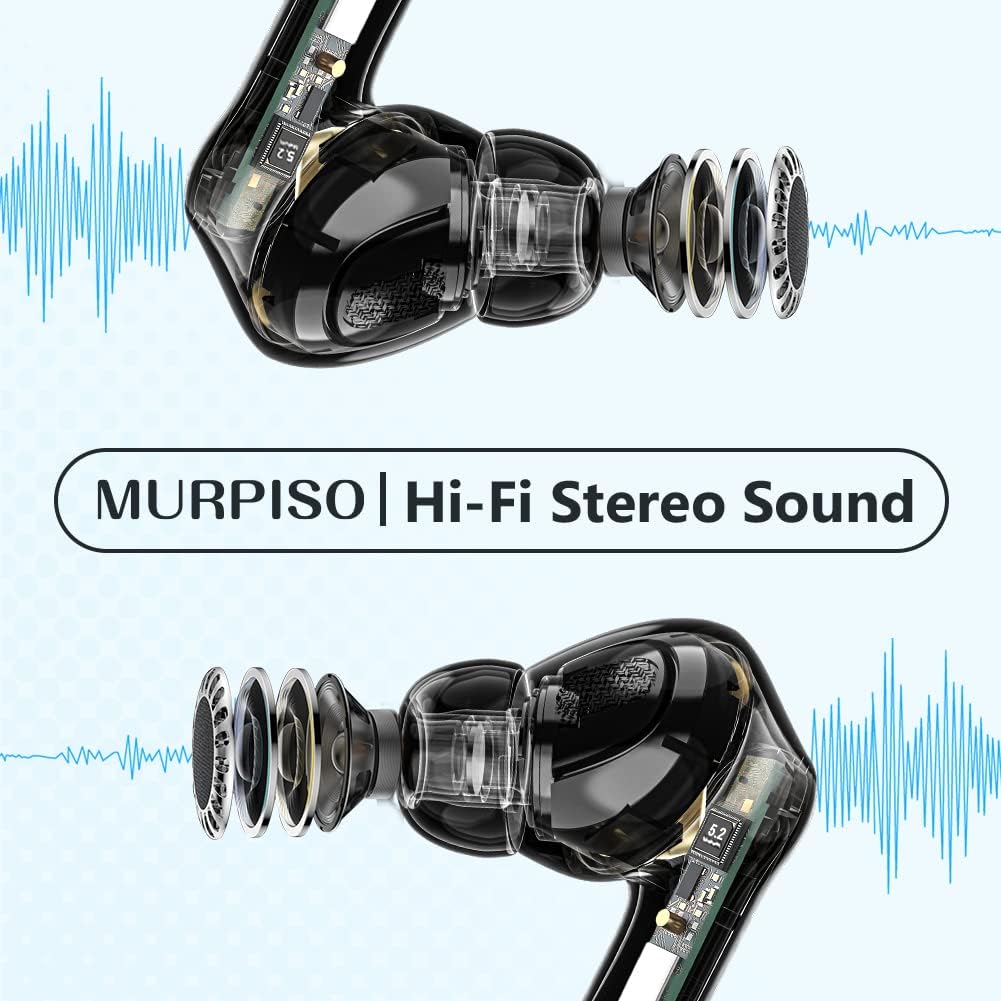
画像: 透明な view イヤホンの、ショーasing their internal components and emphasizing the Hi-Fi Stereo Sound technology.
2. アクティブノイズキャンセレーション(ANC)
The U-Pro2 earbuds feature advanced ANC technology to significantly reduce ambient noise. They offer three optional modes:
- ANCオン: For maximum noise reduction, ideal for noisy environments like subways, buses, or offices.
- 透明モード: オーディオを楽しみながら周囲の音も聞くことができ、公共の場での注意喚起に役立ちます。
- ANC オフ: ノイズキャンセルを無効にします。静かな環境やバッテリーを節約するのに適しています。
Refer to the product's quick start guide or touch control instructions (if applicable) for switching between these modes.

Image: A person wearing the MURPISO earbuds on a train, demonstrating the effectiveness of Active Noise Cancellation in a busy environment.
3. 通話品質
Equipped with 4 microphones, the U-Pro2 earbuds ensure clear phone calls. The active noise cancellation mode also enhances call clarity by reducing background noise for both you and the person you are speaking with.
4. IPX6防水性能
The earbuds are rated IPX6 water-resistant, protecting them from sweat, splashes, and rain. This makes them suitable for workouts and outdoor activities. 注記: 充電ケースは耐水性ではありません。

Image: A person pouring water from a bottle onto their face, with the MURPISO earbud visible, illustrating its IPX6 water-resistant and ergonomic design.
メンテナンス
適切なメンテナンスを行うことで、イヤホンの寿命が長くなり、最適なパフォーマンスが確保されます。
- クリーニング: イヤホン、特にイヤーチップと充電端子は、柔らかく乾いた糸くずの出ない布で定期的に拭いてください。刺激の強い化学薬品や研磨剤は使用しないでください。
- ストレージ: 使用しないときは、ほこりや損傷から保護するために、イヤホンを充電ケースに保管してください。
- バッテリーのケア: Avoid fully depleting the battery frequently. Charge the case and earbuds regularly, even if not in constant use, to maintain battery health.
- 水への露出: While IPX6 rated, avoid prolonged exposure to water or submerging the earbuds. Dry them thoroughly if they get wet before placing them back in the charging case.
トラブルシューティング
| 問題 | 考えられる原因 | 解決 |
|---|---|---|
| イヤホンがペアリング/接続されない | Bluetooth off on device, earbuds not in pairing mode, previously paired to another device. | Ensure Bluetooth is on. Place earbuds in case, close lid, then open to re-enter pairing mode. Forget "MURPISO U-Pro2" on your device's Bluetooth settings and re-pair. |
| 音が出ない、または音量が小さい | Volume too low on device, earbuds not properly seated, dirty eartips/speakers. | Increase device volume. Adjust earbuds for a secure fit. Clean eartips and speaker mesh. |
| ANCが効果的に機能していない | Incorrect ANC mode selected, improper fit. | Ensure ANC mode is active. Adjust earbuds for a tighter seal in your ear canal. Try different eartip sizes. |
| イヤホンが充電されない | Charging contacts dirty, charging case battery low, faulty cable/charger. | Clean charging contacts on earbuds and case. Charge the charging case. Try a different USB cable and power adapter. |
仕様
- モデル: U-Pro2
- ブランド: ムルピソ
- 接続性: ブルートゥース5.2
- ドライバーサイズ: 10mm
- マイク: 4(クリアな通話用)
- 再生時間(イヤホン): 8~10時間(1回の充電)
- 合計再生時間(充電ケース付き): 最大35時間
- イヤフォンの充電時間: 約1.5時間
- ノイズキャンセル: Active Noise Cancellation (ANC) with Transparency Mode
- 耐水性: IPX6(イヤフォンのみ)
- 色: 黒
- フォームファクター: インイヤー
- 材料: プラスチック
- 電池のタイプ: リチウムイオン(3個付属)
保証とサポート
For warranty information and customer support, please refer to the documentation included with your purchase or visit the official MURPISO webサイトをご覧ください。このマニュアルに記載されていない問題が発生した場合は、カスタマーサービスにお問い合わせください。
メーカー: ムルピソ


