1. はじめに
The OREI HD-1016 is a professional 1x16 HDMI Splitter designed to distribute a single HDMI source to sixteen HDMI displays simultaneously. It supports Full HD 1080P and 3D content, making it suitable for various residential and commercial applications.
パッケージ内容:
- 1 x OREI HD-1016 HDMI Splitter
- 1 x DC Power Adapter (100-240V, US Plug)
- ユーザーマニュアル x 1
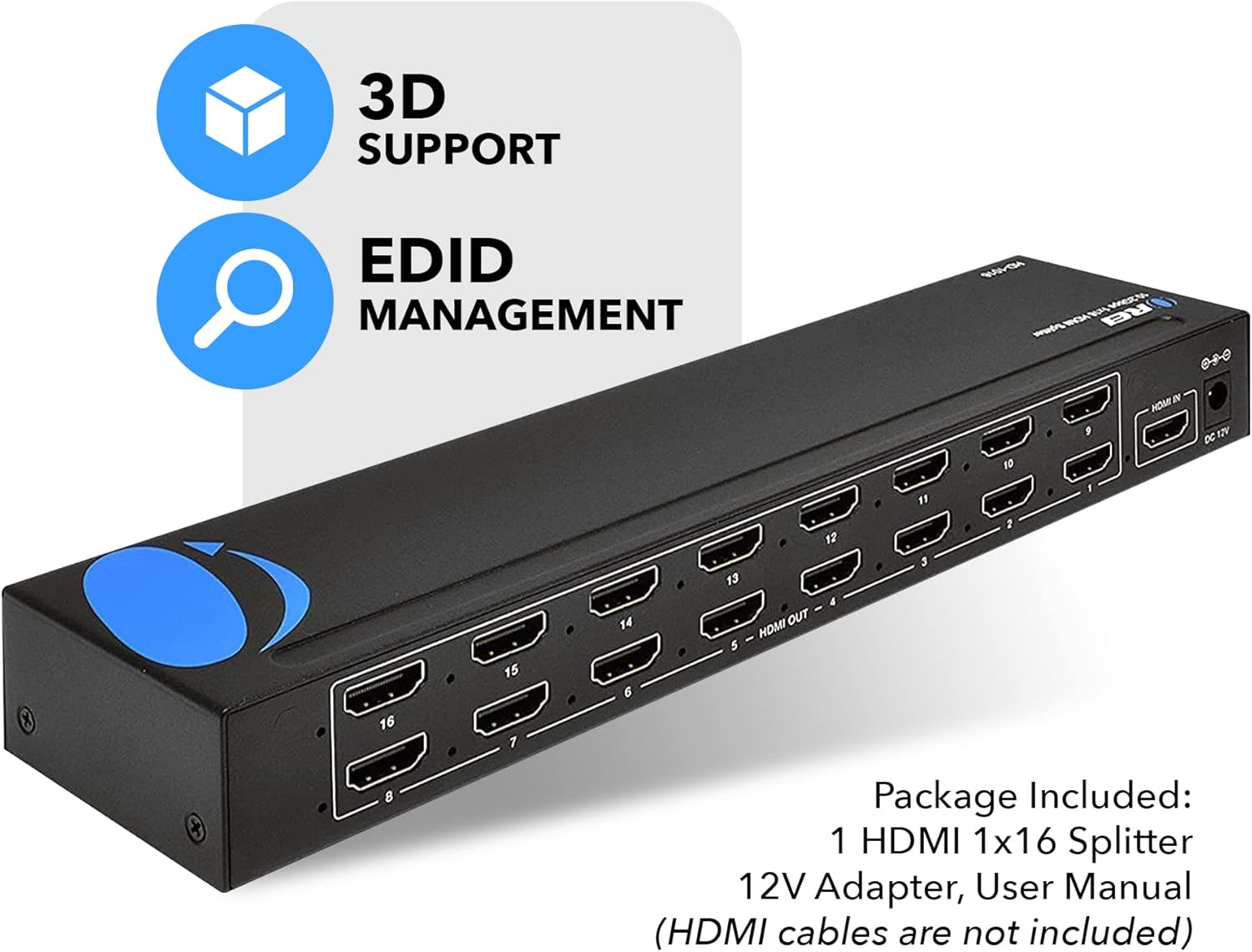
Image: OREI HD-1016 HDMI Splitter and its included accessories.
2. 主な特徴
- 1入力から16出力: Connects one HDMI source to sixteen HDMI displays.
- Full HD 1080P & 3D Support: Compatible with 480i/576i/480p/576p/720p/1080i/1080p resolutions and 3D content.
- Buffering and Amp生きる: Splits the HDMI signal completely without loss, with built-in signal buffering and amp化機能。
- Heavy-Duty Metal Enclosure: 耐久性のある金属casing provides protection and aids in heat dissipation.
- プラグ&プレイ: Simple setup with no software or drivers required.
- EDID管理: Features EDID management for optimal display compatibility.
- 幅広い互換性: Works with various HDMI devices such as Xbox, PS4, PS3, Fire Stick, Blu-Ray players, and Apple TV.
Image: The OREI HD-1016 HDMI Splitter supports Full HD 1080P and 3D content.
3. セットアップ手順
Follow these steps to set up your OREI HD-1016 HDMI Splitter:
- HDMIソースを接続: Connect your HDMI source device (e.g., Blu-Ray player, game console) to the 'HDMI IN' port on the splitter using a high-quality HDMI cable.
- HDMIディスプレイを接続する: Connect up to sixteen HDMI displays (e.g., TVs, monitors, projectors) to the 'HDMI OUT' ports (1-16) on the splitter using high-quality HDMI cables. For optimal performance, it is recommended to use HDMI cables that are 30 feet or shorter.
- 電源アダプタを接続: Plug the included DC Power Adapter into the 'DC 12V' port on the splitter and then into a power outlet.
- 電源オン: Ensure all connected devices and the splitter are powered on. The splitter will automatically detect the input signal and distribute it to all connected displays.

Image: Connection diagram for the OREI HD-1016 HDMI Splitter.
4. 操作手順
The OREI HD-1016 HDMI Splitter is designed for simple plug-and-play operation. Once all connections are made and devices are powered on, the splitter will automatically duplicate the single HDMI input signal to all sixteen connected displays.
EDID管理:
The splitter features EDID (Extended Display Identification Data) management. This allows the splitter to communicate with the connected displays and the source device to ensure optimal resolution and audio settings are used across all outputs. Refer to the EDID switch settings on the device for specific configurations if needed.

Image: EDID Management feature icon.
公式製品ビデオ:
Video: This video demonstrates the functionality of an HDMI splitter, showing one input signal being distributed to multiple outputs. It provides a visual guide to the core operation of the device.
5. 仕様
| 特徴 | 詳細 |
|---|---|
| モデル番号 | HD-1016 |
| 入力ポート | HDMI x 1 |
| 出力ポート | HDMI x 16 |
| サポートされている解像度 | 480i/576i/480p/576p/720p/1080i/1080p |
| 3Dサポート | はい |
| 製品寸法 | 14.02 x 7.99 x 2.01インチ |
| アイテム重量 | 1ポンド |
| 色 | 黒 |
| コネクタタイプ | HDMIからHDMIへ |
| 電源 | DC 12V (Adapter Included) |

Image: Technical specifications and dimensions of the OREI HD-1016 HDMI Splitter.
6。 トラブルシューティング
If you encounter issues with your OREI HD-1016 HDMI Splitter, please refer to the following common troubleshooting steps:
- ディスプレイに信号なし:
- Ensure all HDMI cables are securely connected to both the source, splitter, and displays.
- Verify that the power adapter is correctly connected and the splitter is powered on.
- 入力ソースがアクティブで信号を出力しているかどうかを確認します。
- Try connecting the HDMI source directly to a single display to confirm the source and display are working correctly.
- Test with different HDMI cables, especially if they are longer than 30 feet.
- 画質が悪い、またはちらつく:
- 高品質の HDMI ケーブルを使用していることを確認してください。
- 可能であれば、HDMI ケーブルの長さを短くしてください。
- Check the resolution settings on your source device to ensure compatibility with all connected displays.
- Verify EDID settings on the splitter are configured correctly for your displays.
- オーディオの問題:
- Confirm that your displays support the audio format being sent by the source.
- Check audio settings on both the source device and the displays.
7. 保証とサポート
OREI HD-1016 HDMIスプリッターには、 1年間のメーカー保証. OREI also offers Lifetime OREI Tech Support 自社製品に対して。
技術的なサポートや保証請求については、OREIの公式カスタマーサポートにお問い合わせください。 webサイトまたは製品パッケージに記載されている連絡先情報を参照してください。


