パッケージ内容
以下にリストされているすべてのアイテムがパッケージに含まれていることを確認してください。
- PLZ MP-902 Double Din Car Stereo Unit
- リモートコントロール
- 後方 View カメラ
- バックアップカメラケーブル
- フレーム
- Brackets (Mounting Hardware)
- ネジ
- ワイヤハーネス
- ユーザーマニュアル

Image: Complete package contents for the PLZ MP-902 car stereo.
Model: MP-902 | Brand: PLZ
This user manual provides comprehensive instructions for the installation, operation, and maintenance of your PLZ MP-902 Double Din Car Stereo. Please read this manual thoroughly before using the product to ensure proper functionality and safety. The MP-902 is designed to enhance your in-car audio and entertainment experience with its advanced features and user-friendly interface.
以下にリストされているすべてのアイテムがパッケージに含まれていることを確認してください。
Image: Complete package contents for the PLZ MP-902 car stereo.
Before beginning installation, ensure your vehicle's dashboard opening is compatible with the standard double din size (173mm x 98mm). If not, a suitable dash kit or modification may be required. Professional installation is recommended.
Connect the included wiring harness to your vehicle's existing wiring. Refer to the detailed wiring diagram provided in the user manual and on the product image for correct connections. Additional wire harness adapters or antenna adapters may be needed for specific car models.

Image: Standard size and wiring diagram for the MP-902 car stereo.
The MP-902 supports both front and rear view cameras. The included HD rear camera should be mounted at the rear of your vehicle. Connect the camera's video output to the 'R-CAM' input on the stereo and its power to your vehicle's reverse light circuit for automatic activation when shifting into reverse.

Image: Front and rear camera input setup, highlighting the included rear camera with night vision and wide view角度。
Secure the stereo unit into the dashboard opening using the provided brackets and screws. Attach the frame for a clean, integrated look. Ensure all cables are properly routed and secured to prevent interference or damage.
Video: A demonstration of the PLZ MP-902 car stereo's functions, including a brief overview of its physical features and connections.
The PLZ MP-902 features an intuitive touchscreen interface for easy navigation and control. Below are instructions for key functions.
From the main menu, tap on the desired icon to access functions such as Radio, Bluetooth, Phone Link, USB, Card, AV In, F-CAM (Front Camera), and Setup.

Image: Main menu interface of the MP-902.
To connect your phone via Bluetooth 5.1, go to the 'BT' menu. Enable Bluetooth on your phone and search for 'MP-902'. Pair the devices. Once connected, you can make hands-free calls, access your phonebook, and stream audio. The dual microphone system ensures clear call quality.

Image: Bluetooth 5.1 interface for hands-free calling and music streaming.
Select 'Phone Link' from the main menu. Connect your ISO or Android smartphone via a USB cable. Follow the on-screen prompts to enable screen mirroring. This allows you to display your phone's screen, including navigation apps and video content, directly on the stereo's display.

Image: Phone Mirror Link feature displaying a mirrored smartphone screen.
Access the 16-Band EQ settings from the 'EQ' icon. Adjust individual frequency bands to customize your audio output. You can also control fader and balance settings to optimize sound distribution within your vehicle.

Image: Detailed 16-Band EQ settings for audio customization.
Select 'Radio' from the main menu. You can manually tune to stations or use the auto-scan feature to find available FM/AM frequencies. Save your favorite stations as presets for quick access.
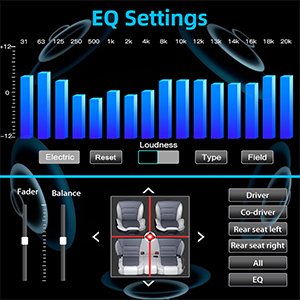
Image: FM/AM Radio interface.
If your vehicle supports steering wheel controls, you can configure them in the 'Setup' menu under 'Steering Wheel Setup'. This allows you to control volume, track changes, and other functions directly from your steering wheel.

画像: ステアリングホイール コントロール設定インターフェイス。
To ensure the longevity and optimal performance of your PLZ MP-902 car stereo, follow these maintenance guidelines:
If you encounter issues with your PLZ MP-902, refer to the following common troubleshooting steps:
| 問題 | 考えられる原因 | 解決 |
|---|---|---|
| 電源なし | Loose wiring, blown fuse, vehicle power issue. | Check power and ground connections. Inspect vehicle's fuse box and the stereo's inline fuse. Ensure ignition is on. |
| 音が出ない | スピーカーの配線が間違っている、音量が低すぎる、ミュートが有効になっている、オーディオソースが間違っている。 | Verify speaker connections. Increase volume. Check if mute is active. Select the correct audio source (e.g., Radio, BT, USB). |
| Bluetoothが接続されない | 電話/ステレオで Bluetooth が有効になっていない、デバイスがペアリング モードになっていない、干渉が発生している。 | Ensure Bluetooth is on for both devices. Put stereo in pairing mode. Delete previous pairings on phone and retry. Move closer to the unit. |
| ミラーリンクが機能しない | Incorrect USB cable, phone settings, app compatibility. | Use a high-quality USB cable. Ensure phone's USB debugging or mirroring settings are enabled. Some apps may restrict mirroring due to copyright. |
| リアカメラの画像が表示されない | Incorrect camera wiring, reverse trigger wire not connected, faulty camera. | カメラのビデオ入力と電源の接続を確認してください。バックトリガーワイヤーが車両のバックランプに正しく接続されていることを確認してください。 |
If these steps do not resolve the issue, please contact PLZ customer support for further assistance.
| 特徴 | 詳細 |
|---|---|
| モデル番号 | MP-902 |
| 画面サイズ | 7インチ |
| スクリーンタイプ | Full HD Capacitive Touchscreen |
| Bluetoothバージョン | 5.1 |
| オーディオイコライザー | 16-Band EQ DSP |
| 接続性 | Bluetooth、補助、USB |
| Supported Video Playback | 1080P |
| 製品寸法 | 奥行き3.26インチ x 幅7インチ x 高さ3.93インチ (8.28 x 17.78 x 9.98 cm) |
| アイテム重量 | 2.51ポンド(1.14kg) |
| 付属カメラ | HD Rear Camera with Night Vision (170° ultra-wide view角度) |
PLZ is committed to providing high-quality products and excellent customer service. For any warranty claims, technical support, or inquiries regarding your MP-902 car stereo, please contact PLZ customer support directly. Refer to the contact information provided with your product packaging or visit the official PLZ webサポートサイト。
Many common issues can be resolved by referring to the troubleshooting section of this manual or by checking for the latest software updates from PLZ.
 |
PLZ 108 シングルディンカーステレオ 取付マニュアル - Apple CarPlay、Android Auto、Bluetooth ワイヤレス Apple CarPlay、Android Auto、Bluetooth 5.3、10.1 インチ タッチ スクリーン、バックアップ カメラ サポート、高度なオーディオ機能を備えた PLZ 108 シングル Din カー ステレオの包括的なインストール ガイド。 |
 |
PLZ ポータブルカープレイスクリーン ユーザーマニュアル: インストールと接続ガイド PLZポータブルカープレイスクリーンの包括的なユーザーマニュアル。Apple CarPlay、Android Auto、AirPlay、Android Castのインストールと接続手順を詳細に説明しています。シームレスなスマートフォン連携で、運転体験をさらに充実させましょう。 |
 |
NAGAOKA MPシリーズ ステレオカートリッジ 取扱説明書 NAGAOKA MP シリーズ ステレオ カートリッジの包括的な操作マニュアルです。MP-500、MP-300、MP-200、MP-150、MP-110 の各モデルの取り付け、スタイラスの交換、仕様、使用上の注意、保証情報について詳しく説明しています。 |
 |
REDFOX MT 900 Saladette Bedienungsanleitung | Technische Daten & Wartung Umfassende Bedienungsanleitung für die REDFOX MT 900 Saladette. Enthält technische Daten, Installationsanweisungen, Sicherheitshinweise, Gebrauchsanweisungen und Wartungstipps für professionelle Küchen. |
 |
PLZ MP-900 ミラーリンク取扱説明書 PLZ MP-900 ミラーリンク システムの取扱説明書。Android および iPhone 用の Phonelink セットアップ、Bluetooth ペアリング、アプリのインストール、トラブルシューティングの手順について詳しく説明しています。 |