1. はじめに
This manual provides essential instructions for the safe and efficient use of your Xiaomi Mi Portable Bluetooth Speaker. Please read this manual thoroughly before using the product and retain it for future reference. The speaker features high-quality sound, True Wireless Stereo (TWS) capability, Bluetooth 5.0 connectivity, and IPX7 waterproofing, making it suitable for various environments.

画像: 斜め view of the Xiaomi Mi Portable Bluetooth Speaker, highlighting its compact design and control panel.
2. パッケージ内容
パッケージにすべてのアイテムが揃っていることを確認します。
- Xiaomi Mi Portable Bluetooth Speaker x1
- Charging Cable x1 (USB-C)
- ユーザーマニュアル x1
3 製品の特徴
- 高品質のサウンド: Delivers clear and balanced audio.
- 真のワイヤレスステレオ(TWS): Connect two speakers for an immersive stereo experience.
- Bluetooth 5.0: 安定した効率的なワイヤレス接続。
- IPX7防水性: Protected against immersion in water up to 1 meter for 30 minutes.
- 長時間プレイ: Approximately 13 hours of playback at 50% volume.
- 内蔵マイク: ハンズフリー通話用。
- AUX入力: 有線オーディオ接続用。
4.コントロールとインジケーター
Familiarize yourself with the speaker's control buttons and indicators:
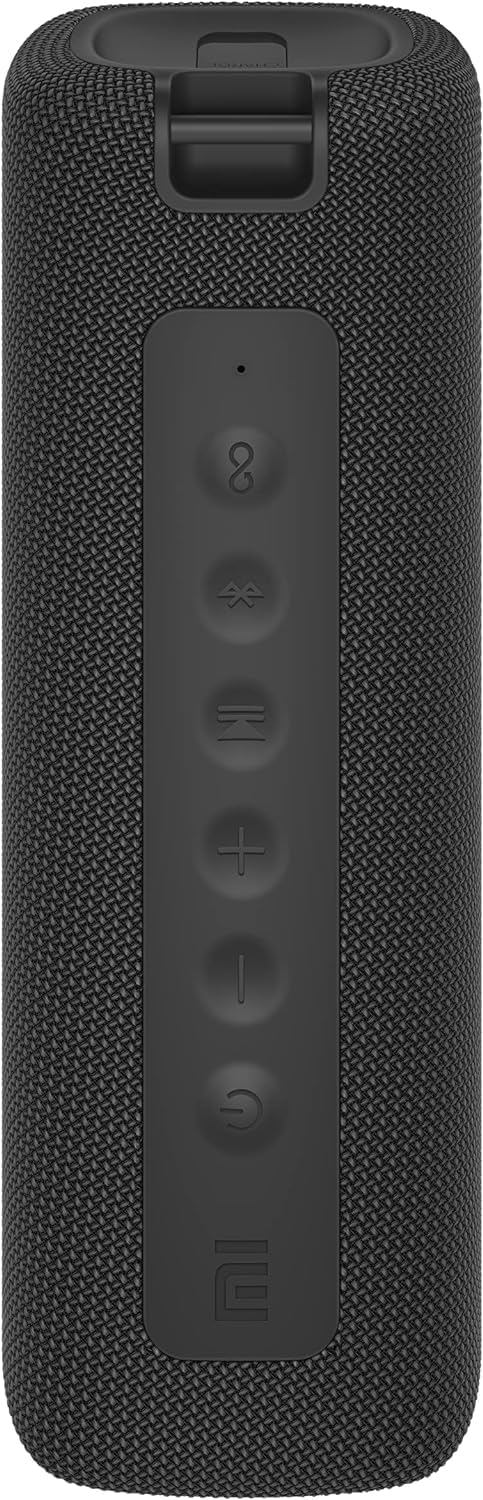
画像: 正面 view of the speaker with clearly visible control buttons.
| ボタン/インジケーター | 関数 |
|---|---|
| 電源ボタン (⏻) | Press and hold for 2 seconds to power on/off. Short press to play/pause music or answer/end calls. |
| 音量を下げる (−) | 短く押すと音量が下がります。長押しすると前のトラックに戻ります。 |
| 音量を上げる (+) | 短く押すと音量が上がります。長押しすると次のトラックに進みます。 |
| Bluetoothボタン (Ⓑ) | 短押ししてBluetoothペアリングモードに入ります。 |
| TWSボタン (∞) | Press to initiate True Wireless Stereo pairing with another Mi Portable Bluetooth Speaker. |
| LEDインジケーター | 電源状態、充電状態、Bluetooth ペアリング状態を示します。 |
5. セットアップ
5.1 スピーカーの充電
- 付属のUSB-C充電ケーブルをスピーカーの充電ポートに接続します。
- Connect the other end of the cable to a 5V 1A USB power adapter (not included) or a computer's USB port.
- LED インジケーターは充電状態を示します (例: 充電中は赤、完全に充電されると消灯)。
- フル充電には約4時間かかります。
5.2 電源オン/オフ
- 電源を入れるには: Press and hold the Power button for 2 seconds. You will hear an audible prompt, and the LED indicator will light up.
- 電源を切るには: Press and hold the Power button for 2 seconds. You will hear an audible prompt, and the LED indicator will turn off.
5.3Bluetoothペアリング
- Ensure the speaker is powered on. The LED indicator will flash blue, indicating it's in pairing mode.
- デバイス(スマートフォン、タブレット、コンピューター)で Bluetooth を有効にし、利用可能なデバイスを検索します。
- Select "Mi Portable Bluetooth Speaker" from the list of devices.
- ペアリングされると、LED インジケーターが青色に点灯し、確認音が聞こえます。
- スピーカーは、範囲内にある場合、電源を入れると最後にペアリングしたデバイスに自動的に接続します。
5.4 トゥルーワイヤレスステレオ(TWS)ペアリング
To pair two Xiaomi Mi Portable Bluetooth Speakers for stereo sound:
- 両方のスピーカーの電源がオンになっており、他の Bluetooth デバイスに接続されていないことを確認します。
- 1台のスピーカー(プライマリスピーカー)で、TWSボタン(∞). The LED indicator will flash.
- On the second speaker, short press the TWS button (∞).
- The two speakers will automatically connect to each other. You will hear a confirmation sound, and the LED indicators on both speakers will turn solid blue.
- Now, connect your device to the primary speaker via Bluetooth as described in section 5.3. The sound will play in stereo through both speakers.
5.5AUX接続
有線オーディオ再生の場合:
- Connect a 3.5mm audio cable (not included) from your audio source to the AUX IN port on the speaker.
- スピーカーは自動的にAUXモードに切り替わります。
- Control playback and volume from your audio source device.
6. 操作手順
6.1音楽の再生
- 再生/一時停止: 電源ボタンを短く押します。
- ボリュームアップ: 音量アップボタン(+) ボタン。
- ボリュームダウン: Short press the Volume Down (−) ボタン。
- 次のトラック: 音量アップ(+) ボタン。
- 前のトラック: 音量を下げる(−) ボタン。
6.2 通話管理
- 通話の応答/終了: Short press the Power button when a call comes in or during a call.
- 通話を拒否: 電話がかかってきたら、電源ボタンを2秒間押し続けます。
7. メンテナンス
- クリーニング: ソフトでスピーカーを拭きます、damp 布で拭いてください。研磨剤や溶剤は使用しないでください。
- ストレージ: スピーカーは直射日光や極端な温度を避け、涼しく乾燥した場所に保管してください。
- 耐水性: The speaker is IPX7 waterproof. Ensure the charging port cover is securely closed before exposure to water. Do not submerge the speaker for extended periods or beyond specified depths.
- バッテリーのケア: バッテリーの寿命を延ばすには、スピーカーを頻繁に完全に放電させないでください。長期間使用しない場合でも、定期的に充電してください。
8。 トラブルシューティング
| 問題 | 考えられる解決策 |
|---|---|
| スピーカーの電源が入りません。 | バッテリーが充電されていることを確認してください。電源に接続してもう一度お試しください。 |
| Bluetooth経由でペアリングできません。 |
|
| 音が出ない、または音量が低い。 |
|
| TWSペアリングに失敗します。 |
|
| 音質が悪い。 |
|
9. 仕様

画像: 下 view of the speaker, displaying model number and certifications.
| パラメータ | 価値 |
|---|---|
| モデル | MDZ-36-DB |
| 製品寸法 | W 213 x D 74 x H 74 mm (approx. 8 x 3 x 3 inches) |
| 接続性 | Bluetooth 5.0, 3.5mm AUX IN |
| 定格出力 | 2 x 8W(合計16W) |
| 信号対ノイズ比 | ≥ 70dB |
| TWS Connection Range | ≤ 5m |
| 防水等級 | IPX7 |
| 電池のタイプ | リチウムイオン、3.7V |
| バッテリー容量 | 2600mAh |
| バッテリー充電時間 | 約4時間 |
| 再生時間 | 約。 13 時間 (50% ボリューム) |
| 周波数範囲 | 80Hz~20KHz |
| 定格インピーダンス | 4Ω |
| 伝送距離 | 15メートル |
| 定格入力 | 5V 1A |
| アイテム重量 | 500 グラム (1.1 ポンド) |
10. 保証とサポート
保証の詳細については、製品に付属の保証書を参照するか、Xiaomiの公式ウェブサイトをご覧ください。 webサイト。
If you encounter any issues not covered in this manual, please contact Xiaomi customer support or visit their official support channels for assistance.


