導入
The Logitech POP Mouse is a compact, wireless mouse designed for enhanced productivity and personal expression. Featuring SilentTouch Technology for quiet clicks, a customizable top button for emojis or shortcuts, and a SmartWheel that shifts between precision and speed scrolling, it offers a versatile user experience. This mouse supports multi-device connectivity via Bluetooth, allowing seamless switching between up to three devices. It is built with durability in mind, offering up to 24 months of battery life and auto-sleep power-saving features.
箱の中身
- ロジクール POP マウス
- 単三電池1本(プリインストール)
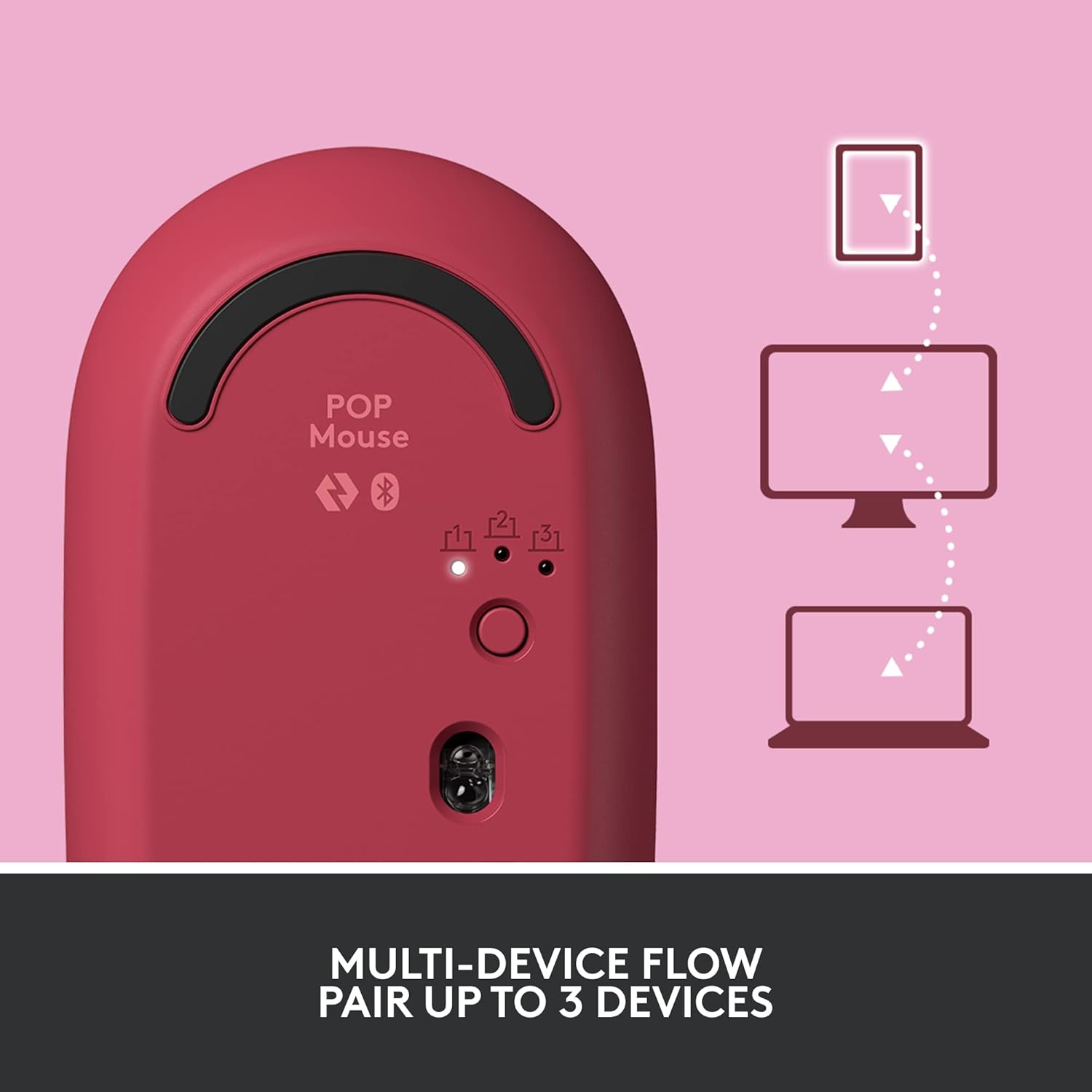
Image: The Logitech POP Mouse and an included AA battery, as typically found in the product packaging.
設定
1. バッテリーの取り付け
- マウスの下側にあるバッテリー収納部を見つけます。
- マウスの上部カバーをゆっくりと後方にスライドさせて取り外します。
- 付属の単三電池を正しい極性 (+/-) を確認して挿入します。
- Replace the top cover by aligning it and sliding it forward until it clicks into place.
2. 電源オン
- Flip the mouse over. Locate the On/Off switch on the bottom of the mouse.
- Slide the switch to the 'On' position (usually indicated by green color).
3. デバイスのペアリング(Bluetooth)
- On the bottom of the mouse, press and hold the Easy-Switch button (labeled with 1, 2, or 3) for 3 seconds until the LED light starts blinking rapidly. This indicates pairing mode.
- On your computer, tablet, or phone, open your Bluetooth settings.
- 利用可能なデバイスのリストから「Logitech POP Mouse」を選択します。
- Follow any on-screen prompts to complete the pairing process. The LED light on the mouse will turn solid for 5 seconds when connected.
4. 複数デバイスの切り替え
- The POP Mouse can be paired with up to three devices. To switch between paired devices, simply press the Easy-Switch button on the bottom of the mouse. The corresponding LED (1, 2, or 3) will light up to indicate the active device.
Image: The Logitech POP Mouse can seamlessly connect and switch between up to three different devices, such as a tablet, desktop computer, and laptop.
マウスの操作
1.基本機能
- 左クリック: 一次選択と相互作用。
- 右クリック: コンテキスト メニューにアクセスします。
- スクロールホイール: 文書を縦にスクロールし、 web ページ。
2. SmartWheel Technology
- The SmartWheel automatically shifts between high-precision scrolling for detailed work and super-fast scrolling for quickly navigating long documents or web ページ。

Image: The SmartWheel on the Logitech POP Mouse dynamically adjusts its scrolling mode for precision or speed.
3. SilentTouch Technology
- Enjoy a quiet working environment with SilentTouch Technology, which significantly reduces click noise without compromising tactile feedback.

Image: SilentTouch Technology ensures a quiet and comfortable user experience.
カスタマイズ
1. カスタマイズ可能なトップボタン
- The top button, located below the scroll wheel, is customizable. By default, it opens an emoji menu for quick access to your favorite emojis.

Image: The customizable top button allows for quick access to an emoji menu on your screen.
2. Logi Options+ App
- ダウンロード Logi Options+アプリ (Windows and macOS only) to personalize your POP Mouse.
- You can reassign the top button to perform various shortcuts, such as Snip Screen, Mic Mute, Voice-to-Text, or any other function you desire.
- The app also allows you to adjust pointer speed, scroll speed, and enable Flow for cross-computer control.
メンテナンス
- クリーニング: 柔らかくてamp マウスの外側を拭くときは布を使用してください。刺激の強い化学薬品や研磨剤は使用しないでください。
- バッテリー交換: Replace the AA battery when the low battery indicator light appears.
- ストレージ: When not in use for extended periods, turn off the mouse using the On/Off switch to conserve battery life.
トラブルシューティング
- マウスが接続されない: Ensure the mouse is powered on and within range of your device. Check your device's Bluetooth settings to confirm it's enabled and the mouse is paired. Try re-pairing the mouse.
- 遅延または不規則な動き: Replace the battery if it's low. Ensure there are no obstructions between the mouse and your device. Avoid using the mouse on highly reflective or uneven surfaces.
- Custom button not working: Verify that the Logi Options+ App is installed and running on your computer. Check the button assignments within the app.
仕様
| ブランド | ロジテック |
| モデル番号 | 910-006545 |
| 接続技術 | ブルートゥース5.1 |
| ワイヤレス範囲 | 32.81フィート(10メートル) |
| センサー技術 | Logitech High Precision Optical Tracking |
| ボタンの数 | 4 (Left/Right click, Scroll wheel click, Top button) |
| カスタマイズ可能なボタン | Yes (Top button, via Logi Options+ App) |
| 電池のタイプ | 単三電池1本 |
| バッテリー寿命 | 最大24か月(使用状況によって異なる場合があります) |
| オペレーティングシステムの互換性 | Windows 10以降、macOS 10.15以降、iPadOS、Chrome OS、Android |
| アイテム重量 | 2.89オンス |
| 製品寸法(長さx幅x高さ) | 4.3 x 2.6 x 1.7インチ |
| 材料 | Plastic parts include certified post-consumer recycled plastic (Heartbreaker Rose: 29%) |
保証とサポート
保証情報およびテクニカルサポートについては、ロジクールの公式サポートをご覧ください。 website or refer to the warranty card included with your product. You can find detailed FAQs, troubleshooting guides, and contact options for customer service.
- オンラインサポート: 訪問 support.logi.com
- 製品登録: アップデートとサポートを受け取るには、製品を登録してください。


