導入
The Vieta Pro Note True Wireless Earphones are designed to provide a high-quality audio experience with advanced features. These earphones utilize Bluetooth 5.1 for stable wireless connectivity, offer Active Noise Cancellation (ANC) up to -30dB, and include an integrated microphone for clear communication. With IPX4 water resistance, they are suitable for various activities. The charging case extends the total battery life to up to 20 hours.
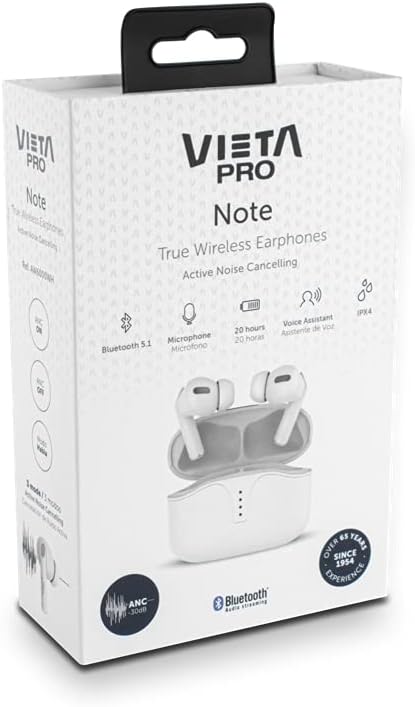
Image: Vieta Pro Note True Wireless Earphones in their retail packaging, highlighting key features like Bluetooth 5.1, microphone, 20 hours battery, Voice Assistant, and IPX4 rating.
設定
1. 初期充電
Before first use, fully charge the earphones and the charging case. Connect the provided USB Type-C cable to the charging port on the case and to a power source. The LED indicators on the case will show the charging status and remaining battery level.
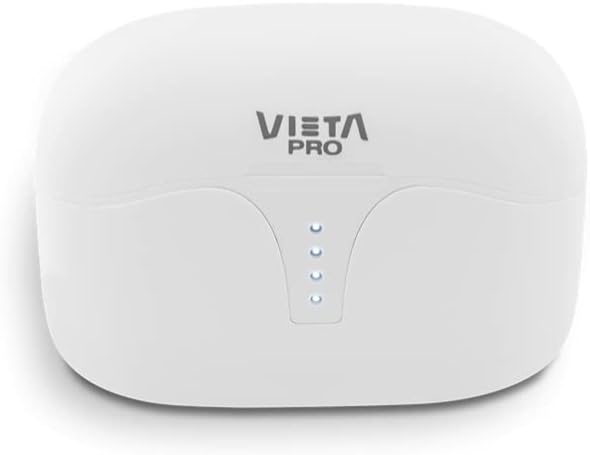
画像: 上 view of the Vieta Pro Note charging case, showing the four LED indicators that display battery status.
2. デバイスとのペアリング
- イヤホンが充電され、充電ケース内に配置されていることを確認します。
- 充電ケースの蓋を開けます。イヤホンは自動的にペアリングモードになります。
- スマートフォンまたは Bluetooth 対応デバイスで、Bluetooth 設定に移動します。
- Select "Vieta Pro Note" from the list of available devices.
- 接続されると確認音が鳴り、イヤホンが使用できるようになります。
The Vieta Pro Note earphones feature Dual Master Technology, meaning both earbuds can function independently. You can use either the left or right earbud alone after initial pairing.
Image: The Vieta Pro Note True Wireless Earphones removed from their open charging case, ready for pairing or use.
操作手順
1. 電源のオン/オフ
- 電源オン: Open the charging case lid, or take the earphones out of the case. They will automatically power on and attempt to connect to the last paired device.
- 電源を切る: イヤホンを充電ケースに戻し、蓋を閉めます。自動的に電源がオフになり、充電が開始されます。
2.タッチコントロール
The Vieta Pro Note earphones feature a touch control panel on each earbud for various functions:

画像: クローズアップ view of the left Vieta Pro Note earbud, showing the touch-sensitive area and microphone.
- 再生/一時停止: どちらかのイヤホンを 1 回タップします。
- 次のトラック: 右のイヤホンをダブルタップします。
- 前のトラック: 左のイヤホンをダブルタップします。
- ボリュームアップ: 右のイヤホンを3回タップします。
- ボリュームダウン: 左のイヤホンを3回タップします。
- 通話の応答/終了: どちらかのイヤホンを 1 回タップします。
- 通話を拒否: どちらかのイヤフォンを2秒間押し続けます。
- 音声アシスタントを有効にする: どちらかのイヤフォンを3秒間押し続けます。
3. アクティブノイズキャンセレーション(ANC)モード
The earphones offer three noise cancellation modes:
- アクティブノイズキャンセリング (ANC): Reduces ambient noise by up to -30dB, ideal for noisy environments.
- Talk Mode (Transparency Mode): Allows you to hear your surroundings and engage in conversations without removing the earphones.
- 無効化: Turns off noise cancellation for a standard listening experience.
To switch between ANC modes, press and hold the touch panel on the 左 earbud for approximately 2 seconds until you hear a voice prompt indicating the mode change.
メンテナンス
1. 清掃
- イヤホンと充電ケースは、柔らかく乾いた糸くずの出ない布で定期的に清掃してください。
- 研磨剤入りの洗剤、溶剤、エアゾールスプレーは使用しないでください。
- 小さくて柔らかいブラシまたは綿棒を使用して、イヤーチップとスピーカーメッシュから耳垢やゴミを丁寧に取り除きます。
2. ストレージ
When not in use, store the earphones in their charging case to protect them from dust, damage, and to ensure they remain charged.
3. 防水性能(IPX4)
The Vieta Pro Note earphones are rated IPX4 for water resistance. This means they are resistant to splashing water from any direction. They are suitable for use during workouts or in light rain. However, they are ない designed for submersion in water or exposure to pressurized water jets. Do not use them in a shower or while swimming.
トラブルシューティング
- 音が出ない: Ensure earphones are charged, connected to your device, and volume is turned up on both the earphones and your device.
- ペアリングできません: Make sure Bluetooth is enabled on your device and the earphones are in pairing mode. Try turning Bluetooth off and on again on your device. If issues persist, try resetting the earphones (refer to the full manual for specific reset instructions if available).
- 断続的な接続: Ensure there are no obstructions between the earphones and your device. Keep the device within the Bluetooth range (typically 10 meters/33 feet).
- イヤホンが充電されていない: Check that the charging cable is securely connected and the charging case has power. Ensure the earbuds are correctly seated in the charging case.
仕様
| モデル番号 | AW6000WH |
| ブランド | ヴィエタプロ |
| 接続性 | ブルートゥース5.1 |
| ノイズキャンセリング | アクティブノイズキャンセレーション(-30dB) |
| マイクロフォン | 統合された |
| 耐水性 | IPX4 |
| イヤホンのバッテリー寿命 | 最大5時間 |
| バッテリー総寿命(ケース付き) | 最大20時間 |
| 充電ポート | USBタイプC |
| コントロールタイプ | タッチコントロール、音量コントロール |
| フォームファクター | インイヤー |
| 材料 | プラスチック |
保証とサポート
For warranty information, technical support, or further assistance, please refer to the official Vieta Pro webご購入いただいたサイトをご覧いただくか、カスタマーサービス部門にお問い合わせください。保証請求のために購入証明書を保管してください。


