導入
This manual provides instructions for the setup, operation, and maintenance of your WE Projection Alarm Clock Radio. Please read this manual thoroughly before use and retain it for future reference.
安全情報
- デバイスを極端な温度、直射日光、高湿度にさらさないでください。
- デバイスを水やその他の液体から遠ざけてください。
- ご自身でデバイスの分解や修理を試みないでください。資格のあるサービス担当者にご連絡ください。
- 付属の電源アダプターのみを使用してください。
- 柔らかく乾いた布でデバイスを拭いてください。
パッケージ内容
- WE Projection Alarm Clock Radio
- 電源アダプター
- ユーザーマニュアル
製品終了view
目覚まし時計ラジオの主なコンポーネントについて理解しましょう。
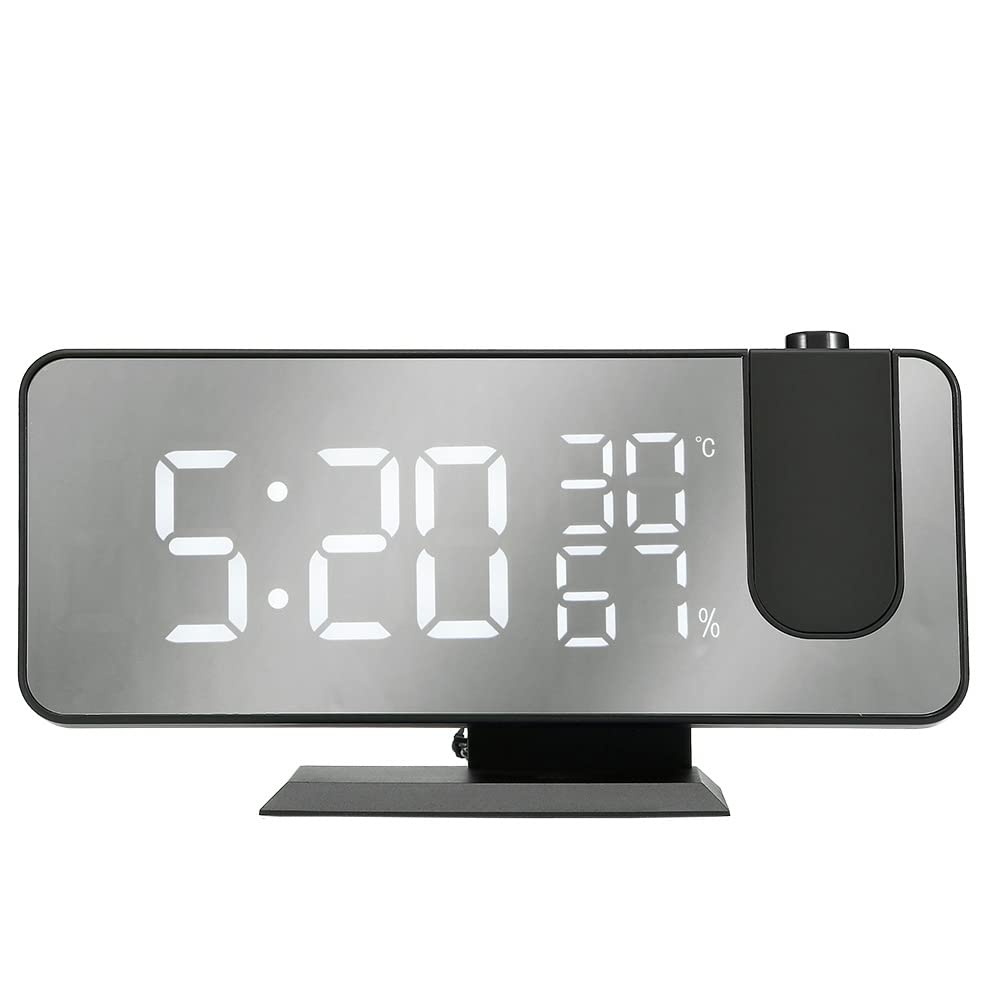
The image shows the WE Projection Alarm Clock Radio from an angled front view. The large mirror-effect LED display shows '22:59' prominently, along with '23°C' and '20%'. Above the clock, a red digital time '22:59' is projected onto a surface, originating from a projector lens on the top right of the clock. A smartphone is connected via a USB cable to the side of the clock, indicating its charging capability.
- 大型LEDディスプレイ: 5-inch ultra-clear screen for easy readability.
- 180°回転可能なプロジェクター: Projects time onto your ceiling or wall.
- USB充電ポート: 外部機器の充電に。
- コントロールボタン: Various buttons for setting time, alarms, radio, and other functions (located on top/back, specific labels may vary).
- FMアンテナ: ラジオ受信を向上させる伸縮式アンテナ。
設定
- 電源接続: Connect the provided power adapter to the DC input port on the back of the alarm clock and plug it into a standard wall outlet. The display will light up.
- FMアンテナ: For optimal radio reception, fully extend the integrated FM antenna.
操作手順
1.時間設定
- を押す 'セット' ボタンを押すと時間設定モードに入ります。
- 使用 '上' そして '下' 時間と分を調整するためのボタン。
- プレス 'セット' again to confirm the time and exit setting mode.
2. アラーム設定(デュアルアラーム)
- を押す 「アラーム1」 or 「アラーム2」 設定したいアラームを選択するボタンです。
- 使用 '上' そして '下' ボタンを押して希望のアラーム時間を設定します。
- Select from 5 available alarm sounds: Chord music, bird song, waves, beep, or FM radio.
- Adjust the alarm volume to one of the 3 available levels.
- それぞれの 'アラーム' button again to confirm your settings.
3. スヌーズ機能
- アラームが鳴ったら、を押します 「スヌーズ」 button to temporarily silence the alarm and get an additional 9 minutes of sleep.
4. FMラジオの操作
- を押す 'RADIO' FM ラジオのオン/オフを切り替えるボタン。
- 使用 'SCAN' or 'TUNE' buttons to manually find radio stations within the 87.5-108.0 MHz frequency range.
- 長押し 'SCAN' button to automatically scan and save up to 30 preset FM stations.
5. Sleep Timer (for Radio)
- FMラジオの再生中に、 'SLEEP' ボタン。
- Adjust the sleep timer duration between 5 and 90 minutes. The radio will automatically turn off after the specified time.
6. 投影機能
- を押す 'PROJECTION' 時間投影をオンまたはオフにするボタン。
- Rotate the projector lens (-90° to 90°) to adjust the projection angle on your ceiling or wall.
- 長押し 'PROJECTION' button to rotate the projected display 180° for optimal viewing。
- Adjust the projection brightness using the dedicated button (4 adjustable brightness levels). Optimal projection distance is 0.5-5 meters.
7. ディスプレイ調光器
- Use the dimmer slider or button to adjust the screen brightness from 0% (off) to 100% (brightest). This allows for a brighter display during the day and a softer display at night.
8.USB充電ポート
- Connect your smartphone or other USB-powered device to the USB port on the side of the alarm clock for convenient charging.
メンテナンス
- クリーニング: 柔らかく乾いた布で拭いてください。研磨剤入りの洗剤、溶剤、化学スプレーは使用しないでください。
- ストレージ: When not in use for extended periods, store the alarm clock in a cool, dry place, away from direct sunlight and moisture.
トラブルシューティング
- 電源なし:
- Ensure the power adapter is securely connected to both the alarm clock and a functional wall outlet.
- ラジオの受信状態が悪い:
- FMアンテナを完全に伸ばします。
- Try repositioning the alarm clock to a different location for better signal reception.
- ステーションの自動スキャンを再度実行します。
- Projection Unclear or Upside Down:
- Adjust the focus of the projector lens.
- Long press the 'PROJECTION' button to rotate the projected display 180°.
- Ensure the projection distance is within the optimal range of 0.5-5 meters.
- アラームが鳴らない:
- Verify that the alarm is enabled and the alarm volume is set to an audible level.
- アラーム時間が正しく設定されていることを確認してください。
- USB充電が機能しない:
- Ensure your device is properly connected to the USB port.
- ケーブルの問題を排除するために、別の USB ケーブルでテストします。
仕様
| ブランド | WE |
| モデル番号 | WERADREVPROJECT2 |
| 色 | 黒 |
| 特徴 | Large screen, Radio, Snooze |
| アイテム重量 | 450グラム |
| 表示タイプ | デジタル |
| スタイル | モダンな |
| 特集 | Large screen, Radio, Snooze |
| 電源 | 電気ケーブル |
| 形 | 長方形 |
| 屋内/屋外での使用 | 屋内 |
| フレーム素材 | アクリロニトリルブタジエンスチレン |
| 電池付属 | いいえ |
保証とサポート
WE products are guaranteed for 2 years from the date of purchase. For any inquiries, technical assistance, or warranty claims, please contact our customer service. Our support team aims to respond to all requests within 24 hours, Monday through Friday.