導入
This manual provides detailed instructions for the installation, operation, and maintenance of your DALY Smart BMS (Battery Management System) for LiFePo4 4S 12V 200A battery packs. The BMS features a programmable Bluetooth module for monitoring and parameter adjustment via a mobile application. It is designed to protect lithium batteries from various conditions including over-charge, over-discharge, over-current, and temperature extremes, while also providing cell balancing.
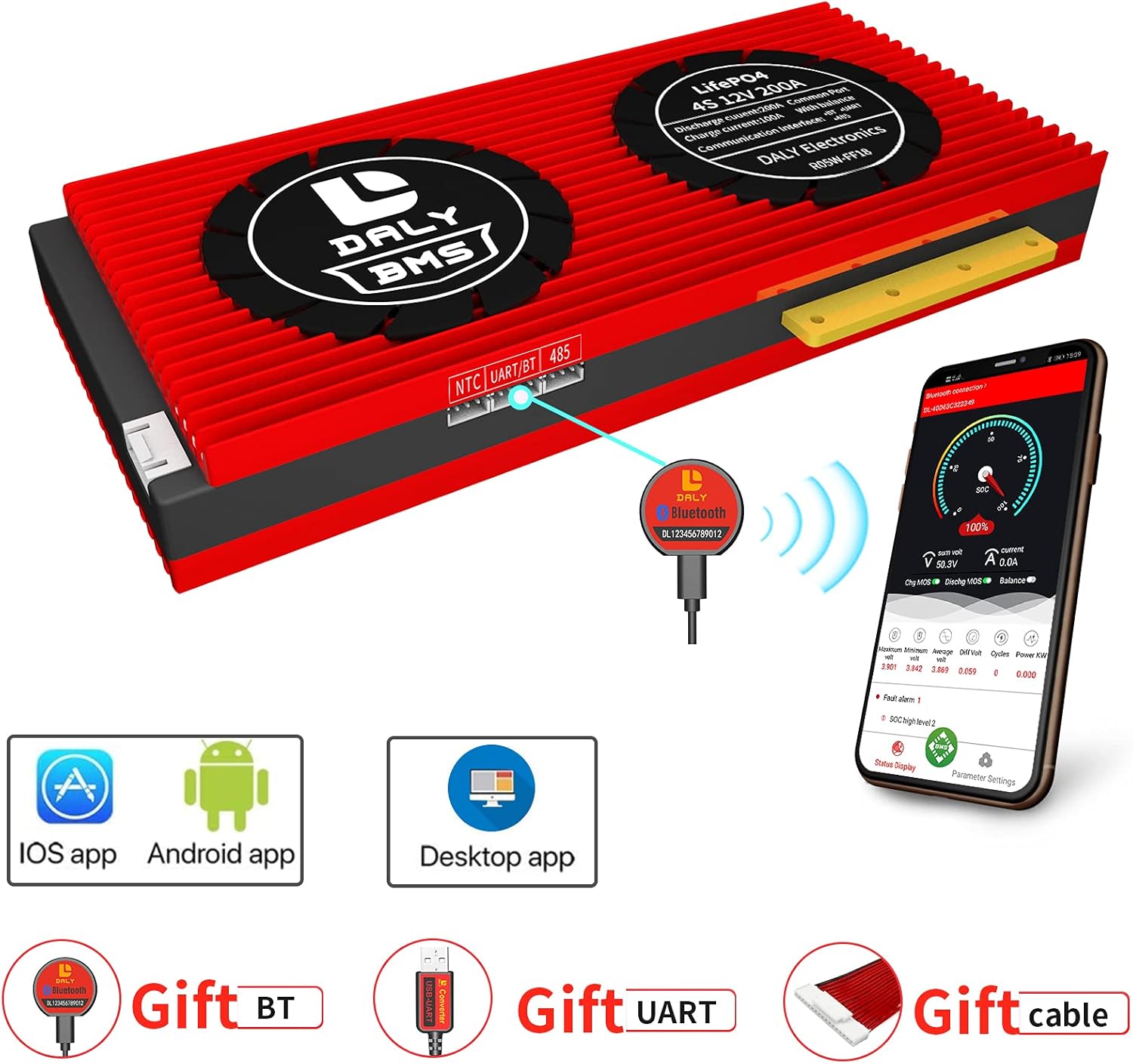
Image: DALY Smart BMS unit with its Bluetooth module and a smartphone displaying the monitoring application. This image illustrates the main components and the digital interface.
安全上の注意
- Always wear appropriate personal protective equipment (PPE) when working with batteries.
- Ensure all connections are secure and correctly polarized to prevent damage to the BMS or battery.
- バッテリー端子をショートさせないでください。
- Avoid exposing the BMS to water or extreme temperatures beyond its operating range.
- Consult a qualified professional if you are unsure about any installation or operation steps.
設定
含まれるコンポーネント:
- Smart BMS unit
- Balance wires
- Bluetooth module (for Mobile APP IOS & Android)
- UART cable (for PC screen)
- English version wiring manual (refer to this for detailed diagrams)
配線手順:
Follow the wiring diagram carefully. Incorrect wiring can damage the BMS and battery. It is crucial to connect the balance wires correctly to each cell in the battery pack.

Image: Detailed wiring diagram showing connections from the battery cells to the BMS, and then to the motor/load and charger. This diagram is essential for correct installation.
- バッテリーパックを準備します。 Ensure all individual cells in your LiFePo4 4S 12V battery pack are at a similar voltage level before connecting the BMS.
- バランスワイヤを接続します。 Connect the balance wires from the BMS to each cell of the battery pack in the correct sequence (B-, B1, B2, B3, B+). Double-check the voltage between adjacent cables using a multimeter to confirm the wiring is normal and matches the nominal voltag単一の文字列の e。
- 主電源ケーブルを接続します。 Connect the main negative (B-) and positive (P+) cables from the BMS to the battery pack and the load/charger respectively.
- Activate the BMS: Plug in the NTC (temperature sensor) and Bluetooth module. Press the activation button on the Bluetooth module to activate the smart BMS.
重要: Disconnect balance wires and the BMS connection port before welding black and red balance wires on the battery pack. Keep the red cooling surface side uncovered and use DALY matching balance wires (regular length 450 mm / 17.72 inch).
モバイルアプリ接続:
- Download the "Smart BMS" application from the Huawei App Store or Apple App Store.
- Open the Smart BMS APP on your mobile phone.
- Connect to the corresponding Bluetooth device number displayed in the app.
- 接続に成功すると、 view battery parameters and adjust settings.
Video: This video demonstrates the initial setup process, including measuring cell voltages, connecting the BMS, activating it, and connecting to the Smart BMS mobile application to view battery parameters and adjust settings. It highlights the steps for first-time power-on and setting battery capacity.
操作手順
Monitoring Real-Time Data:
The Smart BMS app allows you to monitor various battery parameters in real-time via Bluetooth. This includes State of Charge (SOC), current, voltage, temperature, and individual cell voltages。
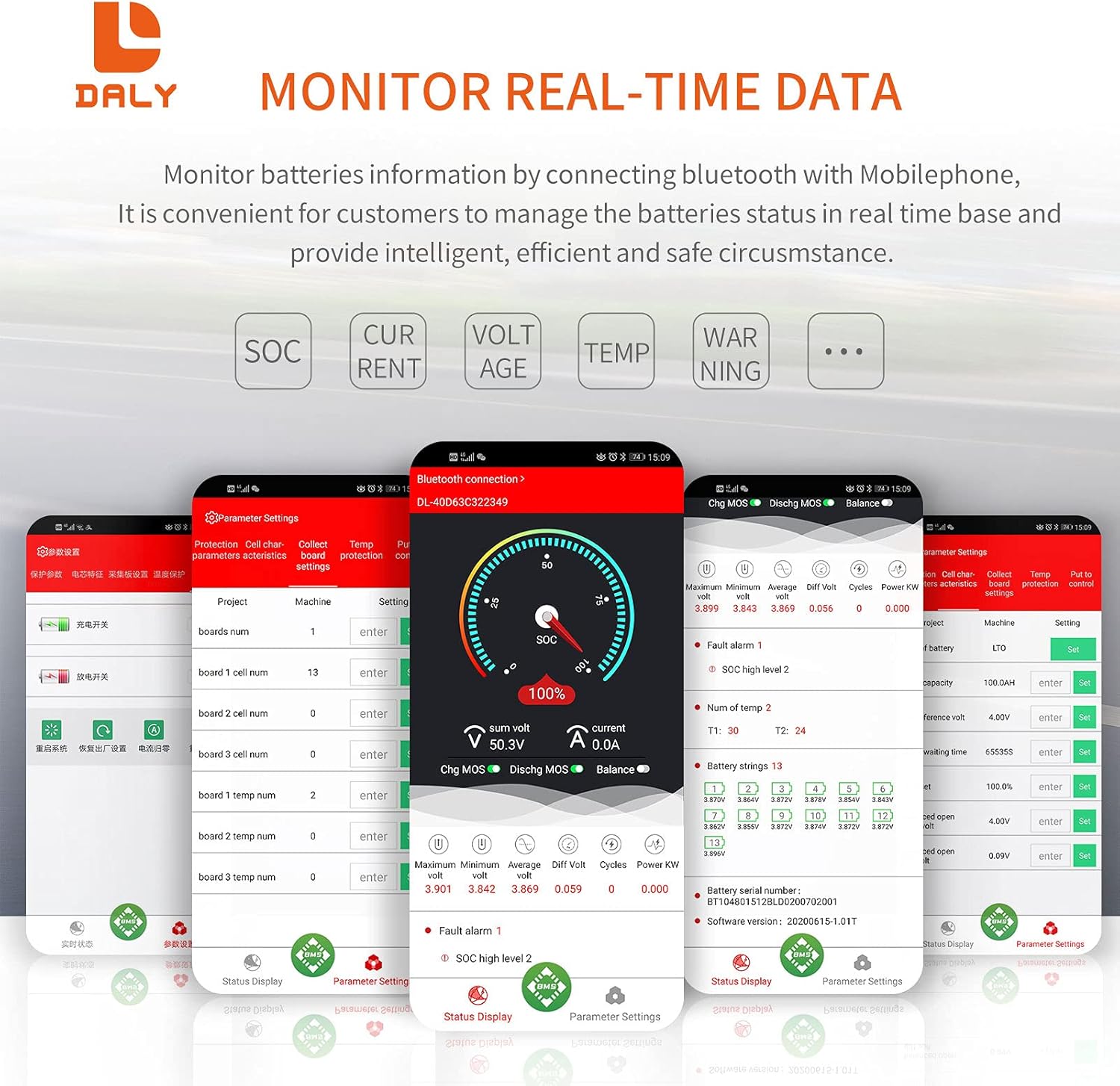
Image: Screenshot of the DALY Smart BMS mobile application interface, showing real-time monitoring of battery parameters such as SOC, current, voltage、および個々のセルの体積tages. This interface provides comprehensive data for battery management.
パラメータ設定:
For the first power-on, the battery capacity must be set to the actual capacity of your battery pack. The initial password for parameter settings is 123456. You can adjust various protection parameters such as:
- オーバーチャージボリュームtag電子保護
- 過放電voltag電子保護
- Over-current protection (charge and discharge)
- Temperature protection (high and low for charge/discharge)
- 巻tage balancing settings
Always modify parameters under the guidance of the battery manufacturer or a qualified expert to prevent damage to the battery or BMS.
保護機能:
The DALY Smart BMS is equipped with multiple protection features to ensure the safety and longevity of your LiFePo4 battery pack:
- 過充電保護: Stops charging when cell voltage reaches a set limit.
- 過放電保護: Stops discharging when cell voltage drops to a set limit.
- 過電流保護: Stops charging or discharging if current exceeds programmed limits.
- 短絡保護: Protects against short-circuit events.
- オーバーボリュームtag保護: Prevents overall battery voltage from exceeding safe levels.
- バランス機能: 細胞体積を積極的にバランスさせるtages to maintain pack health.
- NTC Temperature Protection: Monitors battery temperature and stops current if limits are reached.

Image: Visual representation of the 12 protection functions integrated into the DALY Smart BMS, including Bluetooth connectivity, programmability, various over-voltage/current protections, balancing, and environmental resistances.
メンテナンス
- 定期点検: すべての配線接続部の締め付け具合や腐食や損傷の兆候がないか定期的に確認してください。
- 清潔さ: Keep the BMS unit clean and free from dust and debris. Ensure cooling surfaces are not obstructed.
- ソフトウェアアップデート: Check the DALY website or app store for any available firmware or app updates to ensure optimal performance and security.
- 環境条件: Operate the BMS within its specified temperature and humidity ranges to prevent premature failure.
- バッテリーヘルスモニタリング: Regularly monitor battery parameters via the app to detect any anomalies early.
トラブルシューティング
| 問題 | 考えられる原因 | 解決 |
|---|---|---|
| BMS randomly shuts off. |
|
|
| Bluetooth接続の問題。 |
|
|
| Battery cells are not balancing effectively. |
|
|
仕様
| 特徴 | 詳細 |
|---|---|
| 製品タイプ | LiFePo4 4S 200A Common Port with Balance |
| コミュニケーション | UART (Single communication) |
| 放電電流 | 200A |
| 過放電電流 | 300A ± 30A (Configurable) |
| 充電電流 | 100A(構成可能) |
| Overcharge Current | 300A ± 30A (Configurable) |
| オーバーチャージVoltage | 3.75V ± 0.05V (per string, Configurable) |
| 過放電Voltage | 2.3V ± 0.1V (per string, Configurable) |
| チャージVoltage | 14.6V (Configurable) |
| モデル | 品番 |
| 寸法 | 221 x 130 x 32 mm (8.66 x 4.72 x 1.42 インチ) |
| Output Wire Gauge | 6AWG |
| Balance Wires | 24AWG / 350mm |
| オプション機能 | Bluetooth(BT) |
| 重さ | ~1733g (3.82 pounds) |
| 接続技術 | ブルートゥース |
| 電源 | 電池駆動 |
| 対応デバイス | Mobile Phones (IOS & Android) |

Image: A table detailing the technical specifications of the DALY Smart BMS, such as product type, communication protocols, current ratings, voltage protections, dimensions, and weight.
保証
具体的な保証内容は通常、製品のパッケージまたはメーカーの公式ウェブサイトに記載されています。 website. Please refer to the documentation included with your purchase for precise warranty terms and conditions. Generally, DALY products are covered by a manufacturer's warranty against defects in materials and workmanship for a specified period from the date of purchase.
サポート
For technical assistance, product inquiries, or support, please visit the official DALY website or contact their customer service. You can often find additional resources, FAQs, and contact information on the manufacturer's website. For general information, you may visit the DALY Store on Amazon.


