1. はじめに
This manual provides essential information for the proper installation, operation, and maintenance of the Simplex 4100-9610 Remote Annunciator. The 4100-9610 is designed to provide remote indication and control capabilities for compatible Simplex fire alarm control panels. Please read this manual thoroughly before attempting any installation or operation.
2. 安全情報
怪我や機器の損傷を防ぐために、常に次の安全上の注意事項を守ってください。
- 設置および保守は資格のある担当者のみが行う必要があります。
- Disconnect all power sources before installing or servicing the annunciator.
- 地域および国の電気に関するすべての規定と規制に従ってください。
- Do not operate the annunciator if it appears damaged.
- 感電を防ぐために適切な接地を確保してください。
- Keep the annunciator away from moisture and extreme temperatures.
This device is part of a fire safety system. Proper functioning is critical for life safety. Regular testing and maintenance are required.
3. パッケージ内容
Upon opening the package, verify that all components are present and undamaged. The standard package for the Simplex 4100-9610 Remote Annunciator typically includes:
- Simplex 4100-9610 Remote Annunciator Unit
- Mounting Hardware (screws, anchors, etc. - may vary)
- Installation Guide / Quick Start Guide (this manual provides detailed instructions)
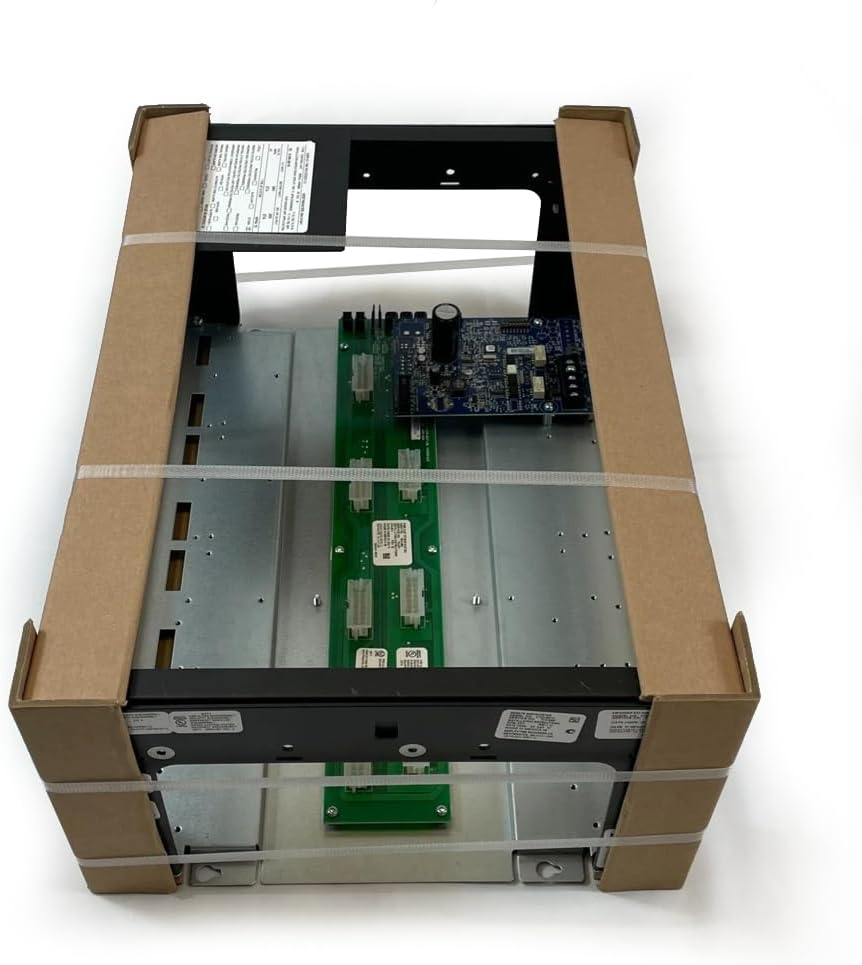
Figure 3.1: Simplex 4100-9610 Remote Annunciator as typically packaged. The image shows the annunciator unit, which consists of a metal enclosure housing circuit boards and connectors, secured within cardboard protective corners and plastic strapping.
不足品や破損品がある場合は、直ちにサプライヤーにご連絡ください。
4. セットアップとインストール
The 4100-9610 Remote Annunciator requires careful installation to ensure proper operation and compliance with safety standards. Refer to the specific wiring diagrams provided with your fire alarm control panel for detailed connection instructions.
4.1 取り付け
- Choose a suitable location for the annunciator, typically near an entrance or a manned station, ensuring visibility and accessibility.
- Ensure the mounting surface is flat and capable of supporting the annunciator's weight.
- Mark the mounting holes on the wall using the annunciator's enclosure as a template.
- Drill pilot holes and install appropriate wall anchors if necessary.
- Secure the annunciator to the wall using the provided mounting hardware.
4.2配線
すべての配線は、NFPA 70 (米国電気工事規定)、NFPA 72 (米国火災警報および信号規定)、および地域の規定に準拠する必要があります。
- 電源接続: Connect the annunciator to the designated power source from the fire alarm control panel. Ensure correct polarity. The annunciator is battery powered, likely drawing power from the main panel's battery backup system.
- Communication Bus: Connect the annunciator to the fire alarm control panel's communication bus (e.g., IDNet, MAPNET II) using shielded twisted-pair cable as specified by Simplex.
- 接地: Ensure the annunciator enclosure is properly grounded to the building's protective earth ground.
注記: Refer to the specific installation instructions for your Simplex Fire Alarm Control Panel for detailed wiring diagrams and compatibility information.
5. 操作手順
The Simplex 4100-9610 Remote Annunciator provides visual and audible indications of system status and allows for basic control functions. Specific functions may vary based on the configuration of the connected fire alarm control panel.
5.1 ステータスインジケータ
The annunciator typically features various LED indicators to display system status:
- アラーム: Illuminates when a fire alarm condition is detected.
- トラブル: Illuminates when a system fault or trouble condition occurs.
- 監督: Illuminates for supervisory conditions (e.g., sprinkler valve tampえー)。
- 力: Indicates that primary power is supplied to the system.
5.2 制御機能
Common control buttons on a remote annunciator may include:
- 認める: Silences the annunciator's local audible signal and acknowledges new events at the control panel.
- 沈黙: Silences audible notification appliances (horns, strobes) throughout the system.
- リセット: Resets the fire alarm system after an alarm or trouble condition has been cleared.
- Lamp テスト: Illuminates all LEDs to verify their functionality.
重要: Always follow your facility's emergency procedures when responding to alarm conditions.
6. メンテナンス
Regular maintenance ensures the continued reliable operation of your Simplex 4100-9610 Remote Annunciator and the overall fire alarm system.
- 目視検査: Periodically inspect the annunciator for any signs of physical damage, loose connections, or excessive dust accumulation.
- クリーニング: Clean the exterior of the annunciator with a soft, dry cloth. Do not use abrasive cleaners or solvents.
- 機能テスト: Perform regular functional tests as part of your overall fire alarm system testing schedule, typically monthly or annually, as required by local codes and NFPA 72. This includes verifying LED illumination and button functionality.
- プロフェッショナルサービス: All internal servicing and complex troubleshooting should be performed by certified fire alarm technicians.
7。 トラブルシューティング
このセクションでは、よくある問題に対する基本的なトラブルシューティング手順を説明します。より複雑な問題については、資格のあるサービス技術者にお問い合わせください。
| 問題 | 考えられる原因 | 解決 |
|---|---|---|
| Annunciator is not powered on. | No power from control panel; loose wiring; internal fault. | Verify power supply from the control panel. Check wiring connections. If problem persists, contact service. |
| LEDs not illuminating during lamp テスト。 | Faulty LEDs; internal circuit issue. | Contact a qualified service technician for diagnosis and repair. |
| Audible alarm not silencing. | Acknowledge button not pressed; new alarm condition; system fault. | Press the Acknowledge button. Check for new alarm events. If problem persists, contact service. |
| Annunciator displays "Trouble" light. | System fault detected by the main control panel. | Check the main fire alarm control panel for specific trouble codes. Contact service if unable to resolve. |
8. 仕様
The following specifications apply to the Simplex 4100-9610 Remote Annunciator:
- モデル: 4100-9610
- ブランド: シンプレックス
- 部品番号: S41009610
- 国際コード: 742779297952
- 電源: Battery Powered (typically from main FACP)
- アラームの種類: Audible (local annunciator sounder)
- スタイル: 安全性
- アイテム数: 1(XNUMX台あたり)
- メーカー: シンプレックス
Note: Specifications are subject to change without notice. Refer to the latest product data sheets for the most current information.
9. 保証情報
Simplex products are typically covered by a limited warranty against defects in materials and workmanship. The specific terms and duration of the warranty may vary based on the region and purchase agreement. Please retain your proof of purchase. For detailed warranty information, contact your authorized Simplex distributor or refer to the warranty statement provided at the time of purchase.
This warranty does not cover damage resulting from improper installation, misuse, unauthorized modification, or acts of nature.
10. カスタマーサポート
For technical assistance, troubleshooting beyond the scope of this manual, or to inquire about replacement parts, please contact your authorized Simplex service provider or the vendor from whom the product was purchased. Ensure you have the model number (4100-9610) and serial number (if applicable) of your annunciator ready when contacting support.
For general inquiries about Simplex products, visit the official Simplex webサイトまたは顧客サービス部門に連絡してください。


