導入
The Infinity Kappa Series component speaker system is engineered to deliver exceptional car audio performance. Featuring Plus One fiberglass woofers for powerful bass and high-resolution edge-driven textile dome tweeters for clear highs, this system provides a superior listening experience in virtually any vehicle. This manual provides essential information for installation, operation, and maintenance of your KAPPA693C speaker system.
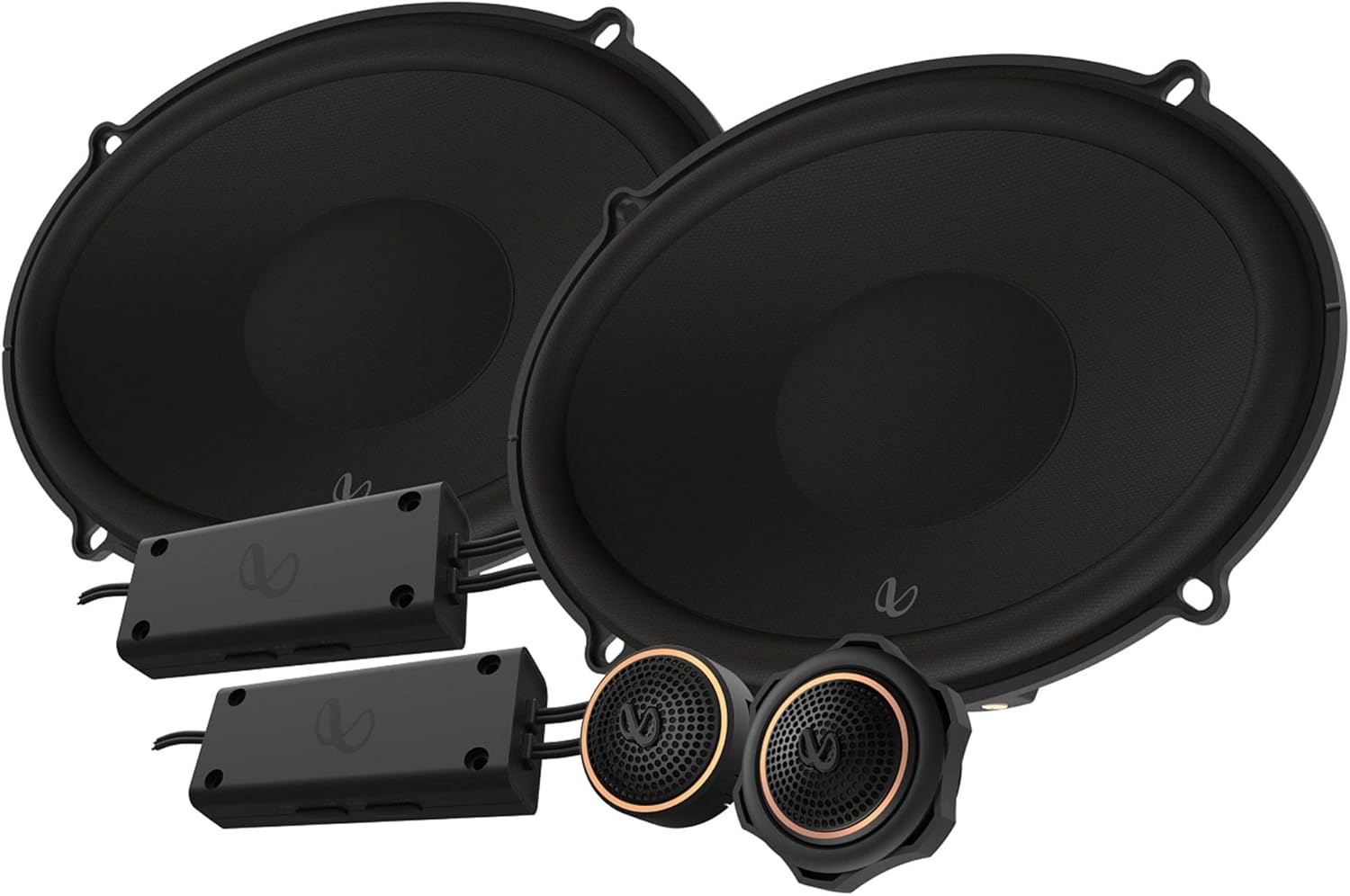
Figure 1: Infinity KAPPA693C Component Speaker System components.
箱の中身
以下にリストされているすべてのコンポーネントがパッケージに含まれていることを確認してください。
- 2x Speakers (Woofers)
- 2x スペーサー
- 2x フォームガスケット
- 2x クロスオーバー
- 2x ツイーター
- 2x スレッド フラッシュ マウント アダプター
- 2x プラスチック製ロックナット
- 2x 表面実装カップ
- 2x スターフィッシュ ツイーター マウント
- ネジ22本
- 16倍速クリップ
- 1x アレンヘッドビット (2.5mm)
- 2xInfinityロゴバッジ
- 2x ブランドステッカー
- 取扱説明書 (本書) x 1
仕様
| 特徴 | 詳細 |
|---|---|
| スピーカータイプ | 6" x 9" (168mm x 240mm) Two-way Component System |
| パワーハンドリング | 145W RMS、435Wピーク |
| 感度(@ 2.83V) | 94デシベル |
| 周波数応答 | 35Hz – 40kHz |
| インピーダンス | 3.0オーム |
| ウーファー直径 | 15.24 cm (6 インチ) |
| ツイーター直径 | 1.91 cm (0.75 インチ) |
| 総重量 | 5.06 kg (10.93 ポンド) |
| モデル番号 | INFSPKKA693CAM |
| 欧州連合 | 050667376987 |
主な特徴
- Plus One Fiberglass Woofers: Lighter and stiffer cones provide increased low-frequency output and higher efficiency for robust bass.
- エッジドリブンシルクドームツイーター: Equipped with oversized voice coils for smooth highs and impressive thermal power handling up to 40kHz.
- 調整可能なツイーター出力: A push-button on the angled tweeter allows for 0dB or -3dB output level control to optimize system linearity based on installation.
- Compact Crossovers: Designed for easy integration, with 2-way and 3-way selections to accommodate optional midrange upgrades.


図2:詳細 views of the woofer, tweeters, and crossovers.
セットアップとインストール
Professional installation is recommended for optimal performance and to prevent damage to your vehicle's electrical system. Always disconnect the vehicle's battery before beginning any electrical work.
1. インストールの計画
- 場所の選択: Choose suitable locations for the woofers, tweeters, and crossovers within your vehicle. Ensure adequate clearance and proper acoustic placement.
- 配線図: Refer to the detailed wiring diagram provided in the physical owner's manual for correct connections between your head unit, amplifier (if used), crossovers, woofers, and tweeters.
- 必要なツール: Gather necessary tools including screwdrivers, wire strippers, crimpers, drill, and appropriate safety gear.
2. ウーファーの取り付け
- Carefully remove existing speakers or prepare the mounting location.
- Use the provided spacers and foam gaskets as needed to ensure a secure and sealed fit.
- Secure the woofers using the supplied screws and speed clips.

図3:側面 view of the woofer, illustrating mounting depth considerations.
3. ツイーターの取り付け
- Choose between flush-mount, surface-mount, or starfish tweeter mounts based on your vehicle's interior and desired sound dispersion.
- Install the tweeters securely using the appropriate adapters and nuts.
- Adjust the tweeter output level (0dB or -3dB) using the push-button on the tweeter to match your listening preference and vehicle acoustics.
4. Installing Crossovers
- Mount the compact crossovers in a dry, accessible location, away from excessive heat or moisture.
- Connect the input from your amplifier/head unit to the crossover, and then connect the woofer and tweeter outputs from the crossover to their respective speakers.
- 短絡を防止するために、すべての接続が安全かつ適切に絶縁されていることを確認してください。
操作手順
Once installed, operate your Infinity KAPPA693C system as follows:
- 初期パワーアップ: 取り付け後、車両のバッテリーを再接続します。カーオーディオシステムを低音量でオンにします。
- 音量調整: Gradually increase the volume to a comfortable listening level. Avoid excessively high volumes that can cause distortion or damage to the speakers.
- オーディオ設定: Adjust your head unit's equalizer and sound settings to optimize the audio output for your vehicle's acoustics and personal preference. Experiment with bass, treble, and balance controls.
- ツイッターレベル: If you notice the highs are too bright or too subtle, re-adjust the tweeter output level on the tweeters (0dB or -3dB) as needed.
メンテナンス
To ensure the longevity and optimal performance of your Infinity KAPPA693C speakers, follow these maintenance guidelines:
- クリーニング: 柔らかく乾いた布でスピーカーのグリルと周囲を優しく拭いてください。刺激の強い化学薬品や研磨剤入りの洗剤の使用は避けてください。
- 環境保護: While designed for automotive use, avoid exposing the speakers to extreme moisture or direct sunlight for prolonged periods, which can degrade materials over time.
- 定期点検: 定期的にスピーカーの接続がしっかりしているか確認し、配線が擦り切れたり露出したりしていないことを確認してください。
- 過剰な力を避ける: Do not continuously play audio at distortion levels, as this can cause permanent damage to the speaker components.
トラブルシューティング
If you experience issues with your speaker system, consult the following common troubleshooting steps:
| 問題 | 考えられる原因 | 解決 |
|---|---|---|
| スピーカーから音が出ない | 配線接続が緩んでいるか間違っています。 Ampライター/ヘッドユニットの電源がオンになっていないか、故障しています。 Speaker wires shorted. | Check all wiring connections at the head unit, amplifier, crossovers, and speakers. Ensure proper polarity. オーディオ システム コンポーネントへの電源を確認します。 スピーカーの配線に損傷やショートがないか検査します。 |
| 歪んだ音 | 音量が大きすぎます。 Ampライフライザーゲインの設定が高すぎます。 クロスオーバー設定が正しくありません。 スピーカーが破損しています。 | 音量を下げます。 調整する ampライファイアのゲイン設定。 クロスオーバー接続と設定を確認します。 スピーカーに物理的な損傷がないか検査します。 |
| 片方のスピーカーが動作しない | Loose connection to that specific speaker or crossover. スピーカーまたはクロスオーバーが破損しています。 | 影響を受けるスピーカーの接続を確認してください。 Swap the speaker with a known working one to isolate the issue. |
| 低音不足 | Incorrect woofer wiring polarity. 不十分 ampライフパワー。 Poor speaker seal in mounting location. | Verify woofer wiring polarity. 確保する ampライファイアーは十分な電力を供給します。 Check for air leaks around the speaker mounting. |
If the problem persists after trying these steps, contact Infinity customer support or a qualified car audio technician.
保証とサポート
保証情報: This product comes with a Limited Warranty provided by Infinity. Please refer to the physical owner's manual included in your package for specific terms, conditions, and duration of the warranty. Retain your proof of purchase for warranty claims.
カスタマーサポート: For technical assistance, installation questions, or warranty service, please visit the official Infinity website or contact their customer support line. Contact information can typically be found in your physical manual or on the manufacturer's webサイト。
また、 AmazonのInfinity Store 詳細な製品情報とサポート リソースについては、こちらをご覧ください。


