1. はじめに
This manual provides comprehensive instructions for the installation, operation, and maintenance of your PGST PG-107 Wireless GSM WiFi Home Alarm System. Please read this manual carefully before using the product to ensure proper functionality and safety.
The PG-107 is a dual-network alarm system, supporting both WiFi and GSM/4G connectivity, offering robust security for your home. It features an LCD screen with capacitive touch buttons and integrates with the "Tuyasmart" or "Smartlife" mobile applications for intelligent control.
2.製品オーバーview
The PGST PG-107 alarm system is designed for easy DIY installation and provides comprehensive home security. Key features include:
- デュアルネットワーク接続: Operates on both WiFi and GSM/4G networks for reliable communication.
- スマートアプリコントロール: Compatible with "Tuyasmart" or "Smartlife" apps for remote management on Android and Apple devices.
- Expandable Zones: Supports 4 wired zones and 99 wireless zones, allowing for extensive sensor integration.
- カスタマイズ可能なゾーン: Each zone can be named individually for easy identification.
- アラーム通知: Prerecord up to 5 groups for SMS alerts or alarm calls.
- Wireless Code Learning: Simplifies the addition of new wireless accessories.
- 音声コントロールの互換性: Supports voice control for arming, disarming, and home modes (2.4 GHz Wi-Fi only).
- バックアップバッテリー: Integrated lithium-polymer battery provides up to 4 hours of operation during power outages。
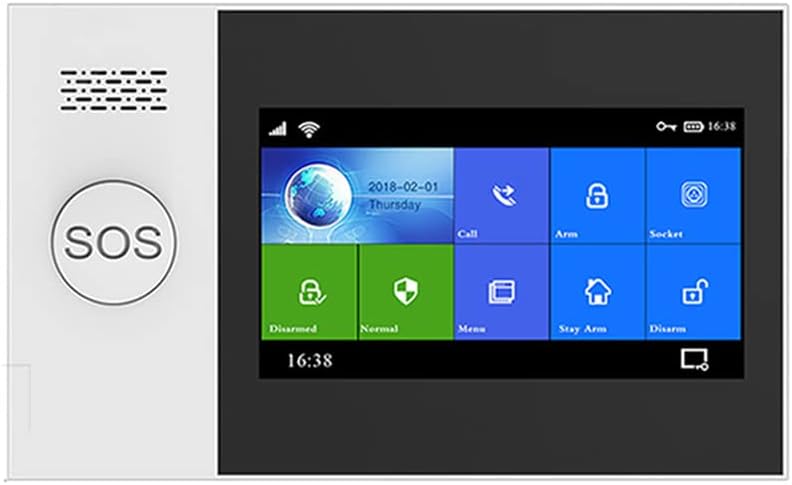
Figure 2.1: The main control panel of the PGST PG-107 Wireless GSM WiFi Home Alarm System, featuring an LCD screen, touch buttons, and an SOS button.
3. パッケージ内容
The PGST PG-107 system typically comes as an 8-piece kit. Please verify that all components are present and in good condition upon unboxing.
- PGST PG-107 Main Alarm Panel (with integrated Lithium-polymer battery)
- 電源アダプター
- ワイヤレスドア/窓センサー
- Wireless Motion Detector (PIR Sensor)
- リモートコントロール
- ユーザーマニュアル(このドキュメント)
- 取り付け金具
4. セットアップとインストール
The PG-107 system is designed for DIY installation without the need for specialized tools. Follow these steps for initial setup:
4.1. Powering On the Main Panel
- Connect the power adapter to the main alarm panel and plug it into a standard electrical outlet.
- The panel will power on automatically. The integrated backup battery will charge and provide power in case of an outage.

Figure 4.1: The PGST PG-107 system features low power consumption and an integrated backup battery, providing continued operation during power failures.
4.2. アプリのインストールとWi-Fi接続
- Download the "Tuyasmart" or "Smartlife" application from your smartphone's app store (available for Android and Apple devices).
- 新しいアカウントを登録するか、すでにアカウントをお持ちの場合はログインしてください。
- On the app, follow the instructions to add a new device. Select the alarm system category.
- Ensure your smartphone is connected to a 2.4 GHz Wi-Fi network. The PG-107 does not support 5 GHz networks.
- Follow the on-screen prompts in the app and on the alarm panel to connect the system to your Wi-Fi network. This typically involves entering your Wi-Fi password.
4.3. Adding Wireless Sensors and Remotes
The system supports wireless code learning for easy addition of accessories.
- Access the "Add Accessory" or "Zone Management" section on the alarm panel or through the mobile app.
- Activate the sensor (e.g., open a door for a door sensor, trigger motion for a PIR sensor, press a button on a remote). The panel will detect the signal.
- Assign the detected sensor to a specific zone and give it a descriptive name (e.g., "Front Door," "Living Room Motion").
- Repeat for all additional sensors and remote controls. The system supports up to 99 wireless zones and 5 remote controls.

Figure 4.2: Illustration of wireless sensor operation, including low battery alerts sent to the mobile application. The system monitors battery levels of connected sensors.
4.4. Setting Up GSM/4G (Optional)
If you wish to use the GSM/4G functionality for SMS alerts and calls, insert a compatible SIM card into the designated slot on the main panel. Ensure the SIM card has an active plan for calls and SMS.
- Power off the main panel before inserting the SIM card.
- Insert the SIM card correctly into the slot.
- Power on the panel. The system will attempt to register with the cellular network.
- Configure up to 5 emergency contact numbers for SMS alerts and alarm calls via the panel's menu or the mobile app.
5. 操作手順
5.1. システムの武装と解除
システムにはいくつかの武装モードがあります:
- アーム(離席モード): Activates all sensors. Ideal when no one is home.
- Stay Arm (Home Mode): 家の中での移動を許可しながら、周囲のセンサー (ドア/窓センサーなど) をアクティブにします。
- 武装解除: Deactivates all alarm functions.
You can arm/disarm using the control panel, remote control, mobile app, or voice commands (if configured).

Figure 5.1: The PGST PG-107 system supports voice control through compatible smart assistants like Amazon Alexa, allowing for convenient arming and disarming.
5.2. 緊急SOS機能
を押す SOS button on the main panel in case of an emergency. This will trigger an immediate alarm and send alerts to your pre-configured emergency contacts.
5.3. 双方向音声インターコム
The system supports two-way voice communication through the mobile app. This allows you to make and receive calls via the alarm panel, send voice messages, and communicate with individuals at home remotely.

Figure 5.2: The PGST PG-107 features a two-way voice intercom function, enabling users to make and receive calls and voice messages through the system for enhanced communication.
5.4. Zone Management and Naming
You can customize the name of each wired and wireless zone through the panel's settings or the mobile app. This helps in quickly identifying the location of an triggered alarm.
5.5. APP Notifications and Alarm Sound
When an alarm is triggered, the system will emit a 100 dB audible alarm and send instant notifications to your mobile app. If GSM is configured, SMS alerts and calls will also be made to the preset numbers.
6. メンテナンス
- バッテリーチェック: Regularly check the battery status of wireless sensors via the mobile app. Replace batteries promptly when low to ensure continuous protection.
- Main Panel Battery: The main panel's internal lithium-polymer battery provides backup power. Ensure the panel remains connected to power for optimal battery health.
- クリーニング: メインパネルとセンサーは、柔らかく乾いた布で拭いてください。研磨剤入りの洗剤や溶剤の使用は避けてください。
- ファームウェアの更新: Check the mobile app periodically for any available firmware updates for the alarm system to ensure optimal performance and security.
7。 トラブルシューティング
| 問題 | 考えられる原因 | 解決 |
|---|---|---|
| システムが Wi-Fi に接続されていません。 | Incorrect Wi-Fi password; 5 GHz network selected; too far from router. | Ensure correct password. Connect to a 2.4 GHz network. Move panel closer to router or use a Wi-Fi extender. |
| ワイヤレスセンサーがアラームをトリガーしません。 | Sensor battery low/dead; sensor not properly paired; sensor out of range. | Check/replace sensor battery. Re-pair the sensor with the main panel. Relocate sensor closer to the panel. |
| No SMS/Call alerts. | SIM card not inserted correctly; no active plan on SIM; incorrect emergency numbers. | Ensure SIM card is properly inserted and active. Verify emergency contact numbers in settings. |
| Alarm panel powers off when unplugged. | Backup battery not charged or faulty. | Allow sufficient time for the backup battery to charge (at least 4 hours). If issue persists, contact support. |
8. 技術仕様
- モデル: PG-107
- ブランド: PGST
- 接続性: Wi-Fi (2.4 GHz only), GSM/4G
- 互換性のあるアプリ: Tuyasmart, Smartlife
- 有線ゾーン: 4
- ワイヤレスゾーン: 99
- サポートされているリモートコントロール: 5
- アラーム音量: 100デシベル
- バックアップバッテリー: リチウムポリマー電池 x 1(付属)
- バックアップバッテリー寿命: 最大4時間
- 寸法(長さ×幅×高さ): 25 x 18 x 6 cm(約9.8 x 7.1 x 2.4インチ)
- 重さ: 610グラム(約1.34ポンド)
- 国際コード: 748095622027
9. 保証とサポート
For warranty information and technical support, please refer to the documentation provided with your purchase or visit the official PGST webサイトでご確認ください。保証請求の際は購入証明として領収書を保管してください。
If you encounter issues not covered in this manual, please contact PGST customer service for assistance.


