導入
This manual provides detailed instructions for the installation, operation, and maintenance of your DeLOCK USB Type-C to 2.5 Gigabit LAN Adapter (Model 66645). Please read this manual thoroughly before using the device to ensure proper functionality and to prevent damage.
製品終了view
The DeLOCK USB Type-C to 2.5 Gigabit LAN Adapter expands your PC or notebook with a network interface via a USB Type-C port. It is also compatible with Thunderbolt 3 interfaces. This adapter supports NBASE-T technology, allowing data transfer speeds of 1 Gbps and 2.5 Gbps over standard network cables, automatically negotiating the best possible transfer rate.

Image: DeLOCK 2.5 Gigabit LAN Adapter in its retail packaging.
The adapter features a SuperSpeed USB (USB 3.2 Gen 1) Type-C male connector for connecting to your host device and a 2.5 Gigabit LAN RJ45 female port for network cable connection. The compact design ensures portability and ease of use.
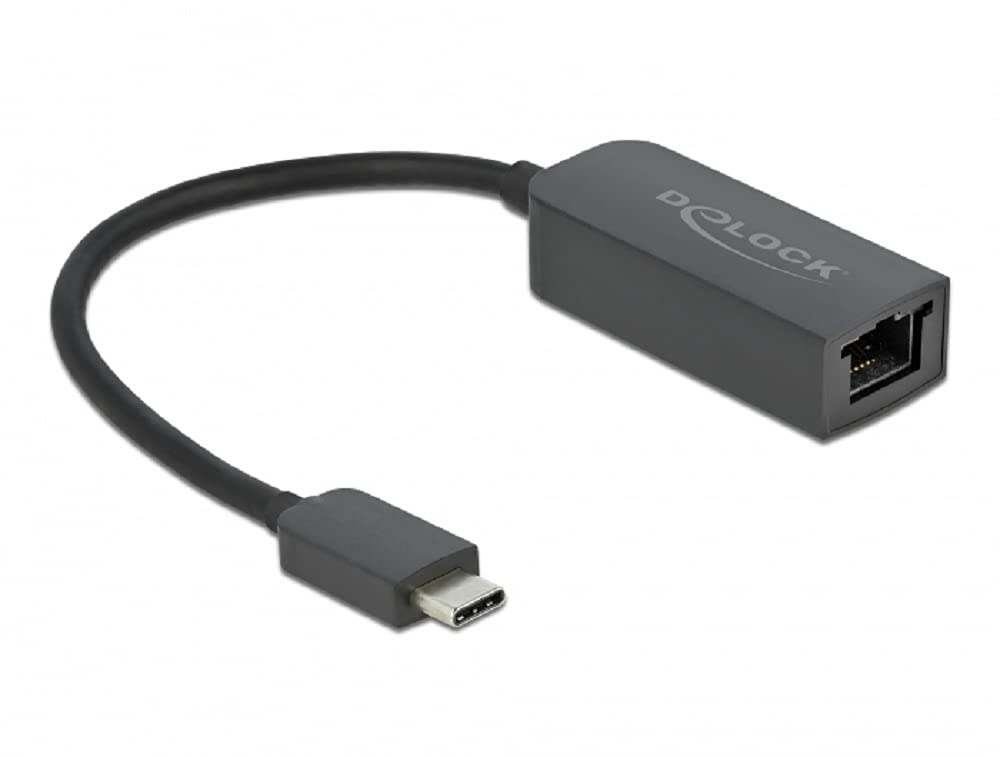
Image: Diagram illustrating the USB Type-C male connector, the 16 cm cable, and the 2.5 Gigabit LAN RJ45 female jack of the DeLOCK adapter.
セットアップ手順
- ホストデバイスに接続します: Plug the USB Type-C male connector of the DeLOCK adapter into an available USB Type-C port on your PC or notebook. Ensure the port supports USB 3.2 Gen 1 or Thunderbolt 3 for optimal performance.
- ネットワークに接続する: Connect a standard RJ45 Ethernet network cable from your router, modem, or network switch to the 2.5 Gigabit LAN RJ45 female port on the DeLOCK adapter.
- ドライバーのインストール: In most modern operating systems (Windows 10/11, macOS, Linux), the adapter is plug-and-play and drivers will install automatically. If prompted, allow the system to install necessary drivers. If automatic installation fails, visit the official Delock website for driver downloads specific to model 66645.
- 接続を確認します: Once connected, check your operating system's network settings to confirm that the new network adapter is recognized and has established a connection.
アダプタの操作
After successful setup, the DeLOCK adapter functions as a standard wired network interface. Your operating system will automatically detect and utilize it for internet and local network access. The NBASE-T technology will automatically negotiate the highest possible speed (up to 2.5 Gbps) supported by your network infrastructure and cable quality.
- Ensure your network cable is securely connected to both the adapter and your network device.
- For optimal performance, use Cat5e or higher-rated Ethernet cables.
- Monitor your system's network activity indicators to confirm data transmission.
メンテナンス
The DeLOCK USB Type-C to 2.5 Gigabit LAN Adapter requires minimal maintenance.
- クリーニング: アダプターの外側を拭く際は、柔らかく乾いた布をご使用ください。液体クリーナーや溶剤の使用は避けてください。
- ストレージ: 使用しないときは、アダプターを直射日光や極端な温度を避け、涼しく乾燥した場所に保管してください。
- 取り扱い: Avoid bending or twisting the cable excessively, and do not apply undue force when connecting or disconnecting the adapter.
トラブルシューティング
- ネットワーク接続なし:
- Ensure the adapter is firmly plugged into the USB Type-C port.
- Verify the Ethernet cable is securely connected to both the adapter and the network device.
- コンピュータとネットワーク機器(ルーター/モデム)を再起動します。
- Check your operating system's network settings to ensure the adapter is enabled.
- Try a different USB Type-C port on your device.
- 別のイーサネット ケーブルでテストします。
- 接続速度が遅い:
- Ensure your network infrastructure (router, switch, cables) supports 2.5 Gigabit Ethernet.
- Use Cat5e or Cat6 Ethernet cables for optimal performance.
- Update the adapter's drivers from the official Delock web利用可能な場合はサイトを参照してください。
- Check for other network activity or bandwidth-intensive applications running on your device.
- アダプタが認識されません:
- Ensure your USB Type-C port is functional.
- Try connecting the adapter to another computer to rule out a device-specific issue.
- Manually install drivers from the Delock website if automatic installation failed.
- Check your device manager (Windows) or system information (macOS/Linux) for any unrecognized devices or driver conflicts.
仕様
| モデル番号: | 66645 |
| コネクタ: | 1 x SuperSpeed USB (USB 3.2 Gen 1) USB Type-C male 1 x 2.5 Gigabit LAN RJ45 female |
| チップセット: | リアルテックRTL8156 |
| データ転送速度: | Ethernet up to 10 Mbps (half/full duplex) Fast Ethernet up to 100 Mbps (half/full duplex) Gigabit Ethernet up to 1000 Mbps (half/full duplex) NBASE-T up to 2.5 Gbps (half/full duplex) |
| USB仕様: | SuperSpeed USB - 5Gbps |
| 特徴: | Auto MDI-X (標準またはクロスオーバーネットワークケーブルの自動検出) をサポート NBASE-T technology for 1Gbps and 2.5Gbps speeds |
| ハードウェアインターフェイス: | イーサネット、サンダーボルト、USB、USBタイプC |
| 対応デバイス: | デスクトップ、ラップトップ |
| 色: | 黒 |
| 製品寸法: | 5.51 x 4.72 x 1.18インチ |
| 商品の重量: | 1.76オンス(50グラム) |
保証とサポート
For warranty information and technical support, please refer to the documentation included with your purchase or visit the official Delock webサイト。通常、サポート リソース、FAQ、カスタマー サービスの連絡先情報がここにあります。


