1. はじめに
This user manual provides essential information for the safe and effective operation of your ITECH IT6952A Programmable DC Power Supply. Please read this manual thoroughly before using the device to ensure proper functionality and to prevent damage or injury. The IT6952A is a high-performance, programmable DC power supply designed for laboratory and industrial applications, offering precise control over voltageと電流出力。
2. 安全情報
Always observe the following safety precautions to prevent electric shock, injury, or damage to the instrument:
- 電源が接地された AC コンセントに接続されていることを確認してください。
- 濡れた状態や濡れた状態でデバイスを操作しないでください。amp 条件。
- cを開けないでくださいasing; 内部にはユーザーが修理可能な部品はありません。修理はすべて資格のある担当者にご依頼ください。
- 入力ボリュームを確認するtage matches the power supply's rating before connecting to the mains.
- Avoid short-circuiting the output terminals, especially at high power settings.
- 過熱を防ぐために、ユニットの周囲に適切な換気を確保してください。
3.製品オーバーview
The ITECH IT6952A features a clear VFD display and intuitive controls for easy operation.
3.1 フロントパネルのレイアウト

Figure 3.1: Front Panel of IT6952A
The front panel includes the VFD display for voltage and current readings, a rotary knob for precise adjustments, number keys (0-9) and ESC for direct input, function keys (V-SET, I-SET, Save, Recall, Meter, Trigger, Enter, On/Off) for various operations, navigation keys (UP/DOWN/LEFT/RIGHT) for cursor movement, and output terminals for connecting loads. The 'Shift' and 'Local' keys provide additional control options, and the main power switch is integrated.
3.2 リアパネルのレイアウト
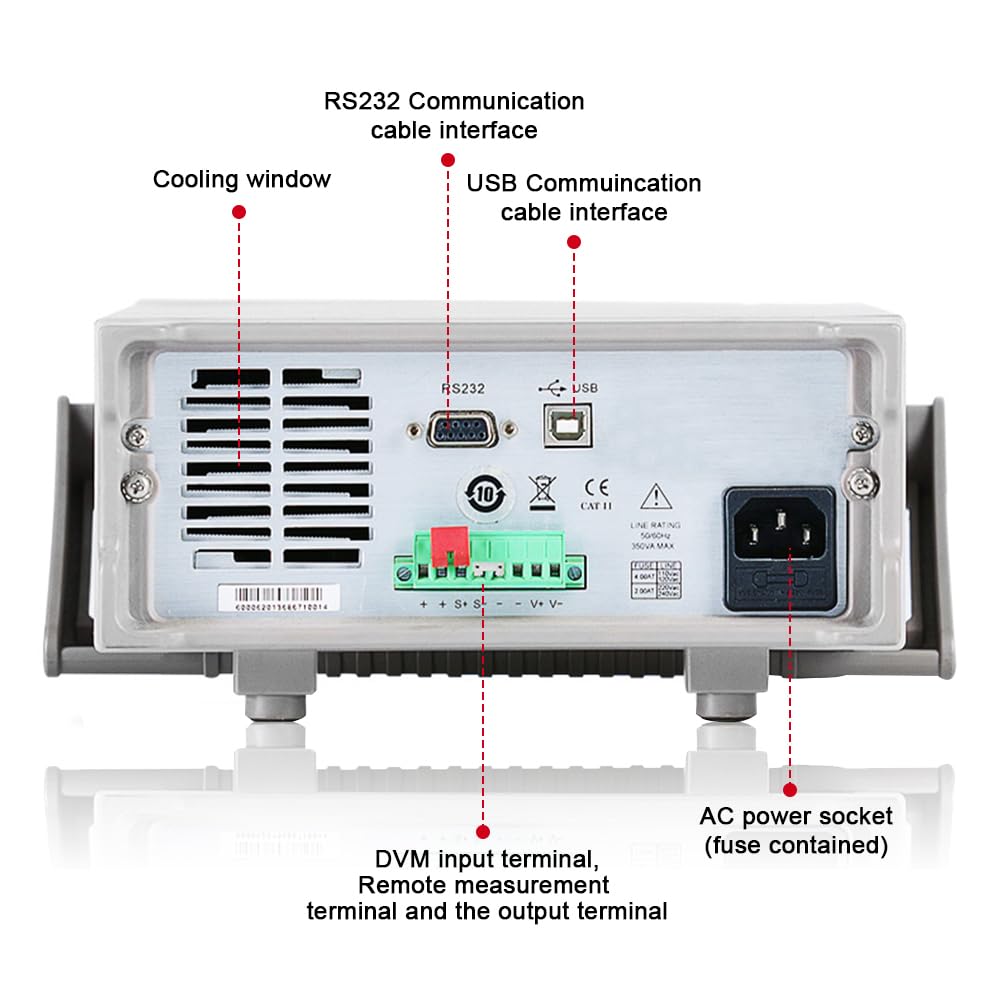
Figure 3.2: Rear Panel of IT6952A
The rear panel features the AC power socket (with integrated fuse), cooling windows for heat dissipation, an RS232 communication cable interface, a USB communication cable interface, and DVM input terminals along with remote measurement terminals and additional output terminals for specific applications.
4. セットアップ
初期設定は次の手順で行います。
- 開梱: 電源ユニットをパッケージから慎重に取り出し、輸送中に生じた損傷がないか確認してください。
- 配置: Place the unit on a stable, level surface with adequate ventilation around all sides. Do not block the cooling vents on the sides and rear.
- 電源接続: Connect the provided AC power cord to the AC power socket on the rear panel of the IT6952A. Plug the other end into a grounded electrical outlet.
- 電源オン: Press the main power switch on the front panel to turn on the unit. The VFD display should illuminate.
- 出力接続: Connect your load to the output terminals on the front panel using appropriate test leads. Ensure correct polarity (positive to positive, negative to negative).
5. 操作手順
This section covers basic operation of the IT6952A.
5.1 ボリュームの設定tageと現在
- セットボリュームtage: を押す V-SET ボタン。ボリュームtage display will become active. Use the rotary knob to adjust the voltage, or use the number keys for direct input followed by 入力.
- 現在の設定: を押す I-SET button. The current display will become active. Use the rotary knob to adjust the current limit, or use the number keys for direct input followed by 入力.
- 出力を有効にする: 希望の音量を設定した後tageと現在の場合は、 オン/オフ button to enable the output. The output indicator will illuminate.
- 出力を無効にする: 出力を無効にするには、 オン/オフ もう一度ボタンを押します。
5.2 Using Memory Functions (Save/Recall)
The IT6952A allows you to save and recall frequently used voltage と現在の設定。
- 設定の保存: 目的のボリュームを設定しますtage and current. Press the 保存 button. Use the navigation keys or number keys to select a memory location (e.g., 0-9) and press 入力 to store the settings.
- Recall Setting: を押す 想起 button. Use the navigation keys or number keys to select the desired memory location and press 入力 to load the stored settings.
6. メンテナンス
適切なメンテナンスを行うことで、電源装置の寿命と信頼性が確保されます。
- クリーニング: Disconnect the power supply from the mains before cleaning. Use a soft, dry cloth to wipe the exterior. For stubborn dirt, a slightly damp 液体がユニット内に入らないように、中性洗剤を含ませた布を使用してください。
- 換気: Regularly check that the cooling vents are free from dust and obstructions. Use compressed air to clear dust if necessary.
- ストレージ: 長期間使用しない場合は、電源装置を涼しく乾燥したほこりのない環境に保管してください。
7。 トラブルシューティング
If you encounter issues with your IT6952A, refer to the following common problems and solutions:
| 問題 | 考えられる原因 | 解決 |
|---|---|---|
| 電源を入れても電源が入らない | Power cord not connected; Blown fuse; No power from outlet | Check power cord connection; Replace fuse (refer to specifications for type); Test outlet with another device |
| 出力なしvoltage/現在 | Output disabled; Overload protection activated; Incorrect settings | プレス オン/オフ to enable output; Reduce load or increase current limit; Verify voltage/現在の設定 |
| ディスプレイに「エラー」と表示される | Internal fault; Over-temperature | Turn off unit, wait 5 minutes, restart; Ensure proper ventilation, allow unit to cool down. If error persists, contact support. |
| 不正確な測定値 | Poor connection; Calibration needed | Check all connections; Contact ITECH support for calibration information. |
8. 仕様
Key technical specifications for the ITECH IT6952A Programmable DC Power Supply:
| 仕様 | 価値 |
|---|---|
| ブランド | アイテック |
| モデル | IT6952A |
| 出力巻tage | 60ボルト |
| Amp怒る | 25 Amps |
| 出力ワットtage | 600ワット |
| フォームファクター | ベンチトップ |
| コネクタタイプ | USB |
| 材料 | 金属 |
| 色 | 赤、黒 |
9. 保証とサポート
ITECH products are designed for reliability and performance. For warranty information, technical support, or service inquiries, please refer to the warranty card included with your product or visit the official ITECH webサイトでご確認ください。保証請求の際は購入証明として領収書を保管してください。
For further assistance, you may contact ITECH customer service through their official channels. Always provide your product model (IT6952A) and serial number when seeking support.


