導入
This manual provides instructions for setting up, operating, and maintaining your Amazon Echo Show 10 (3rd Gen) smart display. Please read this guide thoroughly to ensure proper use and to maximize your device's capabilities.
設定
含まれるもの
- Echo Show 10デバイス
- Glacier white power adapter (30W) / cable (5 ft.)
- Motion footprint template
- クイックスタートガイド
配置ガイドライン
The Echo Show 10 features a rotating screen. Ensure adequate space around the device for its motion. The device itself measures 9.9"W x 6.7"D. A recommended footprint of 15"W x 10"D is suggested to allow for full rotation without obstruction.
初期接続
- Connect the power adapter to the Echo Show 10 and plug it into a power outlet.
- The device will power on and guide you through the on-screen setup process.
- Follow the prompts to connect to your Wi-Fi network. The device supports 802.11a/b/g/n/ac Wi-Fi networks (Wi-Fi 6 is not supported).
- The Alexa app is compatible with Fire OS, Android, and iOS devices, and is also accessible via a web さらに設定するにはブラウザを参照してください。
Amazon Wi-Fi simple setup is available to streamline the connection process for compatible smart devices.
手術
Alexaによる音声コントロール
The Echo Show 10 is primarily controlled using voice commands with Alexa. Simply say the wake word "Alexa" followed by your command or question. Alexa speaks English and Spanish.

Image: The Echo Show 10 displaying music content, with icons indicating its capabilities for music, timers, smart home control, information, intercom, and news.
Motion Features
The 10.1" HD screen is designed to move with you, keeping content in view. The device utilizes a brushless motor for +/- 175° rotation. This feature is particularly useful for video calls, recipes, and watching shows.
- Enabling/Disabling Motion: You can disable motion by saying "Alexa, disable Motion" or through the Alexa app settings.
- 動作範囲: During initial setup, you can customize the range of motion. This can also be adjusted in the 'Motion' menu within the device settings.
カメラ機能
The Echo Show 10 includes a 13MP camera with an integrated shutter. The camera features auto-framing and motion tracking to keep you centered during video calls or when taking pictures.
- ビデオ通話: The camera automatically adjusts zoom and framing to keep individuals in view ビデオ通話中。
- ホームモニタリング: Securely access the built-in camera remotely via the Alexa app or other Echo Show devices to monitor your home.
- プライバシーシャッター: A physical shutter is included to cover the camera when not in use, enhancing privacy.

Image: The Echo Show 10 screen showing a grid of four live camera feeds, demonstrating its home monitoring capability.

画像: クローズアップ view of the Echo Show 10's top edge, highlighting the physical camera shutter mechanism.
エンターテインメント
The device offers access to various entertainment options, including streaming services and music playback. The 2.1 audio system features two 1.0" tweeters and a 3.0" woofer for premium sound.
- ビデオストリーミング: Watch shows and movies from services like Prime Video, Netflix, and Hulu.
- 音楽とポッドキャスト: Play music and podcasts from Amazon Music, Spotify, and other supported services.
- Bluetooth接続: Supports A2DP for audio streaming from mobile devices to the Echo Show 10, or from the Echo Show 10 to a Bluetooth speaker. AVRCP is supported for voice control of connected mobile devices.
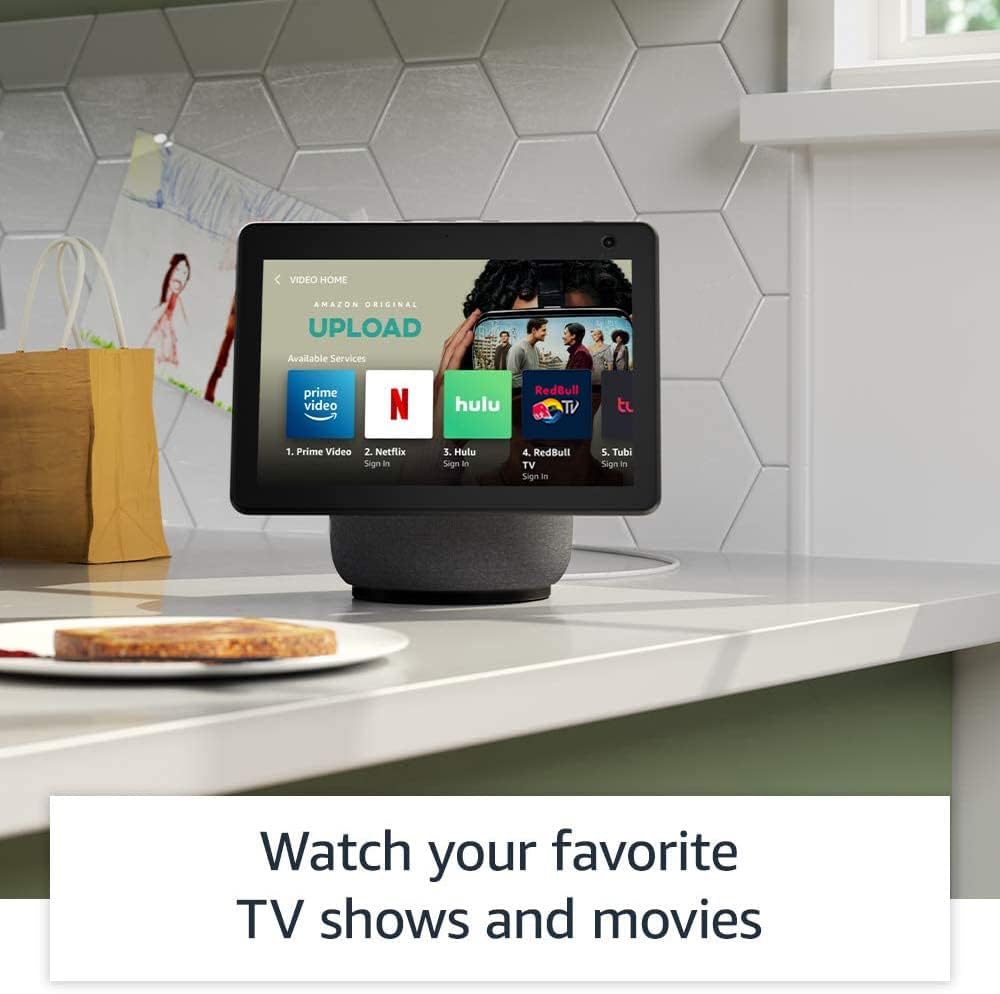
Image: The Echo Show 10 screen showing a "Video Home" interface with icons for Prime Video, Netflix, Hulu, and other streaming services.

Image: The Echo Show 10 displaying music playback with synchronized lyrics on the screen.
スマートホーム統合
The Echo Show 10 includes a built-in smart home hub supporting Zigbee, Sidewalk, and Matter protocols. This allows for direct setup and control of compatible smart home devices without a separate hub.
- デバイス制御: Use voice commands to control lights, adjust thermostats, and view 防犯カメラ。
- アマゾンの歩道: This feature uses Echo and Ring devices to securely maintain connectivity for other devices and assist in locating lost items. Sidewalk uses a small portion of your internet bandwidth. It is enabled by default but can be turned off in settings.
Kitchen Companion
Utilize the Echo Show 10 in the kitchen for various tasks:
- Access personalized recipes and follow step-by-step instructions hands-free.
- Set multiple timers for cooking.
- Add items directly to your grocery list.

Image: The Echo Show 10 displaying a recipe on its screen, positioned on a kitchen counter.
デジタルフォトフレーム
Transform your Echo Show 10 into a digital photo frame using Amazon Photos. Share photos with friends and family, and even take new photos directly from the device.
プライバシー機能
The Echo Show 10 incorporates multiple privacy controls:
- マイク/カメラオフボタン: マイクとカメラを電子的に切断するための物理ボタン。
- カメラのシャッター: カメラレンズをカバーする物理的なスライダー。
- ウェイクワードテクノロジー: デバイスはウェイクワードを検出した後にのみ、音声の録音とクラウドへの送信を開始します。
- ストリーミングインジケーター: Visual indicators show when audio or video is being streamed.
- 音声録音管理: 能力 view 音声録音を削除します。
- Disable Motion: Option to turn off the device's motion tracking.
アクセシビリティ機能
The Echo Show 10 includes various accessibility features. Access these settings via 設定 → アクセシビリティ デバイス上で。
- Alexaにタップ: 画面上のタイルまたはキーボードを使用して、タッチで Alexa と対話します。
- 適応型リスニング: Alexa が応答する前に話し終えるための時間を長くします。
- 好みの話し方: Alexa の話し方速度を制御します。
- Alexa 字幕、通話字幕、クローズド キャプション: サポートされているコンテンツにテキスト キャプションを提供します。
- ショーアンドテル: Helps identify products for users who are blind or visually impaired by saying "Alexa, what am I holding."
- 声View スクリーンリーダー: Provides audio descriptions for screen elements.
- 画面拡大鏡: 画面を拡大/縮小したり、画面をパンしたりします。
- 近くにいるときに通知: Plays notification sounds when you are detected near the device.
- Kindle 読み上げ: Alexa が Kindle 本を読み上げます。
- リアルタイムテキスト: Enables typing live text during a video call.
- 追加の設定には、色反転、色補正、サウンドの要求などがあります。
メンテナンス
To maintain your Echo Show 10, gently wipe the screen and exterior surfaces with a soft, lint-free cloth. Avoid using abrasive cleaners or sprays directly on the device.
トラブルシューティング
よくある問題と解決策
- デバイスが応答しない: Ensure the device is plugged in and powered on. Try restarting the device by unplugging it for a few seconds and plugging it back in.
- Wi-Fi 接続の問題: Verify your Wi-Fi network is active and within range. Check your Wi-Fi password. If issues persist, restart your router.
- Motion Tracking Problems: Ensure the motion feature is enabled in settings. Check for obstructions around the device. The device may have difficulty tracking in very low light conditions.
- オーディオの問題: Check the volume level. Ensure the microphone is not muted (indicated by a red light).
- カメラが動作しない: Ensure the physical camera shutter is open and the camera is not electronically disabled via the mic/camera off button.
For further assistance, refer to the Alexa app or Amazon's online support resources.
仕様
| サイズ | 9.9 "×9"×6.7」(251のx 230のx 172mm) |
| 重さ | 90.3オンス(2560グラム) |
| 画面 | 10.1インチのタッチスクリーン、手動チルトによる回転スクリーン |
| カメラ | 13MP + Shutter |
| Wi-Fi接続 | Dual-band, dual-antenna Wi-Fi (MIMO). Supports 802.11a/b/g/n/ac. Does not support Wi-Fi 6 (802.11ax) or ad-hoc networks. Includes 802.15.4 radio for smart home devices. |
| Bluetooth接続 | A2DP support for audio streaming. AVRCP for voice control of connected mobile devices. |
| オーディオ | 2.1 System: 2 x 1.0” tweeters and a 3.0” woofer |
| プロセッサ | MediaTek 8183 main processor plus Amazon AZ1 Neural Edge processor |
| モーション | Brushless Motor +/- 175° rotation |
| スマートホームハブ | Zigbee + Sidewalk + Matter |
| センサー | ALS RGB |
| 言語 | Alexaは英語とスペイン語を話します |
保証とサポート
保証情報
The Echo Show 10 includes a 1-year limited warranty and service. Optional 1-year, 2-year, and 3-year extended warranties are available for purchase separately for U.S. customers.
Use of the Echo Show 10 is subject to the terms found on the Amazon webサイト。
ソフトウェアセキュリティアップデート
Information regarding software security updates can be found on the Amazon website. Existing Amazon Echo owners can manage their device-specific information via "Manage Your Content and Devices."


