1. はじめに
The Tycon TPSC2440NMPPT is an advanced Maximum Power Point Tracking (MPPT) solar charge controller designed for efficient battery charging from solar panels. It automatically adjusts to 12V or 24V battery systems and supports various battery types including Flooded, AGM, GEL, and Lithium, with a customizable USER setting. This controller features an integral LCD display for monitoring key system parameters.
2. 安全に関する注意事項
Please read and understand all instructions before installation and operation. Failure to follow these instructions may result in electric shock, fire, or severe injury.
- すべての配線が正しく極性化され、しっかりと接続されていることを確認します。
- コントローラーを分解したり修理したりしないでください。資格のあるサービス担当者にご相談ください。
- コントローラーは、可燃性物質や腐食性ガスから離れた、換気の良い場所に設置してください。
- Always disconnect the battery and solar panel before installing or moving the controller.
- 設置作業中は適切な個人用保護具 (PPE) を着用してください。
- The controller is designed for indoor use or protected outdoor environments (IP32 rating). Avoid direct exposure to water.
3.製品オーバーview
The TPSC2440NMPPT controller is equipped with several features to optimize solar charging and battery management:
- MPPT テクノロジー: 太陽光パネルからの電力収穫を最大化します。
- Auto-Ranging Voltage: Compatible with 12V or 24V battery arrays.
- Multimode Load Operation: Offers 5 selectable modes for load control.
- Soft Start Load Output: Powers high capacitive loads safely.
- Automatic Battery Equalization: Performs 30-day equalization for optimal battery health.
- Conformal Coated Electronics: Provides environmental protection.
- TVS Lightning Protection: Enhances durability against electrical surges.
- Integral LCD Display: バッテリー容量を表示しますtage, Capacity, Charging Capacity, Temperature, Load Current, and Solar Current.
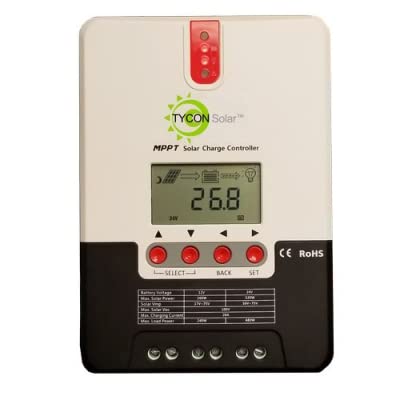
図1: 前面 view of the Tycon TPSC2440NMPPT Solar MPPT Battery Charging Controller, showing the LCD display and connection terminals.
4. セットアップとインストール
適切にインストールするには、次の手順に従ってください。
- 取り付け: Choose a suitable location for mounting the controller. Ensure good ventilation and protection from direct sunlight and moisture.
- バッテリー接続: Connect the battery to the controller's battery terminals first. Ensure correct polarity (+ to + and - to -). The controller will automatically detect the battery voltage(12Vまたは24V)。
- ソーラーパネル接続: Connect the solar panel array to the controller's solar input terminals. Observe correct polarity. Ensure the open-circuit voltage of the solar array does not exceed the controller's maximum input voltage (110V at 25°C).
- 負荷接続(オプション): If using the load output, connect your DC loads to the controller's load terminals. Do not exceed the rated load current (20A Max).
- 温度センサー: Connect the included battery temperature probe cable to the designated port on the controller. Place the sensor near the battery for accurate temperature compensation.
- 電源オン: Once all connections are secure, the controller will power on and begin operation.
5. 操作手順
The integral LCD display provides real-time information about your solar charging system. Use the buttons (if present, assuming standard UP/DOWN/SET) to navigate through the display menus and adjust settings.
5.1 LCDディスプレイ情報
- バッテリー巻tage: 現在の巻tag接続されているバッテリーのe。
- バッテリー容量: Estimated state of charge.
- 充電容量: Current power being delivered to the battery.
- バッテリー温度: Temperature measured by the external probe.
- 負荷電流: Current being drawn by connected DC loads.
- Solar Current: Current being generated by the solar panels.
5.2 バッテリータイプの設定
The controller supports Flooded, AGM, GEL, and Lithium battery types. A USER setting allows for custom charge parameters. Refer to the on-screen menu for selecting and configuring the battery type.
5.3 Load Operation Modes
The controller offers 5 selectable load operation modes. Consult the device's menu for details on each mode and how to select them, typically involving timed operation or dusk-to-dawn control.
6. メンテナンス
定期的なメンテナンスにより、ソーラー充電コントローラーの最適なパフォーマンスと寿命が確保されます。
- 接続を検査する: すべての配線接続部の締め付け具合と腐食を定期的に点検してください。
- クリーンコントローラー: Keep the controller clean and free of dust. Use a dry cloth for cleaning. Do not use liquids.
- バッテリーの状態: バッテリー容量を監視するtage and capacity on the LCD. Ensure batteries are properly maintained according to their manufacturer's guidelines.
- 換気: 過熱を防ぐために、設置場所の換気が十分であることを確認してください。
7。 トラブルシューティング
| 問題 | 考えられる原因 | 解決 |
|---|---|---|
| ディスプレイなし/電源なし | Loose battery connection; Battery voltage too low; Blown fuse (external, if applicable). | バッテリーの接続と極性を確認してください。電圧が低ければバッテリーを充電してください。tage is below operating threshold. Check and replace any external fuses. |
| 太陽光充電なし | Solar panel not connected; Incorrect polarity; Insufficient sunlight; Damaged solar panel/wiring. | Verify solar panel connections and polarity. Ensure panels are receiving adequate sunlight. Inspect panels and wiring for damage. |
| ロードが機能しない | Load disconnected; Overload; Short circuit; Battery voltag低すぎます。 | Check load connections. Reduce load if exceeding 20A. Check for short circuits. Ensure battery is sufficiently charged. |
| 不正確な測定値 | Loose connections; Faulty sensor. | Check all wiring connections. Ensure temperature sensor is properly connected and placed. |
8. 仕様
- モデル: TPSC2440NMPPT
- オートVoltage: 12V/24V (System)
- Ampere: 40A
- 定格負荷電流: 最大20A
- 最大容量性負荷: 10,000uF
- 最大ソーラー入力Voltage: 110V (25°C), 90V (25°C)
- Max Power Point Range: 2VDC to 75VDC (Battery Volts)
- 変換効率: 96% 標準
- MPPT追跡効率: 99%
- 自己消費: 1W
- 温度補正: -3.0mV/°C/セル
- 最大ワイヤサイズ: 8AWG
- 巻tage and Current Accuracy: +/-2%
- 接地: ネガティブグラウンド
- 環境保護: IP32
- 製品寸法: 12 x 9 x 6インチ
- 商品の重量: 5.16ポンド
- 表示タイプ: 液晶


