1. はじめに
The Peaktech P2170 is a digital LCR meter with Equivalent Series Resistance (ESR) measurement capabilities. Designed for both component testing in professional environments and for service and maintenance tasks, its compact design and advanced features ensure precise measurements.
Key features include an illuminated multifunction display with a bargraph and a high measurement frequency of up to 100 kHz. The device also supports PC connectivity for data storage and analysis using the included software.
2. 安全情報
怪我やデバイスの損傷を防ぐために、常に次の安全上の注意事項を守ってください。
- デバイスを操作する前にマニュアル全体をお読みください。
- Do not operate the meter if it appears damaged or if the insulation is compromised.
- Ensure correct battery installation and replacement.
- テスト リードを接続または切断するときは、通電中の回路に触れないようにしてください。
- Do not exceed the maximum input ratings specified for each function.
- デバイスを乾いた状態に保ち、清潔に保ちます。
3.製品オーバーview
The Peaktech P2170 LCR Meter is a handheld device designed for measuring inductance (L), capacitance (C), and resistance (R), along with other parameters like ESR, DCR, Dissipation Factor (D), Quality Factor (Q), and Phase Angle (θ).
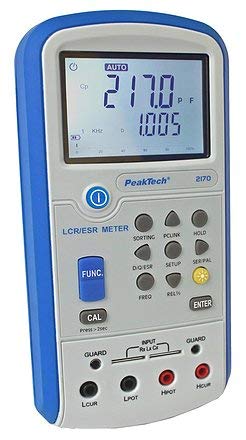
図1: 前面 view of the Peaktech P2170 LCR Meter, showing the display, function buttons, and input terminals.
3.1コンポーネントとアクセサリ
標準パッケージには次の項目が含まれています。
- Peaktech P2170 LCR Meter
- USBインターフェースケーブル
- PCソフトウェア
- Kelvin clips (test leads)
- 保護キャリングケース
- AAA batteries (6x 1.5V)
- 取扱説明書
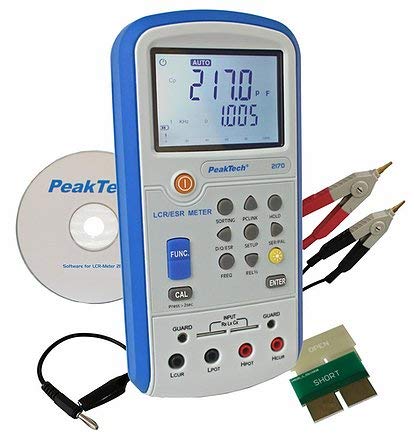
Figure 2: Peaktech P2170 LCR Meter shown with its included accessories, including Kelvin clips, USB cable, and software CD.
4. セットアップ
4.1 バッテリーの取り付け
The device operates on 6 x 1.5V AAA batteries. To install or replace batteries:
- メーターの電源がオフになっていることを確認してください。
- デバイスの背面にある電池ボックスのカバーを見つけます。
- Open the cover and insert 6 AAA batteries, observing the correct polarity markings.
- 電池カバーをしっかりと閉じてください。
An optional 12V 500mA power adapter can also be used for external power.
4.2 テストリードの接続
Use the provided Kelvin clips for accurate measurements. Connect them to the input terminals as follows:
- Connect the red Kelvin clip to the ポット そして Hcur 端末。
- Connect the black Kelvin clip to the Lpot そして ルクル 端末。
- For 2-wire measurements, connect the test leads to ポット そして Lpot.
- Ensure a secure connection to minimize measurement errors.
4.3 Software Installation (PC Link)
The included PC software allows for data logging and analysis. Follow these steps to install:
- Insert the software CD into your computer's optical drive.
- 画面の指示に従ってインストールを完了します。
- Connect the meter to your PC using the supplied USB interface cable.
- Launch the software and establish communication with the device. Refer to the software's help documentation for detailed usage.
5. 操作手順
5.1 電源のオン/オフ
を押す 力 メーターをオンまたはオフにするボタン。
5.2 測定モード
The P2170 supports various measurement modes. Press the FUNC button to cycle through the primary measurement parameters:
- Ls (Series Inductance)
- Cs (Series Capacitance)
- Lp (Parallel Inductance)
- Cp (Parallel Capacitance)
- ダイナミクス (DC Resistance)
- 電子放射 (Equivalent Series Resistance)
- Rp (Parallel Resistance)
- D (Dissipation Factor)
- Q (Quality Factor)
- θ (Phase Angle)
The illuminated display will show the selected mode and measurement results.
5.3 Measurement Frequency Selection
を押す 周波数 button to select the desired test frequency. Available frequencies include 100 Hz, 120 Hz, 1 kHz, 10 kHz, and 100 kHz. The chosen frequency will be displayed on the screen.
5.4データ保持機能
を押す 所有 button to freeze the current measurement reading on the display. Press it again to release the hold function.
5.5 キャリブレーション
To perform a calibration, ensure no component is connected to the input terminals. Press and hold the カル button for approximately 2 seconds. Follow any on-screen prompts.
6. メンテナンス
6.1 クリーニング
メーターのcを拭くasingを柔らかく、damp 布で拭いてください。研磨剤入りの洗剤や溶剤は使用しないでください。清掃する前に、必ずデバイスの電源を切り、すべての電源から取り外してください。
6.2 電池の交換
When the low battery indicator appears on the display, replace all 6 AAA batteries as described in Section 4.1.
6.3 ストレージ
If the meter is not used for an extended period, remove the batteries to prevent leakage. Store the device in its protective carrying case in a cool, dry place, away from direct sunlight and extreme temperatures.
7。 トラブルシューティング
If you encounter issues with your Peaktech P2170, refer to the following common problems and solutions:
- メーターの電源が入らない: Check battery installation and ensure batteries are not depleted. Try replacing with new batteries.
- 不正確な読み取り:
- テストリードが正しく接続されており、損傷がないことを確認します。
- Perform a calibration (Section 5.5).
- Verify the correct measurement mode and frequency are selected for the component being tested.
- Ensure the component is properly connected to the Kelvin clips.
- PCソフトウェアが接続されない:
- USBケーブルの接続を確認してください。
- Ensure the software drivers are correctly installed.
- Restart both the meter and the PC.
If the problem persists, contact Peaktech customer support.
8. 仕様
Detailed technical specifications for the Peaktech P2170 LCR Meter:
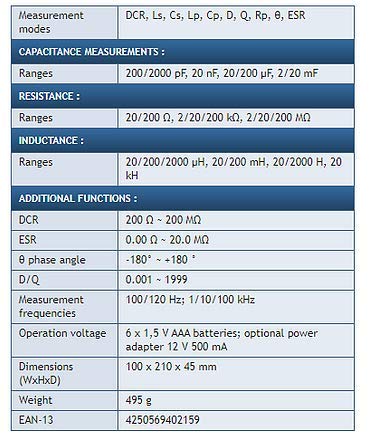
Figure 3: Detailed specifications table for the Peaktech P2170 LCR Meter, including measurement modes, ranges, frequencies, and physical characteristics.
| パラメータ | 価値 |
|---|---|
| 測定モード | DCR, Ls, Cs, Lp, Cp, D, Q, Rp, θ, ESR |
| 静電容量範囲 | 200/2000 pF, 20 nF, 20/200 µF, 2/20 mF |
| 抵抗範囲 | 20/200 Ω, 2/20/200 kΩ, 2/20/200 MΩ |
| Inductance Ranges | 20/200/2000 µH, 20/200 mH, 20/2000 H, 20 kH |
| DCR Range | 200Ω~200MΩ |
| ESR Range | 0.00Ω~20.0MΩ |
| Phase Angle (θ) | -180° ~ +180° |
| D/Q Resolution | 0.001〜1999 |
| 測定周波数 | 100/120 Hz; 1/10/100 kHz |
| 基本精度 | 0.3 % |
| オペレーションVol。tage | 6 x 1.5 V AAA batteries; optional power adapter 12 V 500 mA |
| 寸法(幅x高さx奥行き) | 100 x 210 x 45 ミリメートル |
| 重さ | 495グラム |
| メーカー | Peaktech |
9. 保証とサポート
For warranty information, technical support, or service inquiries, please contact Peaktech directly or refer to their official webサイトでご確認ください。購入証明として購入レシートを保管してください。


