1. はじめに
The MOES WiFi WS-EUR-C Intelligent Touch Panel Roller Blind Switch provides versatile control for motorized roller blinds and curtains. This device supports manual touch control, RF remote control, voice commands via smart assistants, and intelligent control through the Smart Life/Tuya App. It allows for flexible operation and integration into smart home systems.
2. 安全情報
Warning: Electrical installation should only be performed by a qualified electrician. Ensure power is disconnected before installation to prevent electric shock.
- スイッチの設置やメンテナンスを行う前に、必ず回路ブレーカーの電源を切ってください。
- Ensure the switch is installed in a dry environment, away from moisture.
- 最大負荷定格2.5A/500Wを超えないでください。
- 配線図に従って、すべての配線接続が安全かつ正しいことを確認します。
- このデバイスは屋内専用に設計されています。
3. 製品仕様
| 特徴 | 仕様 |
|---|---|
| モデル番号 | WS-EUR-C |
| 寸法(長さx幅x高さ) | 8.5 x 8.5 x 3.5 cm |
| 材料 | プラスチック |
| 営業巻tage | 90-250V AC 50/60Hz |
| 最大荷重 | 2.5A/500W |
| ワイヤレスプロトコル | Wi-Fi 2.4GHz + RF |
| スイッチタイプ | Touch Panel, Single Pole |
| 認定資格 | CE、IP44 |

4.インストールガイド
4.1 配線図

配線するには次の手順に従います。
- 電源を切る: 作業を始める前に、回路ブレーカーで回路への主電源がオフになっていることを確認してください。
- ワイヤーを識別する: Identify the Live (L), Neutral (N), Ground, Open (for curtain up), and Close (for curtain down) wires from your existing setup and the motorized blind.
- Connect Live (L): Connect the Live wire from your power supply to the 'L' terminal on the switch.
- Connect Neutral (N): Connect the Neutral wire from your power supply to the 'N' terminal on the switch.
- モーターの配線を接続します。 Connect the 'Open' wire from your motorized blind to the 'OPEN' terminal on the switch. Connect the 'Close' wire from your motorized blind to the 'CLOSE' terminal on the switch.
- アース接続: Connect the Ground wire to the appropriate terminal, typically indicated by a ground symbol.
- 安全な接続: すべての配線接続がしっかりと締められ、適切に絶縁されていることを確認してください。
4.2物理的な設置
After wiring, carefully place the switch module into the wall box. Secure the switch to the wall box using screws. Attach the glass touch panel cover. Restore power at the circuit breaker.
5. アプリのセットアップとペアリング
The MOES Smart Curtain Switch is compatible with the Smart Life and Tuya Smart applications. Follow these steps to pair your device:
- アプリをダウンロードする: モバイル デバイスのアプリ ストア (iOS または Android) から「Smart Life」または「Tuya Smart」アプリをダウンロードします。
- 登録/ログイン: アプリを開いて、新しいアカウントを登録するか、既存のアカウントでログインします。
- ペアリングモードに入る: With the switch powered on, press and hold the 'Pause' button on the switch for approximately 5-10 seconds until the Wi-Fi indicator light on the switch starts blinking rapidly. This indicates pairing mode.
- デバイスを追加: In the app, tap the '+' icon (usually in the top right corner) to add a device. The app should automatically detect the switch via Wi-Fi and Bluetooth for quick pairing.
- Confirm Network: Select your 2.4GHz Wi-Fi network and enter the password. The switch does not support 5GHz Wi-Fi.
- ペアリング完了: Follow the on-screen prompts to complete the pairing process. Once successfully paired, the Wi-Fi indicator light on the switch will stop blinking and remain solid.

6. 操作手順
6.1 手動タッチコントロール
The touch panel allows for direct control of your roller blinds:
- Open Button (<>): Touch to open the roller blind.
- Pause Button (||): Touch to pause the roller blind at its current position.
- Close Button (X): Touch to close the roller blind.
6.2 アプリコントロール
Once paired with the Smart Life/Tuya app, you can control your blinds remotely and set schedules:
- リモートコントロール: Use the app interface to open, close, or pause your blinds from anywhere.
- スケジュール: Set timers and schedules for automatic opening and closing of blinds at specific times (e.g., 7:30 AM open, 6:00 PM close).
- 秒読み: Utilize countdown functions (e.g., 1/5/30 minutes, 1 hour) for temporary operations.
- リレーの状態: Configure the switch to remember its last state (open/closed/paused) after a power outage.


6.3 音声制御
Integrate the switch with Amazon Alexa or Google Home for hands-free voice control:
- アカウントをリンク: In the Alexa or Google Home app, link your Smart Life/Tuya account.
- デバイスの検出: スマート アシスタントに新しいデバイスを検出するよう依頼します。
- 音声コマンド: Use commands like "Alexa, open the curtains" or "Hey Google, close the blinds."

6.4 RFリモコン
The switch supports RF433 remote control for an additional layer of convenience. Pair a compatible RF remote (sold separately) to control your blinds without Wi-Fi or app access.

6.5 バックライトコントロール
The switch features an optional backlight. You can turn the backlight ON or OFF via the Smart Life/Tuya app settings to avoid disturbance during sleep or to suit your preference.

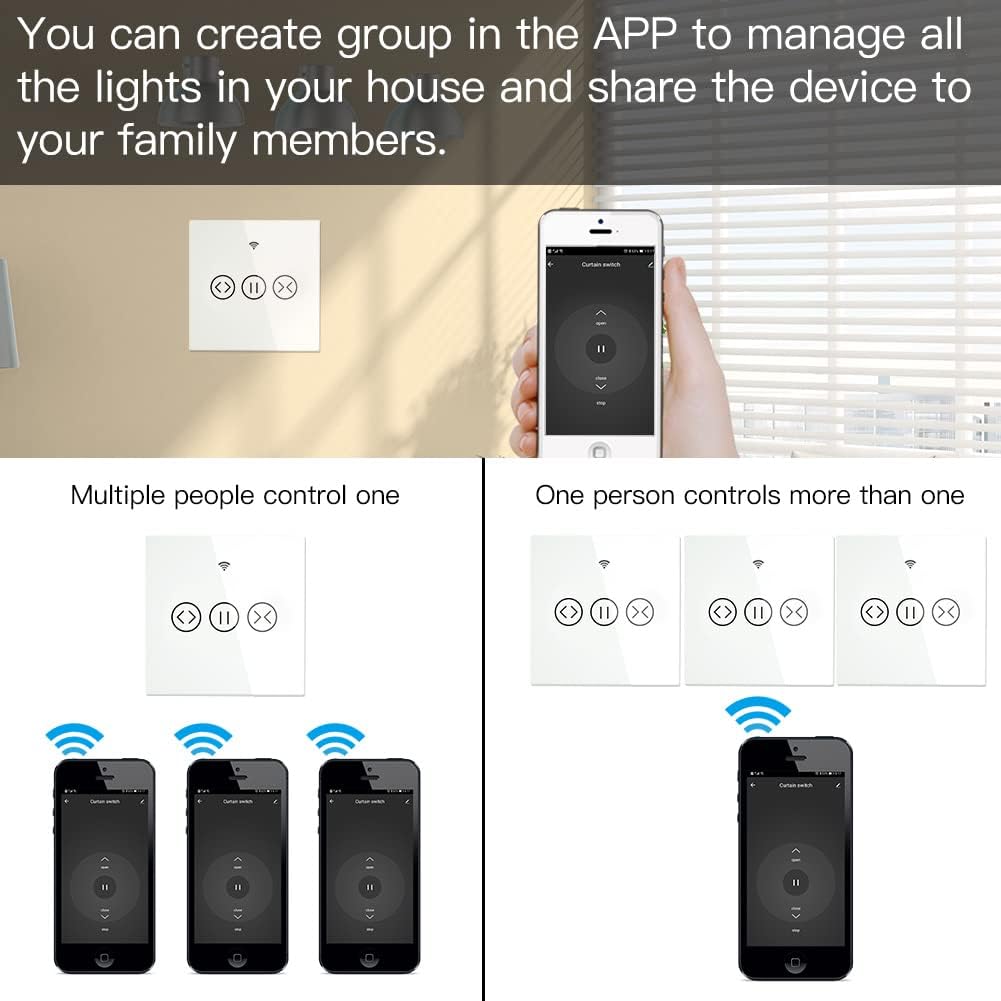
6.6 Group Control and Sharing
The app allows you to create groups of switches for simultaneous control and share device access with family members.
- グループコントロール: Manage multiple switches as a single group within the app.
- デバイスの共有: Share control of the switch with other users who have the Smart Life/Tuya app, granting them access to operate the blinds.
7. メンテナンス
- クリーニング: Use a soft, dry cloth to clean the touch panel. Avoid abrasive cleaners or solvents.
- ファームウェアの更新: 最適なパフォーマンスとセキュリティを確保するために、Smart Life/Tuya アプリで利用可能なファームウェア アップデートを定期的に確認してください。
- 環境条件: Ensure the switch is not exposed to extreme temperatures or humidity, which can affect its operation and lifespan.
8。 トラブルシューティング
- スイッチが応答しない: Check if the power supply is connected correctly. Ensure the circuit breaker is ON.
- アプリのペアリング失敗:
- Wi-Fi ネットワークが 2.4GHz であることを確認してください。5GHz ネットワークはサポートされていません。
- Verify the switch is in pairing mode (Wi-Fi indicator blinking rapidly).
- Wi-Fi パスワードが正確かどうか確認してください。
- ペアリング中にスイッチを Wi-Fi ルーターに近づけます。
- 音声コントロールが機能しない:
- Smart Life/Tuya アカウントが Alexa または Google Home に正しくリンクされていることを確認します。
- Ensure the device is discovered and named appropriately in the smart assistant app.
- インターネット接続を確認してください。
- RF Remote Not Controlling: Ensure the RF remote is properly paired with the switch according to its own instructions.
- 断続的な接続: Check your Wi-Fi signal strength. Consider repositioning your router or using a Wi-Fi extender.
9. 保証とサポート
This MOES product comes with a 2年間保証 そして 60-day refund guarantee to ensure your satisfaction. For technical support or warranty claims, please contact MOES customer service through the retailer where you purchased the product or visit the official MOES web連絡先情報のサイト。