導入
The Strymon NightSky is a powerful and innovative time-warped reverberator pedal designed to transform your sound. It offers a unique blend of traditional reverb and advanced sound design capabilities, allowing musicians to explore new sonic dimensions. This manual provides essential information for setting up, operating, and maintaining your NightSky pedal.
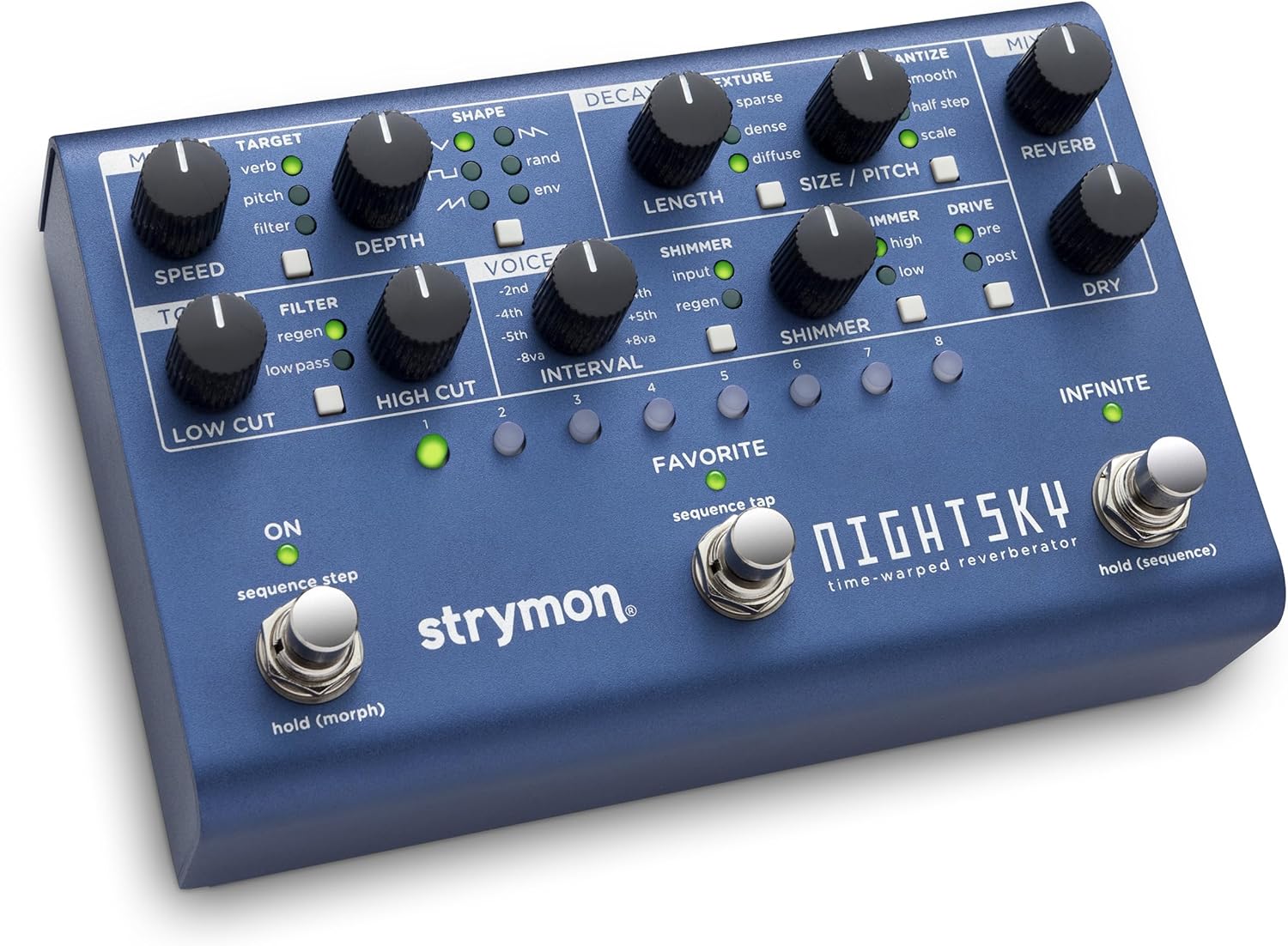
画像: 上 view of the Strymon NightSky pedal, showcasing its blue metallic finish, numerous control knobs, and three footswitches. The labels for each control section are clearly visible.
主な特徴
- Time-Warped Reverberation: Experience a groundbreaking effects pedal that transcends traditional reverb, transforming your instrument into vast soundscapes with surreal pitch and harmonic manipulation and synth-like filter sweeps.
- Powerful Sound Design Platform: Real-time control over reverb pitch, processing rate, core size, harmonics, and resonant filter, plus a versatile step sequencer with variable glide.
- Experimental Sonic Dimensions: Instant response knob-tweaking allows deep and powerful sound manipulation without menu diving, unlocking unparalleled creative potential.
- Versatile Reverb Core: Adjust reverb size and pitch simultaneously with the Variable Process Rate of NightSky's Warp Core, offering smooth or quantized pitch changes and sequencing capabilities.
- Enhanced Harmonic Manipulation: Shift harmonic structure with Shimmer, dynamically enrich with Glimmer, and generate saturated overdriven harmonics with Drive. Sculpt your signal further using the variable-resonance low-pass filter.
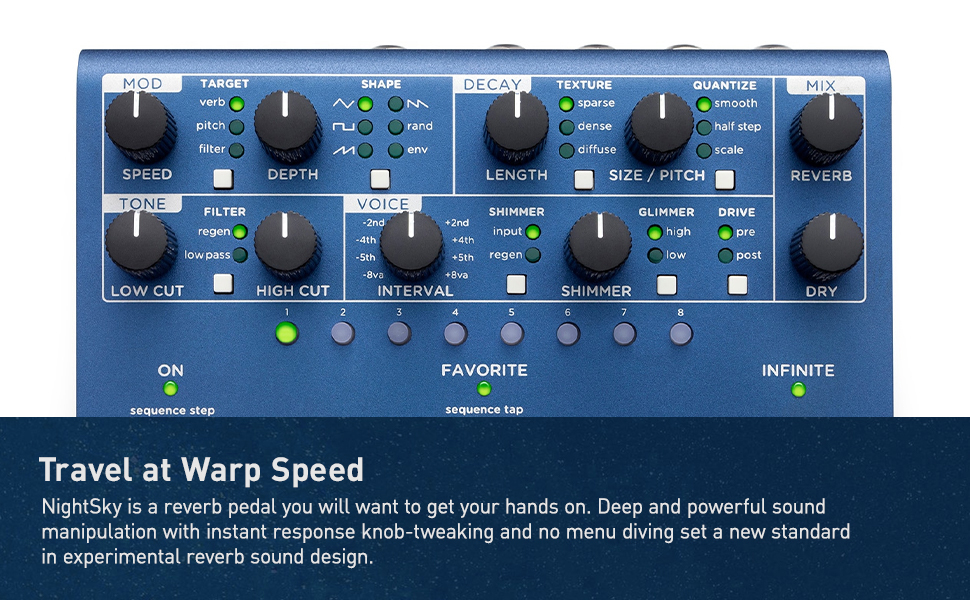
Image: The Strymon NightSky pedal is shown against a starry background with an astronaut, emphasizing its advanced sound design capabilities and the vast sonic landscapes it can create.
コントロールと機能
The NightSky pedal features a comprehensive set of controls for precise sound shaping.
MOD Section
- スピード: モジュレーションのレートをコントロールします。
- ターゲット: Selects the parameter to which modulation is applied (Verb, Pitch, Filter).
- 形: Chooses the modulating waveform (Sine, Triangle, Random, Envelope).
- 深さ: Adjusts the intensity of the modulation effect.
TONE Section
- ローカット: Filters out low frequencies from the reverb signal.
- フィルター: Controls a variable-resonance low-pass filter for shaping the reverb tone.
- HIGH CUT: Filters out high frequencies from the reverb signal.
VOICE Section
- 間隔: Selects the harmonic interval for pitch shifting (e.g., -2nd, -4th, -5th, -8va, +2nd, +4th, +5th, +8va).
DECAY Section
- 長さ: リバーブの減衰時間を調整します。
- テクスチャ: Selects the reverb core type: Sparse (distinct reflections), Dense (smooth sound field), or Diffuse (slow-building atmospheric wash).
SIZE / PITCH Section
- 量子化: Selects the response and range of the SIZE/PITCH knob (Smooth, Half Step, Scale).
- シマー: Adds an octave-up or octave-down effect to the reverb tail.
- グリマー: Dynamically enhances high or low frequency harmonics for synth-like textures.
- ドライブ: Adds saturated overdriven harmonics to the reverb (Pre or Post).
MIX Section
- リバーブ: Sets the output level of the reverberated signal.
- ドライ: Sets the output level of the unprocessed signal.
Foot Switches & Buttons
- ON (Left Footswitch): Toggles the effect on/off. Hold to morph between settings.
- FAVORITE (Middle Footswitch): Taps tempo for the sequencer.
- INFINITE (Right Footswitch): Freezes the audio input and plays it back endlessly.
- PRESET BUTTONS (1-8): Select and enable 16 presets directly from the front panel.
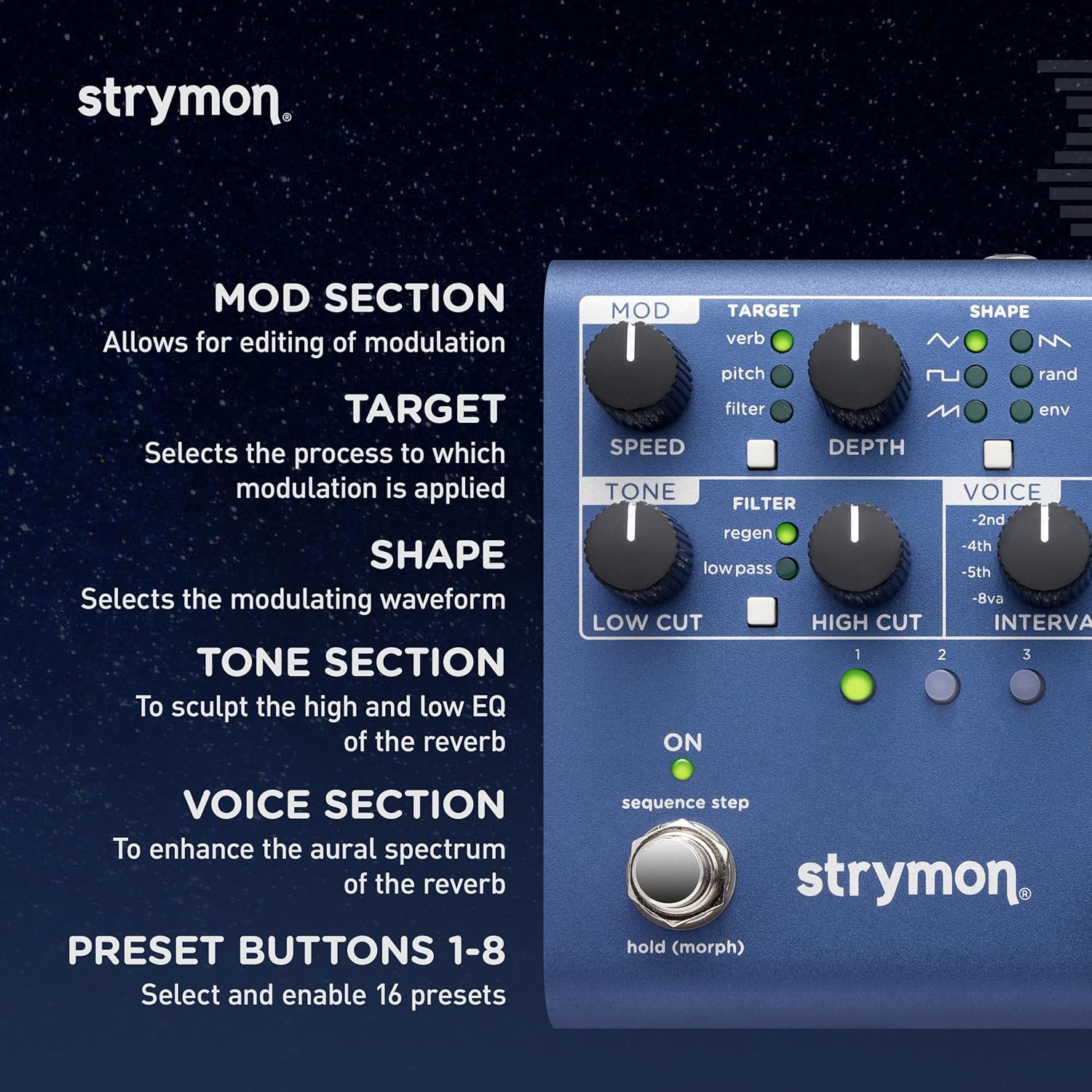
画像: 詳細な view of the left side of the NightSky pedal, highlighting the Mod, Tone, and Voice sections, along with the preset buttons and their corresponding LEDs.
接続
The NightSky offers versatile connectivity options for various setups.
- Input (Left/Right): Standard 1/4-inch mono/stereo audio inputs.
- Output (Left/Right): Standard 1/4-inch mono/stereo audio outputs.
- EXP: Expression pedal input for real-time control of parameters.
- USB: USB port for firmware updates and MIDI control.
- MIDI 入力/出力: Standard MIDI connections for advanced control and integration with other MIDI devices.

Image: The rear panel of the NightSky pedal, displaying the various input and output jacks, including dedicated instrument/line input level switch, USB, and MIDI ports.
操作モード
モーフモード
Hold the left footswitch (ON) to seamlessly morph between two different settings of the pedal. The morph speed can be adjusted for smooth transitions.
シーケンスモード
The NightSky features an eight-step sequencer that allows you to create pitched or free-tuned sequences. These sequences can be saved per preset, offering extensive creative possibilities.
公式製品ビデオ
Explore the capabilities of the Strymon NightSky with these official product videos from the manufacturer.
Strymon NightSky Time-Warped Reverberator Reverb Guitar Overview
ビデオ: 包括的なオーバーview of the Strymon NightSky pedal, demonstrating its various features and sound possibilities for guitar, synths, vocals, and keyboards. (Duration: 13:47)
Strymon NightSky Reverberator Pedal Features
Video: A focused demonstration of the key features and functionalities of the Strymon NightSky Reverberator Pedal. (Duration: 1:50)
仕様
| アイテム重量 | 2.1ポンド |
| 製品寸法 | 4.5 x 6.98 x 1.75インチ |
| 商品型番 | NIGHTSKY |
| 色 | 青 |
| ハードウェアインターフェイス | 1/4インチオーディオ |
| 信号フォーマット | アナログ |
| 電源 | コード式電気 |
| 巻tage | 9ボルト |
お手入れとメンテナンス
To ensure the longevity and optimal performance of your Strymon NightSky pedal, follow these guidelines:
- クリーニング: ペダルの外側を拭く際は、柔らかく乾いた布をご使用ください。研磨剤入りの洗剤や溶剤は使用しないでください。
- ストレージ: ペダルは直射日光や極端な温度を避け、涼しく乾燥した場所に保管してください。
- 電源: Always use the recommended 9V DC power supply with the correct polarity. Using an incorrect power supply can damage the unit and void the warranty.
- 接続: Ensure all cables are securely connected to prevent signal loss or damage. Disconnect cables when not in use or during transport.
トラブルシューティング
If you encounter issues with your NightSky pedal, try the following steps:
- 電源なし:
- Verify the power supply is correctly connected and is the specified 9V DC.
- 電源コンセントの機能を確認してください。
- 音が出ない:
- すべてのオーディオ ケーブルが入力ジャックと出力ジャックに正しく接続されていることを確認します。
- Check the input source (instrument, synth) and output destination (amplifier, mixer) for proper operation.
- Verify the pedal is engaged (ON footswitch LED is lit).
- Check the MIX knobs (REVERB and DRY) to ensure they are not set to minimum.
- 予期しない音/ノイズ:
- グラウンド ループまたは他の電子機器からの干渉がないか確認します。
- すべてのケーブルが良好な状態であり、適切にシールドされていることを確認します。
- Adjust the DRIVE knob if saturated harmonics are not desired.
For further assistance, please refer to the official Strymon support resources or contact customer service.
保証とサポート
Strymon products are built with high-quality components and undergo rigorous testing. For detailed warranty information and support resources, please visit the official Strymon web公式サイトをご覧いただくか、カスタマーサービスチームにお問い合わせください。保証請求の際は、購入証明としてレシートを保管してください。


