1. はじめに
Thank you for choosing the GoHawk RE9-X Motorcycle/UTV Bluetooth Speaker System. This manual provides essential information for the proper installation, operation, and maintenance of your new speaker system. Please read this manual thoroughly before use to ensure optimal performance and safety.

Image 1.1: GoHawk RE9-X Speaker System Overview
The GoHawk RE9-X is a waterproof speaker system designed for motorcycles, ATVs, UTVs, 4-wheelers, Go-Karts, and Golf Karts. It features Bluetooth wireless connectivity, an integrated LED light strip, AUX-in, FM radio, and a USB port for MP3 playback.
2. 安全情報
- Always ensure the speaker system is securely mounted to prevent detachment during vehicle operation.
- Verify all wiring connections are correct and insulated to avoid electrical shorts or damage.
- Do not operate the speaker system at excessively high volumes that may impair your ability to hear traffic or emergency signals.
- This product is designed for 12V DC power systems only. Connecting to other voltage sources may cause damage.
- While the unit is waterproof, avoid submerging it in water or exposing it to high-pressure water jets.
3. パッケージ内容
パッケージに以下の項目が含まれているか確認してください。
- 1 x Speaker Stereo Main Unit
- 2x取り付けClamps
- パワーハーネス x 1
- ユーザーマニュアル (本書) x 1
4. 特徴
The GoHawk RE9-X speaker system offers a range of features for an enhanced audio experience:
- Bluetoothワイヤレス: 互換性のあるデバイスからオーディオをストリーミングします。
- 24 White LEDs Strip: Integrated lighting feature, controllable with one click.
- USB 2.0ポート: MP3をサポート file playback from USB drives.
- オーキシン: 有線接続用の 3.5mm オーディオ入力。
- FMラジオ: Built-in radio tuner.
- Display with Clock: Digital display for information and time.
- 防水設計: Advanced protection against water exposure.
- アルミニウムハウジング: Durable and satin-finished construction.
- Innovative Mounting: Ball stub design with 360-degree swivel for flexible installation.
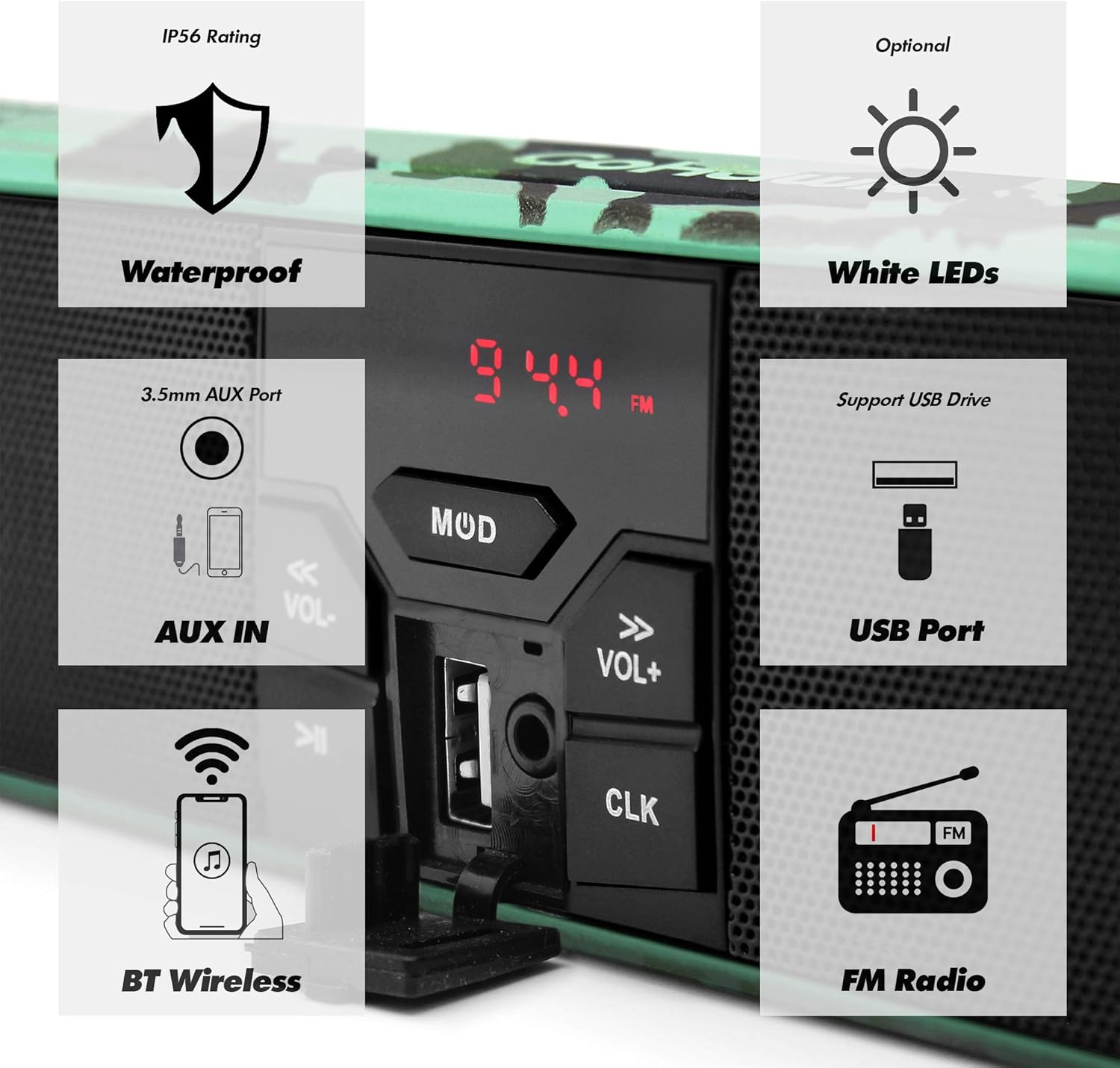
Image 4.1: Key Features of the RE9-X System
5. インストールとセットアップ
5.1 Handlebar Clearance Measurement
Before installation, measure your handlebar's center clearance. The RE9-X model has an overall width of 18-1/4 inches. If your clearance is smaller, consider the RE8 model (16-3/4 inches overall width).

Image 5.1: Handlebar Clearance Comparison and Wiring Diagram
5.2 スピーカーシステムの取り付け
- マウンティングclを取り付けますamps to your vehicle's handlebar. The clamps support handlebar sizes from 7/8 inch to 1 1/4 inches.
- Secure the speaker unit to the mounting clamps using the ball stub design. This allows for 360-degree swivel adjustment to achieve the desired angle.
- Ensure all mounting bolts are tightened securely to prevent movement during operation.
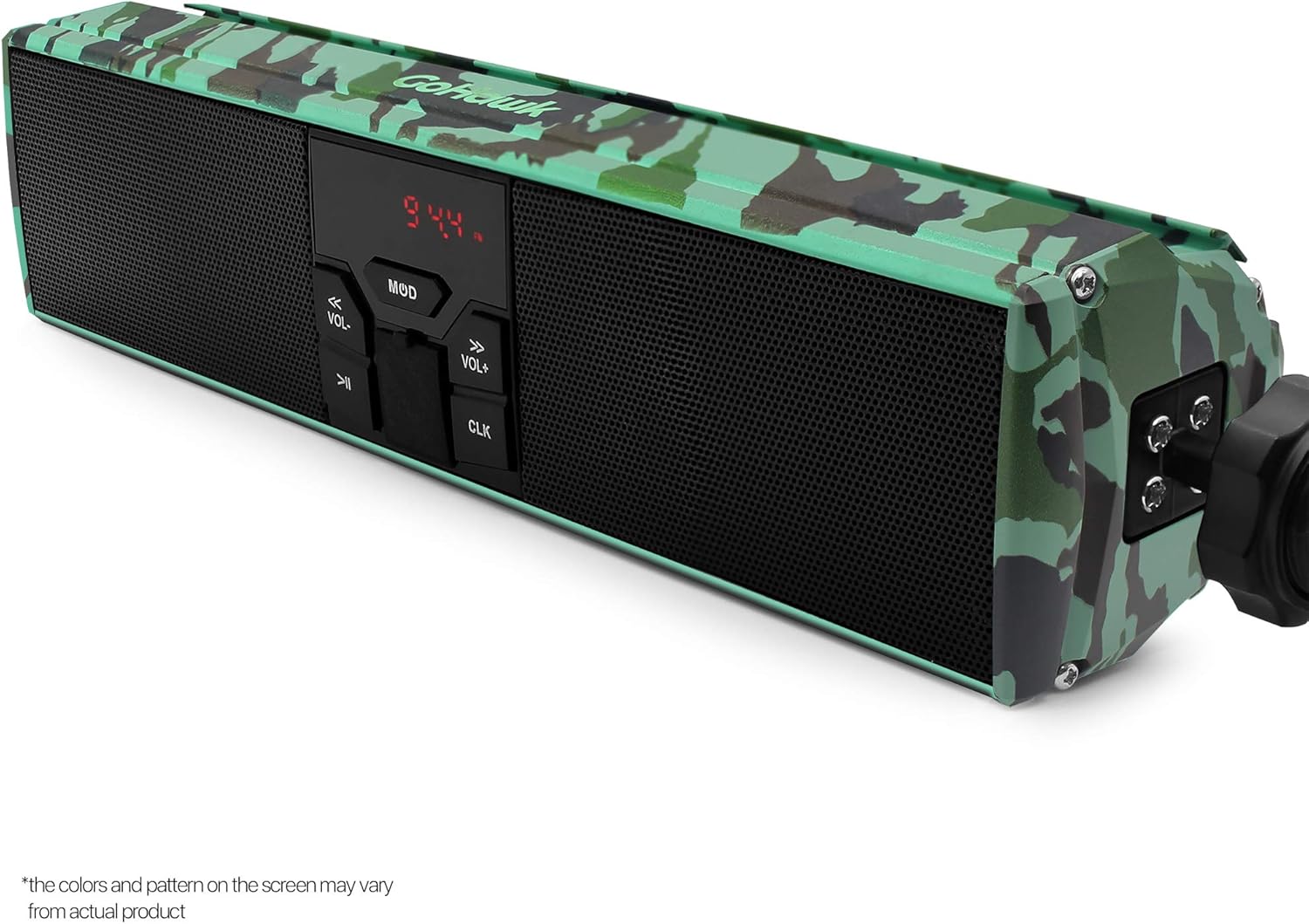
Image 5.2: Mounting Clamp and Swivel Mechanism
5.3配線接続
The system includes a 59-inch battery cable harness with ring terminal connectors for direct connection to your 12V DC battery.
- Connect the red wire of the power harness to the positive (+) terminal of your 12V battery.
- Connect the black wire of the power harness to the negative (-) terminal of your 12V battery.
- Ensure all connections are tight and properly insulated to prevent short circuits.
- Route the wiring safely, away from moving parts or heat sources, and secure it with cable ties if necessary.

Image 5.3: Power Harness Wiring Diagram

Image 5.4: Speaker System Mounted on Handlebar
6. 操作
6.1 電源オン/オフ
を押す MOD ユニットの電源をオンまたはオフにするボタン。
6.2 モード選択
を押す MOD button repeatedly to cycle through available modes: Bluetooth, FM Radio, AUX-IN, USB.
6.3 ボリュームコントロール
使用 巻+ そして vol- 音量レベルを調整するボタン。
6.4Bluetoothペアリング
- Switch the speaker system to Bluetooth mode. The display will indicate pairing readiness.
- モバイル デバイスで Bluetooth を有効にし、利用可能なデバイスを検索します。
- Select "GoHawk RE9-X" (or similar name) from the list to pair.
- Once paired, you can stream audio wirelessly. The wireless transmission range is typically over 15 meters.
6.5 FMラジオの操作
- Switch the speaker system to FM Radio mode.
- 使用 前のトラック そして 次のトラック buttons (often labeled with arrows) to scan for radio stations.
- The display will show the current frequency (e.g., 94.4 FM).
6.6 USB再生
- MP3が入ったUSBドライブを挿入します filesUSBポートに接続します。
- Switch the speaker system to USB mode.
- システムは自動的にMP3の再生を開始します fileNS。 使用 前のトラック そして 次のトラック トラックをナビゲートするためのボタン。
6.7 AUX-INの使用
Connect an external audio device (e.g., MP3 player) to the 3.5mm AUX-IN port using a standard audio cable. Switch the speaker system to AUX-IN mode to play audio from the connected device.
6.8LEDライトストリップ
The integrated 24 white LED strip can be turned on or off with a single click of the dedicated LED button (often indicated by an arrow icon).
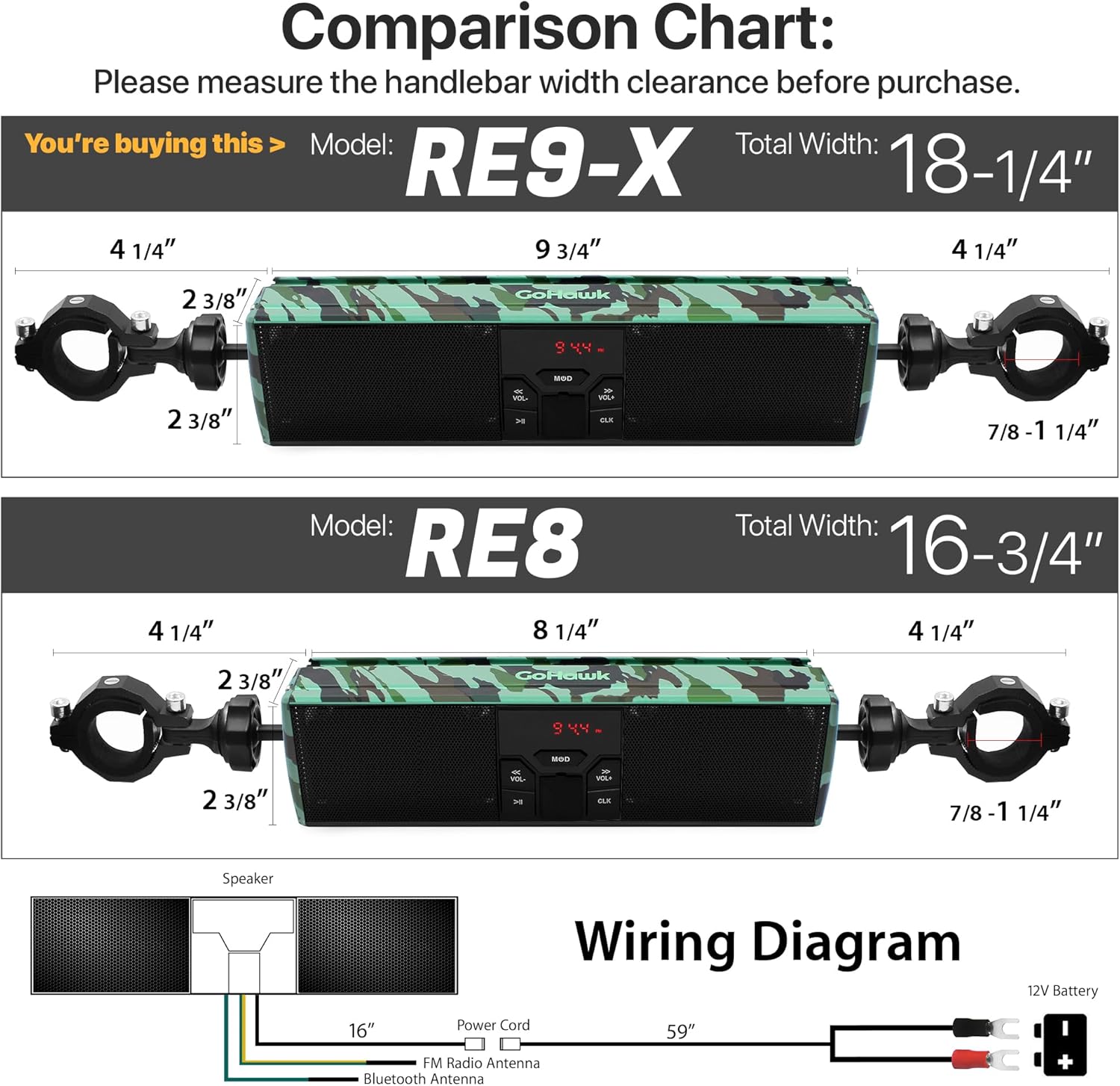
Image 6.1: Illuminated LED Strip
6.9時計表示
The digital display also functions as a clock. Refer to the specific button on your unit (often labeled クロック) for setting the time.
7. メンテナンス
- クリーニング: 柔らかくてamp cloth to clean the speaker unit. Avoid harsh chemicals or abrasive cleaners.
- 防水ケア: Although waterproof, ensure all ports (USB, AUX-IN) are covered when not in use to maintain water resistance.
- 接続チェック: 特に濡れた状態で走行した後は、すべての配線接続に腐食や緩みがないか定期的に確認してください。
- セキュリティの強化: Regularly inspect the mounting clamps and bolts to ensure they remain tight and secure.
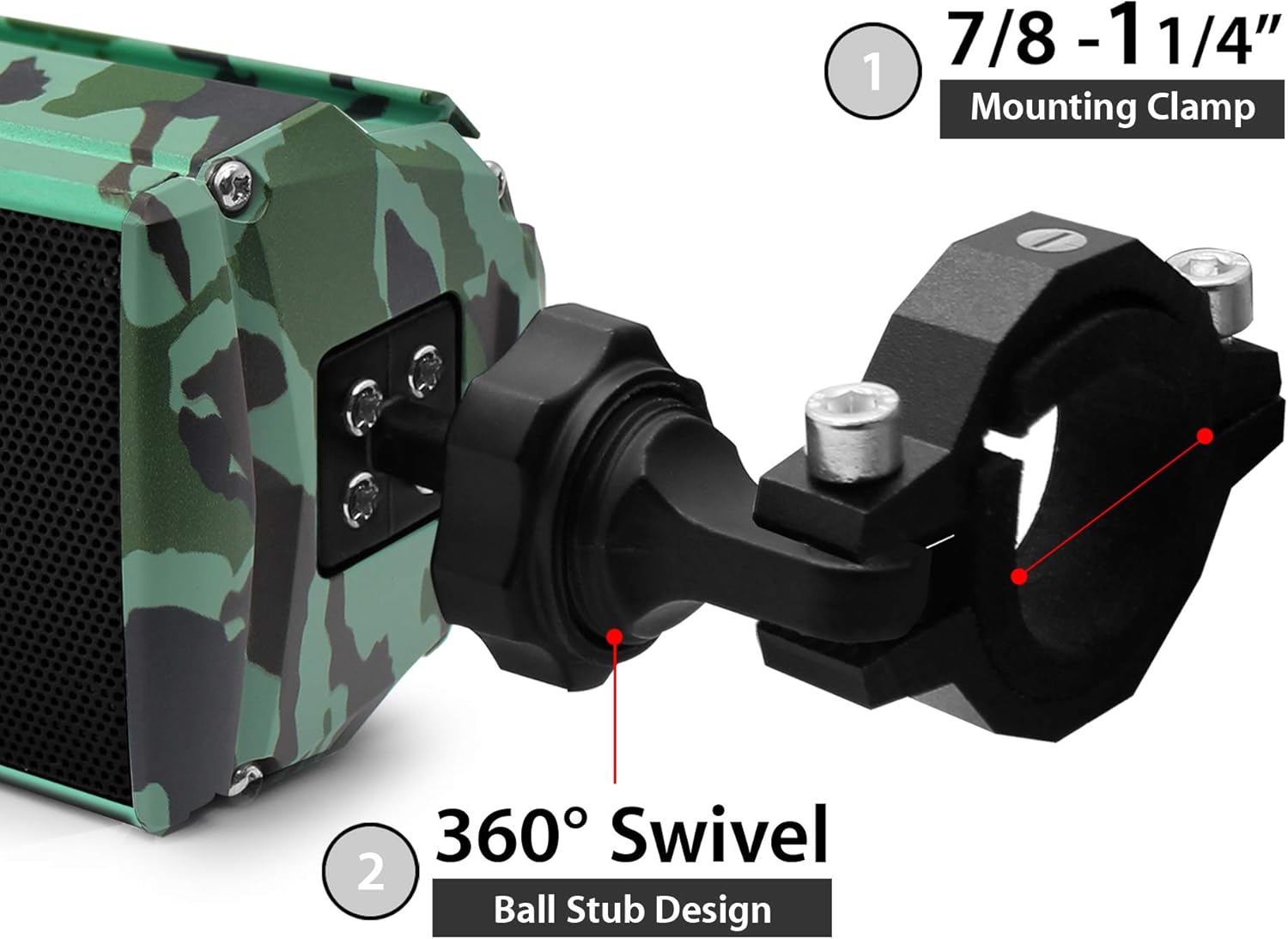
Image 7.1: Aluminum Housing with Camo Green Finish
8。 トラブルシューティング
| 問題 | 考えられる原因 | 解決 |
|---|---|---|
| 電源なし | 電源接続の緩み、ヒューズ切れ、バッテリー電圧低下tage. | Check power harness connections. Verify battery voltage. Inspect vehicle's fuse box. |
| 音が出ない | Volume too low, incorrect mode, device not paired (Bluetooth), faulty cable (AUX). | Increase volume. Select correct input mode. Re-pair Bluetooth device. Check AUX cable. |
| Bluetoothが接続されない | スピーカーがペアリングモードになっていない、デバイスが遠すぎる、干渉が発生している。 | スピーカーがBluetoothモードになっていることを確認してください。デバイスを近づけてください。両方のデバイスを再起動してください。 |
| FM受信状態が悪い | Weak signal, interference, antenna obstruction. | Relocate vehicle for better signal. Scan for stronger stations. |
| USB再生の問題 | サポートされていません file format, corrupted USB drive, drive not properly inserted. | 確保する files are MP3 format. Try a different USB drive. Reinsert USB drive. |
9. 仕様
| 特徴 | 仕様 |
|---|---|
| モデル | RE9-X |
| 定格巻tage | 12V直流 |
| 最大入力電力 | 12W×2 |
| 定格インピーダンス | 4 - 8 Ω |
| Bluetoothバージョン | 4.0 |
| 無線伝送範囲 | > 15m (49.21 feet) |
| 周波数範囲 | 20Hz - 20KHz |
| FM Cover | 87.5 - 108 MHz |
| FM感度 | ≤37dB |
| FM歪み | ≤0.5% |
| FM SNR | ≥40dB |
| オーキシン | 3.5mmジャック |
| USBサポート | USB Drive in MP3 format |
| Speaker Width (Body) | 9-3/4インチ |
| Speaker Width (Overall) | 18-1/4インチ |
| ハンドルバーClamp サイズ | 7/8 to 1-1/4 in. |
| 材料 | アルミニウム |
| 耐水性レベル | 防水 |
10. 保証情報
This GoHawk product comes with a limited warranty. For specific details regarding warranty coverage, duration, and terms, please refer to the warranty card included with your purchase or contact GoHawk customer support.
11. カスタマーサポート
If you encounter any issues or have questions regarding your GoHawk RE9-X speaker system that are not covered in this manual, please contact GoHawk customer support for assistance. Contact information can typically be found on the product packaging or the official GoHawk webサイト。


