導入
Thank you for choosing the DOOGEE S58 PRO Rugged Smartphone. This manual provides essential information for setting up, operating, maintaining, and troubleshooting your device. Please read it carefully to ensure optimal performance and longevity of your smartphone.
The DOOGEE S58 PRO is designed for durability, featuring IP68/IP69K water and dust resistance, and a robust build to withstand challenging environments.
パッケージ内容
製品パッケージにすべてのアイテムが揃っていることを確認します。
- DOOGEE S58 PRO 頑丈なスマートフォン
- タイプCのUSBケーブル
- Type-C to 3.5mm Headphone Adapter
- 充電器
- Anti-explosion Film (Screen Protector)
- カードスロットオープナー
- スリング
- ユーザーマニュアル(このドキュメント)
デバイスオーバーview
The DOOGEE S58 PRO is built with a rugged design for enhanced durability. Its construction includes multiple rigid layers and a silicone liner for exceptional shock absorption, similar to materials used in off-road vehicle tires.

画像: 前面と背面 view of the DOOGEE S58 PRO, highlighting its rugged construction and IP68 rating. The design incorporates elements for shock absorption.
セットアップガイド
1. バッテリーの充電
Before first use, fully charge the device. Connect the Type-C USB cable to the phone's charging port and the other end to the provided charger. Plug the charger into a power outlet. The 5180mAh battery typically provides 2-3 days of normal use on a full charge.

画像: Diagram illustrating the internal 5180mAh battery of the DOOGEE S58 PRO, with indicators for standby, music, video, calling, and gaming durations.
2. SIMカードとMicroSDカードの取り付け
Locate the SIM card tray on the side of the phone. Use the provided card slot opener to eject the tray. Insert your Nano-SIM cards and/or a MicroSD card (for expandable storage up to 256GB) into the designated slots. Ensure the cards are correctly oriented. Carefully reinsert the tray until it clicks into place. The SIM card slot is protected by an O-ring for water resistance.
3.電源のオン/オフ
- 電源を入れるには:DOOGEE ロゴが表示されるまで電源ボタンを押し続けます。
- 電源を切るには: 電源ボタンを長押しし、画面上のオプションから「電源を切る」を選択します。
4. 初期設定
初めて電源を入れたら、画面の指示に従ってデバイスのセットアップを行ってください。これには、言語の選択、Wi-Fiネットワークへの接続、Googleアカウントの設定、セキュリティ機能の設定が含まれます。
操作手順
1. Android 10 オペレーティング システム
Your DOOGEE S58 PRO runs on Android 10.0, offering a user-friendly interface and access to a wide range of applications via the Google Play Store. Navigate using gestures or the traditional navigation bar.
2. パフォーマンスとストレージ
Equipped with 6GB RAM and 64GB ROM, powered by an efficient MediaTek Helio P22 octa-core CPU, the S58 PRO ensures smooth operation for browsing, video playback, and 3D gaming. The internal storage can be expanded up to 256GB using a MicroSD card.

画像: Visual representation of the DOOGEE S58 PRO's 6GB RAM and 64GB ROM, emphasizing its fluid and speedy performance for various applications.
3. カメラ機能
The S58 PRO features a versatile camera system:
- リアカメラ: 16MP AI Triple Camera (SONY IMX298 main sensor) with additional 2MP Portrait and 2MP Macro lenses.
- フロントカメラ: 16MP (SAMSUNG sensor).
- 水中カメラモード: Utilize this mode for capturing photos and videos in aquatic environments, leveraging the phone's IP68 rating.

画像: Depiction of the DOOGEE S58 PRO's camera setup, including the 16MP AI Triple Rear Camera and 16MP Front Camera, along with examples of photos taken with the main, portrait, and macro lenses.
4. ナビゲーションと接続性
- グローバルナビゲーションシステム: The S58 PRO supports GPS, Galileo, Glonass, and Beidou for precise positioning, ensuring you can find your way anywhere.
- Wireless NFC: For convenient contactless payments and data exchange.
- 接続性: Supports 4G and 3G cellular networks, Wi-Fi, and Bluetooth.

画像: A collage showing the DOOGEE S58 PRO's support for four satellite navigation systems (GPS, Galileo, Glonass, Beidou), wireless NFC functionality, and a selection of pre-installed utility tools like Compass, Sound Meter, and Magnifier.
5. Custom Key and Utility Tools
The device includes a customizable physical key for quick access to frequently used apps or functions. Additionally, a suite of outdoor utility tools is pre-installed, including Compass, Sound meter, Pic hanging, Gradienter, Height measure, Magnifier, Protractor, Plumb bob, and Warning.
メンテナンスとケア
1. 防水・防塵性能
The DOOGEE S58 PRO is IP68 and IP69K certified, meaning it is resistant to submersion up to 1 meter underwater for 24 hours and can withstand high-pressure, high-temperature water jets. It also meets MIL-STD-810G standards for durability.
- 携帯電話を水やほこりにさらす前に、すべてのポート カバー (USB-C、SIM トレイ) がしっかりと閉じられていることを確認してください。
- 携帯電話が濡れた場合は、充電したりポートを開けたりする前に、清潔な布で拭いて乾かしてください。
- 携帯電話を動作範囲外(-55°C ~ 70°C)の極端な温度にさらさないでください。
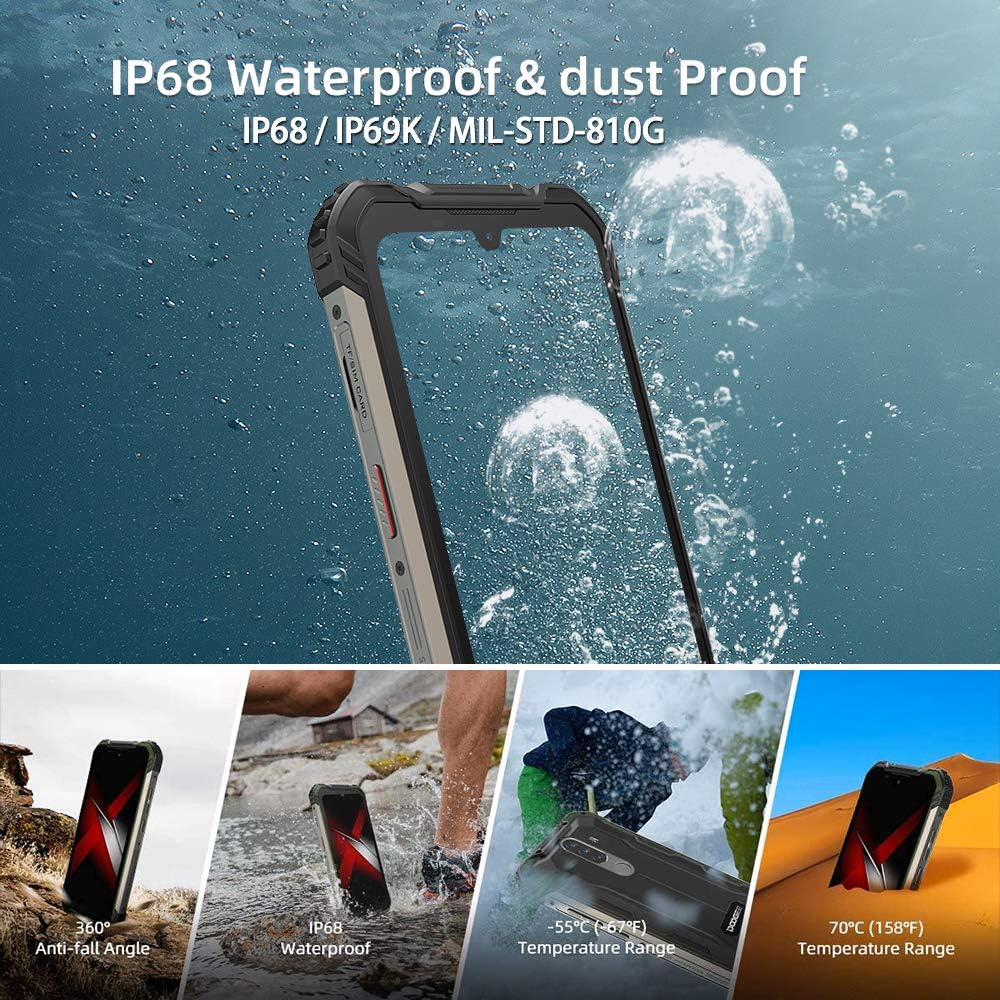
画像: Visual demonstration of the DOOGEE S58 PRO's IP68 waterproof and dustproof capabilities, including resistance to drops, water immersion, and extreme temperatures ranging from -55°C to 70°C.
2. 清掃
柔らかくて乾いた布でデバイスを清掃してください。amp cloth. Avoid using harsh chemicals or abrasive materials, which can damage the phone's protective coatings.
3. バッテリーのお手入れ
To prolong battery life, avoid fully discharging the battery frequently. Charge the phone using only the provided charger and cable. Extreme temperatures can affect battery performance and lifespan.
トラブルシューティング
If you encounter issues with your DOOGEE S58 PRO, refer to the following common solutions:
- デバイスの電源が入らない: バッテリーが充電されていることを確認してください。充電器を接続し、数分待ってから再度電源を入れてください。
- アプリがクラッシュまたはフリーズする: Close the problematic app and reopen it. If the issue persists, restart the phone. Ensure your apps are updated to their latest versions.
- ネットワーク信号が弱い: SIMカードが正しく挿入されているかご確認ください。ネットワークの電波状況が良い場所に移動してください。
- 水やほこりの侵入: If you suspect water or dust has entered the device despite its ratings, power off the phone immediately and allow it to dry completely. Do not attempt to charge it while wet.
- 画面の問題: If the screen is unresponsive, try restarting the device. Ensure the anti-explosion film (screen protector) is correctly applied and not interfering with touch sensitivity.
For more complex issues, consider performing a factory reset (back up your data first) or contact customer support.
仕様
| 特徴 | 詳細 |
|---|---|
| ブランド | ドゥージー |
| モデル | ドゥージーS58プロ |
| オペレーティング·システム | アンドロイド10.0 |
| プロセッサ | MediaTek Helio P22 Octa-core CPU |
| ラム | 6ギガバイト |
| 内部ストレージ (ROM) | 64 GB (MicroSD経由で最大256 GBまで拡張可能) |
| 画面 | 5.71-inch CORNING GORILLA GLASS HD+ Waterdrop, 720 x 1520 Resolution |
| リアカメラ | 16MP AI Triple Camera (SONY IMX298) + 2MP + 2MP |
| フロントカメラ | 16MP (SAMSUNG) |
| バッテリー | 5180 mAhリチウムイオン |
| 耐水・防塵 | IP68、IP69K、MIL-STD-810G |
| 寸法 | 16.28 x 8.1 x 1.59 cm |
| 重さ | 284グラム |
| 接続性 | 4G, 3G, Wi-Fi, Bluetooth, NFC |
| ナビゲーション | GPS、ガリレオ、グロナス、北斗 |
| 動作温度 | -55°C ~ 70°C |
保証とサポート
For warranty information, please refer to the warranty card included in your product packaging or contact your point of purchase. Warranty terms and conditions may vary by region and retailer.
If you require technical assistance or have questions not covered in this manual, please contact the seller or DOOGEE customer support through their official webサイト。


