1. はじめに
The ChunHee WI02 Window Speaker Intercom System is designed to facilitate clear, dual-way voice communication through glass or partition barriers. This system is ideal for environments such as banks, hospitals, offices, and service windows where direct interaction is limited. It incorporates automatic dual-way intercommunication technology, eliminating the need for manual switching during conversations. The system features adjustable volume controls for both the internal and external speakers, along with a high-sensitive microphone for clear, natural sound, enhanced by anti-interruption and noise reduction capabilities.

Image 1: ChunHee WI02 Window Speaker Intercom System components.
2. 箱の中身
以下にリストされているすべてのアイテムがパッケージに含まれていることを確認してください。
- 1 x Dual-way Counter Interphone (Main Unit)
- 1 x External Speaker
- 1 x Power Supply (DC12V power adapter)
- 取扱説明書 x 1
- 1 x 3M Double Sided Tape (for external speaker mounting)
- 4 x Locating pieces (for cable management)

Image 2: Package contents of the ChunHee WI02 Window Speaker Intercom System.
3 製品の特徴
- Dual-Way Intercommunication: Automatic identification of speech signals for seamless two-way conversation without manual intervention.
- 調節可能な音量: Independent knob controls for both inner and outer speaker volumes, allowing for optimal sound levels.
- 高感度マイク: Ensures clear and loud voice transmission, specifically designed for counter communication.
- Anti-Interference & Noise Reduction: Advanced microcomputer technology minimizes static and background noise for clear audio.
- 柔軟なマイク: The main unit features a flexible gooseneck microphone for easy positioning.
- 簡単なインストール: Simple connection process for quick setup.
- 幅広い用途: Suitable for various settings including banks, hospitals, offices, ticket booths, and service windows.

Image 3: Dual-way Intercom Functionality.

Image 4: Volume Adjustable Controls.

Image 5: Clear Sound Quality.

Image 6: Flexible Microphone Design.
4. セットアップ手順
Follow these steps to set up your ChunHee WI02 Window Speaker Intercom System:
- 本体の位置: Place the main unit (counter interphone) on the inside of the window or barrier, within easy reach of the operator.
- 外部スピーカーの位置: Mount the external speaker on the outside of the window or barrier. Use the provided 3M double-sided tape for secure attachment. Ensure the speaker is positioned where the external party will be speaking.
- 外部スピーカーを接続します。 Plug the external speaker cable into the 'Outer' port on the back of the main unit.
- 電源を接続します: Connect the DC12V power adapter to the 'Power' input on the back of the main unit, then plug the adapter into a standard electrical outlet.
- 電源オン: Flip the 'ON/OFF' switch on the back of the main unit to the 'ON' position. The Power LED on the front panel should illuminate.
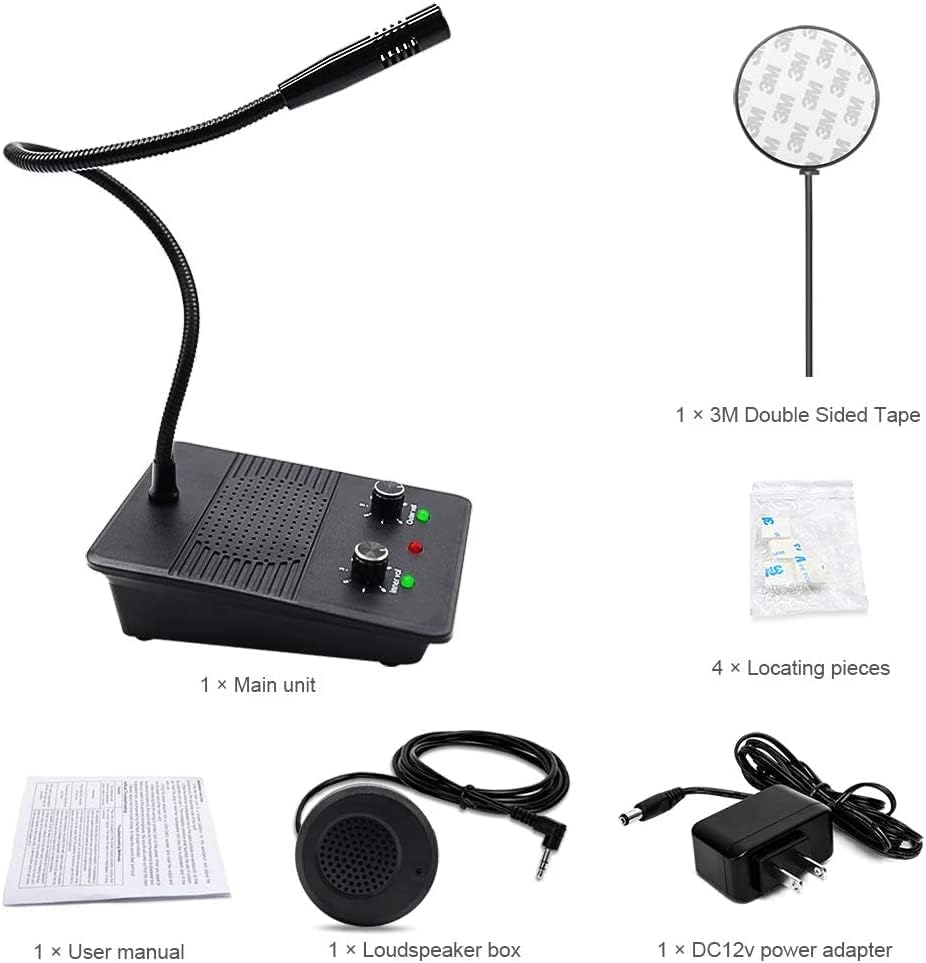
Image 7: Connection diagram and dimensions of the main unit and external speaker.
セットアップビデオガイド
Video 1: This video demonstrates the physical components and basic setup of the ChunHee Window Speaker Intercom System, including the main unit, external speaker, and power adapter. It highlights the various ports and controls for easy identification.
5. 操作手順
The ChunHee WI02 system is designed for straightforward operation:
- Automatic Dual-Way Communication: Once powered on, the system automatically enables dual-way communication. You do not need to press any buttons to speak or listen.
- Adjusting Inner Volume: Use the 'Inner Volume' knob on the front panel of the main unit to adjust the listening volume for the operator.
- Adjusting Outer Volume: Use the 'Outer Volume' knob on the front panel of the main unit to adjust the listening volume for the external party.
- 話し中: Speak clearly into the flexible microphone on the main unit.
- リスニング: Listen for responses through the main unit's speaker. The external party will speak into the external speaker, and their voice will be transmitted to the main unit.
The system's advanced microcomputer technology automatically processes speech signals, ensuring clear and natural sound without requiring any action during a call.
6. メンテナンス
To ensure the longevity and optimal performance of your ChunHee WI02 Window Speaker Intercom System, follow these maintenance guidelines:
- クリーニング: Regularly wipe the main unit and external speaker with a soft, dry cloth. Avoid using abrasive cleaners, solvents, or harsh chemicals, as these can damage the surfaces.
- ケーブル検査: すべてのケーブルに摩耗、ほつれ、損傷の兆候がないか定期的に点検してください。損傷したケーブルは、故障や安全上の危険を防ぐため、直ちに交換してください。
- 環境条件: Keep the system away from extreme temperatures, direct sunlight, and high humidity. Ensure it is not exposed to water or other liquids.
- ストレージ: If storing the system for an extended period, disconnect the power supply and store it in a cool, dry place.
7。 トラブルシューティング
If you encounter issues with your ChunHee WI02 Window Speaker Intercom System, refer to the following troubleshooting steps:
| 問題 | 考えられる原因 | 解決 |
|---|---|---|
| 電源が入らない/システムが起動しない | 電源アダプタが接続されていないか故障しています。電源スイッチがオフになっています。 | Ensure the power adapter is securely connected to the main unit and a working power outlet. Check if the 'ON/OFF' switch is in the 'ON' position. |
| No sound from inner speaker | Inner volume knob is too low; External speaker not connected or faulty. | Increase the 'Inner Volume' knob. Verify the external speaker cable is securely plugged into the 'Outer' port. |
| No sound from outer speaker | Outer volume knob is too low; Main unit microphone not working. | Increase the 'Outer Volume' knob. Ensure the operator is speaking clearly into the main unit's microphone. |
| 歪んだ音や不明瞭な音 | Volume levels too high; Interference; Microphone too far from speaker. | Adjust both inner and outer volume knobs to a moderate level. Ensure the microphone is positioned correctly and not obstructed. Check for strong electromagnetic interference nearby. |
| 反響音 | Volume levels too high; Speakers too close to each other. | Reduce the volume levels. Ensure adequate separation between the main unit and the external speaker. |
8. 仕様
| 特徴 | 仕様 |
|---|---|
| モデル番号 | WI02 |
| 商品の寸法 (長さ x 幅 x 高さ) | 5.87 x 4.09 x 5.2インチ |
| アイテム重量 | 1.12ポンド |
| 電源 | DC |
| 材料 | プラスチック |
| 信号対ノイズ比 | 55デシベル |
| チャンネル数 | 1 |
| 周波数応答 | 15 kHz |
| 接続技術 | 補助 |
| 特集 | 内蔵マイク |
| 対応デバイス | スピーカー |
| 極性パターン | 一方向 |
| オーディオ感度 | 55デシベル |
| マイクフォームファクター | 境界 |
9. 保証とサポート
For warranty information and technical support regarding your ChunHee WI02 Window Speaker Intercom System, please refer to the documentation provided with your purchase or contact ChunHee customer service directly. Details on how to reach support are typically found on the manufacturer's official webサイトまたは製品パッケージ内に記載されています。


