1. はじめに
The D-Link DGS-1100-05PDV2 is a 5-Port Gigabit Smart Managed PoE Powered Switch/Extender designed for small, medium, and enterprise network environments. This switch is unique as it receives its power via Power over Ethernet (PoE) from an upstream PoE switch or injector, eliminating the need for a local AC power source. It also features PoE Pass-through capabilities, allowing it to supply power to one or two downstream PoE-enabled devices. The DGS-1100-05PDV2 incorporates energy-saving technologies like IEEE 802.3az Energy Efficient Ethernet and D-Link Green, ensuring efficient operation. Management is facilitated through an intuitive web-based interface, providing comprehensive control over network settings and features.
2. 主な特徴
- PoE Powered Operation: Receives power from an upstream PoE Switch or PoE injector, eliminating the need for a dedicated AC power supply.
- PoE Pass-through: Provides PoE power to one or two downstream devices, extending network and power reach.
- 5 ギガビット ポート: Offers high-speed network connectivity for various devices.
- Smart Managed Capabilities: Features include 802.1Q VLAN support, Quality of Service (QoS), and Bandwidth Limiting for optimized network performance.
- 高度なセキュリティ機能: Includes Static MAC, Storm Control, and IGMP Snooping to enhance network security and stability.
- エネルギー効率: Compliant with IEEE 802.3az Energy Efficient Ethernet (EEE) and D-Link Green technology for reduced power consumption.
- 簡単な管理: Configurable via an intuitive web-based management interface for simplified network administration.
- 診断ツール: Features Loopback Detection and Cable Diagnostics to assist in quickly identifying and resolving network issues.
- ファンレス設計: Ensures silent operation and contributes to a longer product lifespan.
- 柔軟な取り付け: Supports both desktop and wall mount placement.
- 生涯保証: Backed by a D-Link Lifetime Warranty for long-term reliability.
3. パッケージ内容
パッケージに次のアイテムが含まれていることを確認してください。
- DGS-1100-05PDV2 Gigabit Switch
- ゴム足
- 取り付けネジ
- クイックインストールガイド
- 保証書
Note: A PoE injector or an upstream PoE switch is required to power the DGS-1100-05PDV2 and is not included in the package.
4. セットアップ手順
4.1物理的な設置
The DGS-1100-05PDV2 switch is designed for flexible placement, supporting both desktop and wall mounting. Ensure the installation location provides adequate ventilation and is free from excessive heat or moisture.

図4.1: 前面 view of the D-Link DGS-1100-05PDV2 switch, showing five Gigabit Ethernet ports and LED indicators.
4.2 スイッチの電源供給
This switch is PoE-powered. It receives power from an upstream PoE switch or a PoE injector. Connect an Ethernet cable from a PoE-enabled port on your upstream device to any of the five ports on the DGS-1100-05PDV2. The switch will draw power through this connection.
The switch also features a grounding screw for enhanced safety. If required by your installation environment, connect a grounding wire to the "SWITCH GND" terminal on the rear panel of the device.

図4.2:例ample network diagram illustrating PoE power input and connections to various devices.
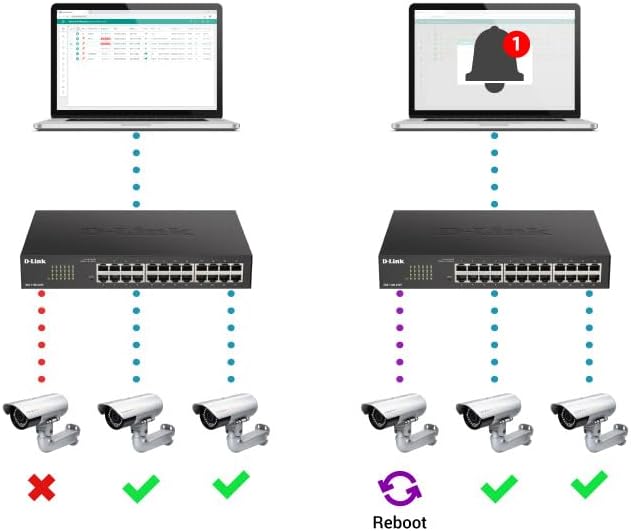
Figure 4.3: Rear panel of the switch, highlighting the "SWITCH GND" terminal for grounding.
4.3 初期設定(Web-Based Management)
The DGS-1100-05PDV2 can be managed via a web-based interface. By default, the switch may have a static IP address (e.g., 10.90.90.90) or obtain one via DHCP. To access the web インタフェース:
- Connect a computer directly to one of the switch's Ethernet ports.
- Configure your computer's IP address to be in the same subnet as the switch's default IP (e.g., if the switch is 10.90.90.90, set your computer to 10.90.90.x with a subnet mask of 255.255.255.0).
- 開く web ブラウザを開き、スイッチのデフォルトのIPアドレスを入力します(例: http://10.90.90.90).
- Log in using the default credentials (typically username: 管理者、パスワード: 管理者 or blank). Refer to the Quick Installation Guide for specific default credentials.
- Once logged in, you can configure network settings, including changing the IP address to DHCP or a different static IP, and enable desired features. Remember to save your configuration changes to ensure they persist after a reboot.
5. スイッチの操作
The DGS-1100-05PDV2 is a Smart Managed switch, offering various functionalities to optimize your network. After initial setup, you can utilize the web-based management interface to configure and monitor the switch.
5.1 PoE Pass-through Functionality
The switch supports PoE Pass-through on ports 1 and 2. This means that if the switch itself is powered by PoE (e.g., from an 802.3at source), it can then provide power to up to two downstream PoE-enabled devices connected to ports 1 and 2. The maximum PoE budget available for downstream devices depends on the input power received by the switch.
5.2 ネットワーク管理機能
を通じて web interface, you can configure advanced Layer 2 features:
- VLAN (仮想ローカル エリア ネットワーク): Segment your network for improved security and performance (e.g., 802.1Q VLAN support, Voice VLAN, Surveillance VLAN).
- サービス品質 (QoS): VoIP やビデオ ストリーミングなどの重要なアプリケーションのネットワーク トラフィックを優先します。
- 帯域幅制御: Manage bandwidth allocation per port to prevent network congestion.
- Static MAC: Manually assign MAC addresses to ports for enhanced security.
- ストームコントロール: ブロードキャスト、マルチキャスト、または不明なユニキャスト ストームによって引き起こされるネットワークの中断を防止します。
- IGMPスヌーピング: Optimize multicast traffic delivery, useful for IPTV and other multicast applications.
- ポートミラーリング: あるポートから別のポートにパケットのコピーを送信して、ネットワーク トラフィックを監視します。
- Spanning Tree Protocol (STP/RSTP): Prevent network loops in complex topologies.
6. メンテナンス
The DGS-1100-05PDV2 is designed for minimal maintenance due to its fanless operation, which reduces moving parts and potential points of failure. However, regular checks and best practices are recommended:
- ファームウェアの更新: D-Linkサポートを定期的にチェックする web最適なパフォーマンス、セキュリティ、新機能へのアクセスを確保するために、ファームウェアの更新については、サイトをご覧ください。
- 物理検査: Ensure the switch is placed in a well-ventilated area, free from dust and obstructions that could impede airflow. Keep the device clean using a soft, dry cloth.
- ケーブル管理 偶発的な切断や損傷を防ぐために、すべてのイーサネット ケーブルが確実に接続され、適切に配線されていることを確認してください。
- 構成のバックアップ: スイッチの設定を定期的にバックアップしてください。 web interface. This allows for quick restoration in case of accidental changes or device replacement.
7。 トラブルシューティング
This section provides solutions to common issues you might encounter with your DGS-1100-05PDV2 switch.
7.1 No Power / Switch Not Turning On
- Verify that the switch is connected to a functioning PoE source (e.g., a PoE switch or PoE injector).
- Ensure the PoE source is active and providing sufficient power (e.g., 802.3at for full functionality, or 802.3af for basic operation).
- Check the Ethernet cable connecting the switch to the PoE source for damage or improper connection.
7.2 アクセスできない Web 管理インターフェース
- IP アドレスの不一致: Ensure your computer's IP address is in the same subnet as the switch's IP address. If the switch is at its default static IP (10.90.90.90), configure your computer with a static IP like 10.90.90.x (where x is not 90) and a subnet mask of 255.255.255.0.
- DHCP Issue: If the switch is configured for DHCP, use an IP scanner tool or check your router's DHCP client list to find the IP address assigned to the switch.
- Incorrect Credentials: Double-check the username and password. Default credentials are often 管理者 両方について。
- ブラウザの互換性: Try accessing the interface with a different web ブラウザ。
- 工場出荷時のデフォルトにリセット: If all else fails, perform a factory reset. Locate the 'Reset' button on the front panel (often recessed, requiring a paperclip to press) and hold it for approximately 5-10 seconds until the LEDs indicate a reset. 警告: これにより、すべてのカスタム構成が消去されます。
7.3 ネットワーク接続の問題
- ケーブル診断: Utilize the built-in Cable Diagnostics feature via the web interface to test the integrity of connected Ethernet cables.
- ループバック検出: If enabled, this feature can detect and prevent network loops. Check the switch logs for loopback events.
- LEDインジケーター: Observe the Link/Act LEDs on the switch ports. A solid green or amber light indicates a valid link, while a blinking light indicates activity. No light suggests a cable issue or a problem with the connected device.
- VLAN 構成: Ensure devices are assigned to the correct VLANs if VLANs are configured on the switch.
8. 技術仕様
| 属性 | 詳細 |
|---|---|
| モデル番号 | DGS-1100-05PDV2 |
| ポート数 | 5 ギガビット イーサネット ポート |
| PoE サポート | PoE Powered (Input), PoE Pass-through on ports 1 & 2 (Output) |
| データ転送速度 | 10/100/1000 Mbps(ギガビット) |
| インターフェースタイプ | RJ45 |
| ケース素材 | 金属 |
| 製品寸法(長さx幅x高さ) | 10.16インチ x 8.26インチ x 2.79インチ (25.8 cm x 21 cm x 7.1 cm) |
| アイテム重量 | 0.5ポンド(約227グラム) |
| 動作温度 | 32°F ~ 104°F (0°C ~ 40°C) |
| エネルギー効率 | IEEE 802.3az エネルギー効率の高いイーサネット (EEE) |
| 管理 | Web-based GUI, D-Link Network Assistant |
| VLAN サポート | 802.1Q VLAN, Voice VLAN, Surveillance VLAN |
| 保証 | 生涯保証 |

Figure 8.1: Dimensions of the DGS-1100-05PDV2 switch.
9. 保証と技術サポート
9.1 生涯保証
The D-Link DGS-1100-05PDV2 is backed by a 生涯保証, which includes Next Business Day (NBD) hardware replacement. This warranty provides long-term confidence in the product's reliability. Please refer to the included warranty card or the D-Link official web完全な契約条件のサイト。
9.2 テクニカルサポート
技術サポート、製品ドキュメント、ファームウェアアップデートについては、D-Linkの公式サポートをご覧ください。 webサイト:
- 米国サポート: http://support.dlink.com
- Canada Support: http://support.dlink.ca
D-Link Systems, Inc. is located at 14420 Myford Road, Suite 100, Irvine, CA 92606, USA.


