導入
ご購入ありがとうございますasing the Altec Lansing AL-5003 Multimedia DJ Trolly Speaker. This speaker is designed to deliver powerful audio for various applications, including parties and surround sound systems. Featuring wireless connectivity, a built-in trolley for portability, and multiple input options, the AL-5003 offers a versatile audio experience. Please read this manual carefully to ensure proper setup, operation, and maintenance of your speaker.
重要な安全上の注意事項
- Read these instructions thoroughly before operating the speaker.
- このマニュアルは将来の参照用に保管してください。
- スピーカーを雨や湿気にさらさないでください。
- 通気口を塞がないでください。
- ラジエーター、暖房レジスター、ストーブ、その他の機器(以下を含む)などの熱源の近くに設置しないでください。 amp熱を発生する装置。
- 特にプラグ、コンセント、および装置から出ている部分で、電源コードが踏まれたり挟まれたりしないように保護してください。
- メーカー指定のアタッチメント/アクセサリのみを使用してください。
- 雷雨のときや長期間使用しない場合は、この装置のプラグを抜いてください。
- すべてのメンテナンスは資格のあるサービス担当者に依頼してください。
パッケージ内容
パッケージに以下の項目が含まれているか確認してください。
- Altec Lansing AL-5003 Multimedia DJ Trolly Speaker
- 電源コード
- リモートコントロール
- ユーザーマニュアル
- Auxiliary Cable (may vary by region)
製品終了view
The AL-5003 speaker features a robust design with integrated wheels and a handle for easy transport. It includes a powerful 10-inch speaker and a 1-inch tweeter, providing clear and dynamic sound. The control panel is located on the top of the unit, offering easy access to various functions.
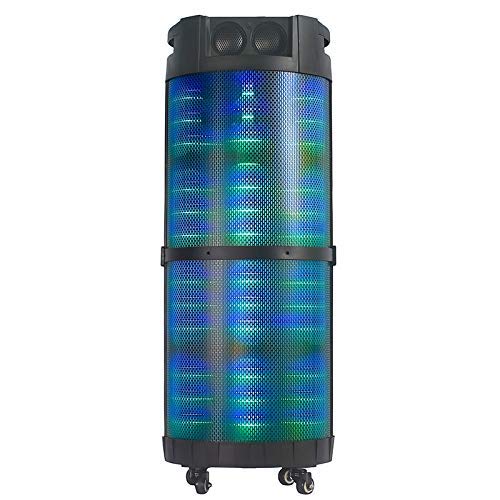
画像1: フロント view of the Altec Lansing AL-5003 speaker, showcasing its cylindrical design and illuminated grille. The speaker features a sturdy build with integrated wheels at the base for portability.
コントロールパネルと接続
The top panel of the speaker houses the main controls and input/output ports.
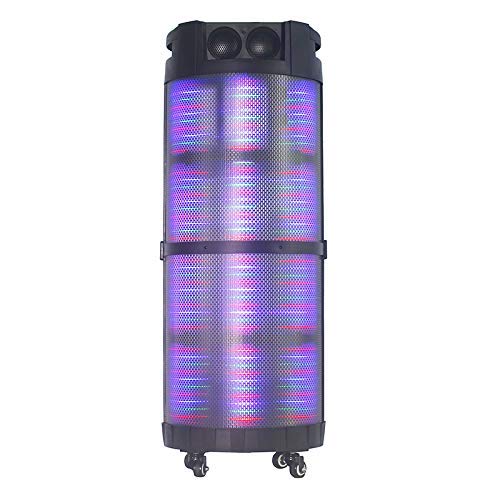
画像2: トップダウン view of the AL-5003 speaker, highlighting the control panel with various buttons and knobs, along with the top-mounted speakers. This view also shows the integrated handle for easy transport.
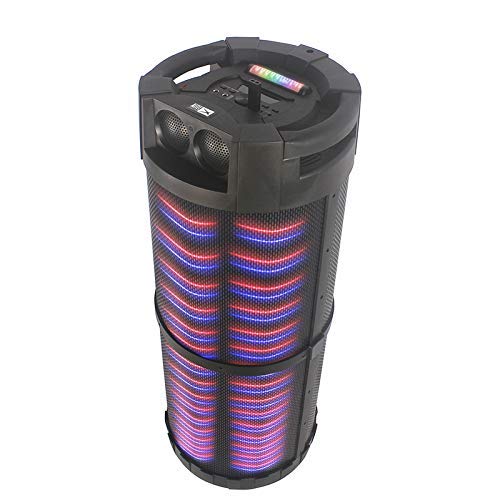
画像3: 角度付き view of the AL-5003 speaker, providing a perspective of its overall structure, including the side grille and the top control area. The dynamic lighting effects are visible through the mesh.
Common controls include Power, Volume, Mode selection, Play/Pause, Track Skip, and inputs for USB, Auxiliary, and potentially Microphone (if available on the model).
セットアップ手順
- 開梱: Carefully remove the speaker and all accessories from the packaging. Retain the packaging for future transport or storage.
- 配置: Place the speaker on a stable, flat surface. Ensure there is adequate ventilation around the unit. For optimal sound, position the speaker in a central location within the listening area.
- 電源接続: Connect the provided power cord to the AC input on the speaker and then plug it into a standard wall outlet (AC 100-240V, 50/60Hz).
- 初期費用(該当する場合): If the speaker has an internal battery (Lead Acid battery mentioned in specs), it is recommended to fully charge it before first use. The charging indicator light will typically show charging status.
- 電源オン: Press the Power button on the control panel or remote control to turn on the speaker.
操作手順
1.Bluetoothモード
- Bluetooth を有効にする: Turn on the speaker. Press the "Mode" button on the control panel or remote until "Bluetooth" or "BT" is displayed (or indicated by a blue LED). The speaker will enter pairing mode, indicated by a flashing light or audible prompt.
- デバイスとのペアリング: On your mobile device (smartphone, tablet, laptop), go to Bluetooth settings and enable Bluetooth. 検索する available devices. You should see "AL-5003" or "Altec Lansing" in the list. Select it to pair.
- 接続確認: Once successfully paired, the speaker will emit a confirmation sound, and the Bluetooth indicator light will become solid.
- 再生: Start playing audio on your connected device. Use the speaker's volume controls or your device's volume controls to adjust the sound level. Use the Play/Pause, Next, and Previous buttons on the speaker or remote to control playback.
2. Auxiliary (AUX) Mode
- AUXケーブルを接続します: Insert one end of a 3.5mm auxiliary cable into the AUX input port on the speaker. Connect the other end to the headphone jack or audio output of your external audio device (e.g., MP3 player, laptop).
- AUXモードを選択: Press the "Mode" button on the speaker or remote until "AUX" is displayed or indicated.
- 再生: Play audio from your connected device. Adjust volume using both the speaker's controls and your device's volume.
3. USB再生モード
- USBドライブを挿入します: MP3オーディオが入ったUSBフラッシュドライブを挿入します fileスピーカーのUSBポートに差し込みます。
- USBモードを選択: The speaker may automatically switch to USB mode. If not, press the "Mode" button until "USB" is displayed or indicated.
- 再生: スピーカーは自動的にオーディオの再生を開始します files from the USB drive. Use the Play/Pause, Next, and Previous buttons to control playback.
4. Karaoke Function (if applicable)
If your AL-5003 model includes a microphone input, you can use it for karaoke:
- マイクを接続する: Plug a wired microphone into the designated microphone input jack.
- 音量を調整: Use the dedicated Microphone Volume knob (if present) to adjust the microphone's volume.
- エコーコントロール: Some models may have an Echo knob to add an echo effect to the microphone audio.
5.リモコン操作
The included remote control provides convenient access to all major functions:
- 力: スピーカーのオン/オフを切り替えます。
- モード: Switch between Bluetooth, AUX, USB, and other available modes.
- ボリューム+/-: マスターボリュームを調整します。
- 再生/一時停止: 再生を開始または一時停止します。
- 前へ/次へ: 前のトラックまたは次のトラックにスキップします。
- EQ: Select different equalizer presets (if available).
- ミュート: オーディオをミュートまたはミュート解除します。
メンテナンス
- クリーニング: スピーカーの外装を清掃する際は、柔らかく乾いた布をご使用ください。液体クリーナーや研磨剤は使用しないでください。
- ストレージ: 長期間使用しない場合は、スピーカーを直射日光や極端な温度を避け、涼しく乾燥した場所に保管してください。
- バッテリーのケア: If the speaker has a built-in rechargeable battery, avoid fully discharging it frequently. For long-term storage, charge the battery to approximately 50-70% every few months to prolong its lifespan.
- 換気: 過熱を防ぐため、通気口がふさがれていないことを確認してください。
トラブルシューティング
| 問題 | 考えられる原因 | 解決 |
|---|---|---|
| 電源なし | Power cord not connected; Power outlet not working; Speaker is off; Battery drained. | Ensure power cord is securely connected. Try a different outlet. Press the Power button. Charge the battery. |
| 音が出ない | Volume too low; Incorrect mode selected; Device not connected properly; Mute function active. | Increase volume on speaker and source device. Select the correct input mode (Bluetooth, AUX, USB). Reconnect device. Check if mute is active on remote. |
| Bluetooth ペアリングの失敗 | Speaker not in pairing mode; Device Bluetooth off; Speaker too far from device; Interference. | Ensure speaker is in Bluetooth pairing mode. Turn on Bluetooth on your device. Move device closer to speaker. Turn off other Bluetooth devices nearby. |
| USB再生が機能しない | USBドライブが正しく挿入されていません。互換性がありません。 file フォーマット; USB ドライブが破損しています。 | USBドライブを再度挿入します。 fileはMP3形式です。別のUSBドライブをお試しください。 |
| リモコンが動作しない | Batteries drained; Obstruction between remote and speaker; Remote not pointed at sensor. | Replace remote control batteries. Remove any obstructions. Point remote directly at the speaker's IR sensor. |
仕様
| 特徴 | 詳細 |
|---|---|
| モデル名 | Altec Lansing AL-5003 Multimedia DJ Trolly Speaker |
| スピーカータイプ | サラウンドサウンド |
| 特集 | 無線 |
| 推奨用途 | For Surround Sound Systems, Party |
| 対応デバイス | Gaming Console, Karaoke Machine, Laptop, MP3 Player, Smartphone, Tablet |
| サラウンドサウンドチャンネル構成 | 1.0 |
| 制御方法 | リモート |
| 無線通信技術 | ブルートゥース |
| スピーカーサイズ | 10インチ |
| 電源 | コード式電気 |
| ツイーター直径 | 1インチ |
| オーディオ入力対応 | 補助、USB |
| スピーカーの接続性 | Wired (for power), Wireless (Bluetooth) |
| オーディオワットtage | 100ワット |
| バッテリーセルの構成 | 鉛蓄電池 |
| 取り付けタイプ | 床立ち |
保証とサポート
Altec Lansing products are manufactured to the highest quality standards. For information regarding warranty coverage, technical support, or service inquiries, please refer to the warranty card included with your product or visit the official Altec Lansing website. Please have your model number (AL-5003) and purchase details ready when contacting support.
Webサイト: www.alteclansing.com (This is a generic link, actual link might vary by region)