1. はじめに
Thank you for choosing the Xiaomi Mi 55-inch 4K UHD Smart Android TV. This manual provides essential information for the safe and efficient use of your television. Please read it thoroughly before operating the device and retain it for future reference.

画像1.1:正面 view of the Xiaomi Mi 55-inch 4K UHD Smart Android TV.
2. 安全情報
安全な操作を確保し、損傷を防ぐために、次の注意事項を守ってください。
- テレビを雨や湿気にさらさないでください。
- 換気口をふさがないでください。
- 電源プラグが適切に接地されていることを確認してください。
- テレビを不安定な場所に置かないでください。
- テレビを直射日光、熱源、火気に近づけないでください。
- 雷雨のときや長期間使用しない場合は、テレビの電源プラグを抜いてください。
- すべてのメンテナンスは資格のあるサービス担当者に依頼してください。
3. パッケージ内容
パッケージにすべてのアイテムが揃っていることを確認します。
- 1 × Xiaomi Mi 55-inch TV
- 1 × Remote control with voice control
- 1 × Remote control batteries
- 1×電源ケーブル
- 1 × ユーザーマニュアル(本書)
- 1 × Support legs
- 4 × Screws for support legs
4. セットアップ
4.1. 物理的な設置
Your TV can be installed on a stand or wall-mounted. The TV is VESA mounting standard compatible.
4.1.1. スタンドの取り付け
- 画面の損傷を防ぐため、テレビを画面を下にして柔らかく平らな面に慎重に置いてください。
- Attach the support legs to the designated slots at the bottom of the TV using the provided screws. Ensure they are securely fastened.
- テレビを安定した水平な場所に置いてください。
4.1.2. 壁掛け(オプション)
If you choose to wall-mount your TV, use a VESA-compatible wall mount kit (sold separately) and follow the instructions provided with the wall mount. Ensure the wall can support the weight of the TV.
4.2. 周辺機器の接続
外部デバイスをテレビのポートに接続します。
- HDMI: Connect Blu-ray players, game consoles, or set-top boxes to the HDMI ports (3 available). HDMI ARC is supported for audio return channel functionality.
- USB: Connect USB storage devices for media playback (2 available).
- LAN: 有線インターネット接続の場合は、イーサネット ケーブルを LAN ポートに接続します。
- デジタルオーディオ出力(光): 外部オーディオ システムに接続して高品質のデジタル サウンドを実現します。
4.3. 初回電源投入
- 電源ケーブルをテレビに接続し、次に電源コンセントに接続します。
- リモコンまたはテレビの電源ボタンを押します。
- 画面上の指示に従って、言語の選択、ネットワーク接続(Wi-Fi または Ethernet)、Google アカウントのサインインなどの初期設定を完了します。
5. 操作手順
5.1. リモートコントロール
The included remote control allows you to navigate the TV's features. It supports voice control for convenient interaction with Google Assistant.
- 電源ボタン: テレビの電源をオンまたはオフにします。
- ナビゲーションパッド(上/下/左/右/OK): メニューを移動し、オプションを選択します。
- 音量ボタン: 音のレベルを調整します。
- チャンネルボタン: テレビのチャンネルを変更します。
- Google アシスタント ボタン: 音声制御を有効にします。
- ホームボタン: Android TV のホーム画面に戻ります。
- 戻るボタン: 前の画面に戻ります。
- アプリボタン: Dedicated buttons for popular apps like Netflix and YouTube.
5.2. スマートテレビ機能(Android TV)
Your TV runs on Android TV (version 9), providing access to a wide range of smart features:
- Google アシスタント: 音声コマンドを使用して、コンテンツを検索したり、スマートホーム デバイスを制御したり、情報を取得したりできます。
- Google Play ストア: Download and install various apps, games, and streaming services.
- Chromecast 内蔵: スマートフォン、タブレット、またはコンピューターからテレビに直接コンテンツをキャストします。
- プリインストールされたアプリ: Access Netflix, YouTube, and a web ブラウザで直接。
- SmartThings アプリのサポート: Integrate with other compatible smart home devices.
5.3. 画像とサウンドの設定
画像とサウンドの設定を調整して最適化します view経験:
- 画像モード: Select from various presets (e.g., Standard, Vivid, Movie, Game) or customize brightness, contrast, color, and sharpness.
- HDR: The TV supports HDR for enhanced contrast and color with compatible content.
- サウンドモード: Choose from presets like Standard, Music, Movie, or customize equalizer settings.
- DTS/Dolby Audio: The TV supports DTS and Dolby audio technologies for immersive sound.
6. メンテナンス
6.1. 清掃
テレビを掃除するには:
- 掃除する前に必ずテレビの電源プラグを抜いてください。
- 画面とキャビネットを拭くときは、柔らかく乾いた布を使用してください。
- 頑固な汚れには、軽くamp布に水または専用のスクリーンクリーナーを含ませてください。スクリーンに直接クリーナーを吹き付けないでください。
- 研磨剤入りのクリーナーや溶剤の使用は避けてください。
6.2. ソフトウェアの更新
Periodically check for software updates to ensure your TV has the latest features and performance improvements. Updates can usually be found in the TV's settings menu under 'About' or 'System Update'.
7。 トラブルシューティング
問題が発生した場合は、次の一般的な問題と解決策を参照してください。
| 問題 | 考えられる解決策 |
|---|---|
| 電源なし | 電源ケーブルがしっかりと接続され、コンセントが正常に機能していることを確認してください。別のコンセントを試してください。 |
| 映像はないが、音声はある | 正しい入力ソースが選択されていることを確認してください。外部デバイスへのケーブル接続を確認してください。 |
| 音はないが、映像は表示される | Check volume level and mute settings. Verify audio cable connections. If using external audio, ensure it's powered on and correctly configured. |
| リモコンが動作しない | 電池を交換してください。リモコンとテレビの間に障害物がないことを確認してください。Bluetoothリモコンの場合は、再度ペアリングしてください。 |
| Wi-Fiに接続できません | Check if the Wi-Fi router is on and working. Re-enter the Wi-Fi password. Try restarting the TV and router. |
| アプリが遅い、またはクラッシュする | 使用していないアプリを閉じてください。アプリのキャッシュをクリアしてください。テレビを再起動してください。十分なインターネット速度を確保してください。 |
問題が解決しない場合は、カスタマー サポートにお問い合わせください。
8. 仕様
| 特徴 | 詳細 |
|---|---|
| モデル番号 | L55M5-5ASP |
| 画面サイズ | 55インチ |
| ディスプレイ技術 | 導かれた |
| 解決 | 3840 x 2160 (4K UHD) |
| リフレッシュレート | 60Hz |
| View角度 | 178度 |
| ビデオ機能 | HDRサポート |
| オペレーティング·システム | Android TV(Android 9) |
| ラム | 2GB |
| ストレージ容量 | 8GB |
| オーディオ出力 | 2Wスピーカー×10 |
| オーディオテクノロジー | DTS/Dolby Audio |
| スマート機能 | Google Assistant, Google Play, Web Browser, SmartThings app support, YouTube, Netflix (subscription not included), Chromecast built-in, DVB-T2 + DVB-C tuner |
| 接続性 | 3 x HDMI (with ARC), 2 x USB, 1 x LAN (Ethernet 100Mbps), 1 x Digital Optical Audio Out, Built-in Wi-Fi (2.4G/5G), Bluetooth 4.2 |
| アスペクト比 | 16:9 |
| 取り付け規格 | VESA互換 |
| 製品の寸法(W x D x H) | 124.2 x 24.5 x 78 cm(スタンド付き) |
| 製品重量 | 13キロ |
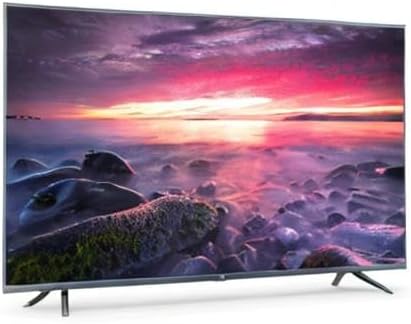
Image 8.1: Energy efficiency label for the Xiaomi Mi 55-inch TV.
9. 保証とサポート
保証情報については、製品に付属の保証書を参照するか、Xiaomiの公式ウェブサイトをご覧ください。 webお住まいの地域のウェブサイトをご覧ください。購入証明書としてレシートを保管してください。
For technical support, troubleshooting assistance beyond this manual, or service inquiries, please contact Xiaomi customer service through their official channels.