1. はじめに
The LAUNCH CRP239 is an intelligent and networkable automotive diagnostic tool designed for passenger cars. It offers comprehensive OBD II full functionality and rapid testing capabilities for four major vehicle systems: Engine, Automatic Transmission (A/T), Anti-lock Braking System (ABS), and Supplemental Restraint System (SRS). Additionally, the CRP239 includes advanced reset functions such as Oil Reset, Steering Angle Reset, Brake-Pad Reset, Battery Matching, Throttle Adaptation, and Diesel Particulate Filter (DPF) Regeneration, catering to the needs of professional technicians and DIY enthusiasts.
2. 安全情報
Always observe the following safety precautions when operating the LAUNCH CRP239:
- 診断ツールを接続または切断する前に、車両のイグニッションがオフになっていることを確認してください。
- 濡れた状態や可燃性の液体やガスの近くでツールを操作しないでください。
- 車両で作業するときは、安全メガネなどの適切な個人用保護具を着用してください。
- 具体的な診断手順と安全上の警告については、車両のサービスマニュアルを参照してください。
- Keep the tool away from strong magnetic fields.
- 付属のケーブルとアクセサリのみを使用してください。
3. パッケージ内容
パッケージにすべてのアイテムが揃っていることを確認します。
- LAUNCH CRP239 Main Unit
- OBDII診断ケーブル
- USBケーブル
- ユーザーマニュアル
- キャリングケース

Figure 3.1: Contents of the LAUNCH CRP239 package, showing the diagnostic tool, cables, and storage case.
4.製品オーバーview
The LAUNCH CRP239 features a robust design with a 5.0-inch 720p touch screen for intuitive navigation. It includes physical buttons for common operations and a durable rubber exterior for protection.

図4.1: 前面 view of the LAUNCH CRP239, highlighting the touch screen display and navigation buttons.
4.1。 構成部品
- 5.0インチタッチスクリーン: High-resolution display for clear data presentation and touch input.
- ナビゲーションボタン: Directional pad, OK button, and Return button for menu navigation.
- OBD IIコネクタ: Standard 16-pin connector for vehicle communication.
- USBポート: アップデートやデータ転送のためにコンピューターに接続します。
- 電源インジケーター: 電源状態を示す LED ライト。
5. セットアップ
Follow these steps for initial setup of your LAUNCH CRP239:
- デバイスを充電します。 Connect the CRP239 to a power source using the provided USB cable to ensure the internal 4000mAh lithium-polymer battery is fully charged before first use.
- 電源オン: 電源ボタンを押したままにして、デバイスの電源を入れます。
- 言語の選択: On the initial setup screen, select your preferred language. The device supports multilingual operation.
- Wi-Fi接続: Navigate to the 'Settings' menu and select 'Wi-Fi'. Connect to an available wireless network to enable online updates and diagnostic report sharing.
- ソフトウェアアップデート: It is recommended to perform a software update immediately after connecting to Wi-Fi to ensure you have the latest features and vehicle coverage. Navigate to the 'Update' section and follow the on-screen prompts.

Figure 5.1: The LAUNCH CRP239 with its diagnostic cable connected, ready for vehicle communication.
6. 操作手順
The LAUNCH CRP239 provides a comprehensive suite of diagnostic functions. Below are instructions for common operations.
6.1. 車両への接続
- Locate the vehicle's 16-pin OBD II diagnostic port (usually under the dashboard).
- 車両のイグニッションがオフになっていることを確認してください。
- Connect the OBD II diagnostic cable to the vehicle's OBD II port and to the CRP239.
- Turn the vehicle's ignition to the ON position (engine off). The CRP239 will power on automatically.
6.2.メインメニューナビゲーション
メインメニューから、さまざまな機能にアクセスできます。
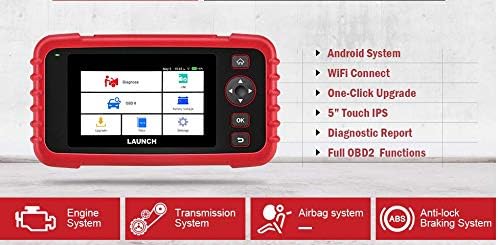
Figure 6.1: The main menu interface of the LAUNCH CRP239, providing access to all primary functions.
- 診断: For full system diagnostics (Engine, A/T, ABS, SRS).
- 私は: Readiness status for emissions.
- OBD II: Standard OBD II functions (read/clear DTCs, live data, freeze frame, O2 sensor test, etc.).
- リセット: Access various maintenance reset functions.
- バッテリー巻tage: Displays real-time vehicle battery voltage.
- アップデート: For software and firmware updates via Wi-Fi.
- データ: Review saved diagnostic data and reports.
- 設定: Configure device settings such as language, Wi-Fi, and display.
6.3. 診断スキャンの実行
- メインメニューから、 "Diagnose".
- The tool will attempt to automatically identify the vehicle via VIN scan. If unsuccessful, you may need to manually select the vehicle make, model, and year.
- 診断するシステム (例: エンジン、トランスミッション、ABS、SRS) を選択します。
- 選択 "Read Fault Codes" に view 診断トラブル コード (DTC)。
- 選択 "Clear Fault Codes" to erase DTCs after repairs have been made. Caution: Clearing codes without addressing the underlying issue will result in the codes reappearing.
- 選択 "Read Data Stream" に view ライブセンサーデータ。
6.4. Using Reset Functions
The CRP239 supports several common maintenance reset functions:
- オイルリセット: オイル交換後にオイル寿命リマインダーをリセットします。
- ステアリング角度リセット: アライメントまたはコンポーネントの交換後にステアリング アングル センサーをリセットします。
- Brake-Pad Reset (EPB): ブレーキパッドの交換後に電子パーキングブレーキシステムをリセットします。
- バッテリーマッチング(BMS): 新しいバッテリーを車両のバッテリー管理システムに登録します。
- スロットル適応: 清掃または交換後にスロットル ボディの位置を再学習します。
- DPF再生: ディーゼル粒子フィルターの再生プロセスを開始します。
To use a reset function, select "Reset" from the main menu, then choose the desired function and follow the on-screen instructions.
6.5. ソフトウェアの更新
The CRP239 supports one-click Wi-Fi updates for software and vehicle coverage, ensuring you always have the latest diagnostic capabilities.
- デバイスが安定した Wi-Fi ネットワークに接続されていることを確認します。
- メインメニューから、 "アップデート".
- The device will check for available updates. Select the updates you wish to install and confirm.
- アップデートプロセスが中断されることなく完了するまでお待ちください。プロセス中にデバイスが再起動する場合があります。

Figure 6.2: The update screen on the LAUNCH CRP239, showing available software updates for various vehicle brands.
6.6. 診断レポートの生成
The CRP239 can automatically generate diagnostic reports, which can be shared via email.
- After completing a diagnostic session, the tool will prompt you to generate a report.
- Confirm to generate the report.
- に移動 "Data" メニュー view saved reports.
- Select a report and choose the option to share via email. Ensure your Wi-Fi is connected and email settings are configured in the 'Settings' menu.
7. メンテナンス
Proper maintenance ensures the longevity and optimal performance of your LAUNCH CRP239:
- クリーニング: デバイスの清掃には、柔らかく乾いた布を使用してください。研磨剤入りの洗剤や溶剤は使用しないでください。
- ストレージ: 使用しないときは、デバイスをキャリングケースに入れて涼しく乾燥した場所に保管してください。極端な温度を避けてください。
- バッテリーのケア: Charge the battery regularly, even if the device is not in frequent use, to maintain battery health. Avoid fully discharging the battery for extended periods.
- ケーブル検査: Periodically inspect the diagnostic and USB cables for any signs of damage. Replace damaged cables immediately.
8。 トラブルシューティング
This section addresses common issues you might encounter with the LAUNCH CRP239.
| 問題 | 考えられる原因 | 解決 |
|---|---|---|
| デバイスの電源が入りません。 | バッテリー残量が少ない、車両との接続に問題がある。 | Charge the device fully. Ensure the OBD II cable is securely connected to both the CRP239 and the vehicle. Check vehicle's ignition is ON. |
| 車両と通信できません。 | Incorrect vehicle protocol; faulty OBD II port; damaged cable. | Verify vehicle compatibility. Check the vehicle's OBD II port for power. Try a different vehicle or cable if available. Ensure vehicle ignition is ON. |
| ソフトウェアの更新に失敗しました。 | Wi-Fi 接続が不安定、ストレージが不足しています。 | 強力で安定したWi-Fi接続を確保してください。デバイスの空きストレージ容量を確認してください。アップデートプロセスを再開してください。 |
| 画面が反応しません。 | ソフトウェアの不具合、物理的な損傷。 | Perform a soft reset by holding the power button until the device restarts. If the issue persists, contact customer support. |
9. 仕様
| 特徴 | 詳細 |
|---|---|
| モデル | CRP239 (CREADER PROFESSIONAL 239) |
| 画面 | 5.0-inch 720p Touch Screen |
| バッテリー | 4000mAh充電式リチウムポリマー(付属) |
| 接続性 | OBD II, Wi-Fi, USB |
| 車両補償範囲 | Domestic, Asian, European vehicles (1996 and newer OBD2) |
| サポートされているシステム | Engine, Automatic Transmission (A/T), ABS, SRS |
| 特殊機能 | Oil Reset, Steering Angle Reset, Brake-Pad Reset (EPB), Battery Matching (BMS), Throttle Adaptation, DPF Regeneration |
| 寸法 | 32.4 x 25.4 x 8 cm(パッケージ) |
| アイテム重量 | 560グラム |
| 外装材 | ゴム |
10. 保証情報
The LAUNCH CRP239 comes with a standard manufacturer's warranty. For specific warranty terms and conditions, please refer to the warranty card included in your product package or visit the official Launch webサイトでご確認ください。保証請求の際は購入証明として領収書を保管してください。
延長保証オプションはサードパーティプロバイダーから提供される場合があります。例:ampこの製品には、Salama Care による 1 年および 2 年の延長保証が提供されます。
11. サポート
For technical assistance, product inquiries, or support, please contact Launch customer service through their official website or the contact information provided in your product documentation. Ensure you have your product model number (CRP239) and serial number ready when contacting support.
追加のリソースについては、 Launch Official Webサイト.


