1. はじめに
Welcome to the user manual for your Nokia 216 Dual SIM mobile phone. This guide provides essential information to help you set up, operate, and maintain your device. The Nokia 216 (RM-1187) is a classic feature phone designed for reliable communication, featuring dual SIM capability, a 2.4-inch display, and a VGA camera.
Please read this manual carefully to ensure proper use and to get the most out of your phone.
2. パッケージ内容
製品パッケージにすべてのアイテムが揃っていることを確認します。
- Nokia 216 Dual SIM Mobile Phone (RM-1187)
- バッテリー
- 電源アダプター
- USBケーブル
3.デバイスオーバーview
Familiarize yourself with the key components of your Nokia 216 phone.
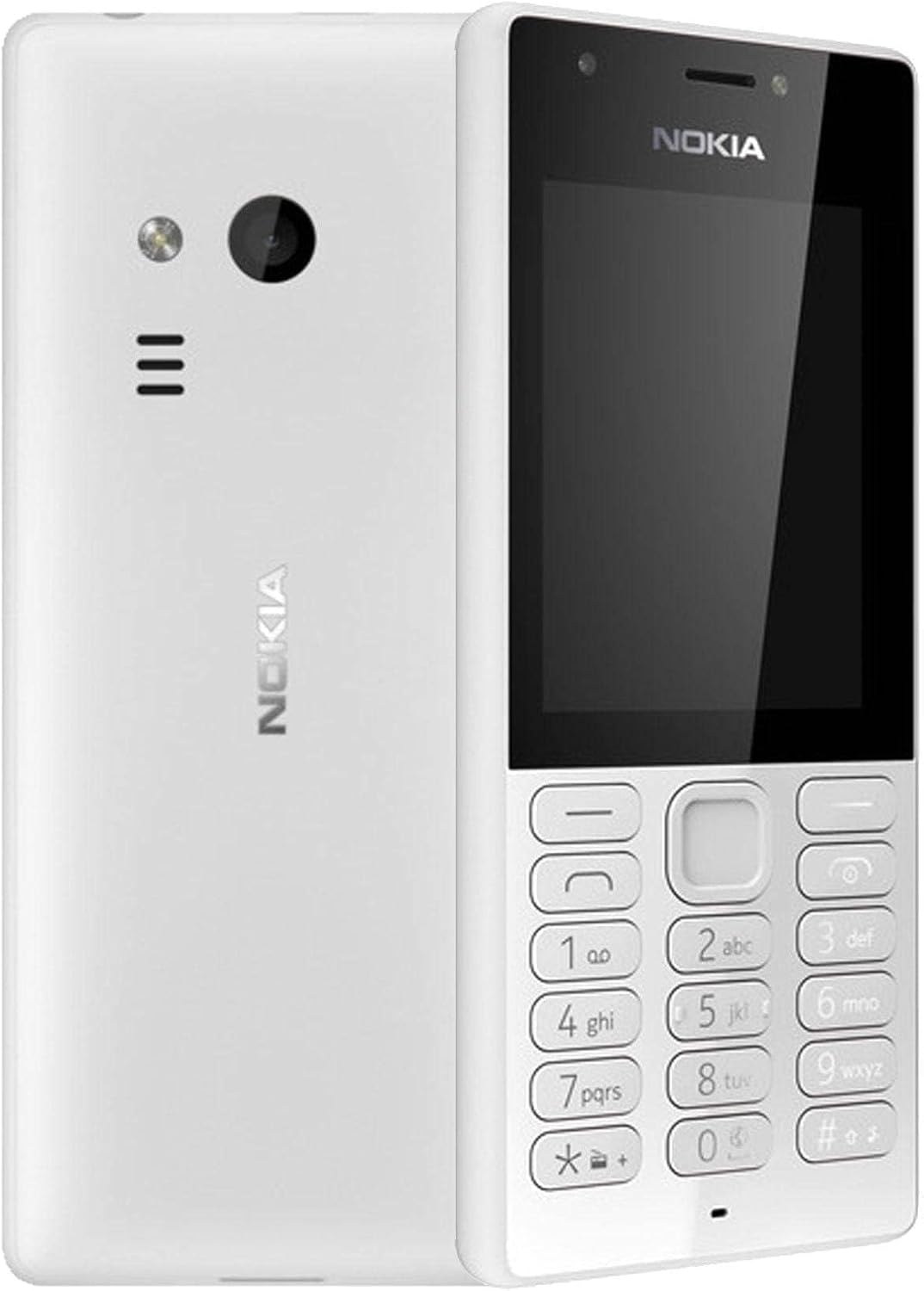
図3.1: 前面と背面 view of the Nokia 216 Dual SIM mobile phone. The front shows the display, earpiece, and numeric keypad. The back features the rear camera, LED flash, and loudspeaker grille.

図3.2: フロント view of the Nokia 216 Dual SIM mobile phone. This image highlights the 2.4-inch display, the navigation keys, and the alphanumeric keypad for dialing and text input.

図3.3: 戻る view of the Nokia 216 Dual SIM mobile phone. This view shows the rear VGA camera lens, the LED flash, and the Nokia branding.
主要コンポーネント:
- 画面: 2.4-inch QVGA screen.
- キーパッド: Alphanumeric keypad for dialing and text entry, with navigation keys.
- リアカメラ: VGA camera with LED flash.
- 拡声器: For audio playback and hands-free calls.
- マイクロフォン: 通話中および録音中の音声入力用。
- 3.5mmオーディオジャック: ヘッドフォンまたは外部スピーカー用。
- 充電ポート: Micro-USB port for charging and data transfer.
4. セットアップ
4.1. SIMカードを挿入する
- 電話の電源をオフにし、充電器を外します。
- Carefully remove the back cover by prying it open from the notch.
- バッテリーが入っている場合は、持ち上げて外します。
- Insert the SIM card(s) into the designated slot(s) with the gold contacts facing down. For dual SIM models, ensure both SIMs are correctly seated.
- If applicable, insert a microSD card into its slot for additional storage.
- バッテリーを交換してください。
- 背面カバーを合わせ、カチッと音がするまでしっかりと押します。
4.2。 バッテリーを充電
- 電源アダプタを壁のコンセントに接続します。
- Plug the micro-USB end of the cable into the phone's charging port.
- 画面上のバッテリーインジケーターに充電状態が表示されます。
- 完全に充電されたら、充電器を携帯電話から外し、次に壁のコンセントから外します。
5. 操作手順
5.1. 電源のオン/オフ
- 電源を入れるには: 電話が振動し、Nokia のロゴが表示されるまで、電源キー (通常は赤い「通話終了」キー) を押し続けます。
- 電源を切るには: Press and hold the power key until the 'Power off' option appears on the screen, then select it.
5.2.電話をかける
- ホーム画面から、テンキーを使用して電話番号を入力します。
- Press the green 'Call' key to initiate the call.
- To end a call, press the red 'End Call' key.
5.3. テキストメッセージ(SMS)の送信
- へ移動 メニュー > メッセージ > メッセージを作成する.
- キーパッドを使用してメッセージを入力します。
- 受信者の電話番号を入力するか、連絡先から選択します。
- 選択 送信.
5.4. カメラの使用
- へ移動 メニュー > カメラ.
- ディスプレイを使用してショットをフレーミングします。
- 中央のナビゲーション キーを押して写真を撮ります。
6. メンテナンスとケア
To ensure the longevity and optimal performance of your Nokia 216, follow these care guidelines:
- デバイスを乾燥した状態に保ってください: 湿気により電子回路が損傷する可能性があります。
- Use original accessories: Only use batteries, chargers, and accessories approved by Nokia.
- 優しく掃除してください: Use a soft, clean, dry cloth to clean the surface of the device.
- 極端な温度を避けてください: Do not expose your device to very high or low temperatures.
- 取り扱いには注意してください: 落としたり、強い衝撃を与えないでください。
7。 トラブルシューティング
If you encounter issues with your Nokia 216, try these common troubleshooting steps:
| 問題 | 解決 |
|---|---|
| 電話の電源が入らない | バッテリーが充電されていることを確認してください。充電器を接続してもう一度お試しください。バッテリーが正しく挿入されているかご確認ください。 |
| ネットワーク信号がありません | SIMカードが正しく挿入されているか確認してください。ネットワークの電波状況が良い場所に移動してください。携帯電話を再起動してください。 |
| バッテリーが充電されない | Ensure the charger is properly connected to both the phone and the power outlet. Try a different power outlet or charger. Check for any damage to the charging port. |
| 電話をかけることも受けることもできない | Check network signal. Ensure your SIM card is active and has sufficient credit/plan. Verify that call barring is not enabled. |
8. 仕様
| 特徴 | 詳細 |
|---|---|
| ブランド | ノキア |
| モデル名 | RM-1187 |
| オペレーティング·システム | Symbian 9.1 (Series 30) |
| 画面サイズ | 2.4インチ |
| 画面解像度 | 240 x 320 ピクセル |
| リフレッシュレート | 90Hz |
| インストールされているRAMサイズ | 256MB |
| メモリストレージ容量 | 3.9 GB (Internal, likely for system/apps, expandable via microSD) |
| CPUモデル | A10 |
| セルラーテクノロジー | 2G |
| 無線通信技術 | セルラー |
| 接続技術 | USB、Bluetooth、Wi-Fi |
| GPS | A-GPS |
| Primary Device User Interface | ボタン、テンキー、マイク |
| その他のカメラ機能 | Rear Camera (VGA) |
| オーディオジャック | 3.5ミリメートル |
| フォームファクター | クラシック |
| 色 | グレー |
| 通話時間 | 最大18時間 |
| アイテム重量 | 339グラム |
| パッケージ寸法 | 13.4 x 12.6 x 3.6 cm |
| 箱の中身 | 電源アダプタ、USBケーブル |
9. 保証とサポート
保証情報については、製品パッケージに同梱されている保証書を参照するか、Nokiaの公式ウェブサイトをご覧ください。 website. If you require further assistance or technical support, please contact Nokia customer service through their official channels.
保証請求のための購入証明として購入レシートを保管してください。