導入
This manual provides detailed instructions for the proper setup, operation, and maintenance of your Supvan TP76E Black & White Label Printer. Please read this manual thoroughly before using the device to ensure optimal performance and longevity. The Supvan TP76E is designed for efficient label printing, offering monochrome output at speeds up to 25 labels per minute.
パッケージ内容
始める前に、パッケージにすべてのアイテムが揃っていることを確認してください。
- Supvan TP76E Label Printer
- 電源アダプター
- USBケーブル
- Sample Label Roll
- ユーザーマニュアル(このドキュメント)
設定
1. 開梱と設置
Carefully remove the printer from its packaging. Place the printer on a stable, flat surface with adequate ventilation. Ensure there is enough space around the printer for easy access to ports and for label output.

Figure 1: Supvan TP76E Label Printer (Side View)
This image displays the Supvan TP76E label printer from a side angle, highlighting its integrated keyboard, the transparent cover over the label compartment, and the overall compact design. The handle on the right side is also visible.
2. 電源接続
- Connect the power adapter to the power input port on the printer.
- 電源アダプタのもう一方の端を標準の電源コンセントに差し込みます。
- Press the power button to turn on the printer. The display should illuminate.
3. Loading Label Roll
The TP76E uses thermal label rolls. Follow these steps to load a new roll:
- Open the transparent cover of the label compartment located at the top of the printer.
- Place the label roll onto the spindle, ensuring the labels feed from the bottom of the roll towards the print head.
- Feed the leading edge of the label through the guide until it is positioned under the print head.
- 透明カバーをしっかりと閉めてください。
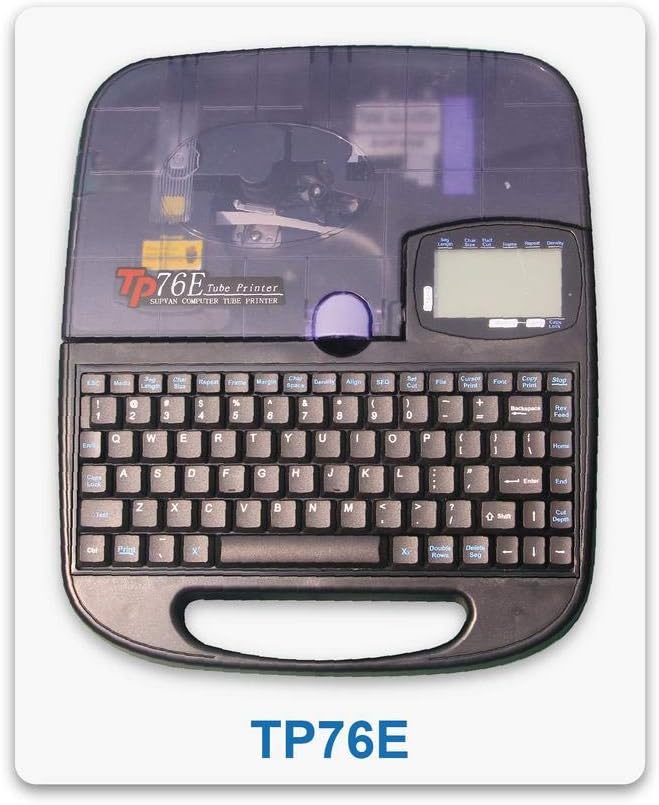
Figure 2: Supvan TP76E Label Printer (Top View)
この画像はトップダウンの view of the Supvan TP76E, clearly showing the full QWERTY keyboard layout, the LCD display, and the transparent cover of the label roll compartment. This perspective is useful for understanding the user interface.
4. コンピュータへの接続(オプション)
The TP76E supports USB connectivity for printing from a computer.
- Connect one end of the provided USB cable to the USB port on the printer.
- USB ケーブルのもう一方の端をコンピューターの使用可能な USB ポートに接続します。
- Install the necessary drivers and software from the official Supvan website or the included installation media (if applicable).
操作手順
1. Basic Label Creation
- プリンタの電源を入れます。
- Use the integrated QWERTY keyboard to type your desired text. The text will appear on the LCD display.
- Utilize the navigation keys to move the cursor and edit text.
- を押す 印刷 button to print the label.
2. 書式設定オプション
The TP76E offers various formatting options accessible via dedicated keys or menu functions:
- フォントサイズ: Adjust the size of the text to fit your label requirements.
- Bold/Italic: Apply bold or italic styling to your text for emphasis.
- 下線: Add an underline to text.
- フレーム: Add decorative frames around your text.
- アライメント: Choose left, center, or right alignment for your text.
3. Saving and Recalling Labels
The printer allows you to save frequently used label designs for quick recall:
- After creating a label, navigate to the 保存 function (refer to the display menu).
- Select an empty memory slot to store the label.
- To recall a saved label, navigate to the 想起 or 開ける function and select the desired label from the list.
メンテナンス
1. プリントヘッドのクリーニング
Regular cleaning of the print head ensures clear and consistent print quality. Clean the print head if you notice faded or incomplete prints.
- プリンタの電源をオフにして、電源アダプタを外します。
- ラベルコンパートメントカバーを開きます。
- プリントヘッドの表面を綿棒で軽く拭きます。ampイソプロピルアルコールで拭いてください。水や研磨剤は使用しないでください。
- カバーを閉じて電源を再接続する前に、プリント ヘッドが完全に乾くまでお待ちください。
2. Replacing Label Rolls
When the label roll is depleted, replace it as follows:
- ラベルコンパートメントカバーを開きます。
- Remove the empty label roll core.
- Insert a new label roll as described in the 設定 セクション。
- カバーを閉じます。
トラブルシューティング
This section addresses common issues you might encounter with your Supvan TP76E printer.
| 問題 | 考えられる原因 | 解決 |
|---|---|---|
| プリンターの電源が入らない | No power supply; Power adapter faulty | Ensure power adapter is securely connected to printer and outlet. Try a different outlet. |
| No labels are printing | Label roll empty; Labels incorrectly loaded; Print head dirty | Replace label roll. Re-load labels correctly. Clean the print head as per maintenance instructions. |
| Print quality is poor/faded | Print head dirty; Low quality labels | Clean the print head. Ensure you are using high-quality thermal labels. |
| プリンターがコンピューターに認識されない | USB cable faulty; Drivers not installed or outdated | Try a different USB cable or port. Install or update printer drivers from the Supvan webサイト。 |
仕様
Key technical specifications for the Supvan TP76E Label Printer:
- モデル番号: Supvan TP76E
- プリンター出力: Monochrome (Black & White)
- 印刷技術: サーマル
- 接続性: USB
- 印刷メディア: ラベル
- 最大入力シート容量: 25 (labels per minute)
- 両面印刷: いいえ
- 必要な電池: いいえ
保証とサポート
For warranty information, technical support, or to purchase accessories and replacement parts, please contact Supvan customer service or visit their official webサイト。
詳しい情報とサポートリソースについては、公式ウェブサイトをご覧ください。 SUPVAN Store on Amazon.
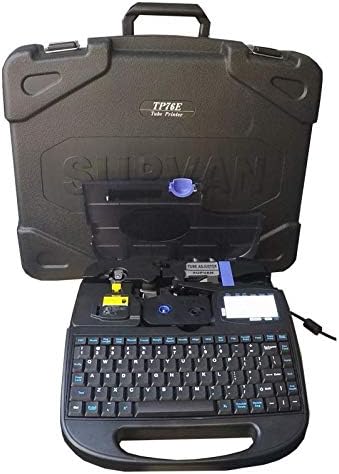
Figure 3: Supvan TP76E Label Printer in Carrying Case
This image shows the Supvan TP76E label printer neatly stored within its custom-fitted protective carrying case, emphasizing its portability and secure storage solution.


