1. はじめに
This manual provides essential information for setting up, operating, maintaining, and troubleshooting your Sony X800H 65-inch 4K Ultra HD Smart LED TV. Please read this manual thoroughly before using your television to ensure proper and safe operation.

画像1.1:正面 view ソニー X800H 65 インチ 4K ウルトラ HD スマート LED テレビ。
2. 箱の中身
Upon unpacking your Sony X800H TV, ensure all the following items are present:
- Sony X800H 65-inch 4K Ultra HD Smart LED TV
- リモートコントロール
- 電源コード
- Table-Top Stand (if not wall-mounting)
- 操作説明書 / クイックセットアップガイド
- リモコン用電池
3. セットアップ
3.1 テーブルトップスタンドの取り付け
- 損傷を防ぐため、テレビ画面を下にして、柔らかく平らな面に慎重に置いてください。
- スタンド ブラケットをテレビの下部にあるネジ穴に合わせます。
- 付属のネジを使用してスタンドを固定します。すべてのネジがしっかりと締められていることを確認してください。
3.2 壁掛け(オプション)
If you choose to wall-mount your TV, please refer to the instructions provided with your wall-mount bracket. Ensure the bracket is compatible with VESA mounting standards for your TV size and weight. Professional installation is recommended.

図3.1: 例ample of a Sony TV mounted on a wall.
3.3 外部機器の接続
Connect your external devices (e.g., cable box, Blu-ray player, gaming console) to the HDMI ports on the back of the TV. The Sony X800H features multiple HDMI inputs for your convenience.

画像3.2:リア view showing various input ports including HDMI, USB, and Ethernet.
3.4 電源接続と初期設定
- 電源コードをテレビに差し込み、次に壁のコンセントに差し込みます。
- リモコンまたはテレビの電源ボタンを押します。
- Follow the on-screen instructions to complete the initial setup, including network connection, language selection, and channel scanning.
4. テレビの操作
4.1 基本的なリモートコントロール機能
The included remote control allows you to navigate menus, change channels, adjust volume, and access smart features. Familiarize yourself with the button layout for optimal use.
4.2 スマート Android TV の機能
Your Sony X800H is an Android TV, providing access to a wide range of apps, streaming services, and smart home integration. Use the Google Assistant for voice control and content search.
- Google アシスタント: Press the Google Assistant button on your remote and speak your commands to search for movies, shows, control smart home devices, or get answers.
- アプリアクセス: Navigate to the 'Apps' section to download and manage your favorite streaming applications like Netflix, Hulu, Disney+, and more.
- アレクサの互換性: Connect your TV with an Alexa-enabled device to control your TV with voice commands, stream smart camera feeds, play music, and launch video apps.
- Apple AirPlay 2とHomeKit: Seamlessly integrate your iPhone and Siri devices for content streaming and smart home management.
ビデオ4.1: 公式終了view of the Sony X800H 4K HDR LED Android Smart TV features, including smart functionality and picture quality enhancements.
5. 主な特徴
The Sony X800H TV is equipped with advanced technologies to enhance your view経験:
- 4K HDRプロセッサーX1: Experience premium 4K pictures with rich detail and texture. Content is upscaled to near-4K resolution using 4K X-Reality PRO.
- TRILUMINOSディスプレイ: Enjoy expanded, vivid colors for a more true-to-life picture, as intended by the creator.
- ゲームモード: Optimized settings for a smoother, more responsive gaming experience, ideal for PlayStation.
- HDR and Dolby Vision: Brings scenes to life with striking highlights, deeper darks, and vibrant colors.
- モーションフローXR: Reduces blur in fast-moving scenes, making content appear with lifelike motion.
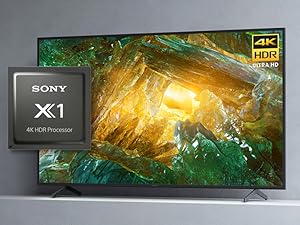
Image 5.1: The Sony X1 4K HDR Processor, central to enhanced picture quality.
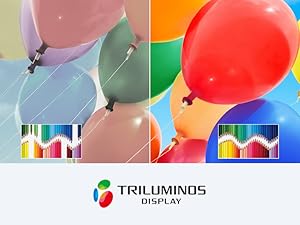
Image 5.2: Visual representation of the wide color gamut provided by the TRILUMINOS Display.
6. メンテナンス
6.1 テレビの掃除
- 画面: 柔らかく乾いたマイクロファイバークロスで画面を優しく拭いてください。頑固な汚れには、軽くamp布に水または画面専用の洗浄液を含ませます(画面に直接スプレーしないでください)。
- フレームとスタンド: 柔らかく乾いた布を使用して、テレビのフレームとスタンドのほこりを拭き取ってください。
- 重要: Always unplug the TV before cleaning. Avoid using harsh chemicals, abrasive cleaners, or solvents.
6.2ソフトウェアアップデート
テレビは、パフォーマンスの向上や新機能の追加のため、ソフトウェアの自動アップデートを受信する場合があります。これらのアップデートを受信するには、テレビがインターネットに接続されていることを確認してください。テレビの設定メニューから手動でアップデートを確認することもできます。
7。 トラブルシューティング
テレビで問題が発生した場合は、次の基本的なトラブルシューティング手順を試してください。
- 電源なし: 電源コードがテレビと壁のコンセントにしっかりと差し込まれていることを確認してください。別のコンセントで試してみてください。
- 画像/音声なし: Check that the correct input source is selected. Verify all cable connections to external devices are secure.
- リモコンが機能しない: リモコンの電池を交換してください。リモコンとテレビの赤外線センサーの間に障害物がないことを確認してください。
- ネットワーク接続の問題: ルーターとモデムを再起動してください。テレビのネットワーク設定を確認し、正しいWi-Fiネットワークまたはイーサネットケーブルに接続されていることを確認してください。
- 画質の問題: テレビのメニューで画質設定(明るさ、コントラスト、色)を調整します。コンテンツソースが高品質であることを確認してください。
For more detailed troubleshooting, refer to the comprehensive help guide accessible through your TV's settings menu or visit the Sony support webサイト。
8. 仕様
| 特徴 | 仕様 |
|---|---|
| ブランド | ソニー |
| モデル番号 | XBR65X800H |
| 画面サイズ | 64.5インチ(対角) |
| ディスプレイ技術 | 導かれた |
| 解決 | 4K ウルトラ HD (3840 x 2160) |
| リフレッシュレート | 60Hz |
| プロセッサ | 4K HDRプロセッサーX1 |
| オペレーティング·システム | Google アシスタント搭載 Android TV |
| 接続性 | HDMI、USB、Wi-Fi、イーサネット、Bluetooth |
| 寸法(幅×奥行き×高さ) | 57.63 x 13.5 x 35.38インチ(スタンド付き) |
| アイテム重量 | 49.81 Pounds (with stand) |
9. 保証とサポート
Your Sony X800H TV comes with a manufacturer's warranty. For specific warranty details, please refer to the warranty card included with your product or visit the official Sony support web技術サポート、製品登録、サービスセンターの検索については、 www.sony.com/electronics/support.


