1. はじめに
Thank you for choosing the FeinTech LED Desk Lamp LTL00600. This high-quality desk lamp is designed to provide optimal lighting for your workspace while offering convenient features such as a USB charging port, adjustable brightness, and customizable color temperature. Please read this manual thoroughly before use to ensure proper operation and to maximize the lifespan of your product.
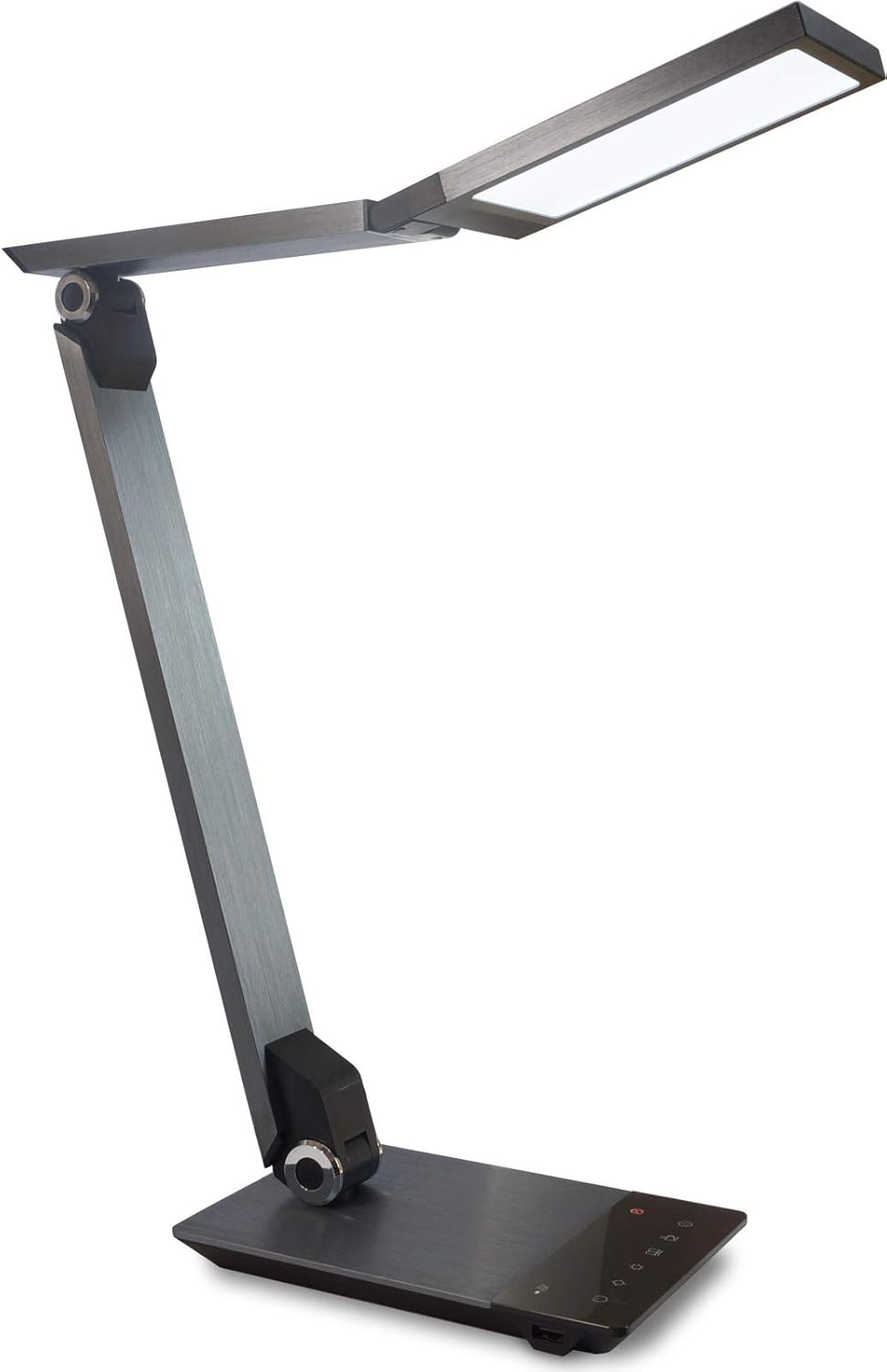
Image 1.1: FeinTech LED Desk Lamp LTL00600. This image displays the lamp in its upright position, showcasing its brushed aluminum finish and sleek design.
2. 安全に関する注意事項
損傷や怪我を防ぐために、次の安全上の注意事項を守ってください。
- 電源アダプタが適切な電源コンセントに接続されていることを確認してください。
- lを露出させないでくださいamp to water or excessive humidity.
- Avoid disassembling or modifying the lamp修理は資格を持った人のみが行う必要があります。
- lを維持amp 熱源や直射日光を避けてください。
- lをきれいにするamp 柔らかく乾いた布でのみ拭いてください。研磨剤入りの洗剤や溶剤は使用しないでください。
- LED 光源を長時間直接見ないでください。
3. パッケージ内容
パッケージにすべてのアイテムが揃っていることを確認してください:
- フェインテック LED デスク Lamp (Model: LTL00600)
- 電源アダプタ(12V / 2A)
4.製品オーバーview
Familiarize yourself with the components of your FeinTech LED Desk Lamp:
- Lamp 頭: LED光源を内蔵しています。
- 調節可能なアーム: Multiple joints for flexible positioning.
- ベース: 安定性を提供し、コントロール パネルと USB ポートを収容します。
- コントロールパネル: Touch-sensitive buttons for power, brightness, color temperature, and timer.
- USB充電ポート: Located on the side of the base for device charging.

画像4.1: トップダウン view lのamp's base and control panel. This image highlights the touch-sensitive buttons for various functions.

画像4.2: 側面 view lのamp's base, showing the integrated USB charging port. This port allows for convenient charging of compatible devices.
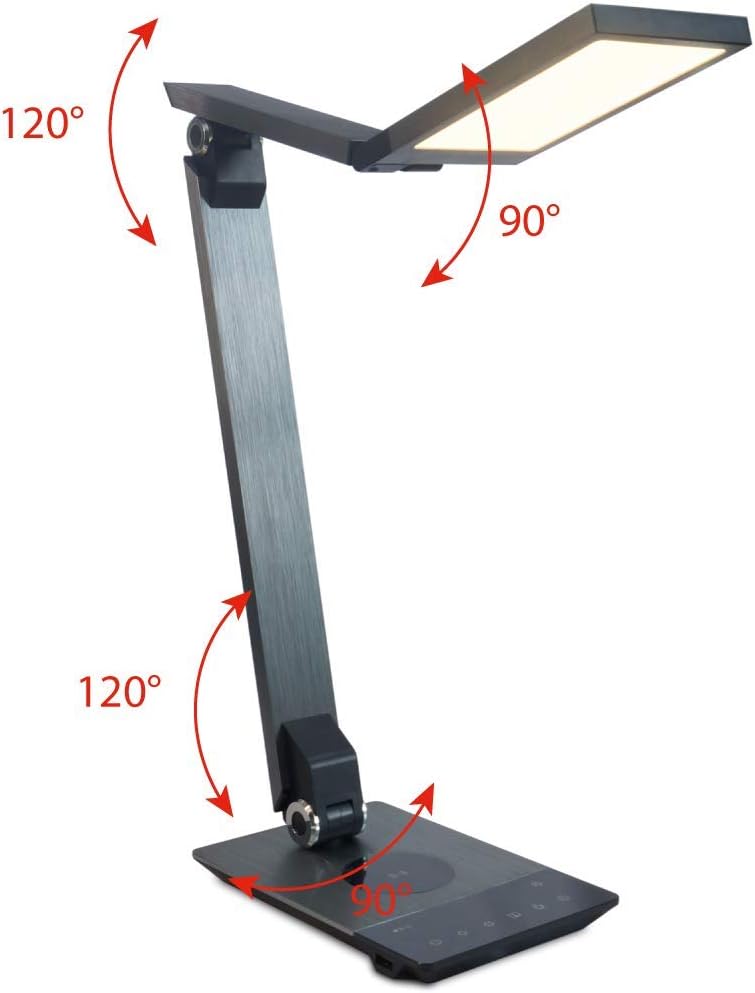
Image 4.3: Diagram illustrating the articulation angles of the lamp's joints. The lamp head can rotate 90 degrees, the upper arm 120 degrees, and the lower arm 120 degrees, allowing for flexible positioning.
5. セットアップ
初期設定は次の手順で行います。
- 開梱: パッケージからすべてのコンポーネントを慎重に取り出します。
- 配置: lを配置amp base on a stable, flat surface. Ensure there is enough space for the lamp to be adjusted without obstruction.
- 接続電源: 電源アダプタケーブルを本体背面のDC入力ポートに挿入します。amp ベース。電源アダプタを標準の電源コンセントに差し込みます。
6. 操作手順
The FeinTech LED Desk Lamp features intuitive touch controls on its base.
6.1 電源オン/オフ
- タッチ 電源ボタン on the control panel (refer to Image 4.1) to turn the lamp オンまたはオフ。
6.2 明るさ調整(調光)
- lでamp on, touch and hold the 明るさアップ or ブライトネスダウン buttons (refer to Image 4.1) to steplessly adjust the light intensity.
- Lamp base will vibrate slightly when the minimum or maximum brightness level is reached.
6.3色温度調整
- lでamp on, touch and hold the Color Temperature Up or Color Temperature Down buttons (refer to Image 4.1) to steplessly adjust the light color from warm white (2700K) to cool white (6500K).
- Lamp base will vibrate slightly when the minimum or maximum color temperature is reached.
6.4 Favorite Settings
- Lamp allows you to store and recall 3 favorite light settings (brightness and color temperature).
- To save a setting: Adjust the brightness and color temperature to your desired level. Then, touch and hold one of the お気に入りボタン (refer to Image 4.1) until the lamp flashes briefly, indicating the setting is saved.
- To recall a setting: Simply touch the corresponding お気に入りのボタン.
- The last used brightness and color temperature settings are automatically saved even after the lamp オフになっています。
6.5 USB充電機能
- Connect your smartphone or other compatible device to the USB charging port on the side of the lamp base (refer to Image 4.2) using a suitable USB cable.
- The intelligent USB port delivers up to 2.4A for fast charging.
- An LED indicator will signal ongoing and completed charging status.
6.6 タイマー機能
- タッチ タイマーボタン (refer to Image 4.1) to activate the timer function.
- The first touch activates a 3-minute timer.
- A second touch activates a 1-hour timer.
- Lamp will automatically turn off after the selected time period.
7. メンテナンス
lを維持するにはamp's appearance and functionality:
- 常に l を外しますamp 清掃前に電源から。
- 拭くamp 柔らかく乾いた糸くずの出ない布で拭いてください。
- 液体クリーナーやエアゾールクリーナーは、仕上げや内部コンポーネントを損傷する恐れがあるため、使用しないでください。
- Avoid scratching the brushed aluminum surface.
8。 トラブルシューティング
lで問題が発生した場合amp次の一般的な問題と解決策を参照してください。
| 問題 | 考えられる原因 | 解決 |
|---|---|---|
| Lamp オンになりません。 | 電源がありません。 | Check if the power adapter is securely connected to the lamp and the electrical outlet. Test the outlet with another device. |
| USB充電が機能しません。 | デバイスに互換性がないか、ケーブルに障害があります。 | Ensure your device is compatible with USB charging. Try a different USB cable. Verify the lamp 電源がオンになっています。 |
| タッチコントロールが反応しません。 | 一時的なソフトウェアの不具合または電源の問題。 | Disconnect the power adapter for 30 seconds, then reconnect it. Ensure your fingers are clean and dry when operating the touch controls. |
9. 仕様
| モデル番号 | LTL00600 |
| 寸法(長さ×幅×高さ) | 36 x 13.5 x 44 cm(約14.2 x 5.3 x 17.3インチ) |
| 重さ | 1.84 kg(約4.06ポンド) |
| 材料 | つや消しアルミニウム |
| 光源 | 導かれた |
| Max. Light Output | 500 lumens (1000 lux at 40 cm distance) |
| 色温度(CCT) | 2700 K (Warm White) to 6500 K (Cool White) |
| Power Consumption (Lamp のみ) | 最大10W |
| Power Consumption (Lamp & Charging) | 最大22W |
| USB出力 | 最大2.4A |
| 入力ボリュームtage(アダプター) | 12V / 2A |
| スイッチタイプ | 触る |

Image 9.1: Diagram showing the dimensions of the FeinTech LED Desk Lamp。 lamp measures approximately 36 cm in length, 13.5 cm in width, and 44 cm in height.
10. 保証とサポート
FeinTech products are designed for reliability and performance. For warranty information or technical support, please refer to the warranty card included with your purchase or visit the official FeinTech webサイトでご確認ください。保証請求のために購入証明書を保管してください。


