導入
The Hyperkin Armor3 NuWave Controller is designed to provide accurate and fluid motion control for your Nintendo Wii U and Wii consoles. Featuring built-in Nu+ technology, this controller enhances your gaming experience by offering a wider range of motion in compatible titles. This manual provides essential information on setting up, operating, maintaining, and troubleshooting your NuWave Controller.
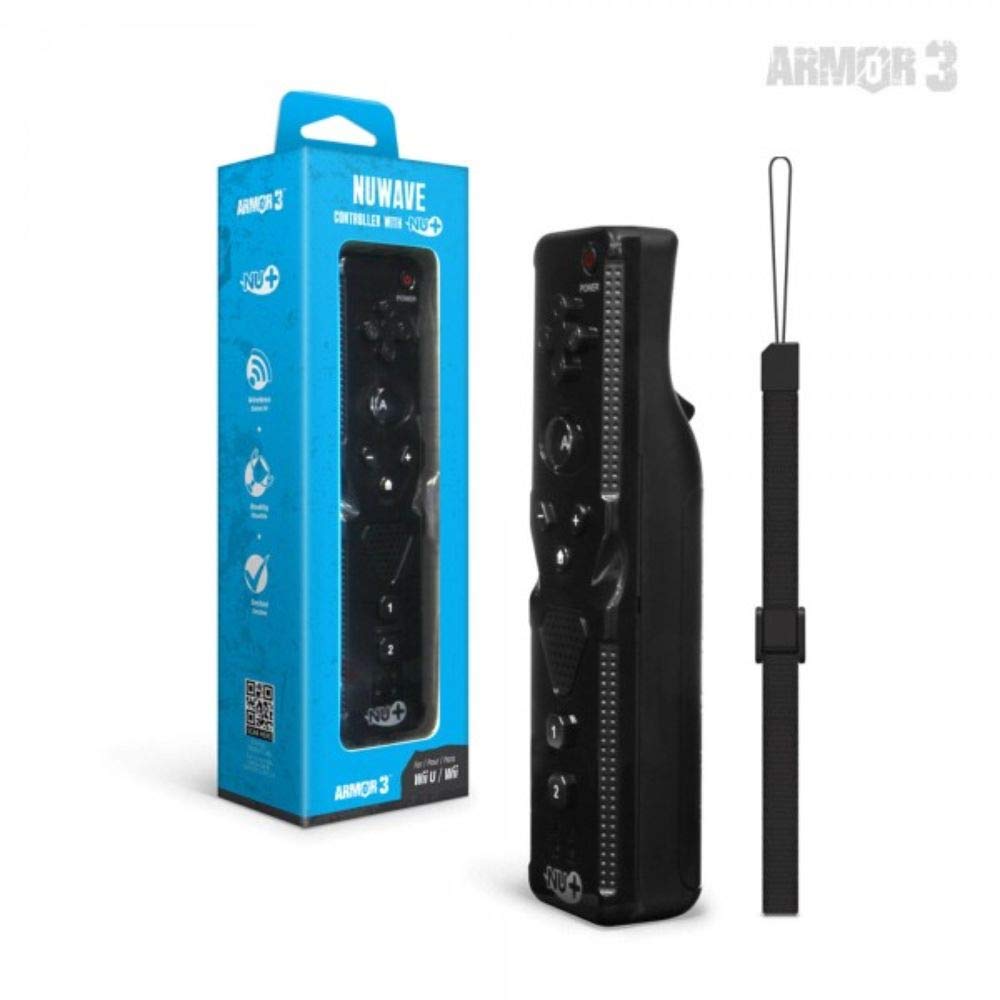
図1: Hyperkin Armor3 NuWave Controller and its packaging. The controller is black with a wrist strap, and the packaging highlights its Nu+ technology and compatibility with Wii U and Wii.
製品終了view
The Armor3 NuWave Controller is a motion-sensing controller compatible with both Wii U and Wii systems. It integrates advanced Nu+ technology for enhanced motion detection and precision in supported games.
主な特徴:
- 互換性: Fully compatible with Nintendo Wii U and Nintendo Wii consoles.
- Nu+ Technology: Built-in technology for a wider range of motion and improved accuracy in compatible titles.
- 人間工学に基づいたデザイン: Designed for comfortable grip and extended gameplay sessions.
- 電源: 2単三電池(別売)が必要です。
設定
1. バッテリーの取り付け
- コントローラーの背面にある電池ボックスを見つけます。
- 電池カバーを下方向にスライドさせて開きます。
- 電池ボックス内の指示に従って、極性 (+/-) が正しいことを確認して、単三電池 2 本を挿入します。
- 電池カバーをカチッと音がするまで上方にスライドさせて取り付けます。
2. Connecting to Your Console
To connect the NuWave Controller to your Wii U or Wii console, follow these steps:
- コンソールの電源がオンになっていることを確認してください。
- On your Wii U or Wii console, press the SYNC button (usually located near the SD card slot or battery compartment).
- On the NuWave Controller, open the battery cover and locate the small red SYNC button inside the battery compartment.
- Press and release the SYNC button on the controller.
- The player indicator lights on the bottom of the controller will flash. Once a single light remains lit, the controller is successfully connected.
- If connection fails, repeat steps 2-5. Ensure the controller is within range of the console.
操作手順
基本的なコントロール:
- 方向パッド(Dパッド): Used for menu navigation and character movement.
- ボタン: Primary action button, often used for selection or interaction.
- B Button (Trigger): Located on the underside, typically used for grabbing or firing.
- 1 および 2 ボタン: Auxiliary action buttons, functions vary by game.
- ホームボタン: Returns to the console's Home Menu.
- プラス(+)とマイナス(-)ボタン: Often used for zooming, adjusting settings, or specific in-game actions.
- 電源ボタン: コントローラーの電源をオン/オフにします。
Motion Sensing with Nu+ Technology:
The built-in Nu+ technology provides enhanced motion tracking. For games that support it, you will experience more precise and responsive movements. Hold the controller firmly and ensure clear line of sight to the sensor bar for optimal performance.
- 較正: Some games may require initial calibration. Follow on-screen prompts.
- リストストラップ: Always use the included wrist strap to prevent accidental drops during active gameplay.
メンテナンス
クリーニング:
- コントローラーを柔らかく乾いた布で拭いてください。
- 頑固な汚れには、軽くamp布を水で拭いてください。刺激の強い化学薬品や研磨剤入りの洗剤は使用しないでください。
- コントローラーの開口部に液体が入らないようにしてください。
ストレージ:
- コントローラーは、直射日光や極端な温度を避け、涼しく乾燥した場所に保管してください。
- 長期間保管する場合は、液漏れを防ぐために電池を取り外してください。
バッテリーのケア:
- 常に新しい高品質の単三電池を使用してください。
- 古い電池と新しい電池、または異なる種類の電池を混ぜないでください。
- 使用済みバッテリーは地域の規制に従って責任を持って廃棄してください。
トラブルシューティング
| 問題 | 考えられる原因 | 解決 |
|---|---|---|
| コントローラーがオンになりません。 | 電池が切れているか、正しく挿入されていない。 | 正しい極性を確認して、新しい単三電池と交換してください。 |
| Controller does not sync with console. | Incorrect syncing procedure; out of range; console interference. | Ensure console is on. Repeat syncing steps (press SYNC on console, then on controller). Move closer to console. Check for other wireless device interference. |
| ボタンが反応しないか、遅延します。 | Low battery; connection issue; physical obstruction. | Replace batteries. Re-sync the controller. Ensure buttons are not stuck. |
| Motion control is inaccurate. | Sensor bar obstruction; improper calibration; environmental factors. | Ensure clear line of sight to the sensor bar. Re-calibrate in-game if prompted. Avoid strong light sources directly facing the sensor bar. |
仕様
- モデル: M07399-bk
- ブランド: ハイパーキン
- 互換性: Nintendo Wii U, Nintendo Wii
- 電源: 単三電池2本(別売)
- 寸法: 2.8 x 1.8 x 8インチ(約)
- 重さ: 3.88オンス(電池を除く、おおよその重さ)
- テクノロジー: Built-in Nu+ motion technology
- 色: 黒
保証とサポート
For specific warranty information and terms, please refer to the documentation included with your purchase or visit the official Hyperkin website. Hyperkin provides customer support for their products.
オンラインサポート: Visit the official Hyperkin webFAQ、トラブルシューティング ガイド、連絡先情報を掲載したサイトです。 www.hyperkin.com
接触: Refer to the Hyperkin website for the most current customer service contact methods (phone, email, etc.).


