導入
This manual provides comprehensive instructions for the setup, operation, and maintenance of your Geemarc CL595 Amplified Corded Telephone. Designed for ease of use, particularly for seniors and individuals with moderate to severe hearing loss, the CL595 features amplified sound, large buttons, and specialized functions like photo memory keys and an SOS emergency call system. Please read this manual thoroughly to ensure proper use and to maximize the benefits of your telephone.
1. セットアップ
Follow these steps to set up your Geemarc CL595 telephone:
- 開梱: Carefully remove all components from the packaging. Ensure you have the telephone base, handset, coiled handset cord, telephone line cord, and power adapter.
- バッテリーの取り付け: The telephone requires 3 AAA batteries (not included) for certain functions like memory retention during power outages. Open the battery compartment on the underside of the base and insert the batteries, observing polarity.
- ハンドセットを接続します: コイル状の受話器コードの一方の端を受話器に差し込み、もう一方の端を電話機ベースの左側にある指定されたポートに差し込みます。
- 電話回線を接続します。 Plug one end of the telephone line cord into the "LINE" port on the back of the telephone base and the other end into your wall telephone jack.
- 電源アダプタを接続します: Plug the power adapter into the "DC IN" port on the back of the telephone base, then plug the adapter into a standard electrical outlet.
- 初回電源オン: The telephone display should light up. Follow any on-screen prompts to set the date, time, and language.

画像1:正面 view of the Geemarc CL595 telephone, showing the handset, large keypad, display, and photo memory buttons. This illustrates the overall design and key user interface elements.
2. 操作手順
This section details the various functions and how to operate your CL595 telephone.
2.1 基本的な呼び出し関数
- 電話をかける: Lift the handset, wait for a dial tone, then dial the desired number using the large keypad.
- 電話を受ける: 電話が鳴ったら、受話器を上げて応答してください。
- 通話を終了する: 受話器をベースに戻します。
- スピーカーフォン: を押す スピーカー button to activate the speakerphone function. Press it again to deactivate.
2.2 Amplified Volume and Hearing Aid Compatibility
- Reception Volume: The telephone offers 6 levels of reception amplification. Adjust the volume during a call using the dedicated volume buttons.
- ブースト機能: を押す 緊急連絡/AMPライフ button during a call to instantly amplify the reception volume by up to 50dB. Press again to return to normal volume.
- 着信音量: The powerful ringer can reach up to 80dB. Adjust the ringer volume using the settings menu.
- 補聴器の互換性: If you use hearing aids, switch them to the "T" position for optimal sound quality during calls.
2.3 Photo Memory Keys
The CL595 features three customizable photo memory keys (M1, M2, M3) for quick dialing of frequently called numbers.
- プログラミング:
- 受話器を持ち上げます。
- を押す 店 button (if available, or refer to specific menu instructions).
- 保存したい電話番号をダイヤルします。
- Press the desired photo memory key (M1, M2, or M3).
- 受話器を交換してください。
- 電話をかける: Simply lift the handset and press the desired photo memory key (M1, M2, or M3) to dial the stored number.
- Customizing Photos: Lift the transparent cover on each photo key, insert a small photo of the contact, and replace the cover.
2.4 留守番電話
The integrated answering machine can record up to 30 minutes of messages.
- メッセージへのアクセス: Press the dedicated answering machine button on the base to play back messages.
- スロー再生: If a message is spoken too quickly, activate the "slow playback" function (refer to the menu for specific steps) to listen at a reduced speed.
2.5 SOS緊急機能
赤 SOS button on the base activates an emergency call sequence.
- SOS番号のプログラミング:
- Access the SOS settings in the telephone menu.
- Program up to four emergency contact numbers in the desired calling order.
- SOS を起動する: 赤を押す SOS button on the base. The telephone will automatically dial the pre-programmed numbers one after another until a connection is made.
2.6 VIP Directory and Call Blocking
- VIP Directory: You can store up to 50 trusted numbers in a special "VIP" directory. The telephone can be configured to only accept incoming calls from numbers listed in this directory.
- 着信拒否: The CL595 allows you to block up to 100 unwanted numbers. Access the call blocking settings in the menu to add numbers to the block list.
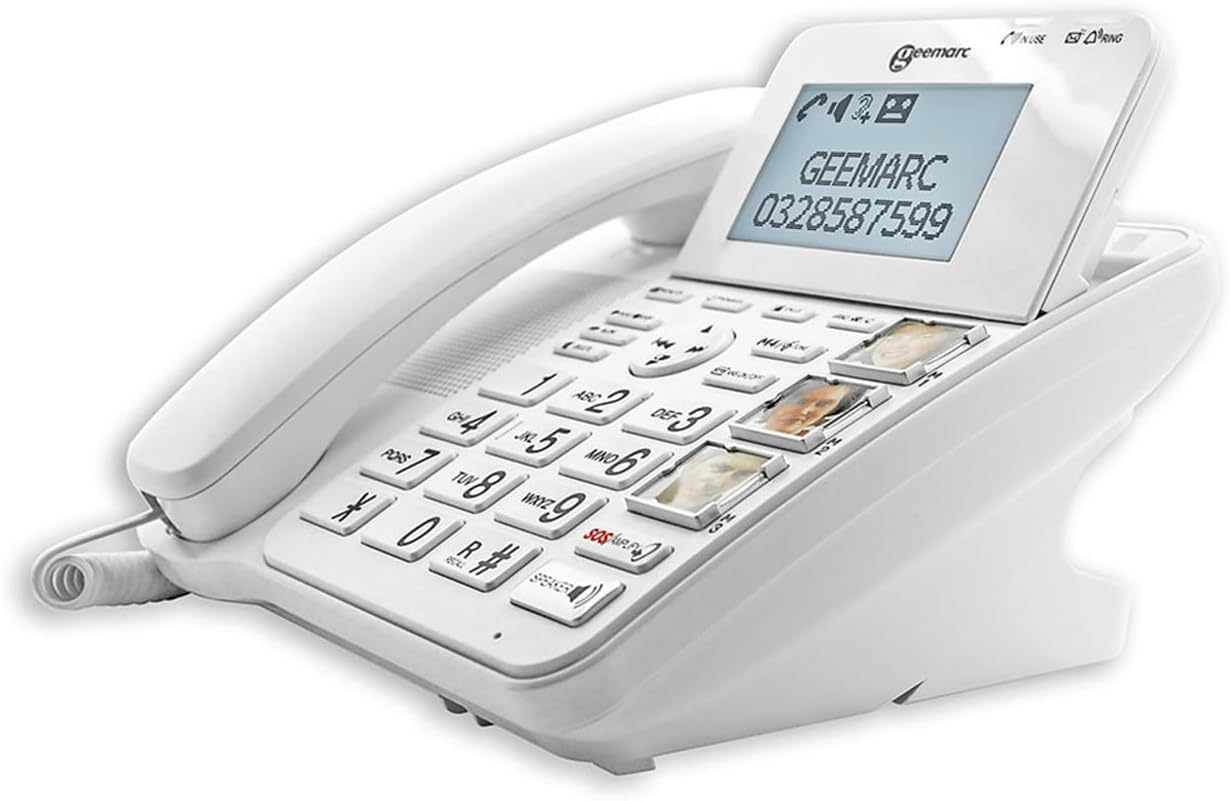
画像2: 角度付き view of the Geemarc CL595, highlighting the large, well-spaced buttons, the digital display, and the three photo memory keys. This image demonstrates the user-friendly interface for dialing and accessing features.
3. メンテナンス
Proper maintenance ensures the longevity and optimal performance of your telephone.
- クリーニング: 柔らかくてamp cloth to clean the telephone's exterior. Do not use abrasive cleaners or solvents. Ensure no liquid enters the telephone's openings.
- バッテリー交換: If the telephone uses AAA batteries for backup, replace them periodically (e.g., annually) or if the low battery indicator appears.
- ストレージ: 電話機を長期間使用しない場合は、直射日光や極端な温度を避け、涼しく乾燥した場所に保管してください。
4。 トラブルシューティング
If you encounter issues with your Geemarc CL595, refer to the following common problems and solutions:
| 問題 | 考えられる原因 | 解決 |
|---|---|---|
| 発信音なし | 電話回線コードが外れているか故障しています。 | 電話回線コードが電話機と壁のジャックの両方にしっかりと接続されていることを確認してください。可能であれば、別の電話機でテストしてください。 |
| 発信者の声が聞こえない / 発信者は私の声が聞こえない | Volume settings are too low; handset or line cord issue. | Adjust reception volume using the dedicated buttons or activate the Boost function. Check handset cord connection. |
| 電話が鳴らない | Ringer volume is off or set too low. | Check ringer volume settings in the menu. Ensure "Do Not Disturb" or similar features are not active. |
| 表示が空白 | Power adapter is disconnected or power outage. | Ensure the power adapter is securely connected to the phone and a working electrical outlet. Check household power. |
If the problem persists after trying these solutions, please contact Geemarc customer support for further assistance.
5. 仕様
- モデル: CL595
- タイプ: コード付き電話
- 寸法(長さ×幅×高さ): 19 x 20 x 27 cm(約)
- 重さ: 1キログラム
- 電源: 電気ケーブル
- 電池: 3 x AAA (for backup, not included)
- 画面サイズ: 5 inches (display)
- 受付 Amplification: Up to +50dB (with Boost function)
- 着信音量: 最大80dB
- 補聴器の互換性: Yes (T-position)
- 留守番電話: デジタル、最大30分の録音時間
- Photo Memory Keys: 3つのダイレクトメモリキー
- VIP Directory Capacity: 最大50個の数字
- 通話ブロック容量: 最大100個の数字
- 対応デバイス: PSTN(公衆交換電話網)
- メーカー: Geemarc Telecom
- 原産国: 中国
6. 保証とサポート
保証: The Geemarc CL595 typically comes with a 1-year parts availability guarantee. For specific warranty terms and conditions, please refer to the documentation provided with your purchase or contact your retailer.
カスタマーサポート: For technical assistance, troubleshooting beyond this manual, or warranty inquiries, please contact Geemarc customer service. Contact details can usually be found on the manufacturer's webサイトまたは製品パッケージに記載されています。


