1. はじめに
Thank you for choosing the Amazon Basics Large Dehumidifier. This manual provides important information for the proper setup, operation, and maintenance of your dehumidifier. Please read this manual thoroughly before using the appliance to ensure safe and efficient operation. Keep this manual for future reference.
重要な安全情報
- 除湿機は常に水平で安定した場所に設置してください。
- 十分な空気の流れを確保するために、ユニットの周囲に適切なスペースを確保してください。
- 電源コードやプラグが損傷した状態で装置を操作しないでください。
- 清掃やメンテナンスを行う前に、ユニットのプラグを抜いてください。
- お子様やペットの手の届かない場所に保管してください。
2.製品オーバーview
The Amazon Basics Large Dehumidifier is designed to effectively reduce humidity in spaces up to 2,500 square feet, maintaining optimal indoor humidity between 45-55% for enhanced comfort and air quality.

図2.1: 前面 view of the Amazon Basics Large Dehumidifier.
主要コンポーネント
- コントロールパネル: ユニットの上部に配置されており、設定に簡単にアクセスできます。
- 空気吸入口: Where humid air enters the unit.
- 空気吹き出し口: 除湿された空気がユニットから排出される場所。
- 水タンク: Collects condensed water. Features a visible water level indicator.
- 再利用可能なフィルター: Located behind the air inlet, designed for easy cleaning.
- キャスターホイール: ユニットの移動が容易になります。

図2.2:以上view of the dehumidifier's key features including the control panel, auto-defrost, overflow protection, and auto-restart functionality.
コントロールパネル
The intuitive control panel allows for effortless dehumidification. It includes buttons for power, fan speed, timer, and humidity settings, along with indicator lights for various functions.

Figure 2.3: Detail of the control panel and water tank full indicator (A).
3. セットアップ
開梱と配置
- 除湿機をパッケージから慎重に取り出します。
- Place the unit upright on a firm, level surface in the desired location. Ensure there is at least 8 inches (20 cm) of space around the unit for proper air circulation.
- 電源プラグを差し込む前に、ユニットを少なくとも 24 時間直立させてください。これにより冷媒が沈殿します。
電源接続
Plug the grounded power cord into a suitable electrical outlet. The unit is designed for standard household electrical supply.
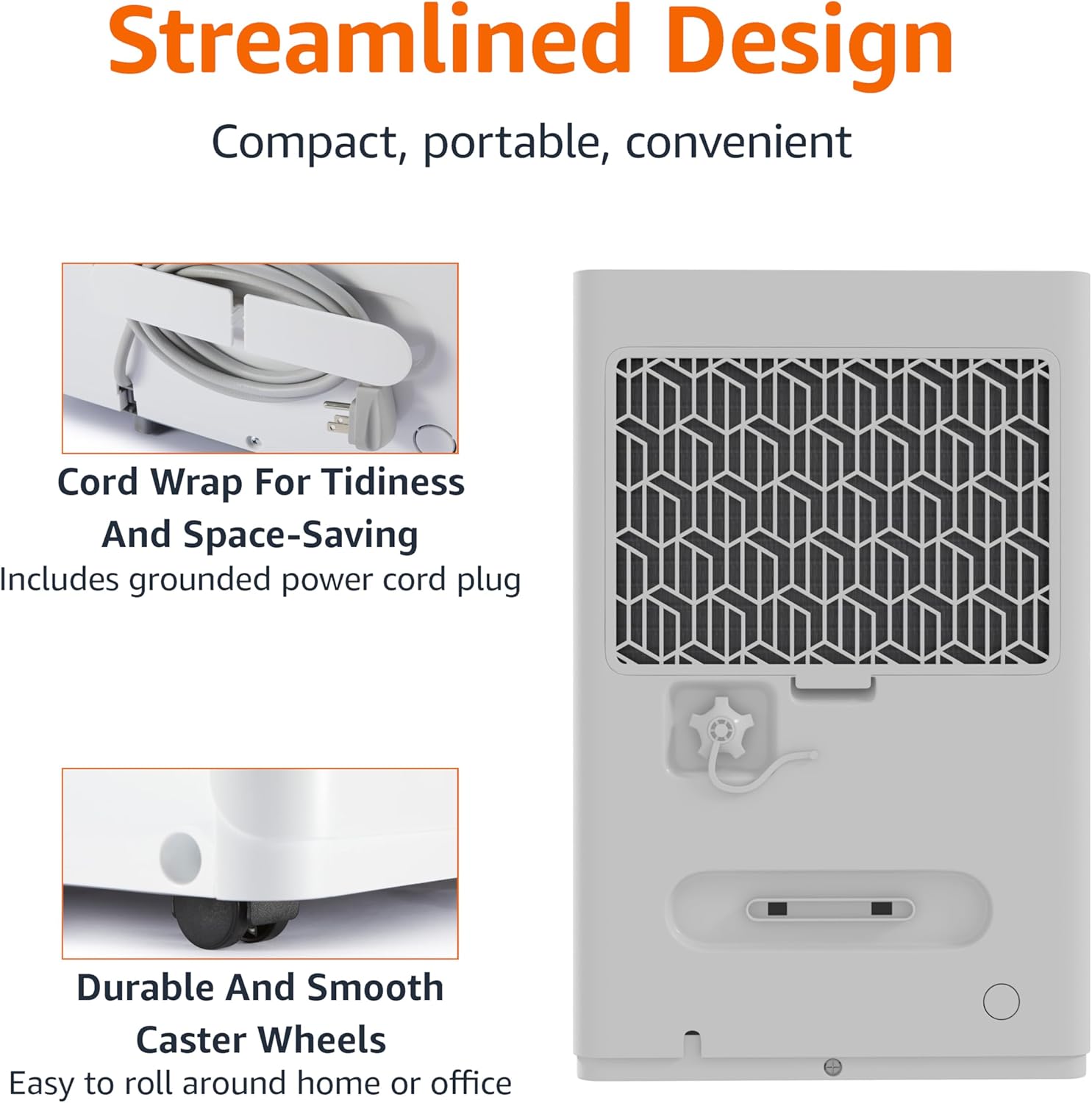
Figure 3.1: The dehumidifier features a cord wrap for tidiness and durable caster wheels for easy movement.
4. 操作手順
オン/オフ
- を押す 力 コントロール パネルのボタンを押して、ユニットの電源をオンまたはオフにします。
湿度レベルの設定
The dehumidifier maintains optimal indoor humidity between 45-55%. You can adjust the target humidity using the control panel.
- 使用 Up そして 下 arrow buttons to set your desired humidity level. The display will show the current humidity.
タイマー機能
The unit features a timer for scheduled operation.
- を押す タイマー button to set the desired operating time (from 0.5 to 24 hours). The unit will turn off or on after the set time.

Figure 4.1: The dehumidifier is ideal for standard 8 ft / 2.4 m ceilings and features a schedule on/off timer from 0.5 to 24 hours.
自動霜取り
The auto-defrost feature prevents frost build-up on the coils, ensuring continuous and efficient operation, especially in cooler environments.
自動再起動機能
停電の場合tage, the dehumidifier will automatically resume operation with your previous settings once power is restored, providing consistent humidity control without manual intervention.
5. メンテナンス
水タンクを空にする
When the water tank is full, the unit will stop operating and an indicator light will illuminate. The water tank has a capacity of 1.59 gallons (6 liters).
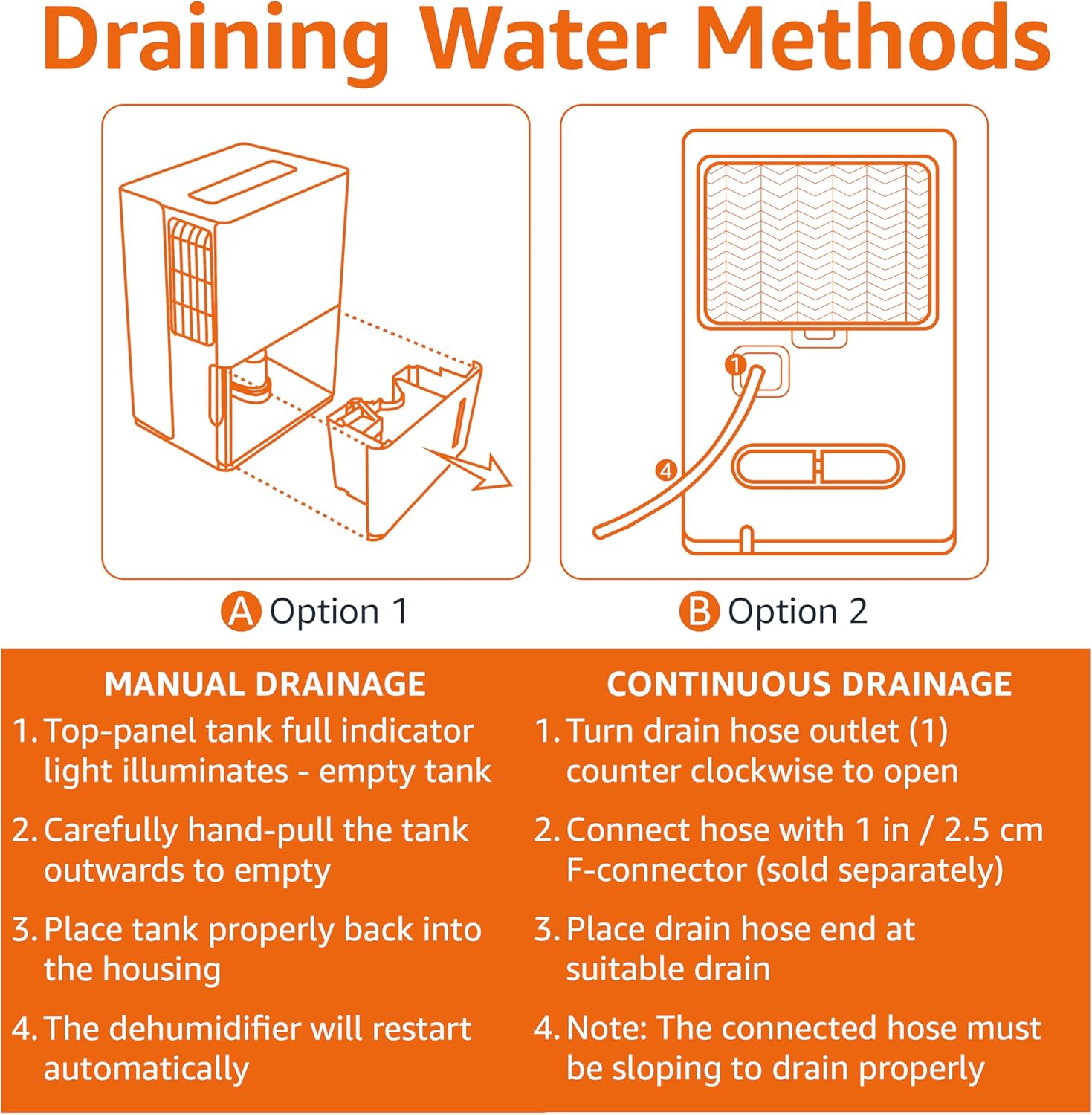
Figure 5.1: Manual and Continuous Drainage Methods.
Manual Drainage (Option 1)
- When the top-panel tank full indicator light illuminates, carefully pull the tank outwards to empty.
- 溜まった水を捨てます。
- Place the tank properly back into the housing. The dehumidifier will restart automatically.
Continuous Drainage (Option 2)
- Turn the drain hose outlet counter-clockwise to open.
- Connect a standard garden hose (sold separately) with a 1 inch / 2.5 cm F-connector to the outlet.
- Place the drain hose end at a suitable drain (e.g., floor drain, sink).
- 注記: The connected hose must be sloping downwards to drain properly.
再利用可能なフィルターのクリーニング
The reusable filter is simple to clean, ensuring the unit performs at its best without frequent replacements.
- 除湿機の電源プラグをコンセントから抜きます。
- ユニットの背面からフィルターを取り外します。
- フィルターを温かい石鹸水で洗浄し、よくすすいでください。
- フィルターをユニットに再度挿入する前に、完全に自然乾燥させてください。
- Plug the dehumidifier back in.
6。 トラブルシューティング
If you experience issues with your dehumidifier, please refer to the following common troubleshooting steps. For more detailed assistance, consult the full User Manual PDF or contact customer support.
| 問題 | 考えられる原因 | 解決 |
|---|---|---|
| 除湿機が作動しません。 | 電源が供給されていません。電源コードがしっかりと差し込まれていません。 | Check power outlet and ensure cord is fully inserted. |
| ユニットは水を収集していません。 | Water tank is full or not properly seated; Air filter is clogged; Room temperature is too low. | Empty and re-seat water tank; Clean air filter; Ensure room temperature is above 41°F (5°C). |
| ユニットは稼働しているが湿度は下がらないasing. | Room size exceeds unit capacity; Doors/windows are open; Air filter is clogged. | Ensure unit is appropriate for room size; Close all doors and windows; Clean air filter. |
| ユニットがうるさいです。 | ユニットが水平面上にありません。エアフィルターが汚れています。 | ユニットを水平な面に置き、エアフィルターを清掃します。 |
7. 仕様
| 特徴 | 詳細 |
|---|---|
| ブランド | Amazonベーシック |
| モデル名 | MDUDP-35AEN1-BA8 |
| 容量 | 35日XNUMXパイント |
| 床面積のカバー率 | 最大2500平方フィート |
| タンク容量 | 35パイント(1.59ガロン/6リットル) |
| 製品寸法(奥行き×幅×高さ) | 奥行き11.1インチ x 幅15.43インチ x 高さ24.25インチ |
| アイテム重量 | 39.2 ポンド |
| 色 | 白 |
| エネルギー認証 | Energy Star認定 |
| 操作モード | 標準 |
| メーカー | アマゾン |
| 欧州連合 | 810004816732 |
8. 保証とサポート
限定保証
This Amazon Basics Dehumidifier comes with a 1-year limited warranty from the date of purchase. This warranty covers defects in materials and workmanship under normal use. For full warranty terms and conditions, please refer to the official User Manual PDF available online or contact Amazon Basics customer support.
保護計画
Extended protection plans are available for purchase to provide additional coverage beyond the standard manufacturer's warranty. These plans offer peace of mind for longer periods.
- 3年間の保護プラン: Extends coverage for an additional 3 years.
- 4年間の保護プラン: Extends coverage for an additional 4 years.
- 完全保護: 対象となる過去および将来のすべての購入を対象とする月額プラン。
購入の詳細についてはasing these plans, please visit the product page on Amazon.com or contact Amazon customer service.
カスタマーサポート
For any questions, technical assistance, or warranty claims, please contact Amazon customer support through your Amazon account or visit the Amazon Basics Store online.
You can also access the official User Manual (PDF) for detailed instructions and diagrams: ユーザーマニュアル(PDF)をダウンロード


