導入
This manual provides comprehensive instructions for the proper use and maintenance of your ELECTROPRIME 8GB Rechargeable USB LCD Digital Voice Recorder, Model ASH20BEBUBEB26998. Please read this manual thoroughly before operating the device to ensure optimal performance and longevity. Keep this manual for future reference.
製品終了view
The ELECTROPRIME Digital Voice Recorder is a compact and versatile device designed for high-quality audio recording and MP3 playback. It features an LCD screen for easy navigation, 8GB of internal storage, and a rechargeable battery.
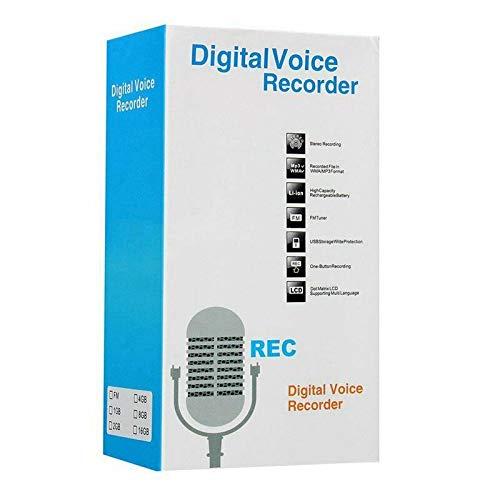
Figure 1: ELECTROPRIME Digital Voice Recorder with included accessories, including earphones, USB cable, and telephone adapter.
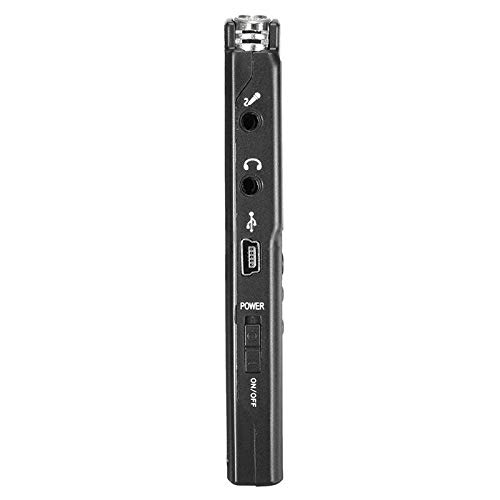
図2:側面 view of the recorder, highlighting the USB port, headphone jack, microphone input, and power switch.
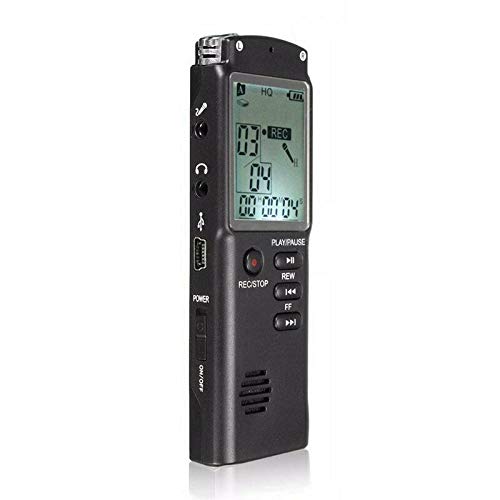
図3: 前面 view of the recorder, displaying the LCD screen with recording information and control buttons.
設定
- デバイスの充電: Connect the recorder to a computer's USB port or a USB wall adapter using the provided USB cable. The LCD screen will indicate charging status. A full charge typically takes 2-3 hours.
- 電源のオン/オフ: Locate the ON/OFF switch on the side of the device. Slide it to the "ON" position to power on and to the "OFF" position to power off.
- 初期設定: Upon first power-on, you may need to set the date and time. Use the navigation buttons (REW, FF) and Play/Pause button to adjust and confirm settings.
操作手順
オーディオの録音
- 録画を開始: デバイスの電源が入っている状態で、 録音/停止 button once. The LCD will display "REC" and a timer, indicating that recording has started.
- 録音を一時停止: 録音中に、 再生/一時停止 button to pause. Press it again to resume.
- 録画を停止: を押す 録音/停止 button again to stop recording. The recording will be saved automatically.
録音の再生
- 録画にアクセス: In standby mode, use the 戻る or FF buttons to navigate through your saved recordings.
- 再生/一時停止: を押す 再生/一時停止 button to start playback of the selected recording. Press again to pause.
- 音量を調整: Use the volume control buttons (if present, typically on the side or via menu) to adjust playback volume.
転送中 Fileコンピュータに
- 接続する: Connect the recorder to your computer using the USB cable.
- アクセスデバイス: レコーダーはコンピュータ上でリムーバブル ディスク ドライブとして表示されます。
- 転送: Open the drive, locate your audio files (usually in a folder like "RECORD" or "VOICE"), and copy them to your computer.
Using as an MP3 Player
このデバイスはMP3オーディオの再生をサポートしています。MP3を転送 files to the device's internal storage via USB connection. Use the 戻る そして FF buttons to select tracks and 再生/一時停止 再生を制御します。
メンテナンス
- クリーニング: デバイスの外装を清掃する際は、柔らかく乾いた布をご使用ください。液体クリーナーや溶剤は使用しないでください。
- バッテリーのケア: バッテリーの寿命を延ばすには、デバイスを頻繁に完全に放電することは避けてください。長期間使用しない場合でも、定期的に充電してください。
- ストレージ: デバイスは、直射日光、極端な温度、高湿度を避け、涼しく乾燥した場所に保管してください。
- 衝撃を避ける: 内部コンポーネントを損傷する可能性のある落下や衝撃からデバイスを保護します。
トラブルシューティング
| 問題 | 考えられる解決策 |
|---|---|
| デバイスの電源が入りません。 | Ensure the battery is charged. Connect to a USB power source and try again. Check the ON/OFF switch position. |
| 音声を録音できません。 | Check if the device has sufficient memory. Delete old files if necessary. Ensure the microphone is not obstructed. |
| デバイスがコンピューターに認識されません。 | Try a different USB port or cable. Ensure the device is powered on when connected. Restart your computer. |
| 音質が悪い。 | Ensure the recording environment is quiet. Keep the device close to the audio source. Check recording settings (if adjustable). |
仕様
- ブランド: エレクトロプライム
- モデル番号: ASH20BEBUBEB26998
- 記憶容量: 8ギガバイト
- オーディオフォーマット: MP3
- ハードウェアインターフェイス: USB
- 対応デバイス: MP3プレーヤー
- 電源: 充電式バッテリー(USB充電)
保証とサポート
Specific warranty information for this product is not provided in the available documentation. For warranty claims or technical support, please contact your retailer or the manufacturer, ELECTROPRIME, directly. Retain your proof of purchase for any warranty-related inquiries.
For further assistance, please refer to the official ELECTROPRIME webサイトまたは顧客サービス部門に連絡してください。