1.製品オーバーview
The OOYCYOO 100 Amp MPPT Solar Charge Controller, Model KP60 100, is designed for efficient management of solar power systems. It automatically identifies 12V or 24V battery systems and is compatible with various battery types, including AGM, Sealed, Gel, Flooded, and Lithium. This controller features advanced Maximum Power Point Tracking (MPPT) technology to maximize energy harvest from solar panels, ensuring optimal charging for your battery bank.
Key features include a backlit LCD display for real-time monitoring, enhanced safety protections, and a high DC/DC transfer efficiency of up to 98.7%.

図1: 前面 view of the OOYCYOO 100 Amp MPPT Solar Charge Controller, showing the LCD display and connection terminals.
2. 安全に関する注意事項
設置および操作の前に、すべての指示と警告をよくお読みください。指示に従わない場合、感電、火災、または重傷を負う可能性があります。
- Ensure all wiring is correctly polarized and securely connected to prevent damage to the controller and connected devices.
- Always disconnect the solar panel array and battery before installing or adjusting the controller.
- コントローラーは、可燃性物質や直射日光を避け、換気の良い場所に設置してください。
- コントローラーを分解したり修理したりしないでください。修理は資格のある担当者にご相談ください。
- Use appropriate circuit breakers or fuses for all connections to protect against overcurrent.
- Wear appropriate personal protective equipment, including eye protection and insulated gloves, during installation.
3. 製品コンポーネントと接続
The controller features clearly labeled terminals for solar panel input, battery connection, and load output. It also includes a remote temperature sensor port and USB charging ports.

図2:詳細 view of the controller's LCD display, 5S Reset button, Solar Panel Terminal, Battery Terminal, Load Terminal, USB 5V2A ports, Remote Temp Sensor port, and RS485 Communication Port.
パッケージ内容:
- 1 x OOYCYOO 100A MPPT Solar Charge Controller (Model K2500W)
- 1 x温度センサー
- ユーザーマニュアル(英語)1冊
4. 技術仕様
The following table outlines the technical specifications for the OOYCYOO 100 Amp MPPT Solar Charge Controller (Model KP60 100).
| パラメータ | 仕様 |
|---|---|
| 定格充電電流 | 100A |
| システム公称容量tage | 12V/24VDC自動識別 |
| 12V System Max. PV Input Power | 1300W |
| 24V System Max. PV Input Power | 2600W |
| 最大。 PV開回路Voltage(Voc) | 100VDC |
| バッテリー巻tage範囲 | 9V〜32V |
| Power Terminal Wire Gauge | 10AWG |
| 寸法(長さ×幅×高さ) | 12 x 7.8 x 3.2 インチ (30.5 x 19.8 x 8.1 cm) |
| 重さ | 8.84ポンド(4kg) |
| 表示タイプ | 液晶 |
| 動作温度 | 最大 45°C (113°F) |
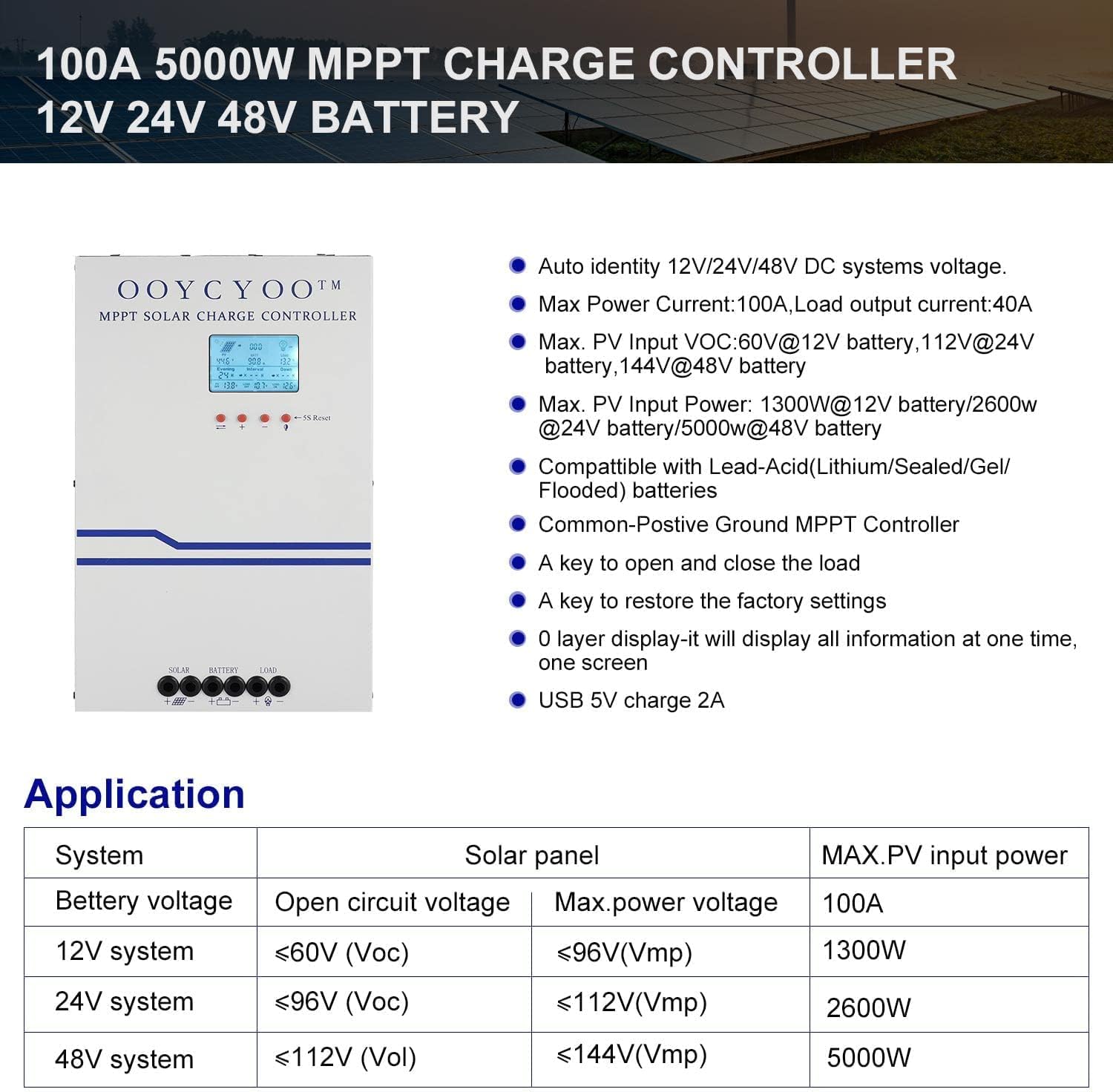
Figure 3: Application table detailing maximum PV input power and voltage for 12V, 24V, and 48V systems.
5.インストールガイド
ソーラー充電コントローラーを安全かつ効率的に動作させるには、適切な設置が不可欠です。以下の手順を慎重に実行してください。
5.1コントローラーの取り付け
- 直射日光、高温、湿気を避け、乾燥した風通しの良い場所を選んでください。
- Ensure sufficient clearance around the controller for proper airflow, especially around the cooling vents.
- 適切なファスナーを使用して、コントローラを不燃性の表面に垂直に取り付けます。
5.2配線接続
Connect the components in the following order: Battery > Solar Panel > Load. Always ensure correct polarity.
- バッテリーを接続します。 Connect the battery cables to the battery terminals on the controller. Ensure the positive (+) and negative (-) terminals are correctly matched. The controller will automatically detect the battery voltage(12Vまたは24V)。
- ソーラーパネルを接続します。 Connect the solar panel cables to the PV input terminals on the controller. Verify correct polarity. Ensure the open circuit voltage (Voc) of your solar array does not exceed 100VDC.
- 負荷を接続する: Connect your DC load to the load output terminals. Ensure the load current does not exceed the controller's rated load current.
- 温度センサーを接続します: Plug the remote temperature sensor into its designated port. This sensor helps the controller optimize charging based on battery temperature.
The controller is compatible with various battery types:

Figure 4: The controller supports AGM, Sealed, Gel, Flooded, and Lithium-Iron phosphate batteries for 12V/24V/48V systems.
6.操作ガイド
Once installed, the controller will begin operation. The LCD display provides real-time system status and allows for configuration.
6.1 LCDディスプレイ
The backlit LCD display shows various parameters such as battery voltage, charging current, solar panel voltage, load status, and accumulated energy (KWH). Use the buttons below the display to navigate through the different screens and access settings.
6.2 基本設定
The controller allows users to set parameters for different battery types (Lithium, LiFePO4, Li(NiCoMn)O2, Flooded, Sealed, Gel). Refer to the on-screen menu for specific adjustments to absorption voltage、float voltage、および低容量tage disconnect settings. A load timer function is also available for controlling DC loads.
6.3 冷却ファンの動作
The built-in cooling fan activates automatically when the internal temperature exceeds 45°C (113°F) and turns off when the temperature drops below 40°C (104°F). This mechanism ensures optimal performance and extends the lifespan of the controller.
7. メンテナンス
定期的なメンテナンスを行うことで、ソーラー充電コントローラーの寿命が長くなり、最適なパフォーマンスが確保されます。
- クリーニング: Periodically clean the controller's exterior with a dry cloth. Ensure cooling vents are free from dust and debris.
- 接続: すべての配線接続部の締め付け具合と腐食がないか、毎年点検してください。接続が緩んでいると過熱や損傷の原因となる可能性があります。
- 環境: 設置環境が乾燥しており、換気が良好であることを確認してください。
8。 トラブルシューティング
The controller incorporates multiple protection functions to safeguard your system. If an issue arises, check the LCD display for error codes or indicators.
8.1 保護機能
- PV過電流/電力保護
- PV短絡保護
- PV 逆極性保護
- 夜間逆充電保護
- バッテリー逆極性保護
- バッテリーオーバーボリュームtag保護
- バッテリーの過放電保護
- Battery Overheating, Controller Overheating Protection
- リチウム電池低温保護
- 負荷短絡保護
- 負荷過負荷保護
- TVS ハイボリュームtageトランジェント保護
8.2 よくある問題
- 充電なし: Check solar panel connections, ensure sufficient sunlight, and verify battery voltageは動作範囲内です。
- ロードが機能しない: Check load connections, ensure battery voltageは低ボラティリティを上回っているtage disconnect setting, and verify load timer settings.
- 過熱: Ensure adequate ventilation around the controller and that cooling vents are clear.
- 間違った巻tage 読み物: Verify all connections are secure and the temperature sensor is properly installed.
これらの点を確認しても問題が解決しない場合は、カスタマー サポートにお問い合わせください。
9. 保証とサポート
The OOYCYOO 100 Amp MPPT Solar Charge Controller is a professional product. For any questions or technical assistance, please contact us directly via email. We are committed to providing prompt support and ensuring your satisfaction.
具体的な保証条件については、購入書類を参照してください。


