導入
This manual provides instructions for the safe and efficient use of your KMC Smart Tap 4-Outlet Wi-Fi Smart Plug. Please read this guide thoroughly before operation and retain it for future reference.
製品終了view
主な特徴
- 4つのコンセント設計: One "always on" outlet and three individually controllable outlets.
- Wi-Fi接続: Requires a 2.4GHz Wi-Fi network.
- リモートコントロール: Manage devices via the KMC Smart app.
- 音声コントロール: Amazon Alexa と Google Home に対応。
- スケジュールとタイマー: Automate power on/off for connected devices.
- エネルギーモニタリング: Track real-time and historical power consumption.
- 安全性: ETL Certified, built-in thermal sensor.
パッケージ内容
- KMC Smart Tap 4-Outlet Wi-Fi Smart Plug
- 取扱説明書
製品図

フロント view of the KMC Smart Tap, showing the four outlets, the main power button, and Wi-Fi indicator.
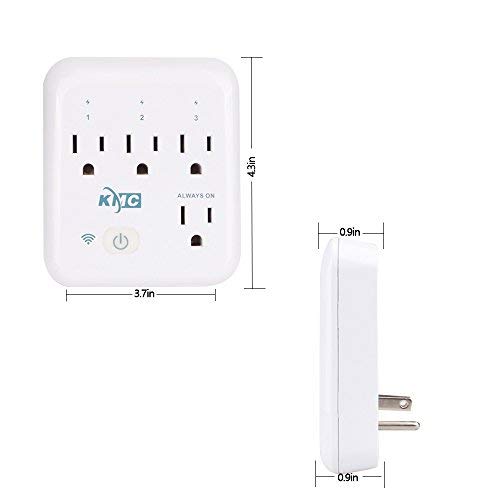
Diagram illustrating the dimensions of the KMC Smart Tap (3.7 inches width, 4.3 inches height, 0.9 inches depth).
セットアップガイド
インストール
Plug the KMC Smart Tap into a standard 110V wall outlet. Ensure it is securely seated.
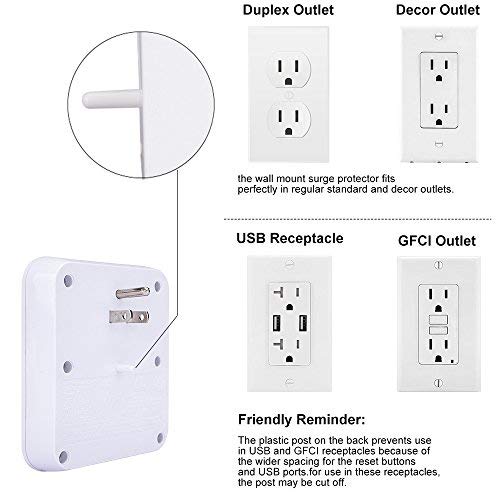
Image showing the KMC Smart Tap plugged into a duplex outlet, with a note about its compatibility and a reminder that the plastic post on the back prevents use in USB and GFCI receptacles due to wider spacing.
アプリのダウンロードとアカウント作成
Download the "KMC Smart" or "Smart Life" app from your smartphone's app store (iOS or Android).
新しいアカウントを登録するか、すでにアカウントをお持ちの場合はログインしてください。
デバイスのペアリング
- Ensure your smartphone is connected to a 2.4GHz Wi-Fi network. The KMC Smart Tap requires a 2.4GHz network for initial setup and operation.
- アプリを開き、画面上の指示に従って新しいデバイスを追加します。
- The device's Wi-Fi indicator light will blink during pairing.
- Once successfully paired, the indicator light will become solid.
手術
手動制御
The main power button on the front of the KMC Smart Tap can be pressed to manually toggle power for all three individually controlled outlets simultaneously. The "Always On" outlet remains powered.
アプリ経由のリモートコントロール
Open the KMC Smart app on your smartphone.
Select the KMC Smart Tap device.
You can individually control the three switchable outlets (labeled 1, 2, 3) and monitor the "Always On" outlet status from anywhere with an internet connection.
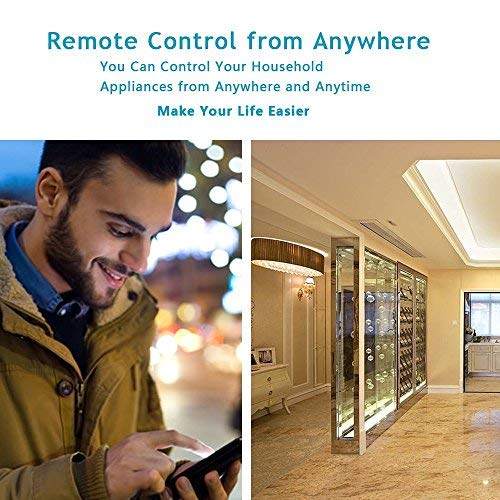
A person using a smartphone to remotely control household appliances, demonstrating the remote control feature of the smart plug.
音声コントロール
The KMC Smart Tap is compatible with Amazon Alexa and Google Home.
To enable voice control, link your KMC Smart account within the Alexa or Google Home app.
For Amazon Alexa, you can name each individual outlet (1, 2, 3) to control them independently using voice commands (e.g., "Alexa, turn on Outlet 1").
For Google Home, overall control of the device is supported.
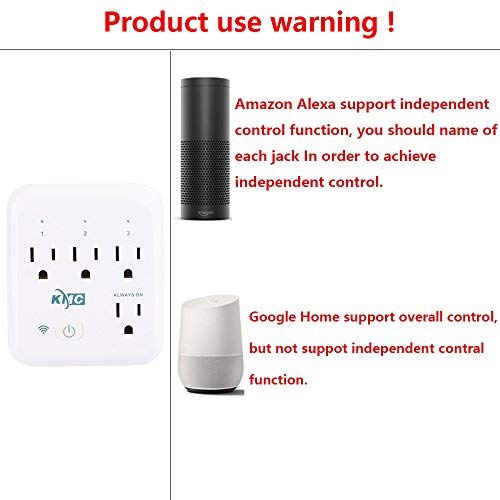
Image showing the KMC Smart Tap alongside Amazon Alexa and Google Home devices, indicating compatibility and control methods.
スケジュールとタイマー
Within the KMC Smart app, navigate to the device settings to set schedules and timers for your connected appliances.
You can program specific times for outlets to turn on or off automatically, enhancing convenience and energy efficiency.

An image depicting a child sleeping peacefully, illustrating how scheduling features can be used to manage device operation for routines, such as ensuring a restful environment.
エネルギー監視
The KMC Smart app provides real-time and historical energy consumption data for devices connected to the Smart Tap.
Access the "Electricity Statistics" section in the app to view current usage (Current, Power, Voltage) and historical data (daily, monthly, yearly kWh).
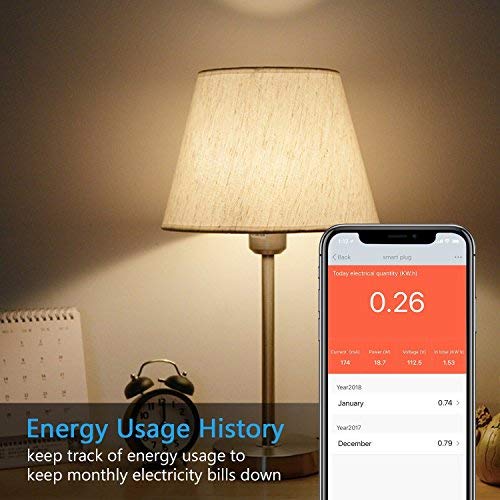
A smartphone screen displaying "Energy Usage History" with current electrical quantity (0.26 kWh) and monthly breakdowns for previous years, next to a lamp.
メンテナンス
クリーニング
- Disconnect the smart plug from the power outlet before cleaning.
- Use a dry, soft cloth to wipe the surface. Do not use liquid or aerosol cleaners.
安全上の注意
- デバイスを分解したり改造したりしないでください。
- デバイスを水や湿気の多い環境にさらさないでください。
- Do not exceed the maximum load of 15A, 1875W.
- The built-in thermal sensor will automatically turn off overheating appliances.
トラブルシューティング
デバイスがWi-Fiに接続できない
- Wi-Fi ネットワークが 2.4GHz であることを確認してください。5GHz ネットワークはサポートされていません。
- Wi-Fi パスワードが正しいことを確認してください。
- スマートプラグを Wi-Fi ルーターに近づけます。
- Reset the smart plug by holding the power button for 5-10 seconds until the Wi-Fi indicator blinks rapidly, then attempt pairing again.
リモコンが動作しない
- スマートフォンのインターネット接続が有効であることを確認します。
- Ensure the smart plug is connected to your home Wi-Fi network (solid Wi-Fi indicator light).
- アプリのアップデートを確認してください。
音声制御の問題
- Confirm that your KMC Smart account is correctly linked in the Alexa or Google Home app.
- Ensure the device names in the smart home app match your voice commands.
- 音声アシスタントデバイスのインターネット接続を確認してください。
仕様
| 特徴 | 価値 |
|---|---|
| 極数 | 2 |
| ワイヤー数 | 2 |
| プラグフォーマット | タイプA |
| 仕様が満たされました | 電子商取引 |
| Amp怒る | 15 Amps |
| 欧州連合 | 743267670332 |
| メーカー | KT-KMC |
| パッケージ寸法 | 8.58 x 4.84 x 2.24インチ |
| アイテム重量 | 14.9オンス |
| ASIN | B07SWZ2N4J |
| 初回利用可能日 | 10年2019月XNUMX日 |
| ブランド | ケイエムシー |
| 色 | 白 |
| 巻tage | 110ボルト |
| 材料 | アクリロニトリルブタジエンスチレン(ABS) |
| コネクタタイプ | プラグイン |
保証とサポート
保証情報
The KMC Smart Tap includes a 30-day money-back guarantee and lifetime support.
カスタマーサポート
For technical assistance or warranty claims, please refer to the contact information provided on the KMC official website or within the KMC Smart app.


