1. はじめに
This manual provides comprehensive instructions for the safe and effective operation of your Nestling HK-688 Walkie Talkies. These mini 2-way radios are designed for clear communication over long distances, making them ideal for children's outdoor adventures, camping, hiking, and general play.
The Nestling HK-688 Walkie Talkies feature 22 UHF channels, a generous range, and user-friendly controls. Please read this manual thoroughly before using the device to ensure proper functionality and to maximize your experience.

Image: Three Nestling HK-688 walkie talkies in camo blue, camo pink, and camo green, displayed with their product packaging.
2.製品オーバーview
2.1 パッケージ内容
標準パッケージには次の項目が含まれています。
- 3x Nestling HK-688 Camo Kids Walkie Talkies (Camo Blue, Camo Pink, Camo Green)
- ユーザーマニュアル (本書) x 1
- 注意: 単4電池は付属していないため、別途購入する必要があります。
2.2 主な特徴
- 22 FRS/GMRS Channels: 複数の通信オプションを提供します。
- 長距離: Up to 3km (1.9 miles) in typical conditions, and up to 5km (3.1 miles) in open fields.
- クリアな音質: Ensures effective communication.
- LCD バックライト付きディスプレイ: 簡単に viewing of channel, battery status, and other indicators.
- Built-in Mini LED Torch: 暗い場所で役立ちます。
- Automatic Channel Scan: Quickly finds active channels.
- 自動スケルチ: Reduces background noise for clearer reception.
- CTCSS 99 Sub-codes: 不要な信号をフィルタリングしてプライバシーを強化します。
- コールアラート: 着信を通知します。
- チャンネルロック: 誤ってチャンネルが変更されるのを防ぎます。
- PTT/VOX Function: Push-to-Talk for manual transmission or Voice Operated Exchange for hands-free communication.
- バッテリー節約機能: バッテリー寿命を延ばします。
- 低電力アラート: Indicates when batteries are running low.
- 調節可能な音量: Control the listening level.
- 軽量で持ち運びに便利: Designed for easy carrying with a built-in belt clip.
- Drop Resistant Design: アクティブな使用に耐える耐久性を向上。

Image: Visual representation of the walkie talkie's dimensions and key features like drop resistance, low battery alert, flashlight, and communication range.

Image: Features of the walkie talkie, including 22 channels with privacy codes, extended range, noise reduction, drop resistance, and a built-in flashlight.
2.3 デバイスコンポーネント

Image: Detailed diagram illustrating the various parts of the walkie talkie, including buttons, display, and audio components.
- アンテナ: 信号の送受信に使用します。
- Lamp (Flashlight): LEDライト内蔵。
- マイクロフォン: For speaking into the device.
- PTT ボタン (プッシュ ツー トーク): 長押しすると音声が送信されます。
- LCDディスプレイ: チャンネル、バッテリーレベル、その他のインジケーターを表示します。
- Call Lock Button: Locks the current channel.
- モニターボタン: Allows listening to weak signals on the current channel.
- Lamp スキャンボタン: Activates the flashlight and initiates channel scan.
- 下ボタン: メニューを移動したり、値を下げたりします。
- 電源/メニューボタン: Turns the device on/off and accesses the menu.
- スピーカー: For listening to incoming transmissions.
3. セットアップ
3.1 バッテリーの取り付け
Each Nestling HK-688 Walkie Talkie requires 4x AAA batteries (not included).
- Release the Belt Clip: Press the lock on the top of the belt clip and lift the clip up to detach it from the radio.
- バッテリーコンパートメントを開く: Locate the battery cover on the back of the walkie talkie. Gently push down on the tab and slide the cover off.
- バッテリーの挿入: Insert 4x AAA batteries into the compartment, ensuring correct polarity (+/-) as indicated inside the compartment.
- バッテリーコンパートメントを閉じます: Replace the battery cover and slide it until it clicks securely into place. Reattach the belt clip if desired.
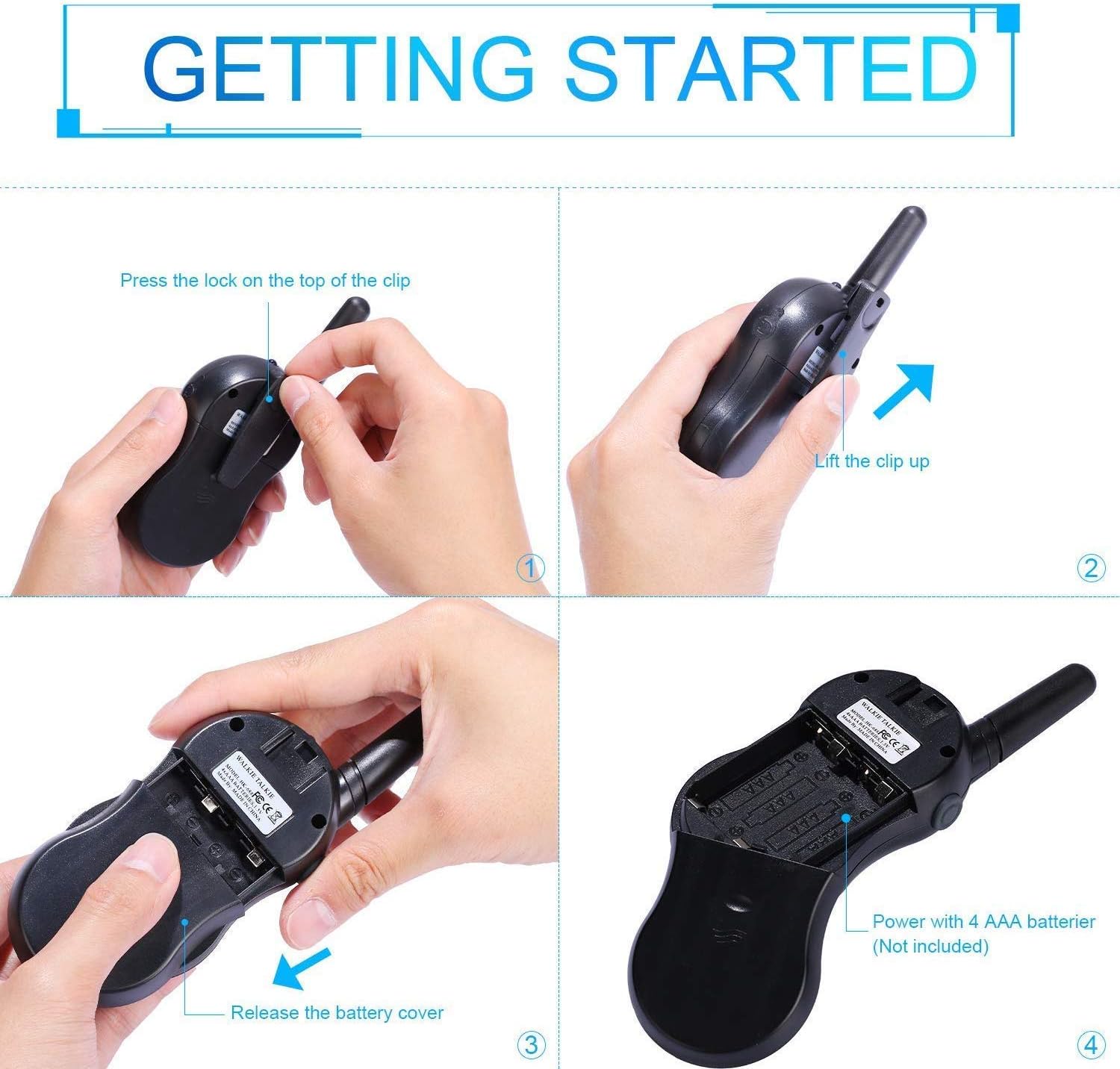
Image: Step-by-step instructions for opening the battery compartment and inserting AAA batteries into the walkie talkie.

Image: An open battery compartment of the walkie talkie, ready for battery insertion.
3.2 電源のオン/オフ
To turn the walkie talkie on or off, press and hold the パワー/メニュー button until the LCD screen illuminates or turns off.
4. 操作手順
4.1 Basic Communication (Push-to-Talk)
- チャンネルを選択します: Ensure all walkie talkies you wish to communicate with are set to the same channel and sub-code. Use the Up そして 下 チャンネルを変更するためのボタン。
- 送信: を押し続けます PTTT button (located on the side of the radio). Speak clearly into the microphone, holding the radio approximately 2-3 inches from your mouth.
- 受け取る: リリース PTTT button to listen for incoming transmissions.
Tip: For optimal range and clarity, avoid obstructions like buildings, dense foliage, or large metal objects. Adverse weather conditions can also affect range.
4.2 Channel Selection and Sub-codes (CTCSS/DCS)
Your walkie talkie supports 22 FRS/GMRS channels and 99 CTCSS/DCS sub-codes. Sub-codes help filter out unwanted conversations on the same channel, enhancing privacy.
- を押す メニュー ボタンを一度押すとチャンネル選択モードになります。チャンネル番号が点滅します。
- 使用 Up or 下 ボタンを押して希望のチャンネル(1~22)を選択します。
- を押す メニュー button again to enter sub-code selection mode. The sub-code number will flash.
- 使用 Up or 下 buttons to select your desired sub-code (0-99). Setting to 0 disables the sub-code.
- を押す PTTT button or wait a few seconds for the setting to be saved and exit the menu.
4.3 VOX機能(音声交換機)
The VOX function allows for hands-free communication. When activated, the radio will automatically transmit when it detects your voice.
- を押す メニュー button multiple times until the VOX icon (VOX) appears on the LCD and flashes.
- 使用 Up or 下 buttons to select the VOX sensitivity level (e.g., 1-3, with 1 being most sensitive). Select "OFF" to disable VOX.
- を押す PTTT button or wait a few seconds to save the setting and exit.
4.4 懐中電灯の操作
To turn the built-in LED flashlight on or off, briefly press the Lamp button (often combined with the Scan button).
4.5 Call Alert Tone
To send a call alert tone to other radios on the same channel, briefly press the 電話 button (often represented by a musical note icon).
4.6 チャンネルロック
To prevent accidental channel changes, you can lock the current channel.
- を押し続けます Call Lock button (often represented by a key icon) until a key icon appears on the LCD.
- ロックを解除するには、 Call Lock キーアイコンが消えるまでもう一度ボタンを押します。

画像: Examples of suitable scenarios for using the walkie talkies, such as outdoor play, family activities, and leisure.

Image: Illustrations of walkie talkies being used for communication in both play and household settings.
5. メンテナンス
5.1バッテリーケア
- 常に新しい高品質の AAA 電池を使用してください。
- Remove batteries from the walkie talkie if it will not be used for an extended period to prevent leakage and damage.
- 使用済みバッテリーは地域の規制に従って責任を持って廃棄してください。
5.2 清掃と保管
- トランシーバーを柔らかくて清潔な布で拭いてください。amp 布で拭いてください。強力な化学薬品や研磨剤入りの洗剤は使用しないでください。
- Do not immerse the walkie talkie in water, as it is not water-resistant.
- トランシーバーは直射日光や極端な温度を避け、涼しく乾燥した場所に保管してください。
6。 トラブルシューティング
| 問題 | 考えられる原因 | 解決 |
|---|---|---|
| 電源なし | 電池が切れているか、正しく取り付けられていません。 | 正しい極性を確認して、新しい電池と交換してください。 |
| 送信も受信もできない | Not on the same channel/sub-code; out of range; PTT button not pressed/released. | Ensure all radios are on the same channel and sub-code. Move closer to the other radio. Press and hold PTT to transmit, release to receive. |
| 音質が悪い / 雑音がある | Out of range; obstructions; low battery; squelch setting. | Move closer. Avoid obstructions. Replace batteries. Check squelch settings. |
| 誤ってチャンネルを変更する | Channel lock is not activated. | Activate the channel lock function. |
| VOXが機能しない | VOX 感度が低すぎるか、VOX がオフになっています。 | Adjust VOX sensitivity to a higher level or ensure VOX is enabled. |
7. 仕様
| 特徴 | 詳細 |
|---|---|
| ブランド | 雛 |
| モデル | HK-688 |
| 周波数範囲 | 400-470MHz |
| チャンネル | 22 FRS/GMRS チャンネル |
| サブコード | CTCSS99 |
| 送信電力 | <=0.5W |
| 変調タイプ | FM-F3E |
| 範囲 | Up to 3km (1.9 miles) typical, MAX 5km (3.1 miles) in open field |
| スケルチ | 自動スケルチ |
| 表示タイプ | LCDバックライト付き |
| イヤホンジャック | 2.5mm / 0.1inch |
| 電源 | 4x AAA batteries per radio (Not Included) |
| 製品寸法(高さ x 幅 x 奥行き) | 14cm x 5.5cm x 3.5cm(5.5 x 2.2 x 1.4インチ) |
| パッケージ重量 | 370グラム |
| 色 | Camo Blue, Camo Pink, Camo Green |
| 耐水性レベル | 耐水性はありません |
8. 保証とサポート
Nestling HK-688 Walkie Talkies come with a 12ヶ月保証 購入日より。
For any support inquiries, troubleshooting assistance beyond this manual, or warranty claims, please refer to the contact information provided on the product packaging or the retailer's web製品を購入したサイト。


