1. はじめに
This manual provides comprehensive instructions for the setup, operation, maintenance, and troubleshooting of your Canyon CNS-SW71SS Smartwatch. Please read this manual carefully before using your device to ensure proper function and longevity.
The Canyon CNS-SW71SS Smartwatch is designed to help you monitor your fitness activities and stay connected. It features a 1.22-inch color screen, multi-sport modes, heart rate monitoring, sleep tracking, and notification alerts. Its IP68 water resistance makes it suitable for various environments.
2.製品オーバーview
2.1 主な特徴
- 1.22-inch color touch screen display.
- Multi-sport mode for tracking various activities.
- Daily activity monitoring: calories, steps, heart rate, and sleep.
- Notifications for incoming calls, SMS, emails, calendar events, and social media.
- Music control and remote camera function.
- Smart alarm and weather data display.
- 最大 7 日間のバッテリー寿命。
- IP68 water resistance (submersible up to 1 meter for 30 minutes).
- Bluetooth 4.0 接続。
- Compatible with iOS and Android operating systems.
- Comes with two interchangeable wristbands: metal and TPU.
2.2 コンポーネント
The Canyon CNS-SW71SS Smartwatch consists of the main watch unit, interchangeable wristbands, and a charging cable.

図1: 前面 view of the Canyon CNS-SW71SS Smartwatch, showing the display with steps, distance, calories, and heart rate data.

図2: 角度付き view of the Canyon CNS-SW71SS Smartwatch, featuring a silver metal mesh strap and a round display.
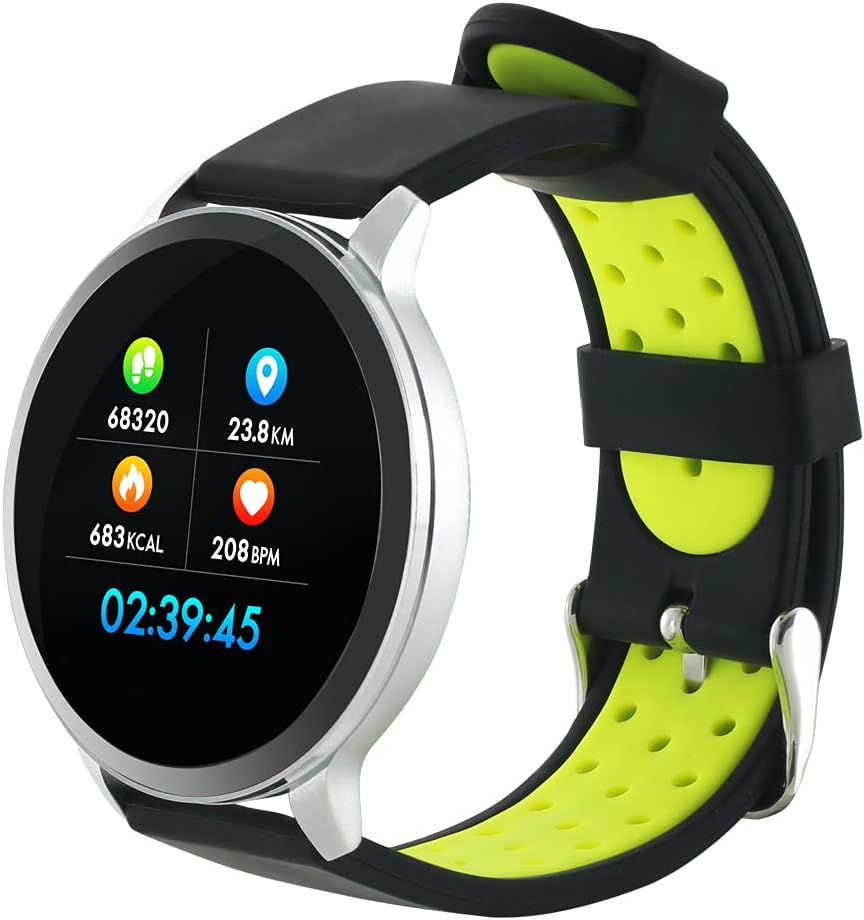
Figure 3: The Canyon CNS-SW71SS Smartwatch shown with an alternative black and lime green TPU strap, highlighting its interchangeable design.

図4:背面 view of the Canyon CNS-SW71SS Smartwatch, displaying the optical heart rate sensor and magnetic charging contacts.

Figure 5: The retail packaging for the Canyon CNS-SW71SS Smartwatch, illustrating key features and the included two straps.
3. セットアップ
3.1 スマートウォッチの充電
- 充電ケーブルを USB 電源アダプター (別売) またはコンピューターの USB ポートに接続します。
- Align the magnetic charging pins of the cable with the charging contacts on the back of the smartwatch. The watch will vibrate and display a charging icon.
- Allow approximately 2-3 hours for a full charge. A full charge provides up to 7 days of usage.
3.2 Installing the Canyon Fit Application
- Scan the QR code provided in the packaging or search for "Canyon Fit" in your smartphone's app store (Google Play Store for Android, Apple App Store for iOS).
- アプリケーションをダウンロードしてインストールします。
- Open the Canyon Fit app and follow the on-screen instructions to create an account and set up your profile.
3.3 スマートフォンとのペアリング
- スマートウォッチが充電され、電源がオンになっていることを確認してください。
- スマートフォンでBluetoothを有効にします。
- Canyon Fit アプリケーションを開きます。
- Navigate to the device pairing section within the app (usually found under 'Device' or 'Profile')。
- Select your smartwatch (e.g., "CNS-SW71SS") from the list of available devices.
- プロンプトが表示されたら、スマートフォンとスマートウォッチの両方でペアリング要求を確認します。
3.4 Attaching/Changing Wristbands
The smartwatch comes with two wristbands (metal and TPU) that can be interchanged. To attach or change a wristband, locate the quick-release pins on the underside of the strap. Slide the pin to detach the current strap and then align and slide the pin of the new strap into the corresponding holes on the watch body until it clicks into place.
4. 操作手順
4.1 基本的なナビゲーション
- タッチスクリーン: Swipe left/right to navigate through different functions and menus. Swipe up/down to view notifications or quick settings.
- サイドボタン: Press the side button to return to the main watch face or to wake up the screen. A long press may access power options or specific features depending on the context.
4.2 フィットネストラッキング
- マルチスポーツモード: Access the 'Workout' or 'Sport' menu on your watch. Select your desired activity (e.g., running, cycling, walking) to start tracking. The watch will record duration, distance, calories burned, and heart rate.
- 日々の活動: The watch automatically tracks your steps, distance, and calories burned throughout the day. View these statistics on the watch face or in the Canyon Fit app.
- 心拍数モニタリング: The watch continuously monitors your heart rate. You can also manually initiate a heart rate measurement from the heart rate interface.
- 睡眠追跡: Wear the smartwatch to bed, and it will automatically track your sleep patterns, including deep sleep, light sleep, and wake times. View detailed sleep analysis in the Canyon Fit app.
4.3 通知
Once paired with your smartphone and with notification permissions granted in the Canyon Fit app, your smartwatch will display alerts for:
- 着信
- SMSメッセージ
- メール
- カレンダーイベント
- Social Media Apps (e.g., WhatsApp, Facebook, InstagRAM)
ウォッチフェイスを上にスワイプして view recent notifications. You can dismiss notifications from the watch.
4.4追加機能
- 音楽コントロール: While music is playing on your phone, you can use the watch to play/pause, skip tracks, and adjust volume.
- リモートカメラ: Open the camera function in the Canyon Fit app. Use your smartwatch as a remote shutter button to take photos on your phone.
- スマートアラーム: Set alarms through the Canyon Fit app. The watch will vibrate to wake you up gently.
- 気象データ: Once connected to your phone, the watch will display current weather conditions and forecasts for your location.
5. メンテナンス
5.1 クリーニング
- 時計の画面と本体を柔らかくて乾いた布で拭いてください。amp 布。
- For the metal strap, use a soft brush to gently clean any debris. For the TPU strap, wash with mild soap and water.
- 充電する前に、充電接点が清潔で乾燥していることを確認してください。
- 洗浄には刺激の強い化学薬品や研磨材の使用を避けてください。
5.2 耐水性(IP68)
The Canyon CNS-SW71SS Smartwatch is IP68 rated, meaning it is resistant to dust and can be immersed in water up to 1 meter deep for a maximum of 30 minutes. While it can withstand splashes, rain, and brief immersion, it is not recommended for hot showers, saunas, or diving, as steam and high water pressure can compromise the seals.
- Do not press any buttons while the watch is submerged.
- 時計が水に濡れた場合は、完全に乾かしてください。
5.3バッテリーケア
- バッテリーを頻繁に完全に放電することは避けてください。
- バッテリーの状態を維持するために、使用していない場合でも定期的にデバイスを充電してください。
- 長期間使用しない場合は、時計を涼しく乾燥した場所に保管してください。
6。 トラブルシューティング
- 時計がオンにならない: 時計が完全に充電されていることを確認してください。充電器に少なくとも30分間接続してください。
- スマートフォンとペアリングできない:
- お使いの携帯電話でBluetoothが有効になっていることを確認してください。
- Ensure the Canyon Fit app has necessary permissions.
- 携帯電話とスマートウォッチの両方を再起動します。
- アプリからデバイスのペアリングを解除し、再度ペアリングしてみてください。
- 通知が表示されない:
- Check notification settings in the Canyon Fit app and your phone's system settings.
- 時計が Bluetooth 経由で接続されていることを確認します。
- 不正確な心拍数/活動データ:
- 時計が手首にぴったりとフィットし、きつすぎたり緩すぎたりしていないことを確認してください。
- 時計の裏側にあるセンサーを清掃してください。
- 環境要因や特定の動きが精度に影響を与える可能性があります。
- 画面が反応しない: Try restarting the smartwatch by holding down the side button. If unresponsive, allow the battery to fully drain and then recharge.
7. 仕様
| モデル名 | CNS-SW71SS |
| ブランド | キャニオン |
| 表示サイズ | 1.22インチ |
| オペレーティングシステムの互換性 | アンドロイド、iOS |
| 接続技術 | ブルートゥース4.0 |
| 耐水性評価 | IP68 |
| 特集 | Wireless Charging (implied by product data), Multi-Sport Mode, Heart Rate Monitor, Sleep Tracker, Notifications |
| 対応デバイス | スマートフォン |
| バッテリー | 充電式(1個付属) |
| カラーオプション | Black, Lime Green, Silver |
8. 保証とサポート
For warranty information and technical support, please refer to the documentation included with your purchase or visit the official Canyon website. You can also contact Canyon customer service for assistance with product issues or inquiries.
オンラインサポート: https://canyon.eu/support/ (元ampリンクについては公式サポートページをご確認ください)


