1. はじめに
This manual provides essential instructions for the installation, operation, and maintenance of your FSP iFP600 Uninterruptible Power Supply (UPS). Please read this manual thoroughly before installing or operating the unit to ensure proper function and safety. The FSP iFP600 is designed to provide reliable power backup and surge protection for your electronic devices.

画像1.1:正面 view of the FSP iFP600 UPS, showcasing its compact design and integrated LCD display.
2. 安全に関する注意事項
Please adhere to these important safety guidelines during installation, operation, and maintenance of the UPS:
- UPSを開けないでください。asing. 内部にはユーザーが修理可能な部品はありません。修理はすべて資格のあるサービス担当者にご依頼ください。
- Do not connect appliances that could overload the UPS, such as laser printers, vacuum cleaners, or heaters.
- UPS が接地された AC 電源コンセントに接続されていることを確認します。
- Avoid placing the UPS in direct sunlight, near heat sources, or in environments with excessive dust, humidity, or corrosive substances.
- Position the UPS in a well-ventilated area to prevent overheating.
- In case of fire, use a dry chemical extinguisher. Water can be hazardous.
- The battery inside the UPS is not user-replaceable. Battery replacement should only be performed by qualified personnel.
3.製品オーバーview
The FSP iFP600 UPS provides reliable power protection for your critical electronics. It features a compact design and an intuitive LCD display for monitoring status.
3.1 パッケージ内容
パッケージを開封したら、すべてのコンポーネントが揃っていて損傷がないことを確認してください。
- FSP iFP600 UPS Unit
- ユーザーマニュアル(このドキュメント)
- 電源コード
- USB通信ケーブル
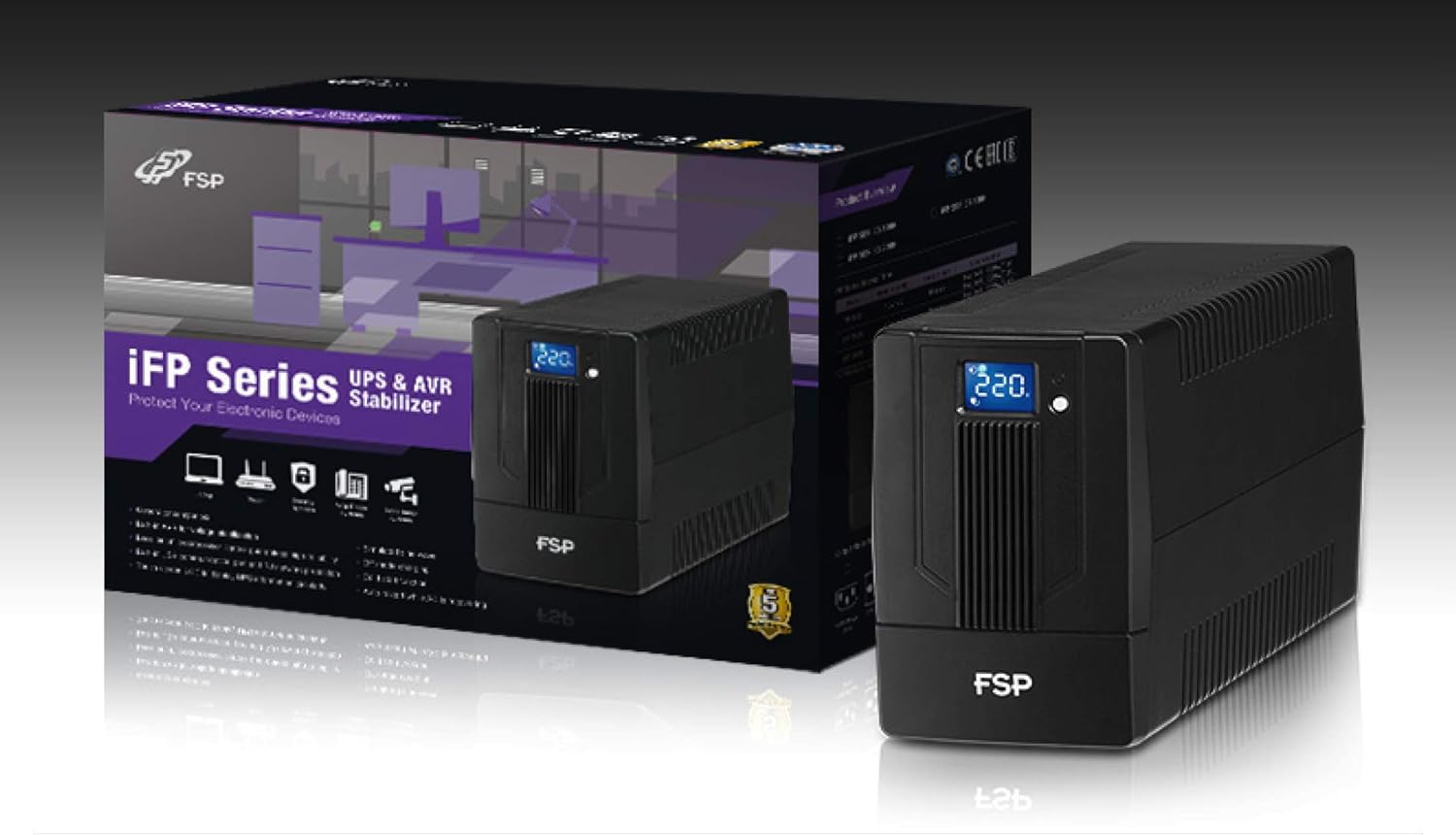
Image 3.1: The FSP iFP600 UPS shown alongside its retail packaging, illustrating the product's presentation.
3.2 背面パネルのコンポーネント
Familiarize yourself with the connections on the rear panel of the UPS:

画像3.2: 詳細 view of the FSP iFP600 UPS rear panel, highlighting connection points.
- アウトレット: Two SCHUKO type outlets for connecting protected equipment.
- AC入力: Connects the UPS to the main utility power.
- Fuse/Breaker: Overcurrent protection for the UPS.
- USB通信: Port for connecting to a computer for monitoring and management.
- Combo RJ11/RJ45 Surge Protection: Provides surge protection for telephone/network lines.
4. セットアップとインストール
Follow these steps to set up your FSP iFP600 UPS:
- 開梱: UPSを梱包から慎重に取り出し、輸送中の損傷がないか確認してください。
- 配置: Place the UPS on a flat, stable surface in a clean, cool, and well-ventilated area. Ensure adequate clearance around the unit for airflow.
- 初期充電: Connect the UPS to a standard grounded AC outlet using the provided power cord. Allow the unit to charge for at least 4-6 hours before initial use to ensure optimal battery performance. The UPS will charge whether it is turned on or off.
- 接続機器: Plug your computer, monitor, and other critical electronic devices into the UPS outlets (A). Do not connect surge suppressors or power strips to the UPS outlets.
- USB Communication (Optional): Connect the USB cable from the UPS USB port (D) to your computer's USB port to enable power management software features (software not included, typically downloaded from manufacturer's web地点)。
- RJ11/RJ45 Protection (Optional): For surge protection of your telephone or network line, connect the incoming line to the 'IN' port of the Combo RJ11/RJ45 (E) and connect the 'OUT' port to your device.
5. 操作手順
5.1 電源のオン/オフ
- 電源を入れるには: Press and hold the power button on the front panel for approximately 2 seconds until you hear a beep and the LCD display illuminates.
- 電源を切るには: Press and hold the power button for approximately 2 seconds until you hear a beep and the LCD display turns off.
5.2 LCDディスプレイ情報
The FSP iFP600 features an LCD display that provides real-time status information. The display is touch-sensitive for navigating information.

Image 5.1: The LCD display of the FSP iFP600 UPS, indicating voltage output and its touch-screen functionality.
LCD ディスプレイには通常、次の内容が表示されます。
- 入力ボリュームtage
- 出力巻tage
- バッテリー充電レベル
- 負荷レベル
- Operating Mode (e.g., AC mode, Battery mode)
- Warning/Fault Indicators
5.3 バッテリーモード操作
When the utility power fails or fluctuates outside acceptable limits, the UPS will automatically switch to battery mode. During battery mode, the UPS will provide power to connected equipment from its internal battery. An audible alarm will sound to indicate battery operation.
6. メンテナンス
Proper maintenance ensures the longevity and reliability of your UPS.
- クリーニング: UPSの外装を清掃する際は、柔らかく乾いた布をご使用ください。液体洗剤やエアゾール洗剤は使用しないでください。
- バッテリーのケア: To maximize battery life, ensure the UPS is connected to AC power and fully charged. If the UPS is stored for an extended period, recharge it every three months to prevent battery degradation.
- バッテリー交換: The internal battery (12V / 7Ah x1) is not user-serviceable. Battery replacement should only be performed by FSP-certified service personnel or a qualified technician. Incorrect battery replacement can pose a risk of explosion or injury.
- ストレージ: Store the UPS in a cool, dry place with adequate ventilation. Ensure the battery is fully charged before storage.
7。 トラブルシューティング
Refer to the following table for common issues and their solutions. If the problem persists, contact FSP support.
| 症状 | 可聴アラーム | 考えられる原因 | 解決 |
|---|---|---|---|
| UPS operating on battery power | 10秒ごとにビープ音を鳴らします | Utility power failure or fluctuation | Save work and shut down equipment if power outage is prolonged. UPS will return to AC mode when power is restored. |
| バッテリー残量警告 | 毎秒ビープ音が鳴る | バッテリー残量が非常に少ない | Immediately save work and shut down connected equipment. |
| 過負荷状態 | 0.5秒ごとにビープ音が鳴ります | 接続された機器がUPSの容量を超えています | Disconnect non-essential equipment until the alarm stops. Ensure total load is within UPS capacity. |
| UPSの故障 | ビープ音が鳴り続ける | 内部故障または故障 | Turn off the UPS and disconnect it from the AC outlet. Contact FSP technical support. |
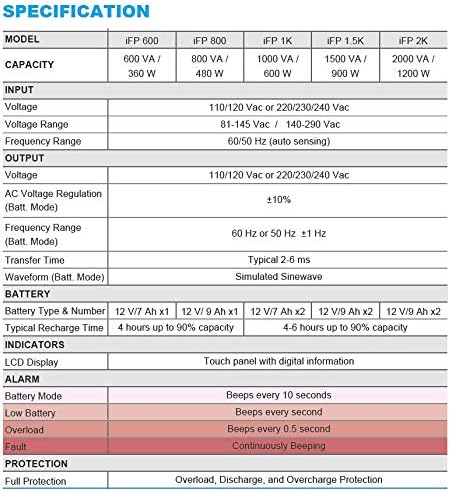
Image 7.1: Excerpt from the FSP iFP series specification table, detailing alarm indicators and their meanings.
8. 仕様
Detailed technical specifications for the FSP iFP600 UPS:
| 特徴 | 仕様 |
|---|---|
| モデル | iFP 600 |
| 容量 | 600VA / 360W |
| 入力ボリュームtage | 110/120 Vac or 220/230/240 Vac |
| 入力ボリュームtage範囲 | 81-145 Vac / 140-290 Vac |
| 入力周波数範囲 | 60/50 Hz(自動検知) |
| 出力巻tage | 110/120 Vac or 220/230/240 Vac |
| ACVol。tageレギュレーション(バットモード) | ±10% |
| Output Frequency Range (Batt. Mode) | 60 Hz or 50 Hz ±1 Hz |
| 転送時間 | 通常2〜6ミリ秒 |
| 波形(バットモード) | シミュレートされた正弦波 |
| バッテリーの種類と番号 | 12V / 7Ah x1 |
| 通常の充電時間 | 4時間で最大90%の容量 |
| 指標 | LCD Display (Touch panel with digital information) |
| 保護 | Overload, Discharge, and Overcharge Protection |
| アイテム重量 | 9.24ポンド(4.2kg) |
| 製品寸法(長さx幅x高さ) | 11.81 x 3.98 x 5.59インチ |
| 色 | 黒 |
| 材料 | 金属 |
9. 保証とサポート
FSP products are designed for reliability and performance. For warranty information, please refer to the warranty card included with your product or visit the official FSP website. For technical support, troubleshooting assistance, or service inquiries, please contact FSP customer service through their official channels.
詳しい情報とサポートリソースについては、 FSP Store on Amazon.


