1. はじめに
The myTouchSmart In-Wall Push-Button Countdown Timer Switch (Model 40953) is designed to simplify your routine by providing convenient automation for indoor or outdoor lighting and various appliances. This timer replaces any standard single-pole light switch and offers preset countdown times to automatically turn off connected devices. It is compatible with LED, CFL, incandescent, and halogen bulbs.

The product packaging displays the in-wall digital countdown timer switch, highlighting its key features such as preset countdown times and compatibility with various bulb types.
2. 安全情報
Before beginning installation, read all instructions carefully. Improper installation can result in electrical shock or fire. Always consult a qualified electrician if you are unsure about any part of the installation process.
- 電源を切る at the circuit breaker or fuse box before wiring.
- このデバイスは、National ElectricCodeおよび地域の規制に従って設置することを目的としています。
- 銅線のみを使用してください。
- NEUTRAL WIRE REQUIRED 操作用。
3. インストール
3.1 必要なツール
- ドライバー(プラスとマイナス)
- ワイヤーストリッパー
- 電気テープ
- 巻tage テスター(推奨)
3.2配線手順
- 電源を切る to the switch location at the circuit breaker or fuse box. Verify power is off using a voltageテスター。
- Remove the existing wall plate and switch from the wall box.
- Carefully disconnect the wires from the old switch. Identify and label the LINE (hot), LOAD, NEUTRAL, and GROUND wires. The timer requires a neutral wire for proper operation.
- Connect the wires to the myTouchSmart timer using the screw terminals:
- 接続する ライン (hot) wire to the terminal labeled 'LINE'.
- 接続する 負荷 wire (to the light/appliance) to the terminal labeled 'LOAD'.
- 接続する 中性 wire (typically white) to the terminal labeled 'NEUTRAL'.
- 接続する 地面 wire (typically bare copper or green) to the terminal labeled 'GROUND'.
- すべての配線接続が安全であることを確認します。
- Carefully push the wired timer into the wall box.
- Mount the timer to the wall box using the provided screws.
- Attach the desired color faceplate (White or Light Almond included, wallplate not included).
- 回路ブレーカーで電源を復旧します。

後部 view of the timer, displaying the screw terminals for Line, Load, Neutral, and Ground connections, essential for proper installation.

副業file of the timer, showing its depth and how it fits into a standard electrical wall box, with wiring connections visible.
4. 操作手順
The myTouchSmart timer features an ON/OFF door panel that conceals preset buttons and LEDs when closed. Opening the door provides access to all countdown options.
4.1 Activating a Countdown
- Open the front door panel to reveal the preset buttons.
- Press the desired countdown button: 5 Min, 10 Min, 30 Min, 60 Min, 2 Hour, or 4時間.
- A blue LED indicator light next to the selected button will illuminate, confirming the countdown is active. The connected device will turn on and remain on for the selected duration, then automatically turn off.
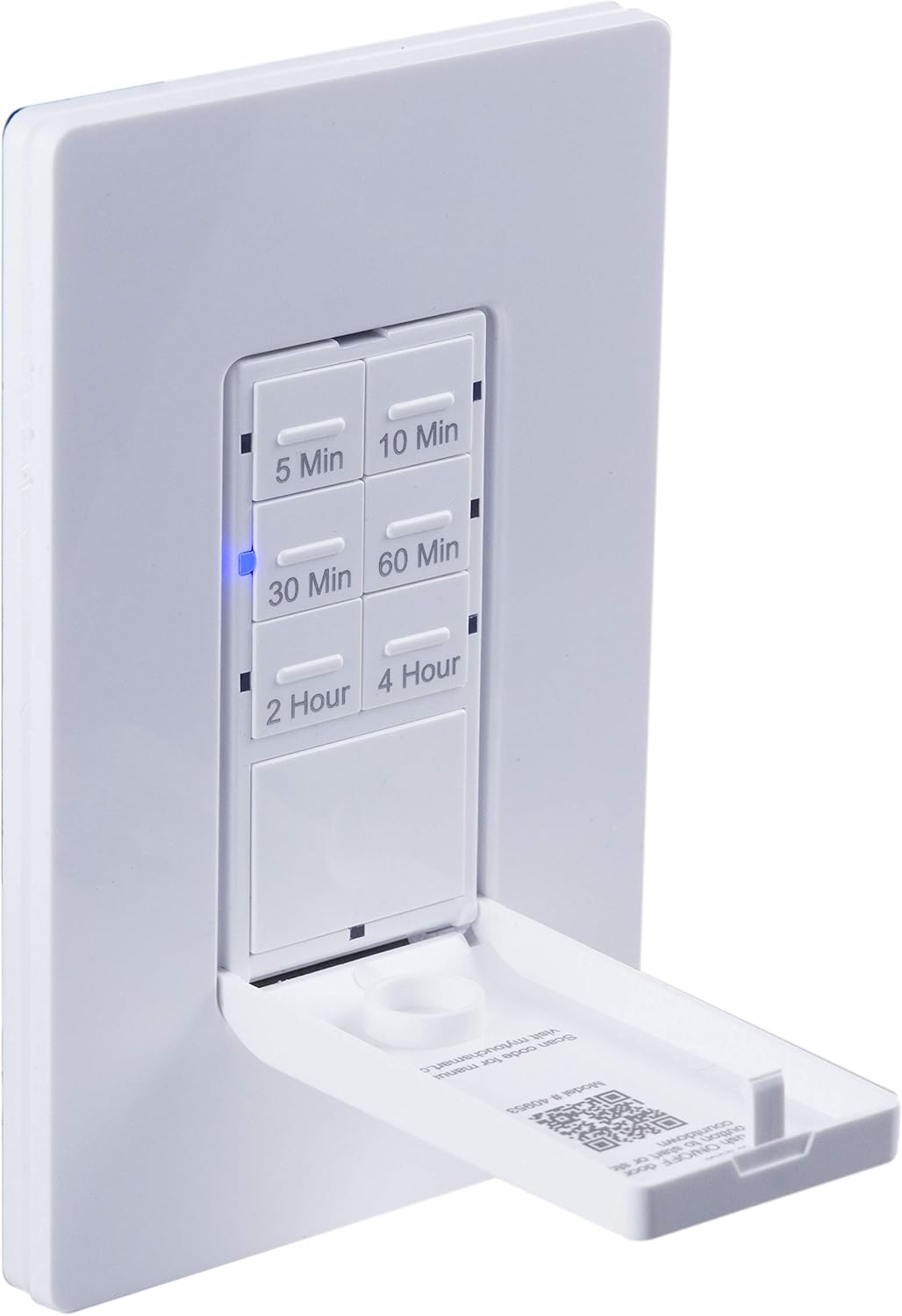
クローズアップ view of the timer with its front door panel open, exposing the six preset countdown buttons (5, 10, 30, 60 minutes, 2, and 4 hours) and the manual ON/OFF button.

The in-wall timer with its door open, showing the preset buttons and a blue LED illuminated next to the '30 Min' button, indicating an active countdown.

A hand pressing one of the preset countdown buttons on the timer, demonstrating user interaction.
4.2 手動オン/オフオーバーライド
- To manually turn the connected device ON or OFF at any time, press the large ON/OFF button located at the bottom of the timer (this button is also the door panel when closed).
- Pressing this button will override any active countdown. If no countdown is active, it functions as a standard ON/OFF switch.
4.3 アプリケーション
This timer is suitable for a variety of applications, including:
- 屋内および屋外の照明
- 排気ファン
- ヒーター
- Other compatible appliances

An image illustrating various applications for the timer, including controlling indoor/outdoor lights, ceiling fans, and exhaust fans.
5. メンテナンス
The myTouchSmart timer requires minimal maintenance. Follow these guidelines:
- クリーニング: Disconnect power at the circuit breaker before cleaning. Wipe the surface with a soft, damp 布で拭いてください。強力な化学薬品や研磨剤入りの洗剤は使用しないでください。
- 検査: Periodically check for any loose connections or damage to the switch. If any damage is observed, discontinue use and consult a qualified electrician.
6。 トラブルシューティング
If you experience issues with your myTouchSmart timer, refer to the following common problems and solutions:
| 問題 | 考えられる原因 | 解決 |
|---|---|---|
| Timer does not turn on/off. | No power to the switch; Incorrect wiring (Line/Load reversed); Loose connections. | Check circuit breaker. Verify wiring connections (Line to Line, Load to Load, Neutral, Ground). Ensure all wires are securely fastened. |
| Countdown does not activate. | Button not fully pressed; Faulty unit. | Ensure the desired countdown button is pressed firmly until the blue LED illuminates. If issue persists, contact customer support. |
| LEDインジケーターが動作しません。 | No power; Unit malfunction. | Check power supply. If the timer functions but LEDs do not, contact customer support. |
| 断続的な操作。 | Loose wiring; Overload. | Check all wiring connections for tightness. Ensure the connected load does not exceed the timer's electrical ratings. |
トラブルシューティング手順を実行しても問題が解決しない場合は、カスタマー サポートにお問い合わせください。
7. 仕様
| 特徴 | 仕様 |
|---|---|
| モデル番号 | 40953 |
| 操作モード | Automatically, Off, Push Button |
| 現在の評価 | 15 Amps |
| 営業巻tage | 120 VAC、60 Hz |
| 抵抗負荷 | 15A |
| タングステン負荷 | 1200W |
| モーター定格 | 1 / 2 HP |
| 互換性のある電球 | LED、CFL、白熱灯、ハロゲン |
| 取り付けタイプ | 壁掛け |
| 寸法(長さ×幅×高さ) | 2.75 x 4.85 x 6.85インチ |
| アイテム重量 | 5.9オンス |
| 中性線 | 必須 |
| 含まれるコンポーネント | In-Wall Timer, White/Light Almond Door Panels |
8. 保証とサポート
保証情報および技術サポートについては、メーカーの公式ウェブサイトをご覧ください。 web購入サイトをご覧いただくか、カスタマーサービス部門にお問い合わせください。購入証明書としてレシートを保管してください。
メーカー: マイタッチスマート
国際コード: 030878409537
Webサイト: www.mytouchsmart.com (公式 web最新のサポート情報については、こちらのサイトをご覧ください。