1. はじめに
ご購入ありがとうございますasing the Infocus 24-inch 720p LED TV, model IM24ED800. This manual provides essential information for setting up, operating, and maintaining your television. Please read this manual thoroughly before using the product and retain it for future reference.
安全情報
- テレビを雨や湿気にさらさないでください。
- 換気口をふさがないでください。
- 適切な電源電圧を確保するtage.
- 電源コードが踏まれたり挟まれたりしないように保護してください。
- すべてのメンテナンスは資格のあるサービス担当者に依頼してください。
- テレビを直射日光、熱源、強い磁場から遠ざけてください。
2. パッケージ内容
以下の項目のボックスにチェックを入れてください。
- Infocus 24-inch 720p LED TV (IM24ED800)
- リモコン(電池付属の場合)
- 電源コード
- テレビ台(2台)
- テレビスタンド用ネジ
- ユーザーマニュアル(このドキュメント)
3. セットアップ
3.1 テレビスタンドの取り付け
To attach the stand to your Infocus TV:
- 傷がつかないように、テレビ画面を下にして、柔らかくて清潔な表面に慎重に置いてください。
- 各スタンド部分をテレビの下部にある対応するスロットに合わせます。
- 付属のネジを使用して、各スタンド部分を固定します。しっかりと締められていることを確認してください。
- テレビを慎重に持ち上げて、安定した水平な面に置きます。
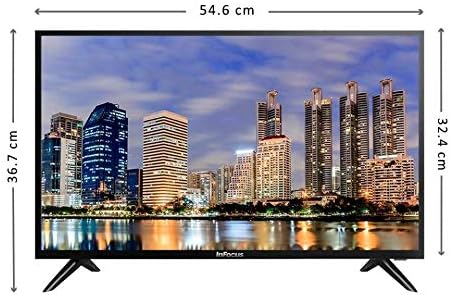
画像: 正面 view of the Infocus 24-inch LED TV with dimensions indicated. The TV measures approximately 54.6 cm in width and 36.7 cm in height with the stand.
3.2 デバイスの接続
Your Infocus TV features multiple input ports for connecting external devices.

画像: 背面 view of the Infocus 24-inch LED TV, highlighting the location of various input ports including HDMI and USB.
- HDMI接続: Connect Blu-ray players, game consoles, or cable/satellite boxes to the HDMI ports. The TV has 2 HDMI inputs.
- USB接続: Connect USB flash drives for media playback to the USB ports. The TV has 2 USB inputs.
- アンテナ/ケーブル: Connect an antenna or cable TV signal to the RF input (if available, not explicitly listed but standard for TVs).
- 力: 電源コードをテレビの電源入力に接続し、次に壁のコンセントに接続します。
3.3初期電源オン
必要なケーブルをすべて接続した後:
- Ensure the power cord is securely plugged into both the TV and a power outlet.
- リモコンまたはテレビ本体の電源ボタンを押します。
- 初期設定については、画面上の指示に従います。これには、言語の選択、タイムゾーン、チャンネルのスキャンなどが含まれる場合があります。
4. テレビの操作
4.1 リモートコントロールオーバーview
The remote control allows you to access all TV functions. While specific button layouts may vary, common functions include:
- 力: テレビの電源をオンまたはオフにします。
- 入力/ソース: 入力ソース(HDMI 1、HDMI 2、USB、TV)を選択します。
- 音量を上げる/下げる: 音のレベルを調整します。
- チャンネルアップ/ダウン: テレビのチャンネルを変更します。
- ミュート: テレビの音声を消音します。
- メニュー: 設定調整のためのメイン メニューを開きます。
- ナビゲーション ボタン (上/下/左/右/OK): メニューを移動したり選択を確定したりするために使用します。
- 出口/戻る: 前の画面に戻るか、メニューを終了します。
4.2 基本機能
- 入力ソースの変更: を押す 入力 or ソース button on your remote control. Use the navigation buttons to select the desired input (e.g., HDMI 1, USB) and press OK.
- 音量の調整: 使用 ボリュームアップ(+) or ボリュームダウン (-) ボタン。
- チャンネルの変更: 使用 チャンネルアップ(CH+) or チャンネルダウン(CH-) ボタン。
4.3 USBメディア再生
メディアを再生するには files from a USB flash drive:
- Insert a USB flash drive into one of the TV's USB ports.
- を押す 入力 or ソース リモコンのボタンを押して、 USB.
- テレビのメディアブラウザが表示されます。 files (photos, music, videos) using the remote control.
- 選択してください file を押して OK それをプレイします。
5. メンテナンス
5.1 画面のクリーニング
- Turn off the TV and unplug the power cord before cleaning.
- 柔らかく糸くずの出ない布(マイクロファイバー布など)を使用して、画面を優しく拭いてください。
- 頑固な汚れには、軽くamp布に水または専用のスクリーンクリーナーを含ませてください。スクリーンに直接クリーナーを吹き付けないでください。
- 研磨剤入りのクリーナー、アルコール、ベンゼン、シンナーは画面を損傷する恐れがあるので使用しないでください。
5.2一般的なケア
- テレビは風通しの良い場所に置いてください。
- テレビの上に重いものを置かないでください。
- 雷雨のときや長期間使用しない場合は、テレビの電源プラグを抜いてください。
6。 トラブルシューティング
テレビで問題が発生した場合は、次の一般的な問題と解決策を参照してください。
| 問題 | 考えられる原因 | 解決 |
|---|---|---|
| 電源なし | 電源コードが接続されていない、電源コンセントに問題がある | 電源コードがしっかりと差し込まれていることを確認してください。別のデバイスでコンセントをテストしてください。 |
| 映像はないが、音声はある | Incorrect input source selected; loose video cable | を押す 入力/ソース button to select the correct input. Check video cable connections. |
| 音はないが、映像は表示される | Volume muted or too low; audio cable issue | を押す ミュート ボタンを押すか、音量を上げてください。オーディオケーブルの接続を確認してください。 |
| リモコンが動作しない | Batteries depleted; obstruction; remote sensor blocked | Replace batteries. Remove any obstructions between the remote and TV. Ensure the TV's remote sensor is clear. |
| 「信号なし」メッセージ | Incorrect input source; device not powered on; cable issue | Verify the correct input source is selected. Ensure the connected device is powered on. Check all cable connections. |
7. 仕様
The following are the technical specifications for the Infocus 24-inch 720p LED TV model IM24ED800:
| 特徴 | 詳細 |
|---|---|
| モデル番号 | IM24ED800 |
| 画面サイズ | 24インチ(61 cm) |
| ディスプレイ技術 | 導かれた |
| 解決 | 1366 x 768 (720p HD) |
| リフレッシュレート | 60Hz |
| HDMI入力 | 2 |
| USB入力 | 2 |
| 接続性 | HDMI、USB |
| 取り付けタイプ | テーブルスタンド |
| パッケージ寸法 | 60.8 x 37.8 x 12 cm |
| パッケージ重量 | 5キロ |
8. 保証とサポート
This Infocus TV is sold as a renewed product, which typically comes with a limited warranty provided by the seller or refurbisher. Please refer to your purchase documentation or contact your retailer for specific warranty terms and conditions.
For technical support or service inquiries, please contact the customer support channel provided by your retailer or the Infocus support webサイト。


