導入
The Sharp Atomic Clock provides precise timekeeping and temperature monitoring for your home or office. Featuring a large, easy-to-read display, this clock automatically synchronizes with the atomic time signal (WWVB) broadcast from Fort Collins, Colorado, ensuring accuracy without manual adjustments. It also includes a wireless outdoor sensor to display both indoor and outdoor temperatures.
製品の特徴
- Atomic Time Accuracy: Automatically synchronizes with the WWVB atomic time signal for precise timekeeping.
- Jumbo 3" Easy-to-Read Numbers: Large digital display for clear visibility of time, date, and temperature.
- Indoor/Outdoor Temperature Display: Monitors both indoor ambient temperature and outdoor temperature via a wireless sensor.
- ワイヤレス屋外センサー: Transmits outdoor temperature data to the main unit.
- 電池駆動: Operates on batteries for flexible placement (batteries not included).
- Automatic Daylight Saving Time (DST) Adjustment: Automatically adjusts for daylight saving time changes.
- 選択可能なタイムゾーン: Allows selection of various US time zones.
- 12/24時間形式: 時間を 12 時間形式または 24 時間形式で表示するオプション。
- Celsius/Fahrenheit Display: 摂氏と華氏の温度単位を切り替えます。
パッケージ内容
セットアップを続行する前に、すべてのアイテムが揃っていることを確認してください。
- Sharp Atomic Clock Main Unit
- ワイヤレス屋外センサ
- 取扱説明書
Note: Batteries are not included. The main unit requires 2 AA batteries, and the outdoor sensor requires 2 AA batteries.
設定
1. バッテリーの取り付け
- 時計本体背面の電池ケースを開きます。
- Insert 2 AA batteries, observing the correct polarity (+ and -).
- 電池ボックスのカバーを閉じます。
- Open the battery compartment on the wireless outdoor sensor.
- Insert 2 AA batteries into the outdoor sensor, observing the correct polarity.
- Close the outdoor sensor's battery compartment cover.
2. 初期同期と設定
After battery installation, the clock will attempt to receive the WWVB atomic time signal and connect to the outdoor sensor. This process may take several minutes or up to 24 hours depending on your location and environmental interference.
- タイムゾーン: Press the "TIME ZONE" button (often labeled "UP TIME ZONE") on the back of the clock to cycle through available time zones (PST, MST, CST, EST). Select your desired time zone.
- 12/24時間形式: Press the "12/24" button to switch between 12-hour and 24-hour display.
- 摂氏/華氏: Press the "°C/°F" button to toggle between Celsius and Fahrenheit temperature display.
- Outdoor Sensor Pairing: If the outdoor temperature does not appear, press the "CHANNEL" button on the main unit to search for the sensor signal. Ensure the outdoor sensor is within range and not obstructed.
For optimal signal reception, place the clock away from large metal objects, electronic devices, and areas with heavy concrete or brick walls. The outdoor sensor should be placed in a shaded, dry location, protected from direct sunlight and precipitation, for accurate readings.
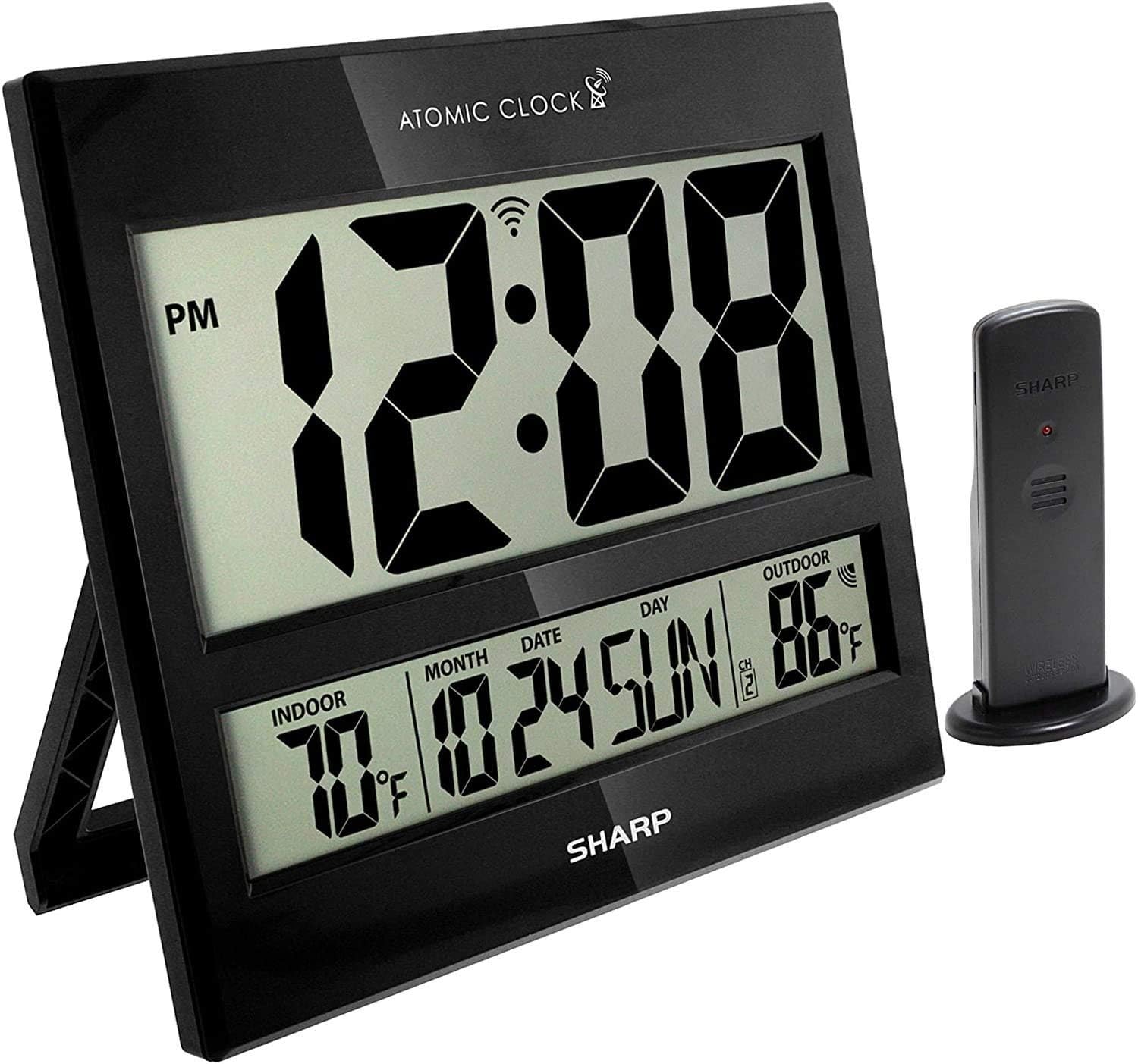
Image: The Sharp Atomic Clock main unit displaying time, indoor temperature, date, and outdoor temperature, alongside its wireless outdoor sensor.
手術
情報を表示
The clock's large LCD screen displays the following information:
- 時間: Current time in selected 12-hour or 24-hour format.
- PMインジケーター: Displays "PM" for afternoon hours in 12-hour format.
- 原子信号インジケーター: Shows the status of the WWVB atomic time signal reception.
- 室内温度: 本体で計測した現在の温度です。
- Month/Date/Day: Current calendar information.
- 屋外温度: Current temperature measured by the wireless outdoor sensor.
- 屋外センサーチャンネル: Indicates the channel the outdoor sensor is transmitting on.
- バッテリー残量低下インジケーター: An icon will appear when batteries are low and need replacement.
Button Functions (Rear Panel)
| ボタン | 関数 |
|---|---|
| カレンダー | Press and hold for 2 seconds to manually set calendar (Year, Month, Date, Language). Use UP/DOWN buttons to change values. |
| 時間 | Press and hold for 2 seconds to manually set time (DST ON/OFF, Hour, Minute). Use UP/DOWN buttons to change values. |
| 12/24 | Switches between 12-hour and 24-hour time display. |
| チャネル | Press to switch between outdoor sensor channels (1, 2, 3). Press and hold for 2 seconds to pair with the outdoor sensor. |
| °C /°F | 摂氏と華氏の温度表示を切り替えます。 |
| 波 | Initiates a manual search for the WWVB atomic time signal. |
| リセット | Resets the clock to factory default settings. Requires a pointed object (e.g., paperclip). |
| UP / TIME ZONE | Increases values during manual setting. Press to cycle through time zones. |
| 下 | Decreases values during manual setting. |
メンテナンス
- バッテリー交換: Replace batteries in both the main unit and outdoor sensor when the low battery indicator appears on the display. Always replace all batteries at the same time with new ones.
- クリーニング: 時計とセンサーは、柔らかく乾いた布で拭いてください。研磨剤入りの洗剤や溶剤は使用しないでください。
- 屋外センサーの配置: Periodically check the outdoor sensor's location to ensure it remains protected from extreme weather conditions, direct sunlight, and moisture.
トラブルシューティング
- Clock not syncing with atomic time:
- Ensure the clock is placed away from electronic interference (TVs, computers, microwaves).
- Try placing the clock near a window facing Fort Collins, Colorado (if applicable to your region).
- Press the "WAVE" button to initiate a manual signal search.
- 最初の同期には最大 24 時間かかります。
- Outdoor temperature not displaying or incorrect:
- Check batteries in the outdoor sensor.
- Ensure the outdoor sensor is within the effective transmission range (typically up to 100 feet, line of sight).
- Press the "CHANNEL" button on the main unit to re-establish connection.
- Verify the outdoor sensor is placed in a location protected from direct sunlight and rain, which can affect readings.
- ディスプレイが暗い、または空白です:
- Replace all batteries in the main unit with fresh ones.
- 電池が正しい極性で挿入されていることを確認してください。
- 時刻または日付が正しくありません:
- Verify the correct time zone is selected.
- Check if Daylight Saving Time (DST) setting is correct for your region.
- If atomic signal is not received, manually set the time and date using the "TIME" and "CALENDAR" buttons.
仕様
| 特徴 | 詳細 |
|---|---|
| ブランド | シャープ |
| モデル番号 | 8541848315 |
| 欧州連合 | 049353998732 |
| 色 | 光沢黒 |
| 表示タイプ | デジタルLCD |
| 特集 | Atomic Time Synchronization (WWVB), Indoor/Outdoor Temperature |
| 製品寸法 | 13"W x 1.5"H (Main Unit) |
| 電源 | 電池駆動 |
| 必要な電池の数 | Main Unit: 2 AA; Outdoor Sensor: 2 AA |
| 材料 | プラスチック |
| 取り付けタイプ | Wall Mount / Tabletop Stand |
| 屋内/屋外での使用 | Indoor (Main Unit), Outdoor (Sensor) |
保証とサポート
Sharp products are manufactured to high-quality standards. For warranty information, technical support, or service inquiries, please refer to the contact information provided with your product packaging or visit the official Sharp webサイトでご確認ください。保証請求の際は購入証明として領収書を保管してください。


