導入
The Insignia NS-SPBTWAVE2-BK Wave 2 Portable Bluetooth Speaker provides high-quality wireless audio streaming from your compatible devices. Designed for versatility, its robust construction and rubberized feet allow for stable placement in both horizontal and vertical orientations. Enjoy hands-free communication with the built-in speakerphone and extended listening sessions thanks to its 12-hour battery life.
This manual provides essential information for setting up, operating, maintaining, and troubleshooting your speaker. Please read it thoroughly before use and retain it for future reference.
パッケージ内容
パッケージにすべてのアイテムが揃っていることを確認します。
- Insignia NS-SPBTWAVE2-BK Wave 2 Portable Bluetooth Speaker
- USB充電ケーブル
- 3.5mm Audio Cable (Auxiliary)
- クイックセットアップガイド(または同様のドキュメント)
製品の特徴
- ワイヤレス接続: スマートフォン、タブレット、その他の Bluetooth 対応デバイスにワイヤレスで接続します。
- 長いバッテリー寿命: Features a rechargeable 2,000 mAh battery, providing up to 12 hours of playback on a full charge.
- 内蔵マイク: Enables hands-free calling directly through the speaker.
- 補助オーディオ入力: Allows for wired connection to audio devices via a 3.5mm audio cable.
- 多彩な配置: Designed to stand securely in both horizontal and vertical positions.
スピーカーの各部
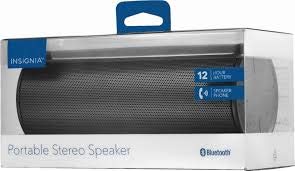
図1: 前面 view of the Insignia Wave 2 Speaker in horizontal orientation.

図2: 垂直 view of the speaker, illustrating the power button, charging port, and auxiliary input port at the bottom.
Refer to the images above for the location of key components such as the power button, volume controls, Bluetooth indicator, charging port, and auxiliary input.
設定
1.スピーカーの充電
- Connect the small end of the USB charging cable to the charging port on the speaker (refer to Figure 2).
- Connect the large end of the USB charging cable to a USB power adapter (not included) or a powered USB port on a computer.
- The charging indicator light will illuminate. Allow approximately 12 hours for a full charge before first use. The indicator light will change or turn off once charging is complete.
2.Bluetoothペアリング
- Ensure the speaker is fully charged. Press and hold the Power button to turn on the speaker. The Bluetooth indicator light will begin to flash, indicating it is in pairing mode.
- On your Bluetooth-enabled device (smartphone, tablet, etc.), navigate to the Bluetooth settings and ensure Bluetooth is enabled.
- 検索する available devices. Select "Insignia Wave 2" from the list.
- Once paired, the Bluetooth indicator light on the speaker will become solid, and you may hear an audible confirmation.
- パスワードの入力を求められた場合は、「0000」と入力してください。
3. Auxiliary (Wired) Connection
- Connect one end of the 3.5mm audio cable to the AUX input port on the speaker (refer to Figure 2).
- 3.5mm オーディオ ケーブルのもう一方の端をオーディオ デバイスのヘッドフォン ジャックまたはオーディオ出力ポートに接続します。
- The speaker will automatically switch to auxiliary mode when a cable is detected.
スピーカーを操作する
電源オン/オフ
- To turn on: Press and hold the Power button until the indicator lights illuminate.
- To turn off: Press and hold the Power button until the indicator lights turn off.
ボリュームコントロール
- スピーカーの音量ボタンを使用して音量を調整します。
- You can also control the volume from your connected Bluetooth device or auxiliary audio source.
ハンズフリー通話
Bluetooth 経由で接続すると、スピーカーをハンズフリー通話に使用できます。
- 電話に出る: 再生/一時停止/通話ボタンを1回押します。
- 通話を終了する: 通話中に再生/一時停止/通話ボタンを1回押します。
- 通話を拒否する: Press and hold the Play/Pause/Call button.
- Speak clearly towards the speaker's built-in microphone for optimal voice pickup.
メンテナンス
- クリーニング: スピーカーの外装を清掃する際は、柔らかく乾いた糸くずの出ない布をご使用ください。液体クリーナー、エアゾール、溶剤は使用しないでください。
- バッテリーのケア: To prolong battery life, avoid fully discharging the battery frequently. Recharge the speaker regularly, even if not in use. Avoid exposing the speaker to extreme temperatures (hot or cold).
- ストレージ: When not in use for extended periods, store the speaker in a cool, dry place away from direct sunlight and moisture.
- 耐水性: このスピーカーは ない 防水仕様です。水や湿気にさらさないでください。
トラブルシューティング
| 問題 | 考えられる解決策 |
|---|---|
| スピーカーがオンにならない。 | バッテリーが充電されていることを確認してください。USB充電ケーブルを使用してスピーカーを電源に接続してください。 |
| スピーカーから音が出ない。 | Check the volume level on both the speaker and the connected device. Ensure the correct input source (Bluetooth or AUX) is selected. Verify the Bluetooth connection or auxiliary cable. |
| Bluetooth経由でペアリングできません。 | Ensure the speaker is in pairing mode (flashing Bluetooth indicator). Turn off and on Bluetooth on your device. Move the speaker closer to your device. Forget the speaker from your device's Bluetooth list and try pairing again. |
| 音質が悪い、または歪みがあります。 | Ensure the speaker is within Bluetooth range (approx. 33 ft / 10 m). Reduce the volume on the source device or speaker. Check for interference from other wireless devices. Try a different audio source or file. |
| 通話中にマイクが機能しません。 | Ensure the speaker is properly connected via Bluetooth. Speak directly towards the speaker. Check your phone's call settings to ensure audio is routed to the Bluetooth speaker. |
仕様
- モデル名: 第2波
- モデル番号: NS-SPBTWAVE2-BK
- 接続技術: ブルートゥース
- バッテリー寿命: 最大12時間
- 電池のタイプ: 1 リチウムイオン (付属)
- 充電時間: 約12時間
- 製品寸法: 6.8 x 2.8 x 2.8 インチ (17.3 x 7.1 x 7.1 cm)
- 商品の重量: 1ポンド(0.45 kg)
- オーディオ出力モード: ステレオ
- 信号対雑音比: 80デシベル
- 内蔵マイク: はい
- 補助入力: はい(3.5mm)
- 防水: いいえ
- 材料: プラスチック
- 国際コード: 600603230455
保証とサポート
This Insignia NS-SPBTWAVE2-BK Wave 2 Portable Bluetooth Speaker comes with a 限定保証. For specific terms and conditions of your warranty, please refer to the warranty card included with your purchase or visit the official Insignia webサイト。
For technical support, troubleshooting assistance, or warranty claims, please contact Insignia Customer Service. Contact information can typically be found on the Insignia webサイトまたは製品ドキュメントに記載されています。


